<?xml version="1.0" encoding="utf-8"?>
<feed xmlns="http://www.w3.org/2005/Atom">
            <title type="text">阿紫的博客网站</title>
            <subtitle type="text">人非生而知之 <br/> 持续学习，未来可期。</subtitle>
    <updated>2024-04-08T13:46:36+08:00</updated>
        <id>https://zijiancode.cn</id>
        <link rel="alternate" type="text/html" href="https://zijiancode.cn" />
        <link rel="self" type="application/atom+xml" href="https://zijiancode.cn/atom.xml" />
    <rights>Copyright © 2026, 阿紫的博客网站</rights>
    <generator uri="https://halo.run/" version="1.5.4">Halo</generator>
            <entry>
                <title><![CDATA[使用Cloudflare开启SSL]]></title>
                <link rel="alternate" type="text/html" href="https://zijiancode.cn/archives/cloudflare-ssl" />
                <id>tag:https://zijiancode.cn,2024-04-08:cloudflare-ssl</id>
                <published>2024-04-08T13:46:36+08:00</published>
                <updated>2024-04-08T13:46:36+08:00</updated>
                <author>
                    <name>阿紫</name>
                    <uri>https://zijiancode.cn</uri>
                </author>
                <content type="html">
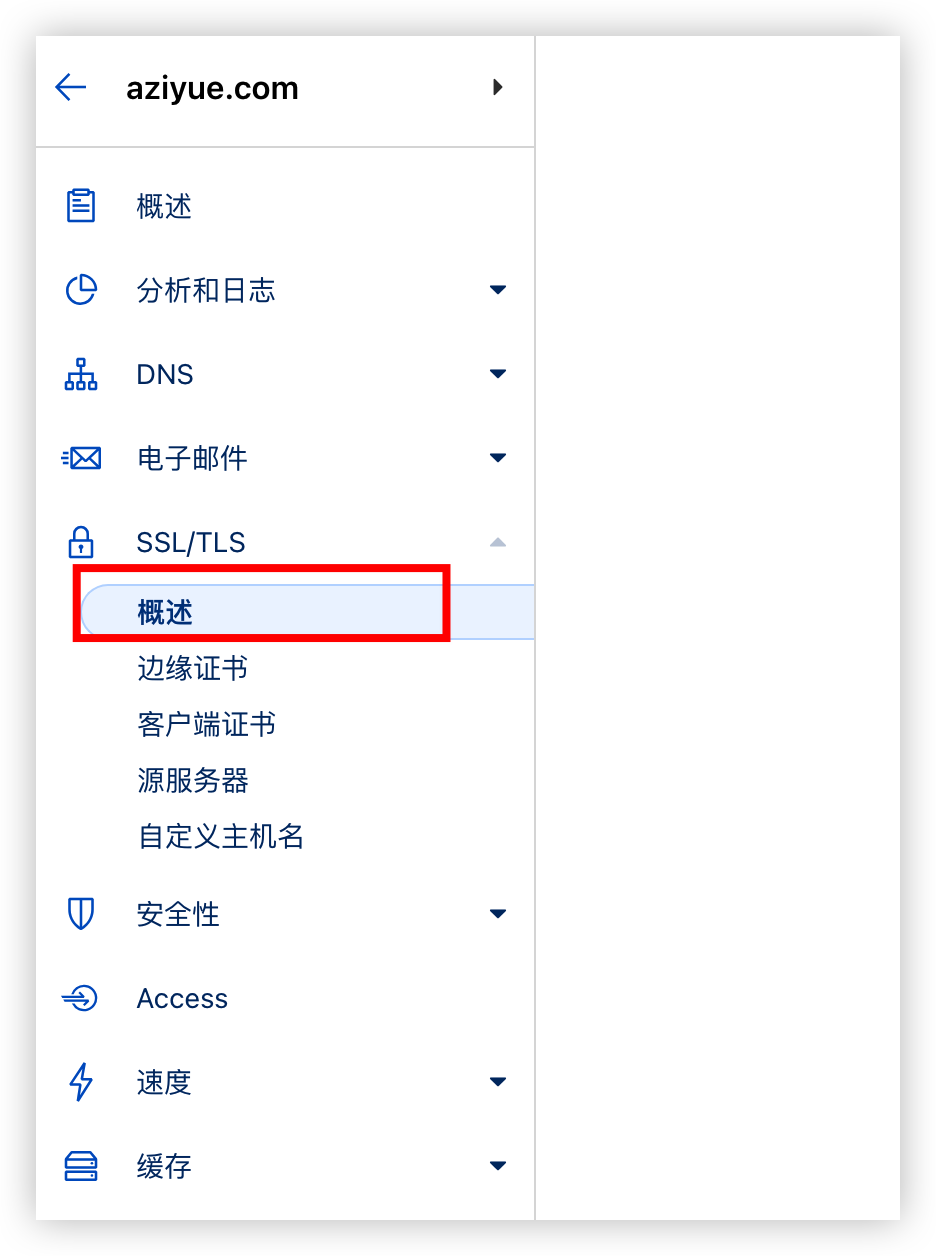
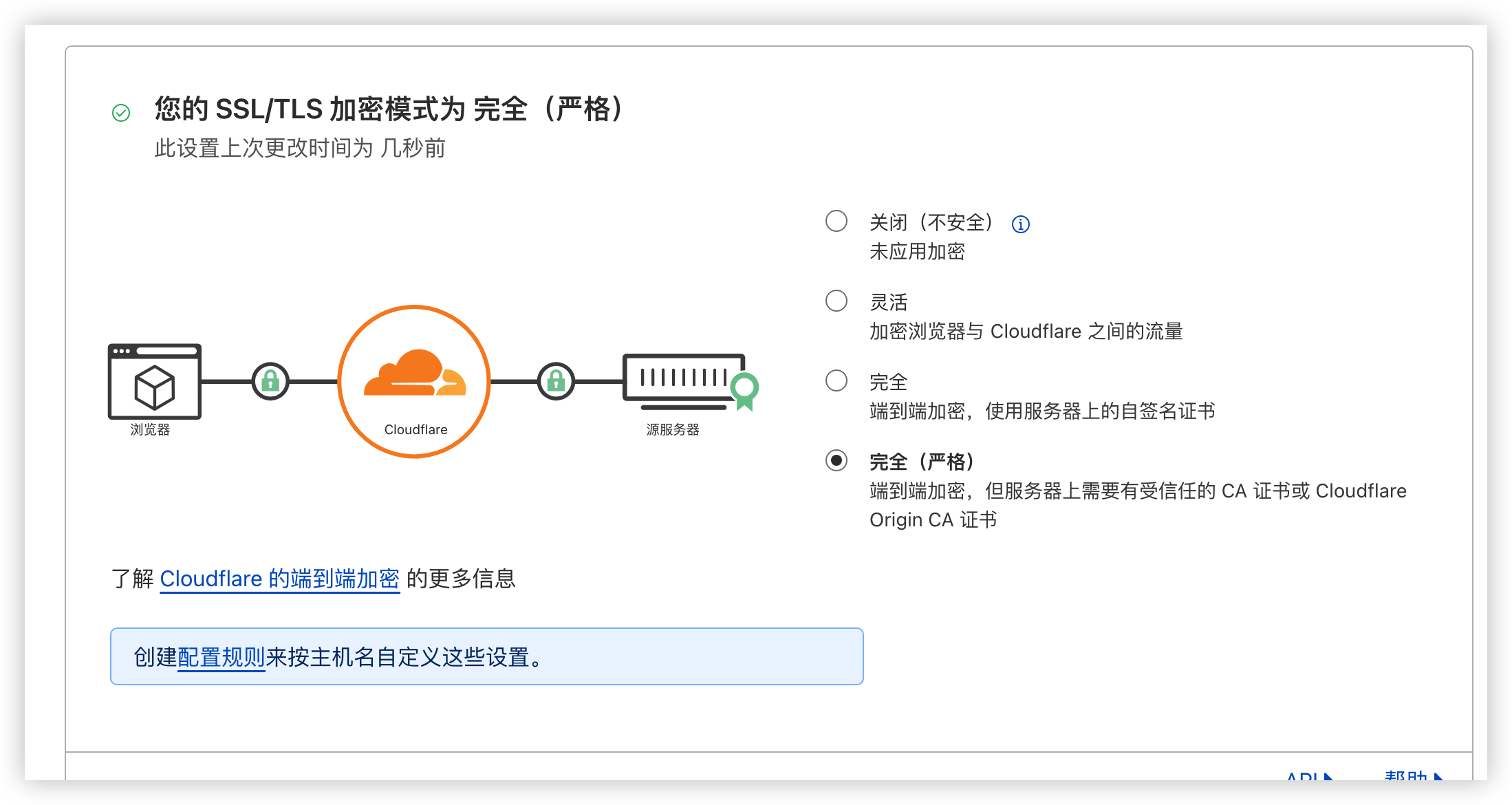
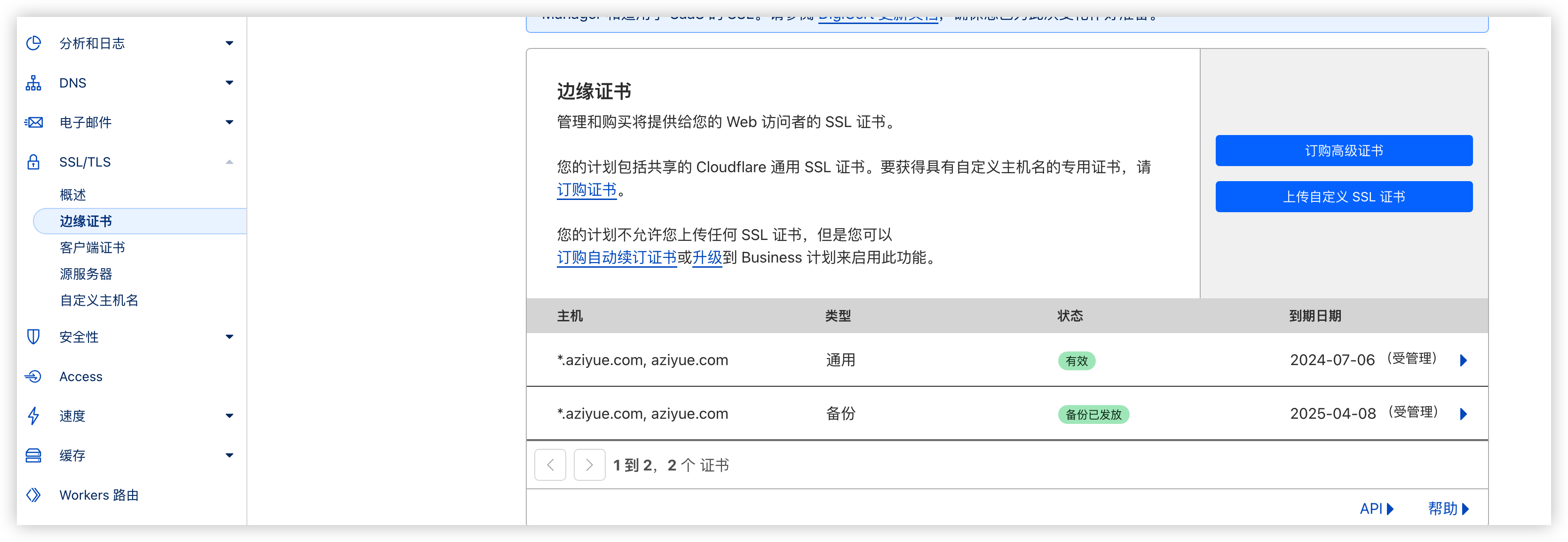
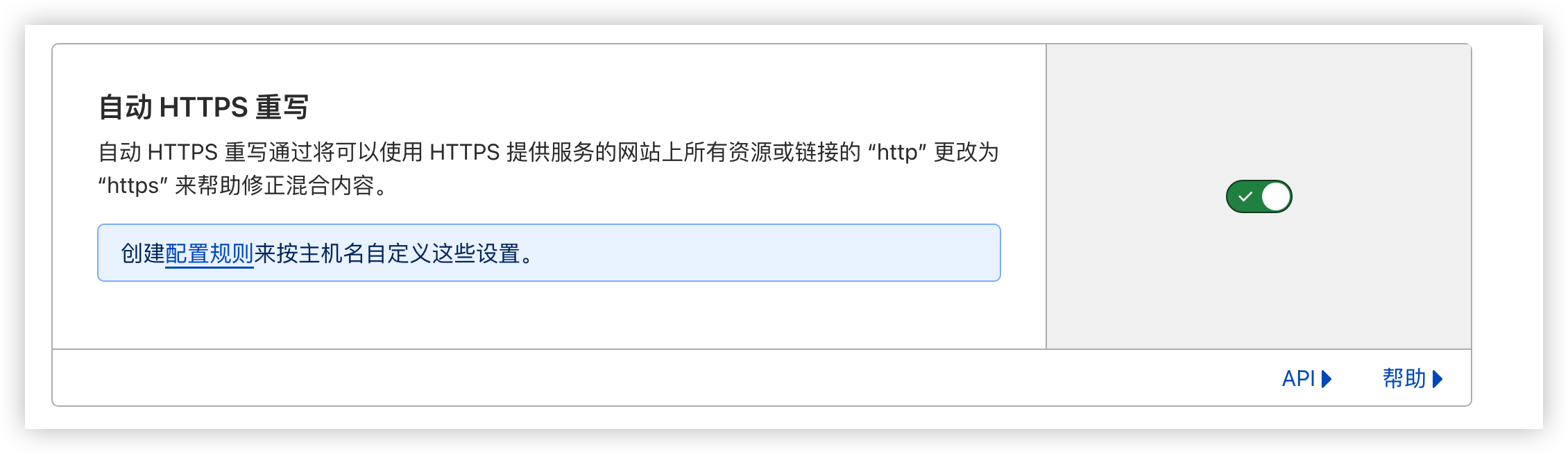
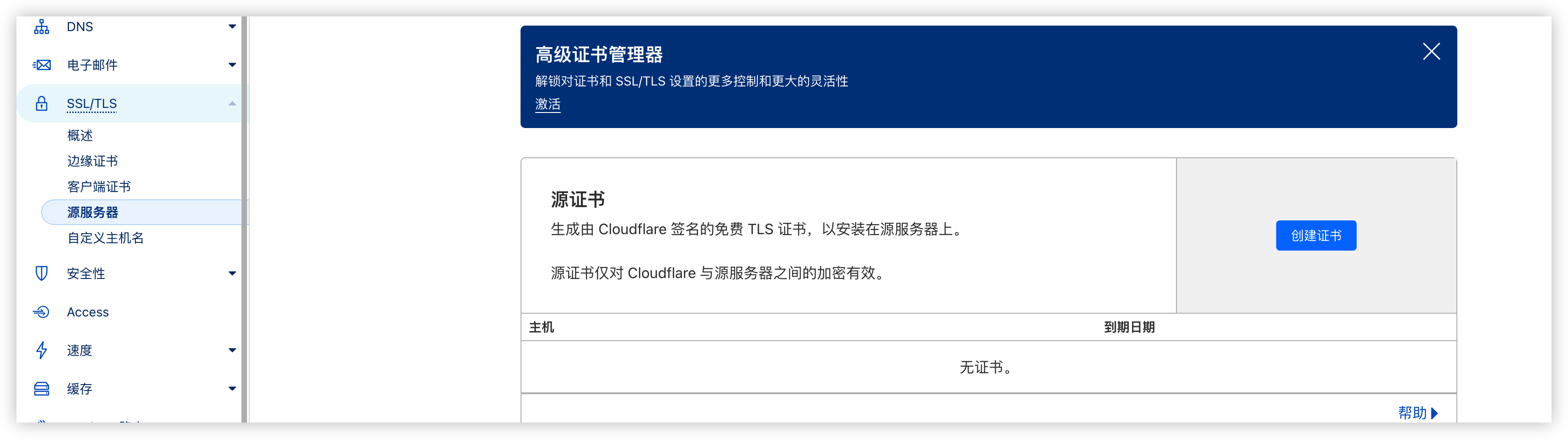
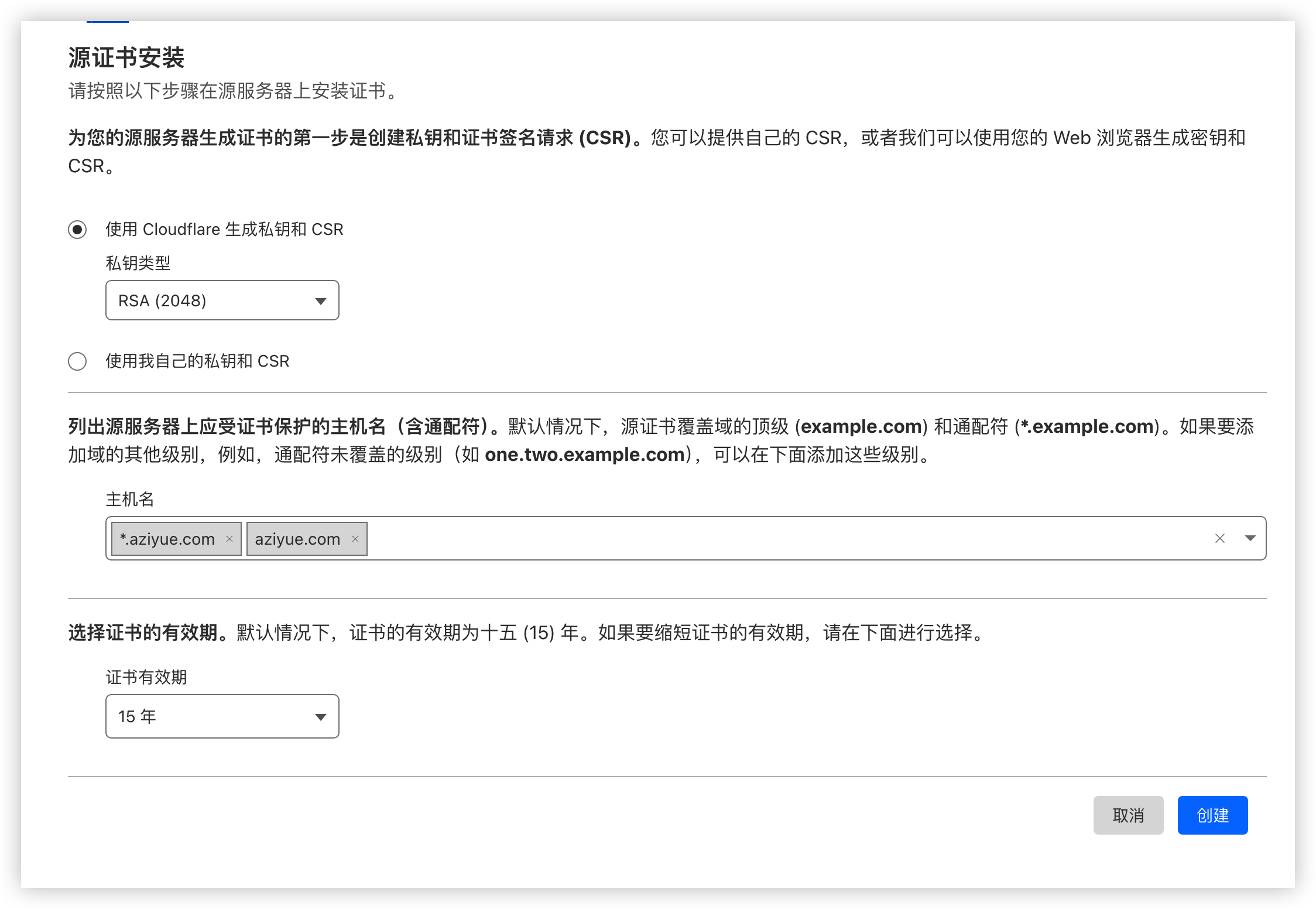
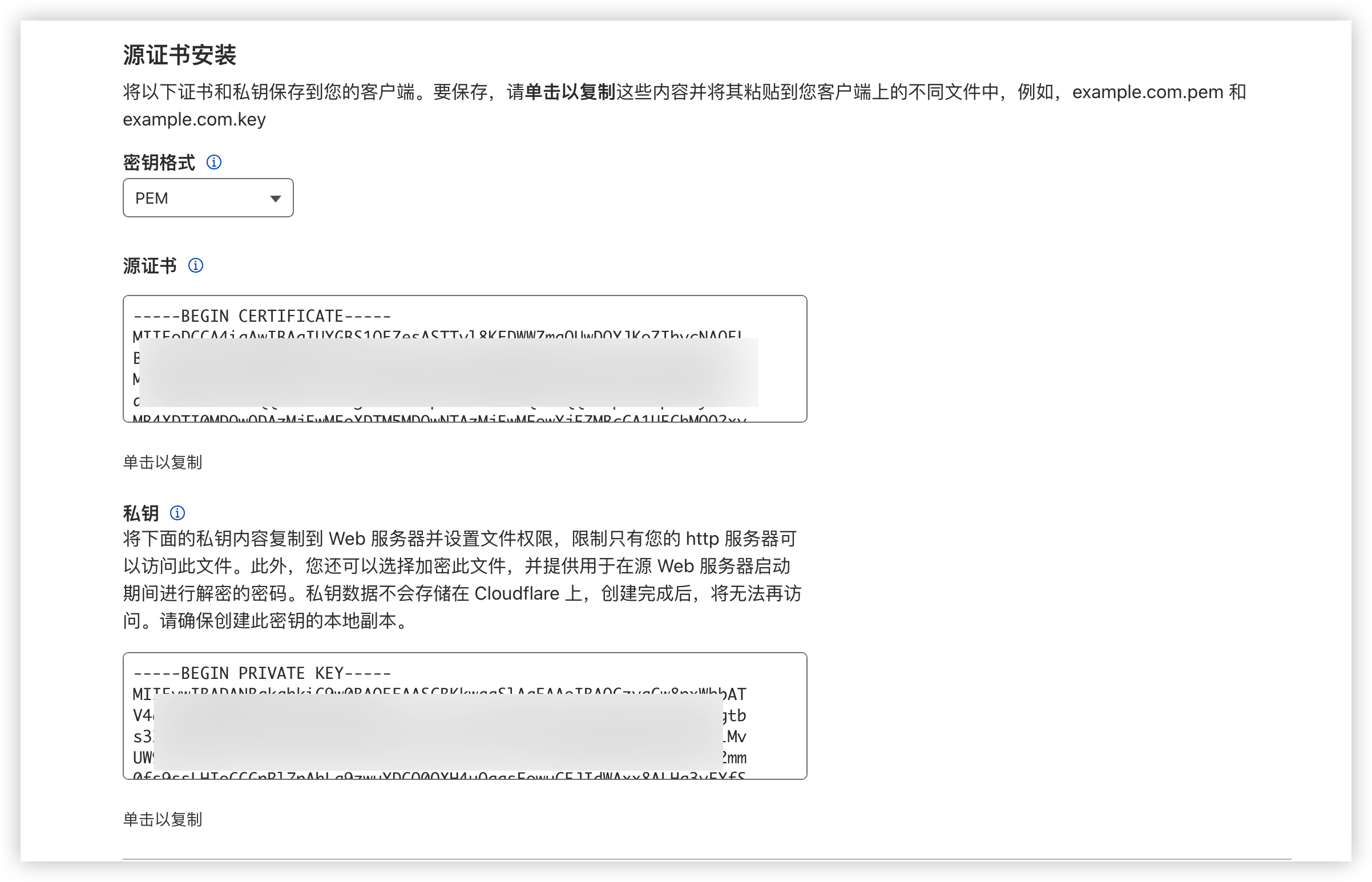
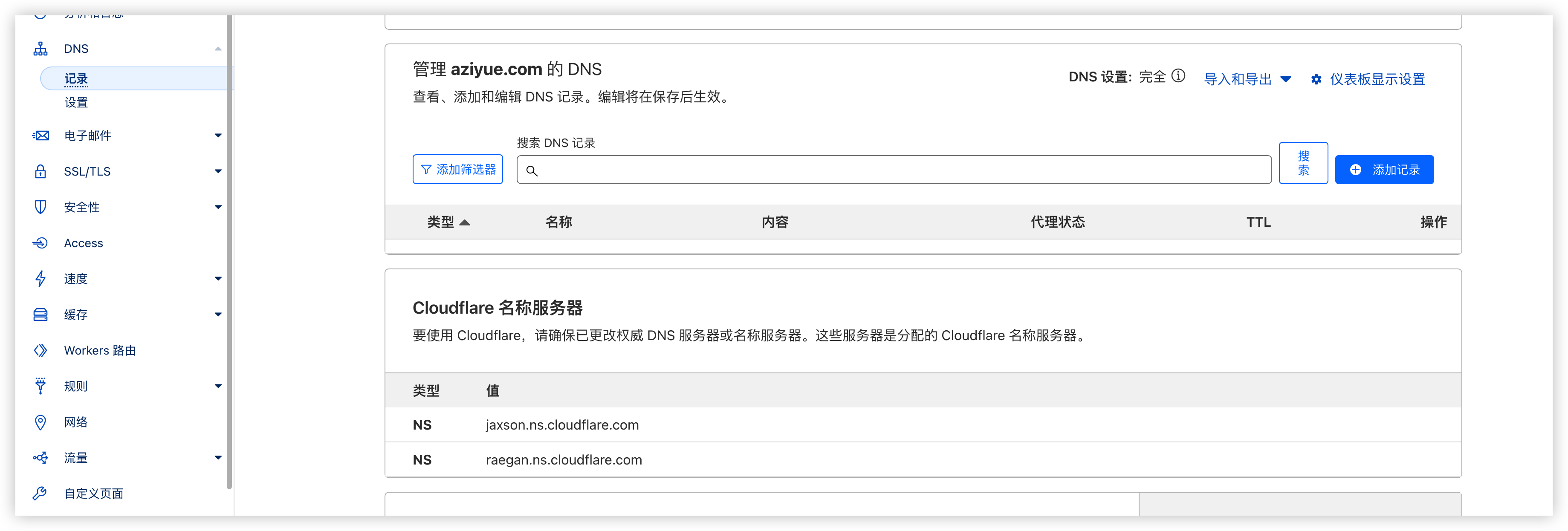
                        <![CDATA[<p>在国内做网站有两个问题：</p><p>1、要备案</p><p>2、ssl免费证书只有3个月。到期要手动更换。</p><p>当然也有好处：国内的服务器便宜嘛。</p><p>当然国外还有免费的服务器给你用，比如vercel</p><p>故我选择Cloudflare建站在海外。</p><p>将自己的域名迁移到Cloudflare上，只需要修改自己云产商的域名DNS为Cloudflare，然后在Cloudflare上绑一下即可。这个比较简单，不多赘述。</p><p>使用Cloudflare的SSL就有点小复杂了。</p><p>1、登录Cloudflare, 选择自己的域名, 选择SSL/TLS, 概述</p><p><img src="https://notes.zijiancode.cn/2024/04/08/image-20240408111844380.png" alt="image-20240408111844380" /></p><p>2、如果你的服务端是你自己的，SSL/TLS 加密模式改为完全，如果你的服务端在第三方，比如Vercel, 选灵活</p><p><img src="https://notes.zijiancode.cn/2024/04/08/image-20240408112015999.png" alt="image-20240408112015999" /></p><p>3、到边缘证书页面，订阅一个证书</p><p><img src="https://notes.zijiancode.cn/2024/04/08/image-20240408112117848.png" alt="image-20240408112117848" /></p><p>4、自动Https重写勾上，其他的默认</p><p><img src="https://notes.zijiancode.cn/2024/04/08/image-20240408112215250.png" alt="image-20240408112215250" /></p><p>5、到源服务器页面，创建一个证书，如果你第二步选的是灵活，到这里就结束了。</p><p><img src="https://notes.zijiancode.cn/2024/04/08/image-20240408112543517.png" alt="image-20240408112543517" /></p><p><img src="https://notes.zijiancode.cn/2024/04/08/image-20240408112606005.png" alt="image-20240408112606005" /></p><p><img src="https://notes.zijiancode.cn/2024/04/08/image-20240408113551162.png" alt="image-20240408113551162" /></p><p>将密钥放入nginx目录下，我个人习惯是放到nginx的certs(自己建的)目录， 配上nginx配置</p><pre><code class="language-nginx">server {        server_name aziyue.com;        listen 443 ssl;        ssl_session_timeout 5m;        ssl_session_cache shared:SSL:50m;        client_max_body_size 20000m;        proxy_set_header X-Forwarded-For $proxy_add_x_forwarded_for;        proxy_set_header Host $http_host;        proxy_redirect off;        location / {                proxy_pass http://127.0.0.1:8090;        }        ssl_certificate  /etc/nginx/certs/aziyue.pem;        ssl_certificate_key /etc/nginx/certs/aziyue.key;}</code></pre><p>6、配DNS</p><p><img src="https://notes.zijiancode.cn/2024/04/08/image-20240408113704155.png" alt="image-20240408113704155" /></p><p>添加记录保存即可。</p><p>注意：如果你的服务器在国内，还是逃不过备案</p>]]>
                </content>
            </entry>
            <entry>
                <title><![CDATA[Elastic 集成 GitLab Oauth登录]]></title>
                <link rel="alternate" type="text/html" href="https://zijiancode.cn/archives/elastic--gitlab-oauth" />
                <id>tag:https://zijiancode.cn,2024-03-28:elastic--gitlab-oauth</id>
                <published>2024-03-28T10:30:19+08:00</published>
                <updated>2024-03-29T09:11:35+08:00</updated>
                <author>
                    <name>阿紫</name>
                    <uri>https://zijiancode.cn</uri>
                </author>
                <content type="html">
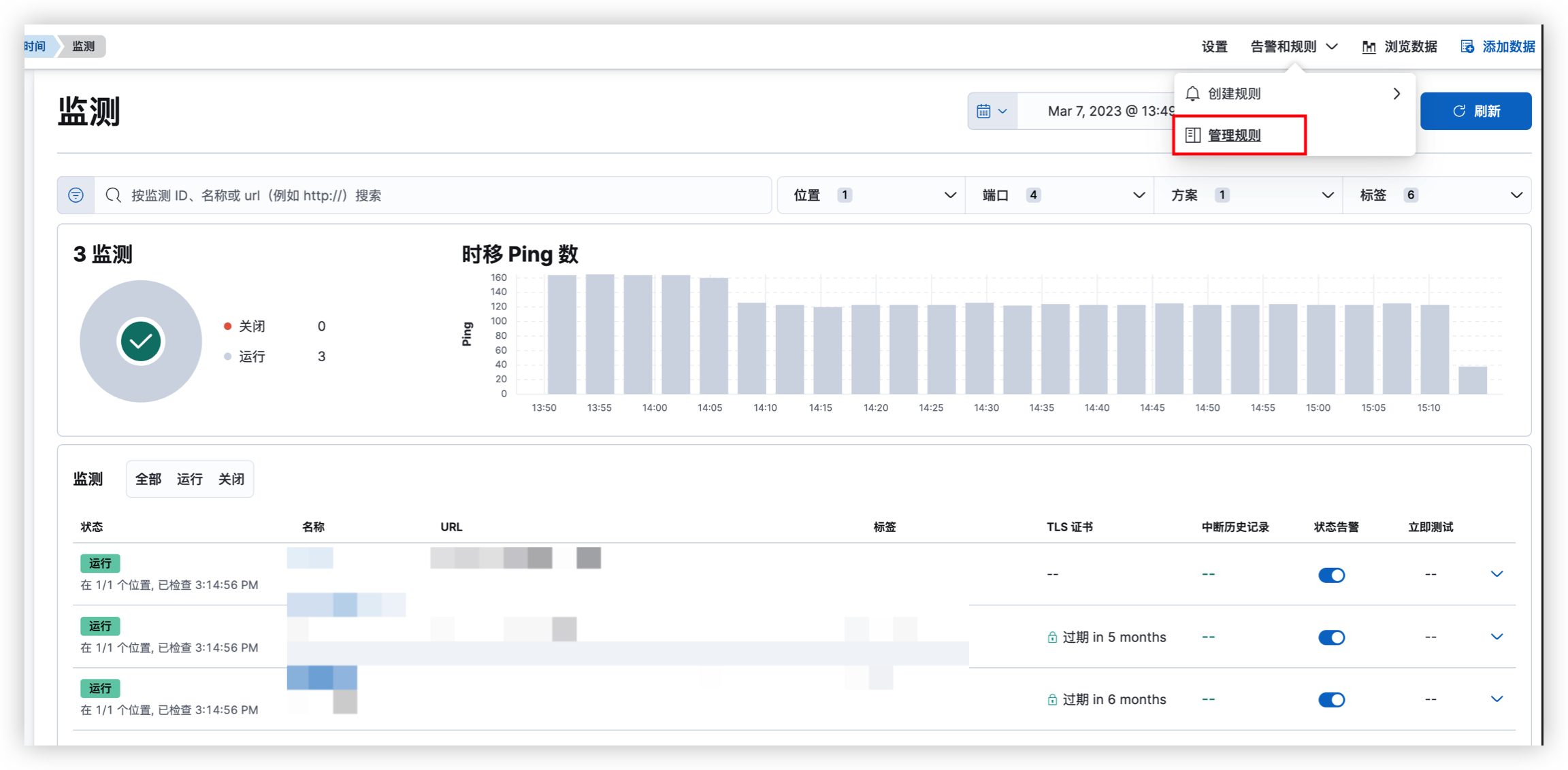
                        <![CDATA[<p>当你有很多中间件时，你可能会需要在每个中间件都配置账号密码，但更好的做法是使用其中一个中间件作为登录中心，一般来说，我们会选用代码仓库，你可以没有其他中间件，但你不可能没有代码仓库吧！</p><h2 id="elastic%E5%A6%82%E4%BD%95%E9%9B%86%E6%88%90gitlab" tabindex="-1">Elastic如何集成GitLab</h2><p>我这里有两篇文档：</p><p>1、<a href="https://www.elastic.co/guide/en/cloud/current/ec-secure-clusters-oidc.html" target="_blank">https://www.elastic.co/guide/en/cloud/current/ec-secure-clusters-oidc.html</a></p><p>2、<a href="https://gitlab.com/.well-known/openid-configuration" target="_blank">https://gitlab.com/.well-known/openid-configuration</a></p><p>相信你作为工程师，有这两个东西已经能自己搞定了~</p><p>如果还不行，我这里还有两份配置配置样例</p><p>这是kibana的</p><pre><code class="language-yaml">xpack.security.authc.providers:  oidc.oidc1:    order: 0    realm: gitlab    description: &quot;Log in with GitLab&quot;    icon: &quot;your_icon_url&quot;  basic.basic1:    order: 1    icon: &quot;logoElasticsearch&quot;</code></pre><p>这是elasticsearch的</p><pre><code class="language-yaml">xpack.security.authc.realms.oidc.gitlab:  order: 2  rp.client_id: &quot;YOUR_CLIENT_ID&quot;  rp.response_type: code  rp.redirect_uri: &quot;YOUR_KIBANA_URL/api/security/oidc/callback&quot;  op.issuer: &quot;https://gitlab.com&quot;  op.authorization_endpoint: &quot;https://gitlab.com/oauth/authorize&quot;  op.token_endpoint: &quot;https://gitlab.com/oauth/token&quot;  op.jwkset_path: https://gitlab.com/oauth/discovery/keys  op.userinfo_endpoint: &quot;https://gitlab.com/oauth/userinfo&quot;  rp.post_logout_redirect_uri: &quot;YOUR_KIBANA_URL/security/logged_out&quot;  claims.principal: sub  claims.groups: &quot;https://gitlab.org/claims/groups/developer&quot;</code></pre><p>我使用的是<code>gitlab.com</code>作为代码仓库，如果你是本地部署的，请改为你自己的地址。</p><p>我使用的是Elastic Cloud,  如果你是本机部署的，请多看看官方文档，找一找你的client_secret应该配在哪里。有可能是文件里配个：rp.client_secret 就好了<br />文档：<a href="https://www.elastic.co/guide/en/elasticsearch/reference/8.13/security-settings.html#ref-oidc-settings" target="_blank">https://www.elastic.co/guide/en/elasticsearch/reference/8.13/security-settings.html#ref-oidc-settings</a></p><p>如果你想做权限控制的话，可以使用gitlab的group来做，不同的group给不同的权限，在role_mappings配置</p>]]>
                </content>
            </entry>
            <entry>
                <title><![CDATA[延时消息是如何实现的？]]></title>
                <link rel="alternate" type="text/html" href="https://zijiancode.cn/archives/how-implement-delay-queue" />
                <id>tag:https://zijiancode.cn,2024-02-28:how-implement-delay-queue</id>
                <published>2024-02-28T12:05:04+08:00</published>
                <updated>2024-02-28T12:05:04+08:00</updated>
                <author>
                    <name>阿紫</name>
                    <uri>https://zijiancode.cn</uri>
                </author>
                <content type="html">
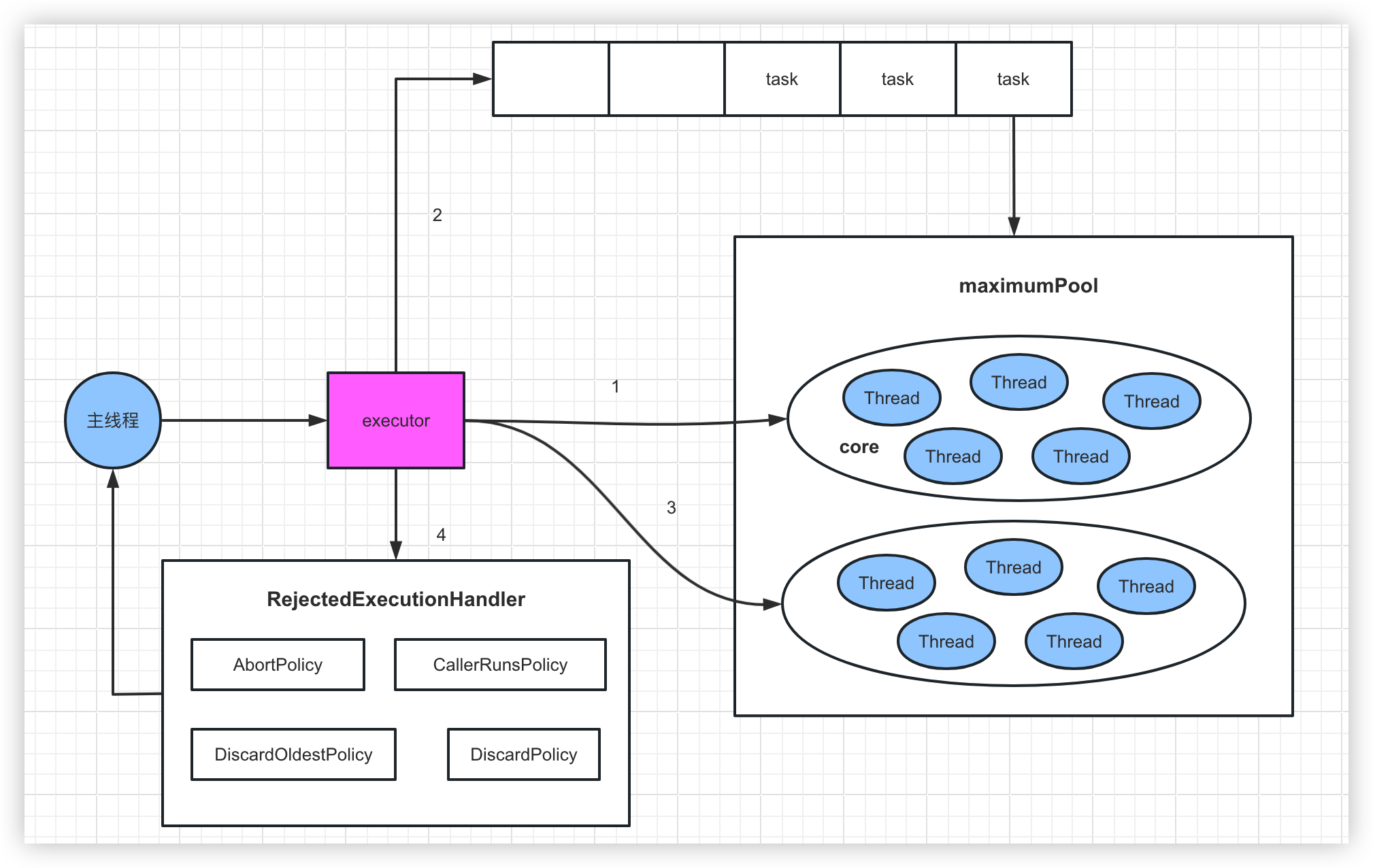
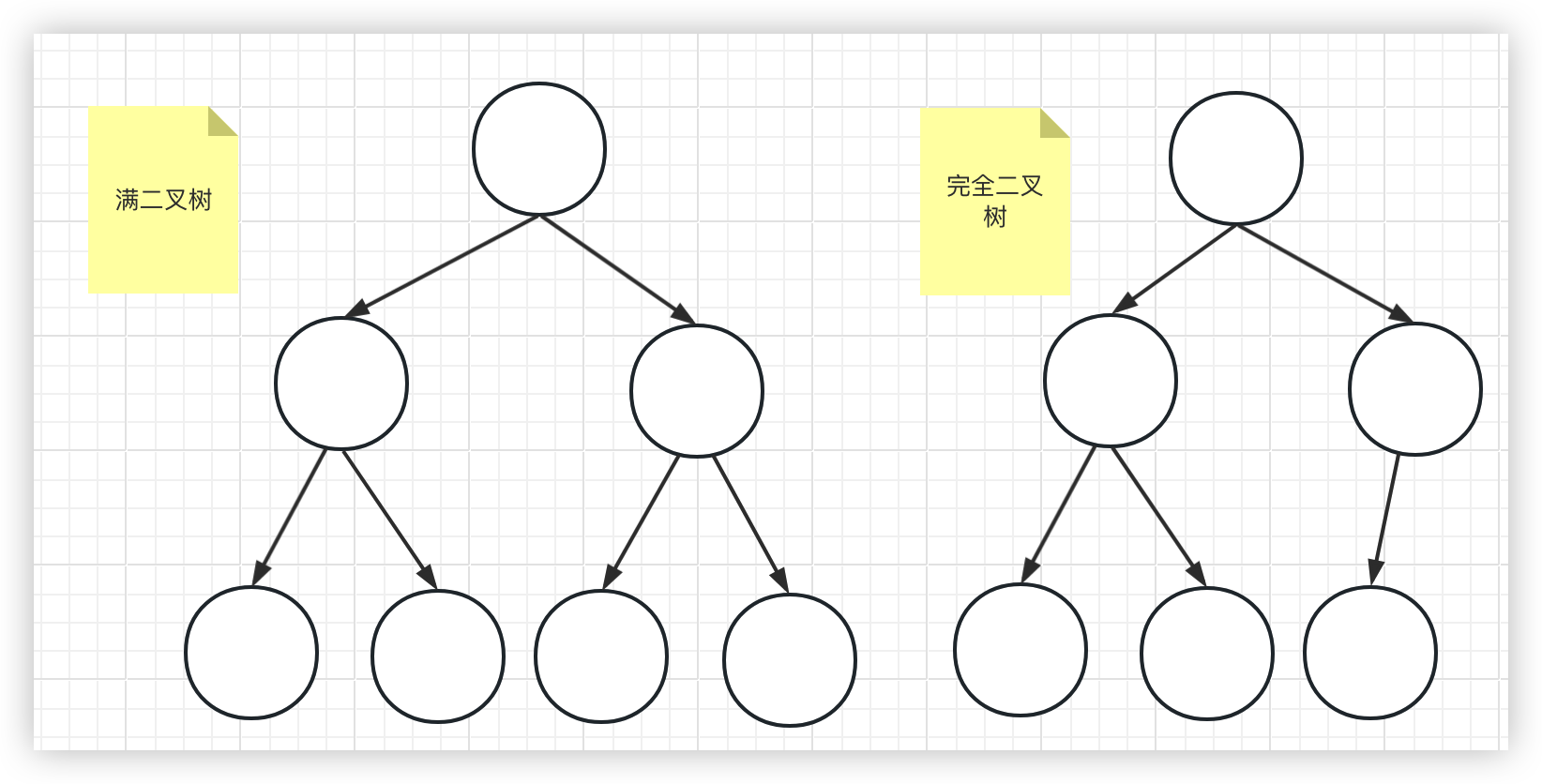
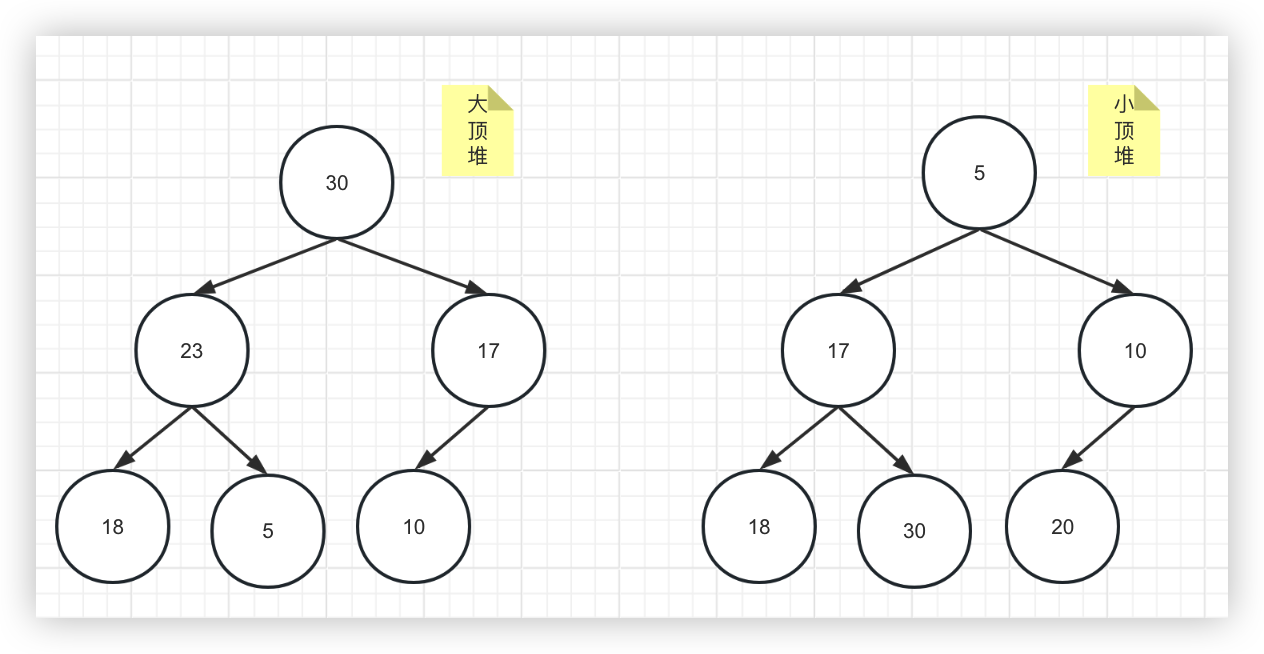
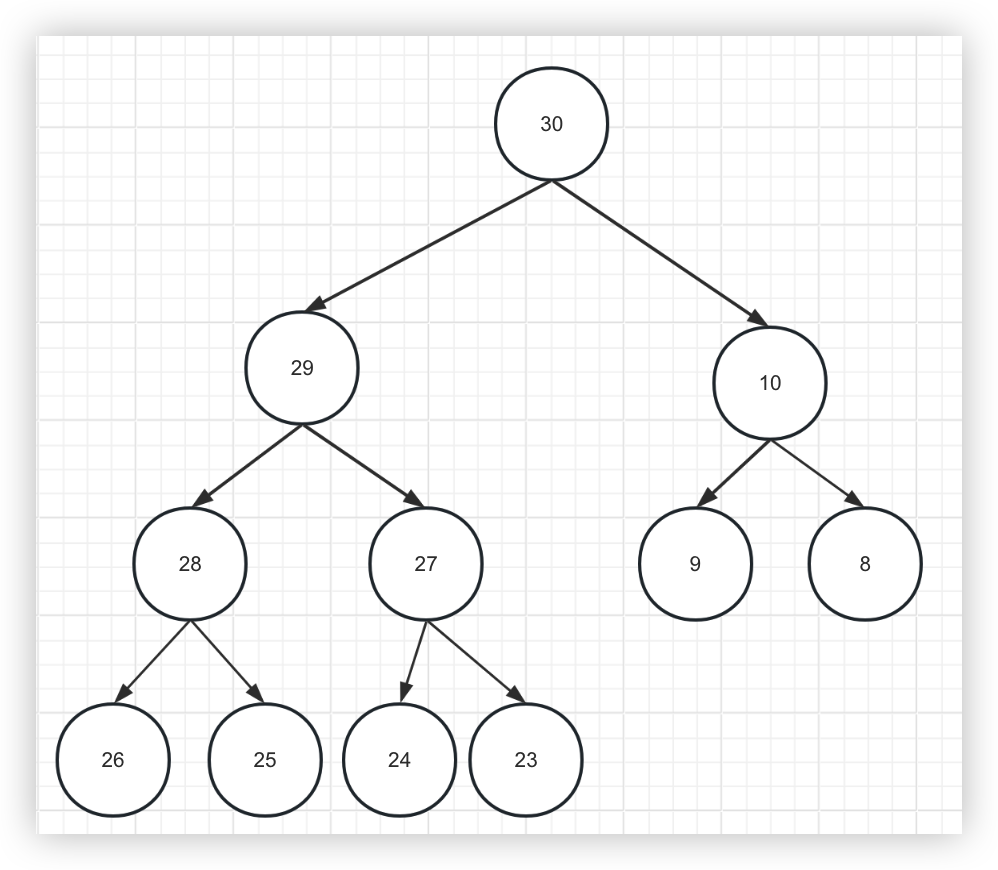
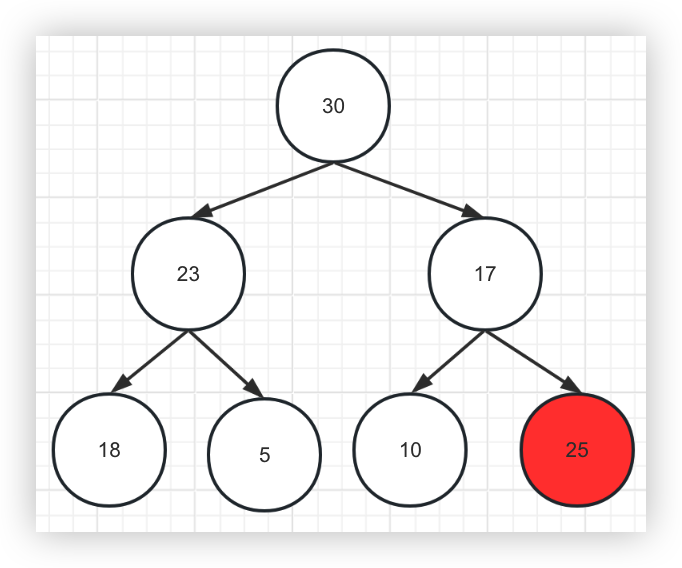
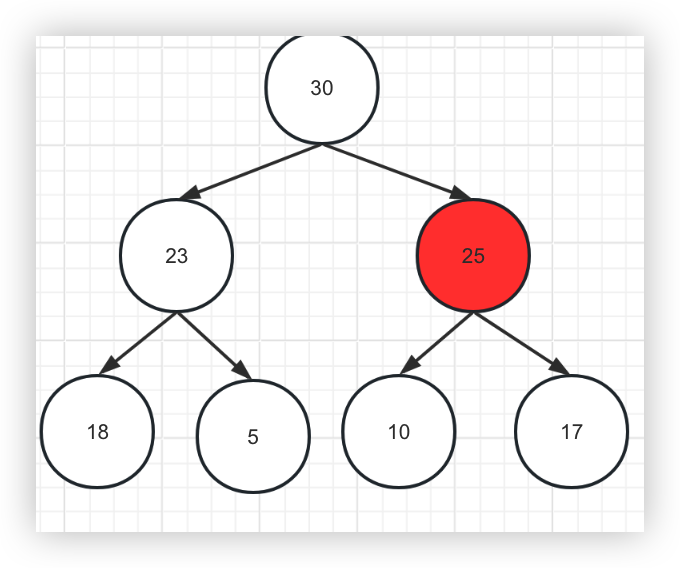
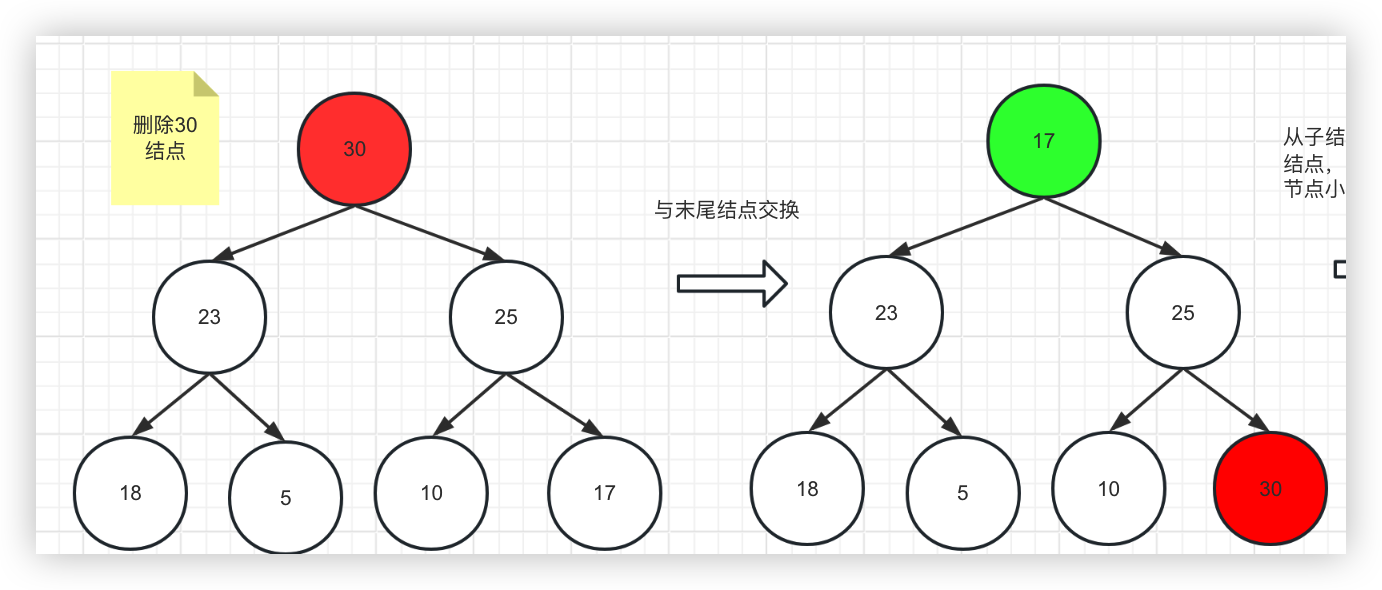
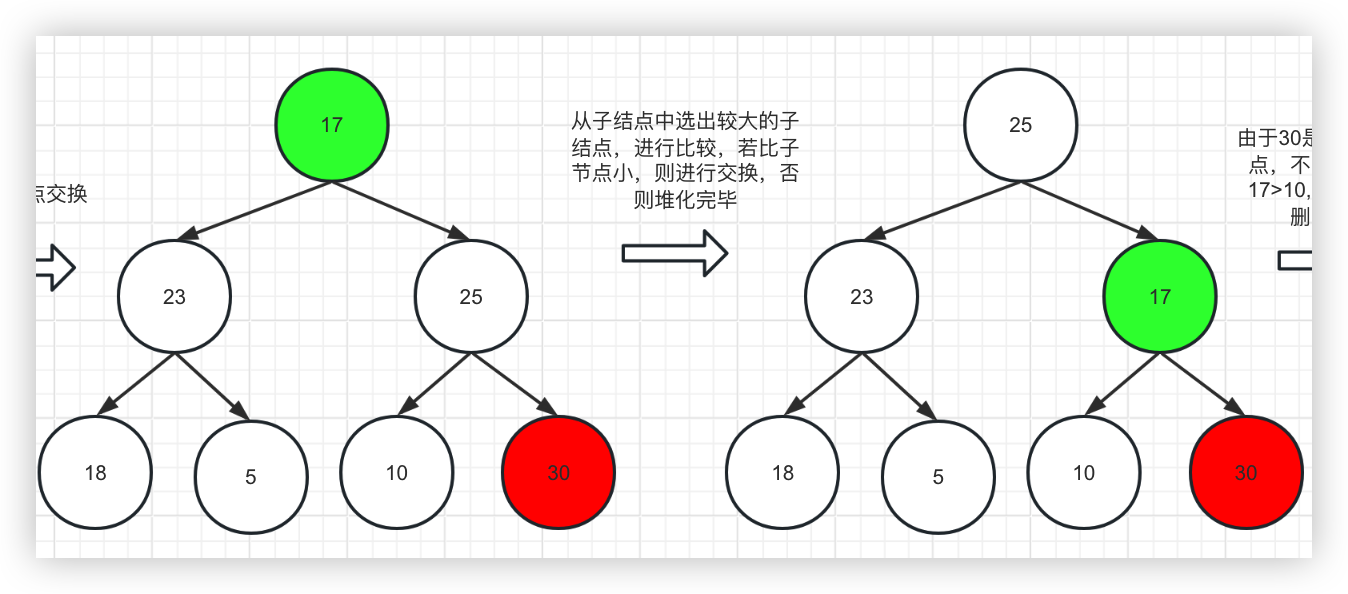
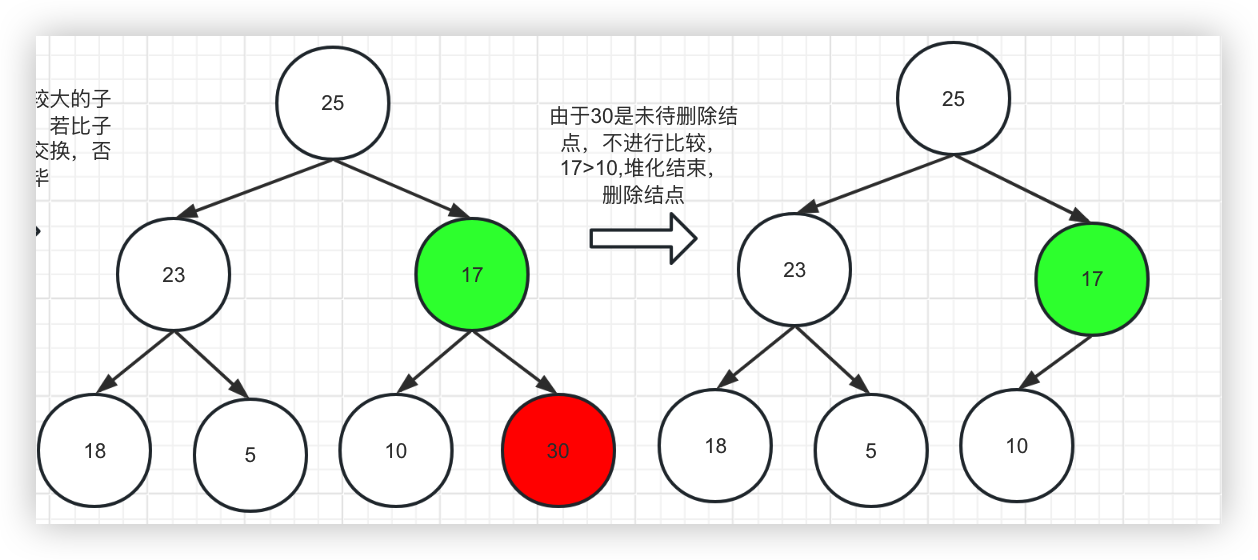
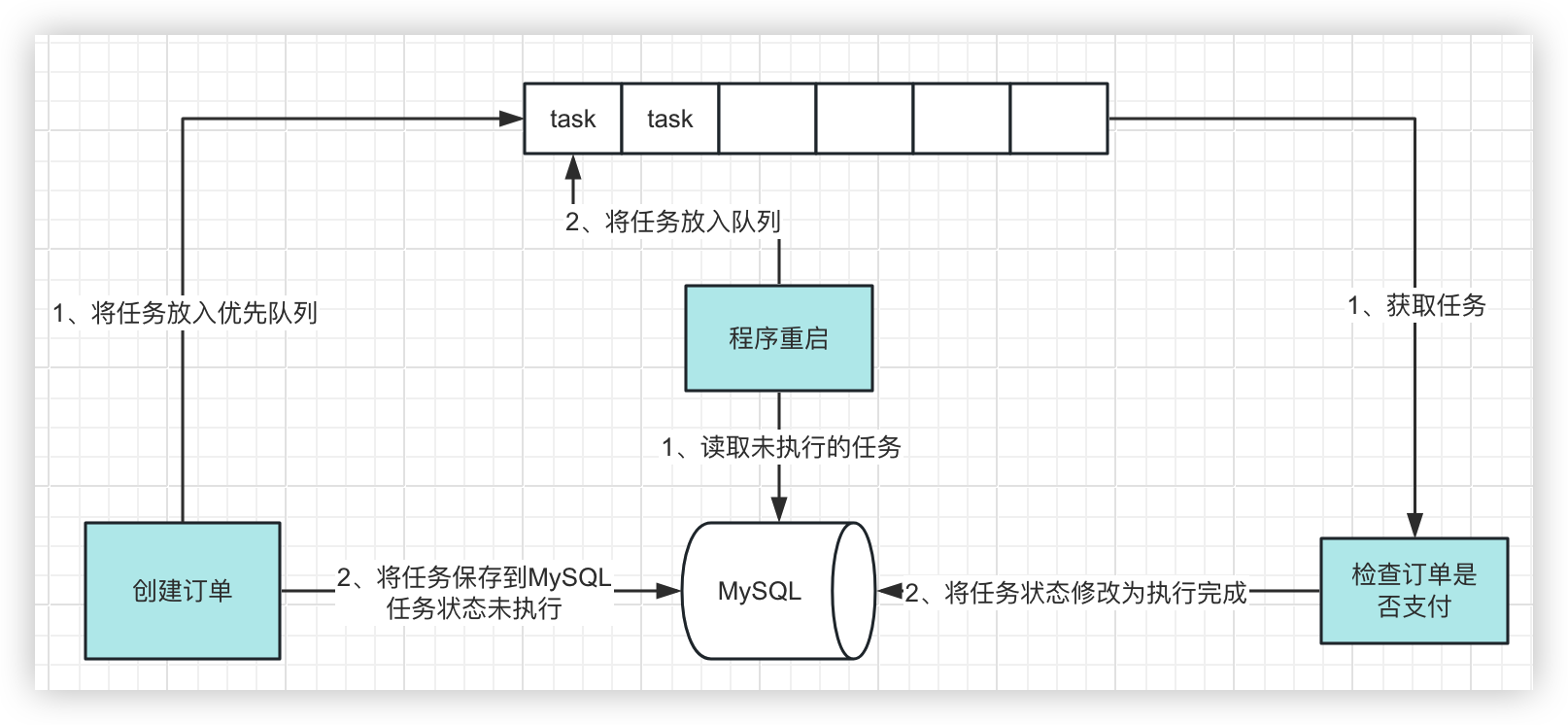
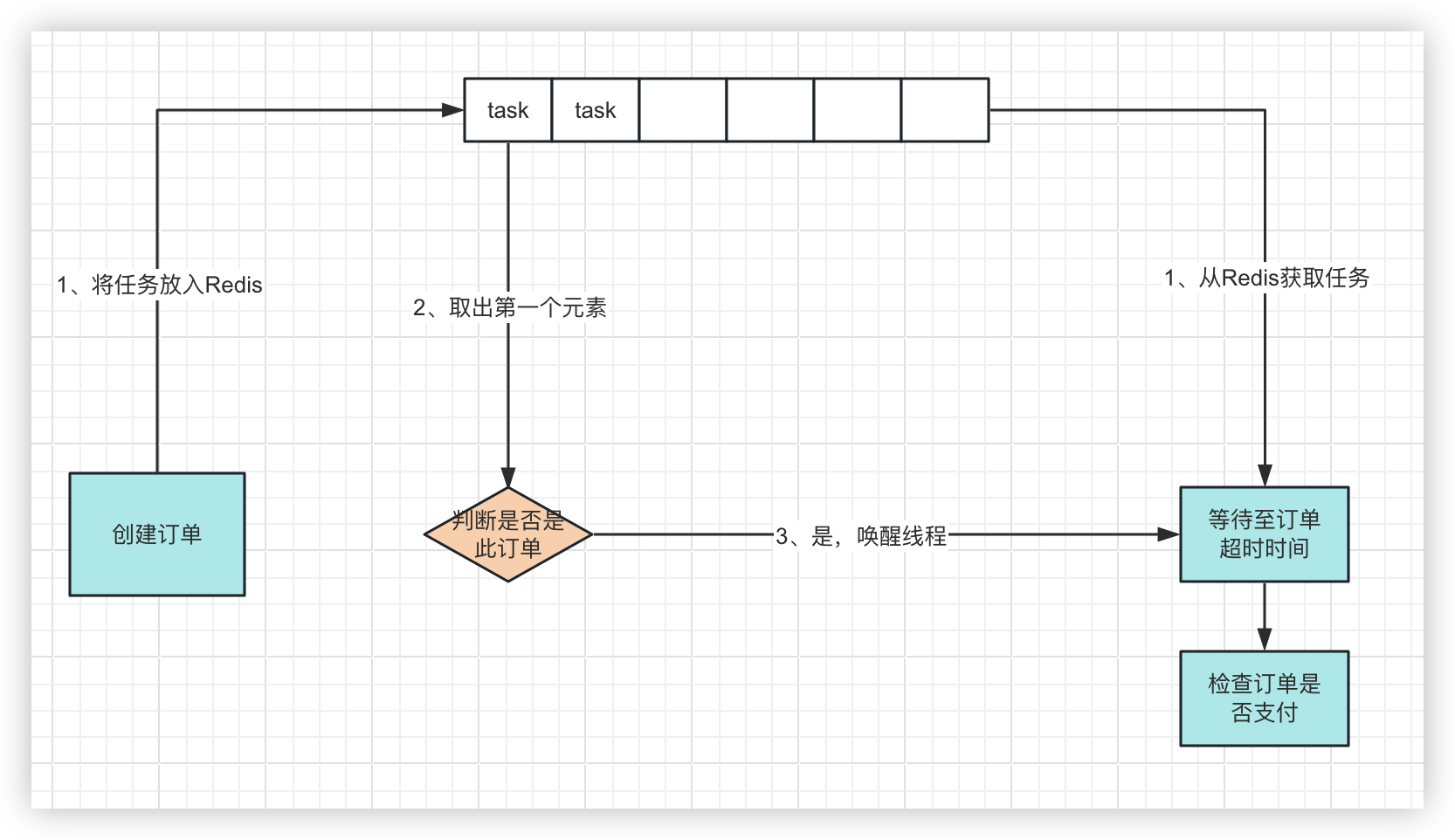
                        <![CDATA[<h2 id="%E5%89%8D%E8%A8%80" tabindex="-1">前言</h2><p>延时消息是项目中经常用到的一种解决方案, 本篇文章我们就来尝试探探它到底是如何实现的？以及有哪些方案。</p><h2 id="%E9%9D%A2%E8%AF%95%E7%9C%8B%E4%BA%86%E5%9B%9E%E5%AE%B6%E7%AD%89%E9%80%9A%E7%9F%A5%E7%89%88" tabindex="-1">面试看了回家等通知版</h2><p>为了更能直观的感受，我们还是通过案例来进行表述。</p><p>万年不变老案例：下单5分钟后，支付超时取消订单。</p><pre><code class="language-java">    public void order(){        // 假设这里已经下单并得到了订单id        String orderId = UUID.randomUUID().toString();        new Thread(() -&gt; {            try {                // 延时5分钟                TimeUnit.MINUTES.sleep(5L);                // 查询订单是否支付，未支付则取消                boolean isPay = checkOrderPayState(orderId);            } catch (InterruptedException e) {                e.printStackTrace();            }        }).start();    }</code></pre><p>咱先不论回不回家等通知，你就说能不能用？</p><p>诶，它还真能用，但不多。</p><p>主要有两个问题：</p><p>1、性能很差，一个订单就开个线程等5分钟，好家伙，多来点订单直接内存溢出了。</p><blockquote><p>老板：业务上不去原来就是你小子啊</p></blockquote><p>2、服务停机，5分钟内的订单取消逻辑全部消失了。</p><blockquote><p>用户：咦，咋昨天的订单还能支付勒？</p></blockquote><h2 id="%E5%9B%9E%E5%AE%B6%E5%A4%8D%E7%9B%98" tabindex="-1">回家复盘</h2><p>我们先想想第一个问题咋解决。</p><p>既然问题主要在于<strong>一个订单就会开一个线程</strong>，那我能不能把线程省着点用？</p><p>省线程？线程复用？这不直接触发了关键字：线程池。</p><p>试试？</p><pre><code class="language-java">    private static final ExecutorService executor = new ThreadPoolExecutor(5, 20, 1, TimeUnit.MINUTES, new LinkedBlockingQueue&lt;&gt;(60));    @Test    public void orderPro() throws IOException {        // 假设这里已经下单并得到了订单id        String orderId = UUID.randomUUID().toString();        executor.execute(() -&gt; {            try {                // 延时5分钟                TimeUnit.MINUTES.sleep(5L);                // 查询订单是否支付，未支付则取消                boolean isPay = checkOrderPayState(orderId);                log.info(&quot;订单支付状态：{}&quot;, isPay);            } catch (InterruptedException e) {                e.printStackTrace();            }        });    }</code></pre><p>这里阿紫先补充一下线程池的执行机制，以防有小伙伴吃懵逼果。</p><p>以上代码的线程池参数分别为：核心线程数5，最大线程数20，线程空闲超时时间1分钟，任务队列容量60.</p><p>执行机制是这样的：</p><p>1、线程池收到任务，先判断核心线程数是否已满(达到5)</p><p>2、未满则创建线程执行任务</p><p>3、已满则将任务放入任务队列</p><p>4、如果任务队列也满了，任务放不进，则继续创建线程(非核心线程)</p><p>5、如果非核心线程也满了(达到20)，则拒绝该任务</p><blockquote><p>线程空闲超时时间作用：如果非核心线程在空闲超时时间（一分钟）内没收到任务，则回收该线程</p><p>核心线程和非核心线程只是线程池的一个概念，用来区分哪些线程可以回收，实际上没有区别。</p><p>叠个甲：核心线程实际也可以被回收，给个允许核心线程超时的参数就行。</p></blockquote><p><img src="https://notes.zijiancode.cn/2024/02/20/image-20240220105635616.png" alt="image-20240220105635616" /></p><p>好，现在就来看看这个改造可不可行？</p><p>假设现有6个任务</p><table><thead><tr><th></th><th>订单创建时间</th><th>期望检查时间</th></tr></thead><tbody><tr><td>订单1</td><td>10:00:00</td><td>10:05:00</td></tr><tr><td>订单2</td><td>10:00:30</td><td>10:05:30</td></tr><tr><td>订单3</td><td>10:01:00</td><td>10:06:00</td></tr><tr><td>订单4</td><td>10:01:30</td><td>10:06:30</td></tr><tr><td>订单5</td><td>10:02:00</td><td>10:07:00</td></tr><tr><td>订单6</td><td>10:02:30</td><td>10:07:30</td></tr></tbody></table><p>由于线程池有5个核心线程，所以前5个订单都正常交给了线程执行。</p><p>到第6个订单时，由于核心线程数已满，所以第6个订单放入队列。直到第一个订单的线程执行完毕，也就是在<code>10:05:00</code>. 这时候线程开始执行第6个订单的检查任务，检查时间为<code>10:05:00</code> + 5分钟 = <code>10:10:00</code></p><p>程序出错，问题原因在于我们期望创建订单后马上执行任务，但是由于线程数不足，任务在队列中等待了一段时间后才执行。</p><p>程序的逻辑应该从<code>等待5分钟</code>改为<code>等待至订单支付超时的时间点</code></p><pre><code class="language-java">    public void orderPlus() throws IOException {        // 假设这里已经下单并得到了订单id        String orderId = UUID.randomUUID().toString();        // 计算订单检查是否支付超时时间点        long checkTime =  System.currentTimeMillis() + TimeUnit.MINUTES.toMillis(5);        executor.execute(() -&gt; {            // 延时等待至订单超时时间            Thread.sleep(checkTime - System.currentTimeMillis());            // 查询订单是否支付，未支付则取消            boolean isPay = checkOrderPayState(orderId);            log.info(&quot;订单支付状态：{}&quot;, isPay);        });    }</code></pre><p>到这里好像问题已经解决了，程序的线程数可控，程序执行也没有问题。</p><p>但如果细想一下，我们就会发现：先创建的订单总是先执行任务，这好像是句废话，因为订单的延时时间是固定的5分钟，所以任务天然是按照订单创建顺序排好队等待执行的。</p><p>但这句废话会让我们得出一个结论：一般情况下，有且只有一个线程会执行任务。我们不妨把线程池的线程数改为1进行验证一下，就会发现确实如此。</p><blockquote><p>不知道为什么，说起废话总会让我想起鸽巢原理</p></blockquote><h2 id="%E7%BB%A7%E7%BB%AD%E4%BC%98%E5%8C%96" tabindex="-1">继续优化</h2><p>既然一个线程就能解决的事情，那我们就尝试回归一下，用最开始的单线程试试。</p><pre><code class="language-java">    // 定义阻塞队列    private static final LinkedBlockingQueue&lt;Order&gt; checkQueue = new LinkedBlockingQueue&lt;&gt;(100);    @Test    public void orderProMax() {        // 假设这里已经下单并得到了订单id        String orderId = UUID.randomUUID().toString();        // 计算订单检查是否支付超时时间点        long checkTime = System.currentTimeMillis() + TimeUnit.MINUTES.toMillis(5);        // 将任务放入队列        checkQueue.offer(new Order(orderId, checkTime));    }    static {        // 开启线程从队列中获取任务        new Thread(() -&gt; {            try {                while (true) {                    Order order = checkQueue.take();                    // 延时等待至订单超时时间                    Thread.sleep(order.checkTime - System.currentTimeMillis());                    // 查询订单是否支付，未支付则取消                    boolean isPay = checkOrderPayState(order.orderId);                    log.info(&quot;订单支付状态：{}&quot;, isPay);                }            } catch (InterruptedException e) {                e.printStackTrace();            }        }).start();    }</code></pre><blockquote><p>可能有小伙伴好奇为什么线程里面<code>Order order = checkQueue.take();</code>不会出现order为null的情况</p><p>因为<code>Order order = checkQueue.take();</code> take方法原理是当队列有元素时取出，无元素时阻塞等待。</p></blockquote><p>现在的方案是不是又更优雅了一些？只用了一个线程，程序执行正常。</p><h2 id="%E9%9A%BE%E5%BA%A6%E6%8F%90%E9%AB%98" tabindex="-1">难度提高</h2><p>案例中的检查时间固定是5分钟后，这时候业务发生变更，有一类特殊的订单，检查时间是2分钟后，程序还能hold住吗？</p><p>假设:</p><p>订单1创建时间为<code>10:00:00</code>,5分钟后<code>10:05:00</code>检查.</p><p>订单2创建时间为<code>10:01:00</code>,2分钟后<code>10:03:00</code>检查.</p><p>这时候在<code>10:04:00</code>时，订单1还在等待至超时时间，但是订单2已经超时了。</p><p>GG!</p><p>分析一下，<code>一般情况下，有且只有一个线程会执行任务</code>这个结论在此案例中仍然是起效的。</p><p>问题在于任务的执行顺序出现了异常。我们应该让订单2的任务排在订单1前面？</p><p>所以这个队列应该是可以排序的，并且排序方式是按照订单检查时间顺序从早到晚。</p><p>又更进一步分析，由于程序每次只取第一个任务执行，所以我们只需要保证队列中第一个任务是最先执行的就可以了。</p><p>恰好就有个这样的数据结构：堆！</p><blockquote><p>我们待会再来论证为什么用堆而不是纯粹的排序列表</p></blockquote><h3 id="%E5%A0%86" tabindex="-1">堆</h3><p>定义：</p><ul><li>是一颗完全二叉树</li><li>每一个结点都大于等于它的子结点（大顶堆），或者小于等于它的子结点（小顶堆）</li></ul><blockquote><p>完全二叉树: 除去最后一层外，其余层为满二叉树状态，并且最后一层的叶子结点都往左排列</p><p>满二叉树: 除叶子结点外，其他的结点都有两个子结点</p></blockquote><p><img src="https://notes.zijiancode.cn/2024/02/27/image-20240223123442661.png" alt="image-20240223123442661" /></p><p><img src="https://notes.zijiancode.cn/2024/02/27/image-20240223123603362.png" alt="image-20240223123603362" /></p><p>拿上图的大顶堆举例，要注意的是：堆的结构是每个结点比它的子结点大,而不是每一层比下一层大。上图第二层的<code>17</code>就比<code>18</code>要小，完全可能出现最后一层的结点比根的另一分叉都要大的情况。</p><p><img src="https://notes.zijiancode.cn/2024/02/27/image-20240223124459487.png" alt="image-20240223124459487" /></p><p>那堆这个数据结构是怎么插入新结点呢？</p><p>1、首先将新结点放到末尾</p><p><img src="https://notes.zijiancode.cn/2024/02/27/image-20240223130040206.png" alt="image-20240223130040206" /></p><p>2、将结点与父结点相互比较，如果比父节点大，则进行交换，否则插入结束</p><p><img src="https://notes.zijiancode.cn/2024/02/27/image-20240223132220873.png" alt="image-20240223132220873" /></p><blockquote><p>25比此时的父结点30要小，所以插入结束</p></blockquote><p>如何取值？取值也可以认为是删除根结点</p><p>1、与末尾结点交换</p><p><img src="https://notes.zijiancode.cn/2024/02/27/image-20240223132428225.png" alt="image-20240223132428225" /></p><p>2、从子结点中选出较大的子结点，进行比较，若比子节点小，则进行交换，否则堆化完毕</p><p><img src="https://notes.zijiancode.cn/2024/02/27/image-20240223132441730.png" alt="image-20240223132441730" /></p><p>3、删除结点</p><p><img src="https://notes.zijiancode.cn/2024/02/27/image-20240223132502794.png" alt="image-20240223132502794" /></p><p>分析以上过程，不难看出，堆的新增和删除的时间复杂度都是<code>O(logn)</code>, 而排序列表插入时间复杂度是<code>O(n)</code>，删除头结点是<code>O(1)</code></p><h3 id="%E9%80%9A%E7%9F%A5" tabindex="-1">通知</h3><p>数据结构选定了，还有个问题没解决。</p><p>正在执行中的线程如何得知有了一个更早执行的任务进入了队列呢？这时候就要唤醒线程，让线程重新获取最近的任务。</p><p>案例代码中我们使用的是<code>sleep</code>方式让线程休眠，可以采用<code>interrupt</code>线程中断的方式将线程唤醒。</p><p>但java中还有更为优雅的方式，那就是<code>park</code>机制。</p><pre><code class="language-java">    public void testPark() throws InterruptedException {        Thread thread = new Thread(() -&gt; {            log.info(&quot;线程开始休眠&quot;);            LockSupport.park(this);            log.info(&quot;线程已被唤醒&quot;);        });        thread.start();        // 模拟2秒后有新的任务        Thread.sleep(2000);        log.info(&quot;放入新任务&quot;);        // 唤醒线程        LockSupport.unpark(thread);    }</code></pre><blockquote><p><code>LockSupport.park(this);</code>会将当前线程阻塞</p><p><code>LockSupport.unpark(thread);</code>会唤醒指定的线程</p></blockquote><p>打印日志如下</p><pre><code class="language-">10:44:53.493 [Thread-1] INFO com.xxx - 线程开始休眠10:44:55.497 [main] INFO com.xxx - 放入新任务10:44:55.500 [Thread-1] INFO com.xxx - 线程已被唤醒</code></pre><h3 id="%E9%9B%86%E6%88%90" tabindex="-1">集成</h3><p>1、首先，队列我们改为java中的<code>PriorityBlockingQueue</code>优先级队列,此队列的内部结构即为堆数据结构</p><pre><code class="language-java">    // 定义阻塞队列    private static final BlockingQueue&lt;Order&gt; checkQueue = new PriorityBlockingQueue&lt;&gt;(100);</code></pre><p>2、定义订单类，由于使用优先级队列，需要实现<code>Comparable</code>接口用于排序</p><pre><code class="language-java">    class Order implements Comparable&lt;Order&gt; {        String orderId;        long checkTime;        Order(String orderId, long checkTime) {            this.orderId = orderId;            this.checkTime = checkTime;        }        // 为方便使用封装一个获取延时时间方法        public long getDelay() {            return checkTime - System.currentTimeMillis();        }        @Override        public int compareTo(Order o) {            return (int) (this.getDelay() - o.getDelay());        }    }</code></pre><p>3、编写在线程中获取订单方法</p><pre><code class="language-java">    // 定义静态变量用于唤醒线程时使用    private static Thread thread = null;    private void start() {        // 开启线程从队列中获取任务        thread = new Thread(() -&gt; {            while (true) {                try{                    Order order = take();                    // 查询订单是否支付，未支付则取消                    boolean isPay = checkOrderPayState(order.orderId);                    log.info(&quot;执行完毕，订单id:{}, 检查时间：{}&quot;, order.orderId, df.format(new Date(order.checkTime)));                }catch (Exception e){                    log.info(e.getMessage(), e);                }            }        });        thread.start();    }    private Order take() {        while (true) {            Order order = checkQueue.peek();            // 无订单则直接阻塞等待            if (order == null) {                LockSupport.park(this);            } else {                if (order.getDelay() &lt;= 0) {                    return checkQueue.poll();                }                // 延时等待至订单超时时间                LockSupport.parkNanos(this, TimeUnit.MILLISECONDS.toNanos(order.getDelay()));            }        }    }</code></pre><p>4、编写将订单放入队列方法</p><pre><code class="language-java">    public void orderPlusMax() {        // 假设这里已经下单并得到了订单id        String orderId = String.valueOf(orderIdGenerator.incrementAndGet());        // 随机一个20秒内的检查时间        long checkTime = System.currentTimeMillis() + TimeUnit.SECONDS.toMillis(new Random().nextInt(20));        // 将任务放入队列        if (checkQueue.offer(new Order(orderId, checkTime))) {            log.info(&quot;订单id:{}, 检查时间：{}&quot;, orderId, df.format(new Date(checkTime)));            // 判断新放入的订单是否是第一个，是则说明新的订单是最早执行的            if (orderId.equals(checkQueue.peek().orderId)) {                // 唤醒线程                LockSupport.unpark(thread);            }        }    }</code></pre><p>5、测试</p><pre><code class="language-java">    public void test() throws IOException, InterruptedException {        start();        for (int i = 0; i &lt; 6; i++) {            orderPlusMax();        }    }</code></pre><p>测试效果</p><pre><code class="language-">11:37:27.751 [main] INFO com.xx - 订单id:1, 检查时间：11:37:3211:37:27.752 [main] INFO com.xx - 订单id:2, 检查时间：11:37:4211:37:27.752 [main] INFO com.xx - 订单id:3, 检查时间：11:37:3111:37:27.752 [main] INFO com.xx - 订单id:4, 检查时间：11:37:3911:37:27.752 [main] INFO com.xx - 订单id:5, 检查时间：11:37:3311:37:27.752 [main] INFO com.xx - 订单id:6, 检查时间：11:37:4111:37:31.753 [Thread-1] INFO com.xx - 执行完毕，订单id:3, 检查时间：11:37:3111:37:32.756 [Thread-1] INFO com.xx - 执行完毕，订单id:1, 检查时间：11:37:3211:37:33.758 [Thread-1] INFO com.xx - 执行完毕，订单id:5, 检查时间：11:37:3311:37:39.754 [Thread-1] INFO com.xx - 执行完毕，订单id:4, 检查时间：11:37:3911:37:41.757 [Thread-1] INFO com.xx - 执行完毕，订单id:6, 检查时间：11:37:4111:37:42.757 [Thread-1] INFO com.xx - 执行完毕，订单id:2, 检查时间：11:37:42</code></pre><blockquote><p>以上<code>优先级队列+LockSupport</code>其实就是Java中<code>DelayQueue</code>的原理</p><p>什么？为什么我不直接扒开<code>DelayQueue</code>的源码给你看，哦，它的源码太简单了，我看你看着会想睡觉。</p></blockquote><h2 id="%E6%8C%81%E4%B9%85%E5%8C%96" tabindex="-1">持久化</h2><p>在一步一步的分析优化下，性能问题我们解决了，订单不同的延时时间问题我们也解决了。</p><p>但是还是不能上生产，因为服务停机导致取消逻辑消失的问题还没解决。</p><p>细想一下，这里的根本原因是因为队列是在内存里，服务停机导致内存数据清空。</p><p>如果我们把这个队列进行了持久化，是不是就可行了？</p><h3 id="%E5%80%9F%E7%94%A8mysql" tabindex="-1">借用MySQL</h3><p>第一种方式，我们可以借用数据库，每次将任务放入队列的同时，往MySQL中插入一条任务数据，执行完任务更新任务状态，程序重启时查询未执行的任务放入队列</p><p><img src="https://notes.zijiancode.cn/2024/02/27/image-20240226140107240.png" alt="image-20240226140107240" /></p><p>1、定义任务类</p><pre><code class="language-java">public class Task {        private Order order;    // 执行状态：1、未执行 2、执行完成    private Integer state;}</code></pre><p>2、增加插入逻辑</p><pre><code class="language-java">    public void orderPlusMax() {      // ......        Order order = new Order(orderId, checkTime);        if (checkQueue.offer(order)) {            log.info(&quot;订单id:{}, 检查时间：{}&quot;, orderId, df.format(new Date(checkTime)));            // 插入数据到MySQL            saveTask(order);            // ......        }    }</code></pre><p>3、订单检查后将任务状态修改为执行中</p><pre><code class="language-java">    private void start() {        // 开启线程从队列中获取任务        thread = new Thread(() -&gt; {            while (true) {                    // ......                    log.info(&quot;执行完毕，订单id:{}, 检查时间：{}&quot;, order.orderId, df.format(new Date(order.checkTime)));                    // 修改任务状态                    updateTaskState(order.orderId);                    // ......            }        });    }</code></pre><p>4、程序重启时查询未执行的任务放入队列</p><pre><code class="language-java">    private void rePushTask(){        // 查询未执行的任务列表        List&lt;Task&gt; taskList = queryTask();        for (Task task : taskList) {            // 将任务放入队列            checkQueue.offer(task.getOrder());        }    }</code></pre><p>当然，还有种更为轻量的方法就是利用JVM的程序停止的回调函数, 在程序停止时将队列中还未执行的任务进行持久化。</p><pre><code class="language-java">        Runtime.getRuntime().addShutdownHook(new Thread(() -&gt; {            // 读取队列中的所有任务            for (Order order : checkQueue) {                // 持久化保存                saveTask(order);            }        }));</code></pre><p>但是这种方法只能在程序正常停止的情况下使用，非正常停止(kill)则失效，故不推荐。</p><h3 id="%E5%80%9F%E7%94%A8redis" tabindex="-1">借用Redis</h3><p>MySQL有一个问题就是不太好做分布式，而Redis的原子性(单线程)特性则很容易做到。</p><p>我们当然也可以直接像用MySQL一样直接把Redis当数据库用。用Redis的List数据类型就可以了。</p><p>但如果你熟悉Redis数据类型，再类比一下以上案例，会不会想到：</p><p>案例中的<code>优先级队列</code>是<code>有序</code>的数据结构，Redis也有一个<code>zset</code>的<code>有序集合</code>，我们能不能直接把内存中的<code>优先级队列</code>直接换成<code>zset</code>?</p><p>在这之前，我们先看看Redis的<code>zset</code>数据类型用法</p><pre><code class="language-java">    public void testZSet(){        String key = &quot;task&quot;;        // 往集合中添加一个元素 参数分别为：集合key, 元素值, 分数        redisTemplate.opsForZSet().add(key, &quot;2&quot;, 2);        // 从集合中按从小到大的方式取出元素，参数分别为：集合key, 分数最小值, 分数最大值        // 最小值和最大值是边界，-1, 6表示取出集合中分数为-1到6(闭区间)的元素        Set&lt;String&gt; set = redisTemplate.opsForZSet().rangeByScore(key, -1, 6);        // 取出元素并带分数 TypedTuple类型有两个变量：value, score        Set&lt;TypedTuple&lt;String&gt;&gt; set2 = redisTemplate.opsForZSet().rangeByScoreWithScores(key, -1, 6);        // 取出元素，最小值-1，最大值6，从offset 0开始，总数取1个        Set&lt;String&gt; set3 = redisTemplate.opsForZSet().rangeByScore(key, -1, 6, 0, 1);        redisTemplate.delete(key);    }</code></pre><p>改造流程图</p><p><img src="https://notes.zijiancode.cn/2024/02/27/image-20240227111602436.png" alt="image-20240227111602436" /></p><p>更改代码</p><p>1、注入Redis</p><pre><code class="language-java">    @Resource    private RedisTemplate&lt;String, String&gt; redisTemplate;</code></pre><p>2、修改创建订单代码</p><pre><code class="language-java">    public void orderPlusMax() {        // 假设这里已经下单并得到了订单id        String orderId = String.valueOf(orderIdGenerator.incrementAndGet());        // 随机一个20秒内的检查时间        long checkTime = System.currentTimeMillis() + TimeUnit.SECONDS.toMillis(new Random().nextInt(20));        // 将任务放入队列        if (Boolean.TRUE.equals(zSetOperations.add(key, orderId, checkTime))) {            log.info(&quot;订单id:{}, 检查时间：{}&quot;, orderId, df.format(new Date(checkTime)));            // 获取第一个订单            Set&lt;String&gt; orderSet = zSetOperations.rangeByScore(key, 0, Long.MAX_VALUE, 0, 1);            Optional&lt;String&gt; first = orderSet.stream().findFirst();            String redisOrderId = first.get();            // 判断新放入的订单是否是第一个，是则说明新的订单是最早执行的            if (orderId.equals(redisOrderId)) {                // 唤醒线程                LockSupport.unpark(thread);            }        }    }</code></pre><p>3、修改获取订单代码</p><pre><code class="language-java">    private Order take() {        while (true) {            // 获取第一个订单            Set&lt;TypedTuple&lt;String&gt;&gt; typedTuples = zSetOperations.rangeByScoreWithScores(key, 0, Long.MAX_VALUE, 0, 1);            Optional&lt;TypedTuple&lt;String&gt;&gt; first = typedTuples.stream().findFirst();            // 无订单则直接阻塞等待            if (!first.isPresent()) {                LockSupport.park(this);            } else {                String orderId = first.get().getValue();                Double checkTime = first.get().getScore();                Order order = new Order(orderId, checkTime.longValue());                if (order.getDelay() &lt;= 0) {                   // 删除zset中的订单                   zSetOperations.remove(key, orderId);                   return order;                }                // 延时等待至订单超时时间                LockSupport.parkNanos(this, TimeUnit.MILLISECONDS.toNanos(order.getDelay()));            }        }    }</code></pre><p>对比来看，Redis的方式是否比MySQL更为简洁呢？当然，Redis一定要开启持久化配置，否则redis挂了同样也会数据丢失。</p><h2 id="%E5%A4%8D%E7%9B%98" tabindex="-1">复盘</h2><p>虽然最后进一步了优化，解决了持久化问题，但是该方案仍然只局限于单机环境，问题的根本原因在于LockSupport的机制是线程内通信，而不是进程间的通信。这个问题又该如何解决？</p><p>虽然还有那么多虽然，但是已经写了那么多，容我下篇继续可好？</p><p>本篇文章如之前所言，延时消息确实涉及太多的知识点，大家可以自己算一下～</p><p>最后，如果可以的话，还请点赞转发关注，阿紫非常感谢大家的捧场！</p>]]>
                </content>
            </entry>
            <entry>
                <title><![CDATA[小猪佩奇第一集知识点]]></title>
                <link rel="alternate" type="text/html" href="https://zijiancode.cn/archives/peppa-pig-1" />
                <id>tag:https://zijiancode.cn,2024-01-09:peppa-pig-1</id>
                <published>2024-01-09T22:12:52+08:00</published>
                <updated>2024-01-09T22:12:52+08:00</updated>
                <author>
                    <name>阿紫</name>
                    <uri>https://zijiancode.cn</uri>
                </author>
                <content type="html">
                        <![CDATA[<p><code>This is my little brother, George.这是我的弟弟乔治</code></p><pre><code class="language-">弟弟 little brother/younger brother哥哥 big brother/older brother妹妹 little sister/younger sister姐姐 big sister/older sister</code></pre><blockquote><p>little brother/big brother/little sister/big sister 这种说法感觉要更亲昵一些.</p></blockquote><blockquote><p>elder brother /elder sister 这种说法比较老旧，用的少，类似兄长/家姐</p></blockquote><p><code>This is Mummy Pig.这是我的妈妈。And this is Daddy Pig.这是我的爸爸。</code></p><pre><code class="language-">猪妈妈是 mommy pig 而不是 pig mommy，英文比较喜欢先说重点，猪妈妈的重点是妈妈，而不是介绍猪，猪爸爸也是一样，是 Daddy Pig 而不是 Pig daddy</code></pre><p><code>Muddy Puddles.泥坑</code></p><pre><code class="language-">泥泞的是 muddy，是个形容词，puddle 是水坑的意思，muddy puddle 就是泥坑，但是这里说的不是一个泥坑而是指所有的泥坑，所以要加s</code></pre><p><code>It is raining today.今天是雨天。</code></p><pre><code class="language-">形容天气的句子一般都用 it 做主语来代表天气，这句话描绘的场景就是正在下雨。那就用现在进行时，It is raining. 同理如果是正在下雪就是 It is snowing. 还可以在最后加上时间，today，英语里时间地点这种词都喜欢放在最后，所以就是 It is raining today.</code></pre><p><code>So, Peppa and George cannot play outside.所以佩奇和乔治不能在外边玩。</code></p><pre><code class="language-">玩是 play，外面是 outside所以佩奇和乔治不能玩 就是So, Peppa and George can’t play. 那么所以佩奇和乔治不能在外边玩。在最后再加个 outside 就行了，So, Peppa and George can’t play outside. 注意这里没有介词，不要说 Peppa and George can’t play at outside.因为外面它并不是一个具体地点，如果说，所以佩奇和乔治不能在学校玩。那可以说So, Peppa and George can’t play at school. 而 outside 可以把它理解为一个大方向，用来补充说明一下 play 的方向,所以直接说 play outside 就可以了。</code></pre><p><code>Daddy, it's stopped raining.爸爸，现在雨停了。</code></p><pre><code class="language-">当形容一个刚才一直在发生的动作现在结束了，或者完成了，有了个结果的时候就可以用现在完成时have/has+动词的过去分词.雨停了，形容天气用 it 开头代表天气，所以是 it has stopped，但光说 it has stopped不知道是啥停了，所以在最后再加上一个 raining 来代表下雨这件事。如果是雪停了，就说 it has stopped snowing. 口语里 it 和 has 经常会缩略成 it&#39;s，it‘s stopped raining，it‘s stopped snowing</code></pre><p><code>Can we go out to play?我们能出去玩吗？</code></p><pre><code class="language-">出去 go out 出去玩就是 go out to play我能干嘛干嘛吗？Can I..... 我们能干嘛干嘛吗？Can we..... 所以整句话就是Can we go out to play?</code></pre><p><code>Alright, run along you two.好的，你们两个去玩吧。</code></p><pre><code class="language-">小朋友想去玩，征求你的同意的时候，你应该怎么说呢，就是 alright，run along，alright 表示好的好吧，你说 ok 也可以，不重要。run along 就是去吧，去玩吧的意思。通常都是对小朋友说的，对成年人这么说就感觉很没有礼貌，就像你用中文跟成年人说，去吧，去玩吧就也挺冒犯的。除非你们的关系就是那种类似大人跟孩子的关系。一个小朋友要去玩，你说 run along，两个小朋友要去玩，可以说run along you two，三个小朋友可以说 run along you three</code></pre><p><code>Peppa loves jumping in muddy puddles.佩奇喜欢在泥坑里玩。</code></p><pre><code class="language-">这句话如果是佩奇喜欢泥坑那就可以说 Peppa loves muddy puddles. 那么在泥坑里玩这里指的情景其实是在泥坑里跳啊跳，jump 是跳的意思，在泥坑里玩就可以说 jump in muddy puddles但是连起来Peppa loves jump in muddy puddles.就不对了love 是动词，正常就应该是 I love 啥，啥这个位置应该是个名词块，muddypuddles 就是个名词块，泥坑的意思，而 jump in muddy puddles，在泥坑里跳是个动作，它一个动作放在名词块的位置，怎么行呢，除非，它把自己伪装成名词块，也就是在 jump 后面加个 ing，把动词 jump 变成动名词 jumping 就可以了。也可以在后面加个to，可以这么理解，I love 啥/ I love to 干啥。所以在 to 后面就是动词位置，就可以用原形，而啥是个名词块的位置，你得把动作加个 ing 伪装成名词块。所以这句话也可以说：Peppa loves to jump in muddy puddles</code></pre><p><code>Peppa. lf you jump in muddy puddles, you must wear your boots.佩奇，如果你要在泥坑里跳，你必须要穿上靴子才行。</code></p><pre><code class="language-">如果你要。。。。。你必须要。。。。。。If you.....you must......穿上靴子，穿是 wear，靴子是 boot，但是一般都不会穿一只靴子的，两只脚都要穿，所以是两只靴子，加个 s，wear your boots.</code></pre><p><code>George, let's find some more puddles.乔治，我们再去找几个泥坑跳吧。</code></p><pre><code class="language-">提出我们一起去干嘛干嘛的建议，那就用 Let’s 开头，Let‘s 干嘛呢，再找几个泥坑，不用去管这个跳吧这两个字，不要逐字翻译，要想的是现在这个场景，怎么表达清楚意思就行了，找泥坑当然是去跳的，不然还去喝水吗，所以就表达清楚“我们再去找几个泥坑吧”就行了。这句话如果只是说，我们去找几个泥坑，我们去找些泥坑，就可以说Let&#39;s find some muddy puddles. 那“我们再去找几个泥坑吧”多了个再，就在 some 后面加个 more 就可以了，就像你说：要喝点茶吗？Would you like some tea？那如果现在人家已经喝了一些了，你问要再喝点茶吗？就是Would you like some more tea？</code></pre><p><code>Peppa and George are having a lot of fun.佩奇和乔治玩得很开心。</code></p><pre><code class="language-">have fun 是一个惯用词组，字面意思是拥有乐趣，拥有快乐，实际上是指玩得开心。have a lot of fun 也是一个惯用词组，意思是玩得很开心，a lot of 是很多的意思。一般形容别人玩得很开心就用 have a lot of fun 个惯用词组，如果别人要去哪里玩你祝别人玩得开心，就用 have fun 这个词组，这就跟中文一样的，人家跟你说我要去三亚玩啦，你说，哇，玩得开心 have fun. 你不会说玩得很开心 have a lot of fun这里的场景是佩奇和乔治正玩着呢，玩得很开心，所以用现在进行时。Peppa and George are having a lot of fun.</code></pre><p><code>Peppa has found a little puddle.佩奇找到了一个小泥坑。George has found a big puddle.乔治找到了一个大泥坑。</code></p><pre><code class="language-">这里是找到了，用现在完成时：have/has + 动词的过去分词找到是 find，过去分词 found，佩奇是第三人称单数，has found</code></pre><p><code>Look, George. There's a really big puddle. 你看，乔治。那里有一个很大的泥坑。</code></p><pre><code class="language-">如果这句话是，看！我有个大泥坑。就是，look ,I have a big puddle. 但现在要说的是，那里有个大泥坑，是某个位置有某个东西，不是某个人有某个东西，某个人有某个东西可以用 have，某个地方有某个东西要用 there be 结构。比如，你跟朋友逛商场呢，看到了一家海底捞，你说：那里有家海底捞 There is a HaiDiLao. 桌子上有两本书 There are two books on the table. 所以那里有个大泥坑就可以说 There is a big puddle. there 和 is 可以缩略成 There’s如果要强调这个泥坑很大，可以在 big 前面加个 really 来加强一下语气和程度，big 是大，really big 就是很大，所以这句话是Look, George. There&#39;s a really big puddle.</code></pre><p><code>George wants to jump into the big puddle first.乔治想第一个跳到泥坑里去玩。</code></p><pre><code class="language-">先说乔治想跳到泥坑里去玩。这里的动作是乔治想跳到这个大泥坑里去，这个大泥坑就是他们刚才找到的那个大泥坑，所以用 the big puddle 来形容这个泥坑，那跳到这个泥坑里说 jump in the big puddle合适吗？不合适，因为 jump in 表达的感觉就是在这个大泥坑里跳啊跳，就像刚才那些句子都是指的乔治和佩奇喜欢在泥坑里跳啊跳，所以都用的 jump in，而这里的动作是从旁边跳进来，要描述跳进来这个动作，用 jump into 比较合适，into 就有个方向感。那乔治想要干嘛干嘛就是， George wants to .... George wants to jump ino the big puddle. 他想第一个跳进去，在句子最后加个 first 就可以了，整句话就是George wants to jump into the big puddle first.</code></pre><p><code>Stop, George.l must check if it's safe for you.等一下，乔治。我得检查一下这里安不安全。</code></p><pre><code class="language-">等一下，乔治，这里就是让乔治停下，直接说 stop 就行了，因为乔治正要跳嘛，佩奇阻止他，佩奇说，我得检查一下这里安不安全，我得检查一下我得确认一下....是不是.....I must check if........ 比如，出门的时候你可以说：I must check if I have my phone. 我得检查一下我带没带手机。吃瓜的时候你可以说：I must check if it&#39;s the real thing. 我得确认一下是不是真事。那佩奇说 我得检查一下这里是不是安全，如果是安全的，就是说对乔治是安全的，她这里是要帮乔治检查，所以可以说 it&#39;s safe for you. 那我得检查一下这里是不是安全.就可以说I must check if it&#39;s safe for you. </code></pre><p><code>Sorry, George. It's only mud.对不起，乔治。只是些泥而已。</code></p><pre><code class="language-">muddy 是泥泞的的意思，是个形容词，而 mud 是名词，泥的意思，是泥就可以说 It’s mud. 只是泥就在泥前面加个 only 就可以了， It&#39;s only mud.</code></pre><p><code>Come on, George. Let's go and show Daddy.走，乔治。我们去给爸爸看看。</code></p><pre><code class="language-">这里是佩奇想叫上乔治跟她一起去给爸爸展示身上的泥，给别人展示什么东西的时候可以用 show 这个词，比如说，你在网上看到一个图特别搞笑，要给朋友看，就可以说，I’ll show you a picture.我给你看个图。那我们给爸爸看，这里又是佩奇提出我们一起去干嘛干嘛的建议，那就用 Let’s 开头，我们给爸爸看看，就可以说Let’s show Daddy. 现在爸爸不在眼前，得先去爸爸那边，我们去给爸爸看看，就可以说Let’s go and show Daddy. </code></pre><p><code>Daddy. Daddy.Guess what we've been doing.爸爸，爸爸，你猜猜我们刚才干了些什么。</code></p><pre><code class="language-">这里是让爸爸猜刚才这一段时间里他们在做的事情，这种描述刚才的一段时间里一直在做的事的句子可以用现在完成进行时。就是 have/has＋been 加动词的 ing 形式比如：你放学回家之后就一直在写作业，朋友给你打了好多电话你都没接，后来你看她一直打，你就接了，你一接她就问你怎么都不接电话，你就可以说I have been doing my homework. 这句话就表示的是，你刚一直在写作业，如果你说I‘m doing my homework. 所以猜猜我们刚才干什么了，先说猜 guess，然后 what，guess what we have beendoing. </code></pre><p><code>Have you been watching television?你们刚才看电视了？</code></p><pre><code class="language-">描述刚一段时间在做的事，那就用现在完成进行时，但这是个问句，现在完成进行时的问句用 have 开头Have you been..... Has he been...... Has she been.............. 这里就是 have you been 后面在加一个 watching television ，整句话就是Have you been watching television?</code></pre><p><code>Have you just had a bath?你们刚才洗澡了？</code></p><pre><code class="language-">洗澡可以说 have a bath/take a bath , 那么这句话就跟刚才一样在 Have you been 后面加个 having a bath?Have you been having a bath？你们刚在洗澡?这么说是可以的，但是这句话也可以用现在完成时Have you had a bath？这种说法的重点就在结果了，一个是洗澡的过程，一个是洗完了澡的结果，这里佩奇他们明显很脏，爸爸说这句话就是逗一下他们，把重点放在洗澡的结果，所以用现在完成时，就更合适一些，还可以在 had a bath 前面加个 just ，代表刚刚，你们这么脏一定是刚洗完澡吧，这种感觉。所以整句话就是Have you just had a bath?</code></pre><p><code>I know. You've been jumping in muddy puddles.我知道了。你们刚才在泥坑里跳来跳去。</code></p><pre><code class="language-">我知道了虽然也是一个结果，猜着猜着，哎知道了，但是它不是动作，它就是你的思想，跟写作业找东西那些都不一样，所以直接说 I know。不需要用现在完成时。</code></pre><p><code>Ho. Ho. And look at the mess you're in.呵呵，看看你们弄得多脏呀。</code></p><pre><code class="language-">看看多脏可以说 look at the mess，mess 是个名词，意思是脏，不整洁，比如你进你弟弟的房间，看到房间超级脏乱，你就可以跟他说，Look at the mess 你看看多脏。如果是你弟弟出去玩，把自己弄的特别脏，你就可以说：Look at the mess you are in. 字面意思就是你在这个脏里，那就是你脏嘛。</code></pre><p><code>Let's clean up quickly before Mummy sees the mess.快清理干净，别让妈妈看到那么脏。（在妈妈看到前弄干净）</code></p><pre><code class="language-">清理干净可以说 clean up，这里是提议我们一起来清理干净，我们一起来做这件事，那就是 Let’s clean up, 再加个快，quickly，Let&#39;s clean up quickly. 别让妈妈看到那么脏，就是在妈妈看到前弄干净，before mummy sees the mess. 整句话就是Let&#39;s clean up quickly before Mummy sees the mess. </code></pre><p><code>Daddy, when we've cleaned up, will you and Mummy come and play, too?爸爸，我们清理干净以后，你和妈妈也会一起来玩吗？</code></p><pre><code class="language-">我们清理干净之后又是做完了一个什么事情，就是爸爸在这里擦擦擦擦擦，哎，擦好了，所以也用现在完成时。我们清理干净之后，当我们清理干净了的那个时候，就可以用when，When we have cleaned up，可以缩略成 When we’ve cleaned up，这种 when加上一个现在完成时的句子在生活中很常见的。等我写完作业了，我可以看电视吗？When I‘ve finished my homework，can I watch TV？等我吃完早饭，我能跟朋友出去吗？When I‘ve finished my breakfast，can I go out with my friends？会干嘛干嘛吗？用 will 开头：你和妈妈会来玩吗？Will you and Mommy come and play？“也”会来玩吗？最后加个 too 就可以了。整句话就是Daddy, when we&#39;ve cleaned up, will you and Mummy come and play, too?</code></pre><p><code>Yes, we can all play in the garden.是的，我们都可以在花园玩。</code></p><pre><code class="language-">我们可以在花园玩，We can play in the garden. 我们都可以在花园玩就可以说，Wecan all play in the garden.或者 we all can play in the garden.差别不大，都行。</code></pre><p><code>Peppa and George are wearing their boots.佩奇和乔治穿着他们的靴子。</code></p><pre><code class="language-">一般形容穿着什么东西都是用现在进行时，因为这东西就一直在你身上嘛，所以这句话就是Peppa and George are wearing their boots. </code></pre><p><code>Everyone loves jumping up and down in muddy puddles.每个人都喜欢在泥坑里跳来跳去。</code></p><pre><code class="language-">每个人是 everyone 它也是第三人称单数，因为它指的是一个一个的人，所以这里的 love后面也要加 s，就是Everyone loves jumping up and down in muddy puddles.</code></pre><h2 id="%E8%AF%AD%E6%B3%95%E5%B0%8F%E7%BB%93" tabindex="-1">语法小结</h2><h3 id="%E7%8E%B0%E5%9C%A8%E8%BF%9B%E8%A1%8C%E6%97%B6" tabindex="-1">现在进行时</h3><p>概述：表示正在进行的动作或存在的状态</p><p>构成：be(am/is /are)+现在分词</p><p>1、肯定式：be(am/is/are)+动词-ing</p><p>It is raining / It is snowing.</p><p>2、否定式：be+not+动词-ing形式</p><p>I am not watching TV.</p><p>3、一般疑问句：be 动词提前</p><p>肯定回答：Yes,主语+be</p><p>否定回答：No,主语+be not</p><p>Are you watching TV now?</p><p>Yes, I am.  \ No, I am not.</p><p>动词-ing形式的构成规则</p><table><thead><tr><th>情况</th><th>规则</th><th>例词</th></tr></thead><tbody><tr><td>一般情况下</td><td>直接在动词末尾加-ing</td><td>go-going, talk-talking</td></tr><tr><td>以不发音的字母e结尾的动词</td><td>去e加-ing</td><td>come-coming, make-making</td></tr><tr><td>以单个福音字母结尾的重读闭音节动词</td><td>双写末尾的辅音字母后加-ing</td><td>sit-sitting, get-getting</td></tr><tr><td>以ie结尾的动词</td><td>变ie为y后加-ing</td><td>die-dying, tie-tying</td></tr></tbody></table><h3 id="%E7%8E%B0%E5%9C%A8%E5%AE%8C%E6%88%90%E8%BF%9B%E8%A1%8C%E6%97%B6" tabindex="-1">现在完成进行时</h3><p>have/has＋been 加动词的 ing 形式</p><h4 id="%E7%8E%B0%E5%9C%A8%E5%AE%8C%E6%88%90%E6%97%B6" tabindex="-1">现在完成时</h4><p>have/has + 动词的过去分词</p><p>等我写完作业了，我可以看电视吗？</p><p>When I‘ve finished my homework，can I watch TV？</p>]]>
                </content>
            </entry>
            <entry>
                <title><![CDATA[路由基础知识]]></title>
                <link rel="alternate" type="text/html" href="https://zijiancode.cn/archives/routing" />
                <id>tag:https://zijiancode.cn,2023-10-30:routing</id>
                <published>2023-10-30T18:08:30+08:00</published>
                <updated>2023-11-02T14:53:31+08:00</updated>
                <author>
                    <name>阿紫</name>
                    <uri>https://zijiancode.cn</uri>
                </author>
                <content type="html">
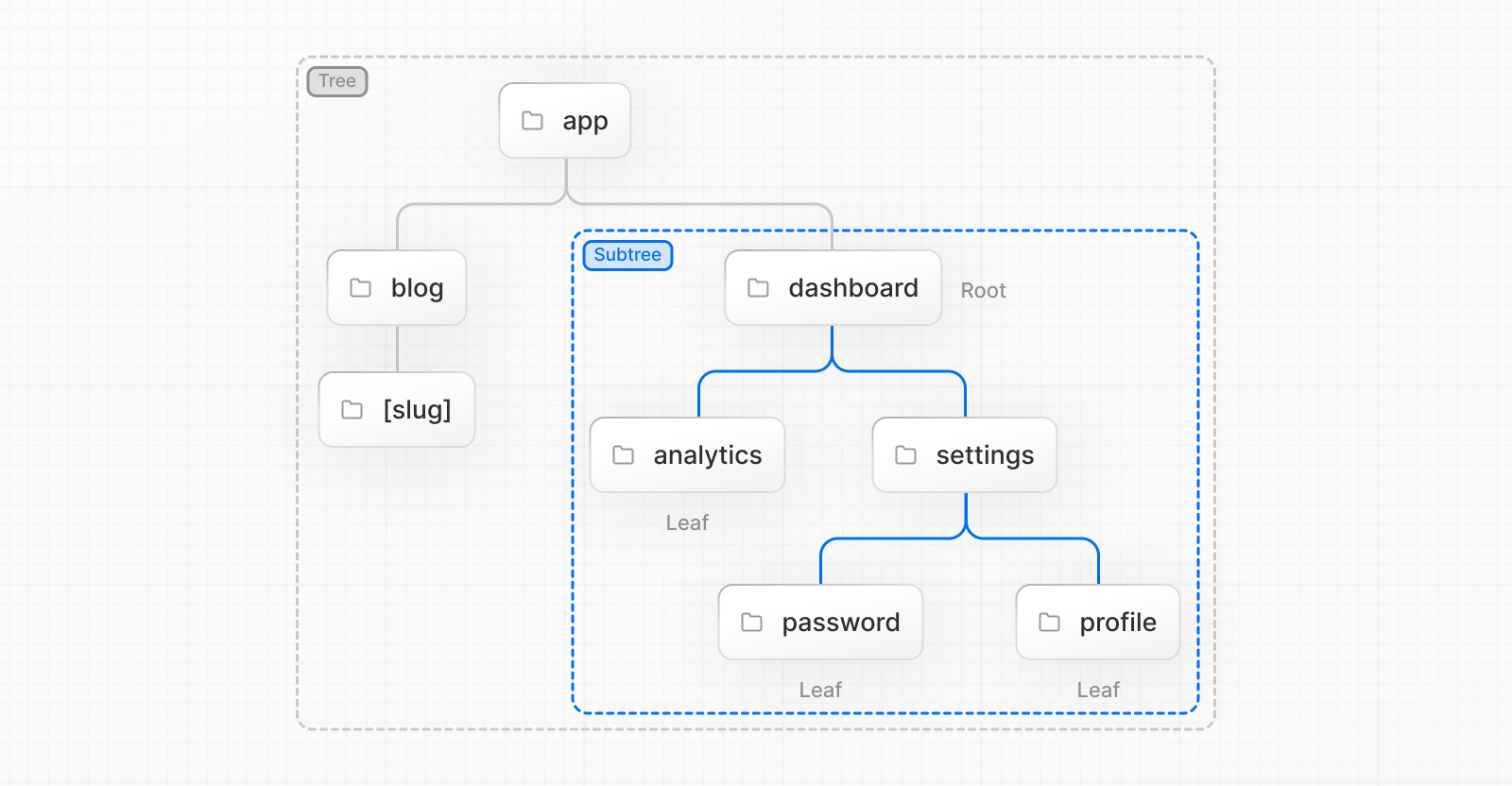
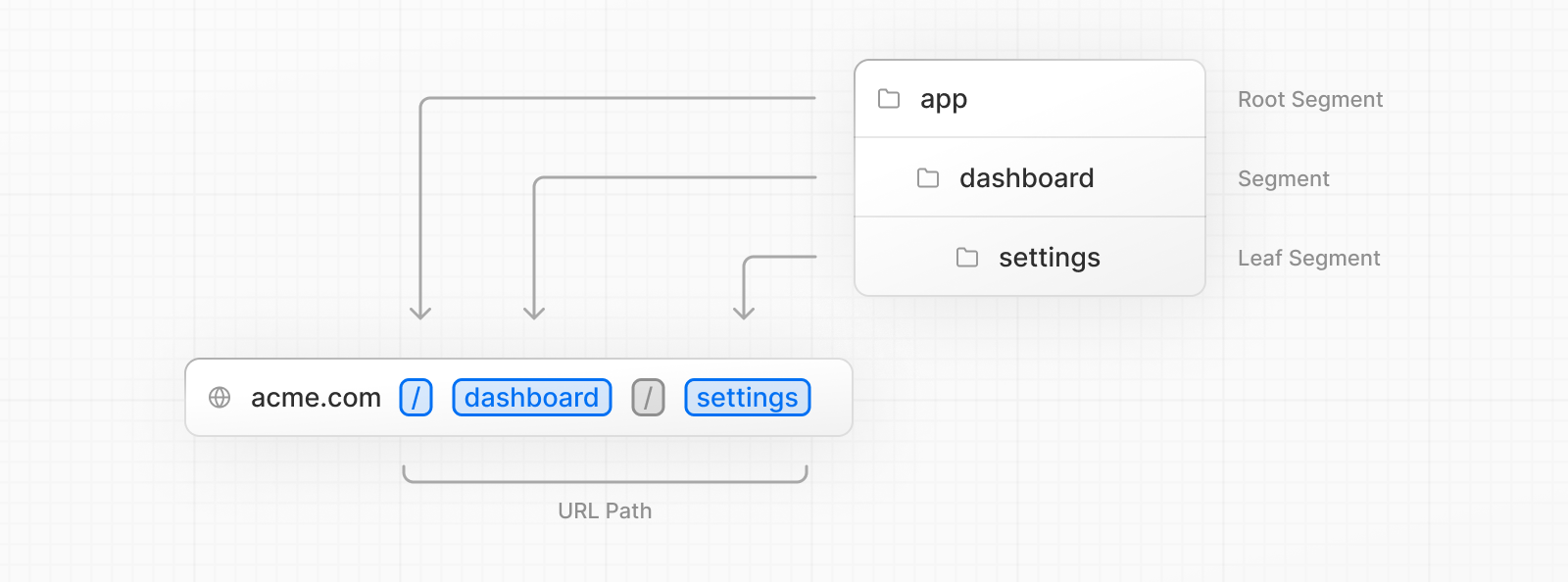
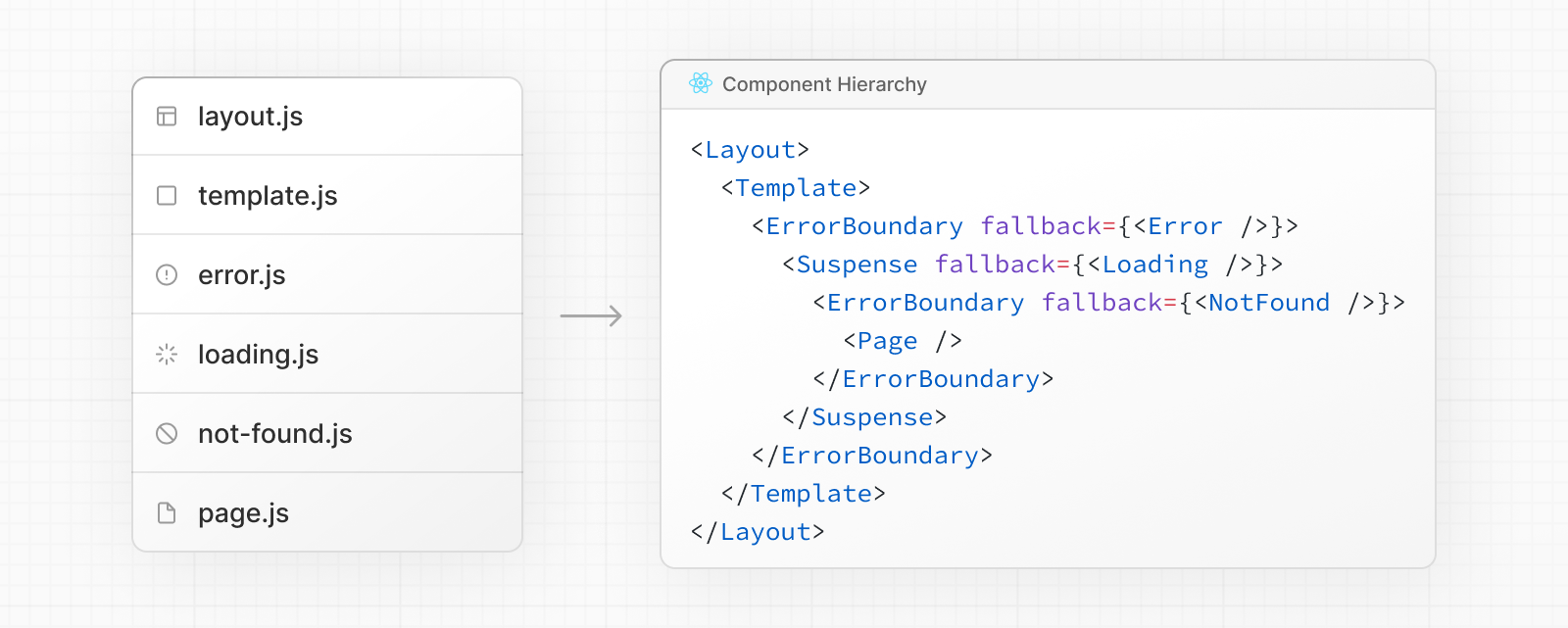
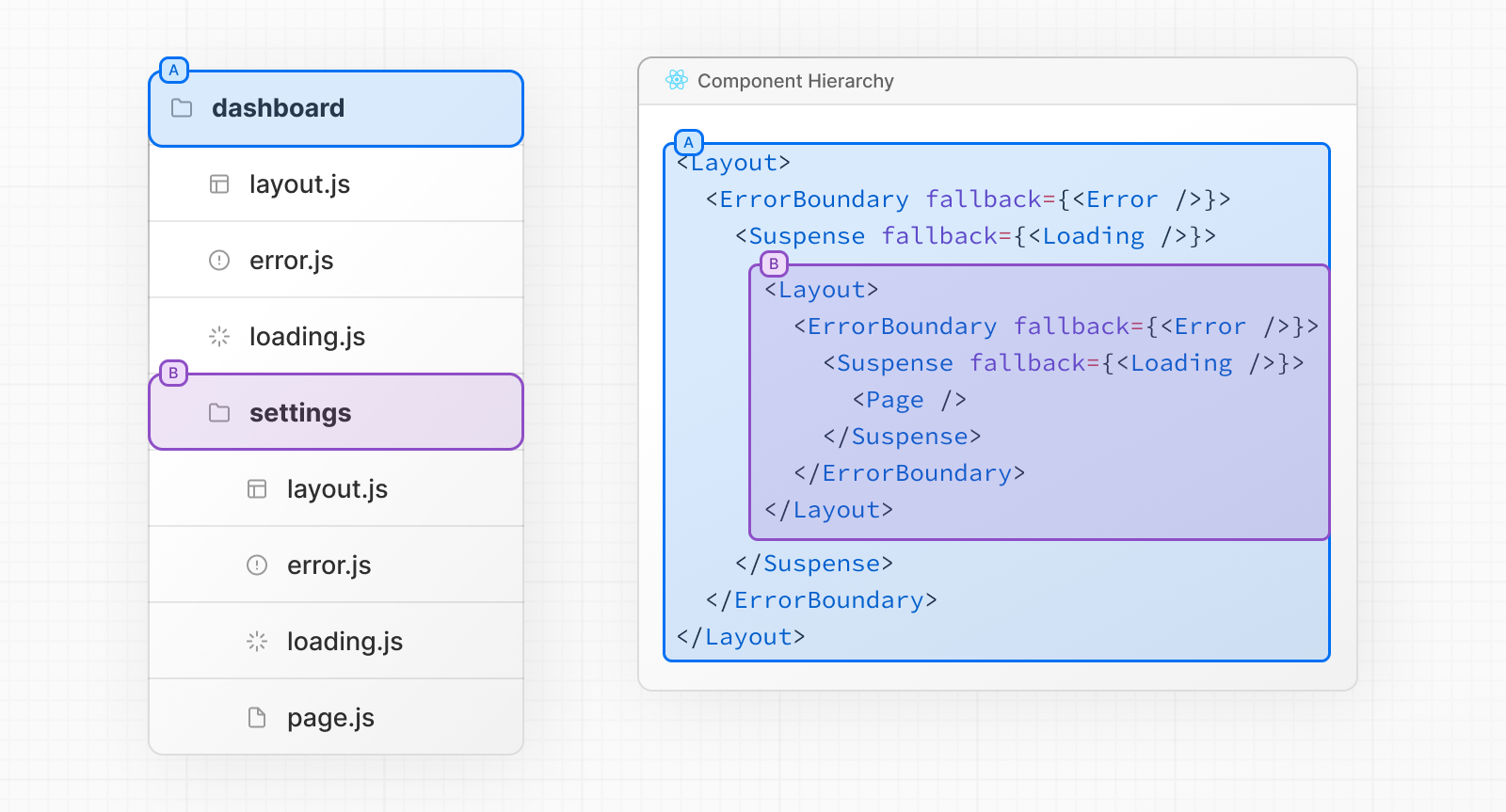
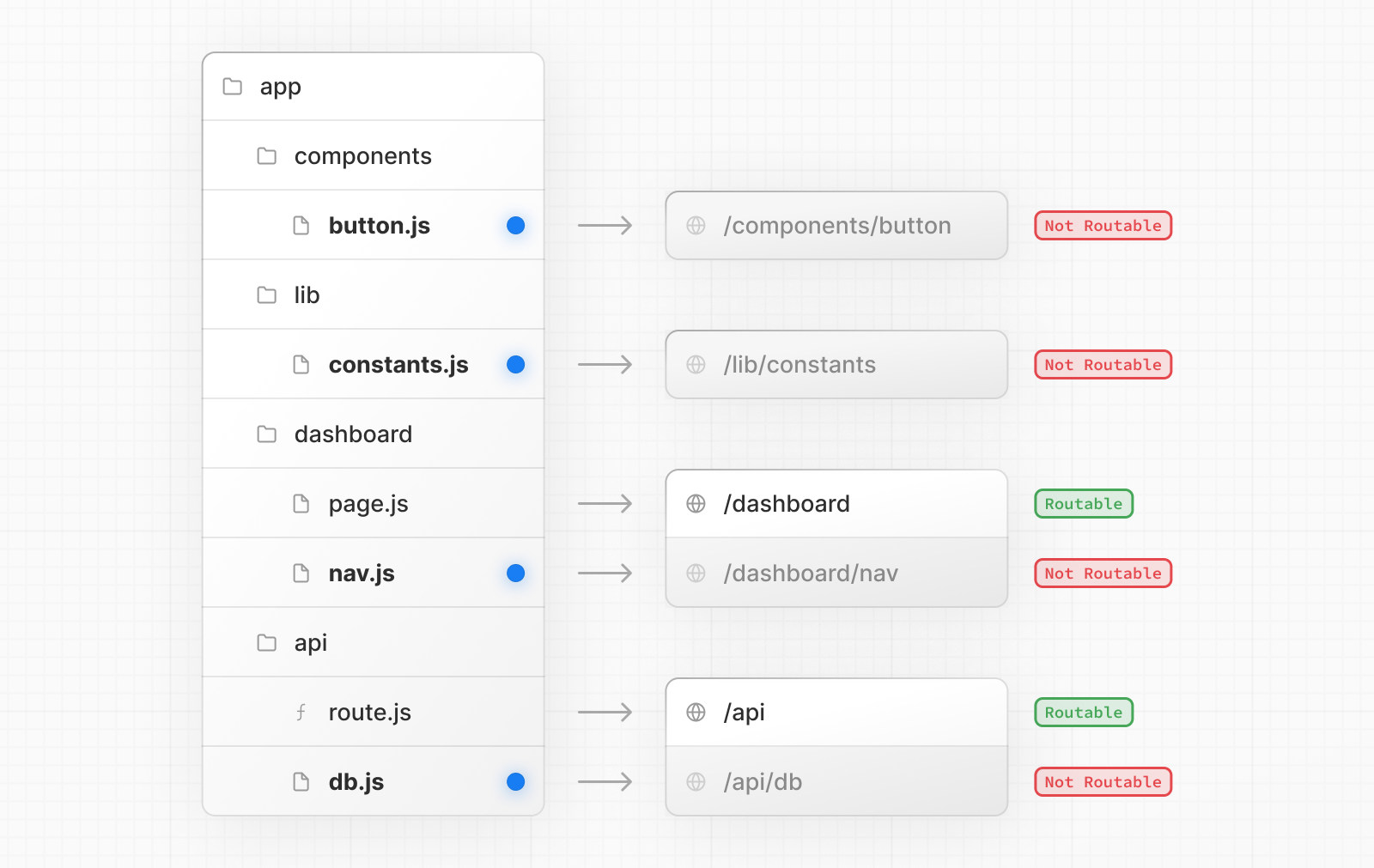
                        <![CDATA[<h1 id="routing-fundamentals" tabindex="-1"><a href="https://nextjs.org/docs/app/building-your-application/routing" target="_blank">Routing Fundamentals</a></h1><p>路由基础知识</p><blockquote><p>Fundamentals: 基础知识</p></blockquote><h2 id="terminology" tabindex="-1"><a href="https://nextjs.org/docs/app/building-your-application/routing#terminology" target="_blank">Terminology</a></h2><p>术语</p><p>First, you will see these terms being used throughout the documentation. Here’s a quick reference:</p><p>首先，你会在整个文档中看到这些术语。下面是一个快速参考：</p><blockquote><p>throughout: 从头到尾</p></blockquote><p><img src="https://nextjs.org/_next/image?url=%2Fdocs%2Flight%2Fterminology-component-tree.png&amp;w=3840&amp;q=75&amp;dpl=dpl_GWgyVSdHCrYdH5TfBYmmG7pRiHi8" alt="Terminology for Component Tree" /></p><ul><li><p><strong>Tree:</strong> A convention for visualizing a hierarchical structure. For example, a component tree with parent and children components, a folder structure, etc.</p><blockquote><p>树：可视化分层结构的公约。例如包含父组件和子组件的组件树、文件夹结构等。</p></blockquote></li><li><p><strong>Subtree:</strong> Part of a tree, starting at a new root (first) and ending at the leaves (last).</p></li><li><p><strong>Root</strong>: The first node in a tree or subtree, such as a root layout.</p></li><li><p><strong>Leaf:</strong> Nodes in a subtree that have no children, such as the last segment in a URL path.</p></li></ul><blockquote><p>convention: 公约</p><p>visualizing: 可视化的</p><p>hierarchical：分层的</p></blockquote><p><img src="https://nextjs.org/_next/image?url=%2Fdocs%2Flight%2Fterminology-url-anatomy.png&amp;w=3840&amp;q=75&amp;dpl=dpl_GWgyVSdHCrYdH5TfBYmmG7pRiHi8" alt="Terminology for URL Anatomy" /></p><ul><li><strong>URL Segment:</strong> Part of the URL path delimited by slashes.</li><li><strong>URL Path:</strong> Part of the URL that comes after the domain (composed of segments).</li></ul><blockquote><p>composed of: 由…组成</p></blockquote><h2 id="the-app-router" tabindex="-1"><a href="https://nextjs.org/docs/app/building-your-application/routing#the-app-router" target="_blank">The <code>app</code> Router</a></h2><p>In version 13, Next.js introduced a new <strong>App Router</strong> built on <a href="https://nextjs.org/docs/app/building-your-application/rendering/server-components" target="_blank">React Server Components</a>, which supports shared layouts, nested routing, loading states, error handling, and more.</p><p>在第 13 版中，Next.js 引入了基于 React Server Components 的全新 App Router，它支持共享布局、嵌套路由、加载状态、错误处理等功能。</p><p>The App Router works in a new directory named <code>app</code>. The <code>app</code> directory works alongside the <code>pages</code> directory to allow for incremental adoption.</p><p>App 路由器在一个名为 app 的新目录中工作。app 目录与 pages 目录一起工作，以支持渐进性采用。</p><blockquote><p>alongside: 与此同时</p></blockquote><p>This allows you to opt some routes of your application into the new behavior while keeping other routes in the <code>pages</code> directory for previous behavior. If your application uses the <code>pages</code> directory, please also see the <a href="https://nextjs.org/docs/pages/building-your-application/routing" target="_blank">Pages Router</a> documentation.</p><blockquote><p>这允许您将应用程序的某些路由选择性地采用新行为，同时保留 pages 目录中的其他路由以维持以前的行为。如果您的应用程序使用 pages 目录，请同时查看页面路由器文档。</p></blockquote><blockquote><p><strong>Good to know</strong>: The App Router takes priority over the Pages Router. Routes across directories should not resolve to the same URL path and will cause a build-time error to prevent a conflict.</p><p>需要注意的是：App 路由器优先于页面路由器。跨目录的路由不应该解析到相同的 URL 路径，否则会在构建时出现错误以防止冲突。</p></blockquote><p><img src="https://nextjs.org/_next/image?url=%2Fdocs%2Flight%2Fnext-router-directories.png&amp;w=3840&amp;q=75&amp;dpl=dpl_GWgyVSdHCrYdH5TfBYmmG7pRiHi8" alt="Next.js App Directory" /></p><p>By default, components inside <code>app</code> are <a href="https://nextjs.org/docs/app/building-your-application/rendering/server-components" target="_blank">React Server Components</a>. This is a performance optimization and allows you to easily adopt them, and you can also use <a href="https://nextjs.org/docs/app/building-your-application/rendering/client-components" target="_blank">Client Components</a>.</p><p>默认情况下，<code>app</code> 内的组件是 <a href="https://nextjs.org/docs/app/building-your-application/rendering/server-components" target="_blank">React Server Components</a>。这是一种性能优化，使您能够轻松采用它们，并且你也可以使用 <a href="https://nextjs.org/docs/app/building-your-application/rendering/client-components" target="_blank">Client Components</a>。</p><blockquote><p>adopt: 采用</p></blockquote><blockquote><p><strong>Recommendation:</strong> Check out the <a href="https://nextjs.org/docs/app/building-your-application/rendering/server-components" target="_blank">Server</a> page if you’re new to Server Components.</p><p>**建议：**如果您对服务器组件不熟悉，可以查看 <a href="https://nextjs.org/docs/app/building-your-application/rendering/server-components" target="_blank">Server</a> 页面。</p></blockquote><h2 id="roles-of-folders-and-files" tabindex="-1"><a href="https://nextjs.org/docs/app/building-your-application/routing#roles-of-folders-and-files" target="_blank">Roles of Folders and Files</a></h2><p>Next.js uses a file-system based router where:</p><ul><li><strong>Folders</strong> are used to define routes. A route is a single path of nested folders, following the file-system hierarchy from the <strong>root folder</strong> down to a final <strong>leaf folder</strong> that includes a <code>page.js</code> file. See <a href="https://nextjs.org/docs/app/building-your-application/routing/defining-routes" target="_blank">Defining Routes</a>.</li><li><strong>Files</strong> are used to create UI that is shown for a route segment. See <a href="https://nextjs.org/docs/app/building-your-application/routing#file-conventions" target="_blank">special files</a>.</li></ul><p>Next.js 使用基于文件系统的路由器，其中：</p><ul><li>文件夹用于定义路由。路由是嵌套文件夹的单一路径，按照文件系统的层次结构，从根文件夹向下延伸至包含 page.js 文件的最终叶文件夹。请参见 <a href="https://nextjs.org/docs/app/building-your-application/routing/defining-routes" target="_blank">定义路由</a>。</li><li><strong>文件</strong> 用于创建在路由段上显示的 UI。请参见 <a href="https://nextjs.org/docs/app/building-your-application/routing#file-conventions" target="_blank">特殊文件</a>。</li></ul><h2 id="route-segments" tabindex="-1"><a href="https://nextjs.org/docs/app/building-your-application/routing#route-segments" target="_blank">Route Segments</a></h2><p>Each folder in a route represents a <strong>route segment</strong>. Each route segment is mapped to a corresponding <strong>segment</strong> in a <strong>URL path</strong>.</p><p>路由中的每个文件夹代表一个路由段。每个路由段都映射到 URL 路径中的相应段。</p><blockquote><p>represents：代表</p><p>corresponding: 相应的</p></blockquote><p><img src="https://nextjs.org/_next/image?url=%2Fdocs%2Flight%2Froute-segments-to-path-segments.png&amp;w=3840&amp;q=75&amp;dpl=dpl_GWgyVSdHCrYdH5TfBYmmG7pRiHi8" alt="How Route Segments Map to URL Segments" /></p><h2 id="nested-routes" tabindex="-1"><a href="https://nextjs.org/docs/app/building-your-application/routing#nested-routes" target="_blank">Nested Routes</a></h2><p>To create a nested route, you can nest folders inside each other. For example, you can add a new <code>/dashboard/settings</code> route by nesting two new folders in the <code>app</code> directory.</p><p>要创建嵌套路由，你可以让文件夹互相嵌套，例如：你可以通过在<code>app</code>目录下嵌套两个文件夹添加一个新的 <code>/dashboard/settings</code> 路由</p><p>The <code>/dashboard/settings</code> route is composed of three segments:</p><ul><li><code>/</code> (Root segment)</li><li><code>dashboard</code> (Segment)</li><li><code>settings</code> (Leaf segment)</li></ul><p>该 <code>/dashboard/settings</code> 路由由三个段组成：。。。</p><h2 id="file-conventions" tabindex="-1"><a href="https://nextjs.org/docs/app/building-your-application/routing#file-conventions" target="_blank">File Conventions</a></h2><p>文件公约</p><p>Next.js provides a set of special files to create UI with specific behavior in nested routes:</p><p>Next.js 提供了一组特殊文件，用于在嵌套路由中创建具有特定行为的用户界面：</p><table><thead><tr><th></th><th></th></tr></thead><tbody><tr><td><a href="https://nextjs.org/docs/app/building-your-application/routing/pages-and-layouts#layouts" target="_blank"><code>layout</code></a></td><td>Shared UI for a segment and its children</td></tr><tr><td><a href="https://nextjs.org/docs/app/building-your-application/routing/pages-and-layouts#pages" target="_blank"><code>page</code></a></td><td>Unique UI of a route and make routes publicly accessible</td></tr><tr><td><a href="https://nextjs.org/docs/app/building-your-application/routing/loading-ui-and-streaming" target="_blank"><code>loading</code></a></td><td>Loading UI for a segment and its children</td></tr><tr><td><a href="https://nextjs.org/docs/app/api-reference/file-conventions/not-found" target="_blank"><code>not-found</code></a></td><td>Not found UI for a segment and its children</td></tr><tr><td><a href="https://nextjs.org/docs/app/building-your-application/routing/error-handling" target="_blank"><code>error</code></a></td><td>Error UI for a segment and its children</td></tr><tr><td><a href="https://nextjs.org/docs/app/building-your-application/routing/error-handling" target="_blank"><code>global-error</code></a></td><td>Global Error UI</td></tr><tr><td><a href="https://nextjs.org/docs/app/building-your-application/routing/route-handlers" target="_blank"><code>route</code></a></td><td>Server-side API endpoint</td></tr><tr><td><a href="https://nextjs.org/docs/app/building-your-application/routing/pages-and-layouts#templates" target="_blank"><code>template</code></a></td><td>Specialized re-rendered Layout UI</td></tr><tr><td><a href="https://nextjs.org/docs/app/api-reference/file-conventions/default" target="_blank"><code>default</code></a></td><td>Fallback UI for <a href="https://nextjs.org/docs/app/building-your-application/routing/parallel-routes" target="_blank">Parallel Routes</a></td></tr></tbody></table><blockquote><p><strong>Good to know</strong>: <code>.js</code>, <code>.jsx</code>, or <code>.tsx</code> file extensions can be used for special files.</p></blockquote><h2 id="component-hierarchy" tabindex="-1"><a href="https://nextjs.org/docs/app/building-your-application/routing#component-hierarchy" target="_blank">Component Hierarchy</a></h2><p>组件层次结构</p><p>The React components defined in special files of a route segment are rendered in a specific hierarchy:</p><p>在路由段的特殊文件中定义的 React 组件会以特定的层次结构呈现：</p><ul><li><code>layout.js</code></li><li><code>template.js</code></li><li><code>error.js</code> (React error boundary)</li><li><code>loading.js</code> (React suspense boundary)</li><li><code>not-found.js</code> (React error boundary)</li><li><code>page.js</code> or nested <code>layout.js</code></li></ul><p><img src="https://nextjs.org/_next/image?url=%2Fdocs%2Flight%2Ffile-conventions-component-hierarchy.png&amp;w=3840&amp;q=75&amp;dpl=dpl_GWgyVSdHCrYdH5TfBYmmG7pRiHi8" alt="Component Hierarchy for File Conventions" /></p><p>In a nested route, the components of a segment will be nested <strong>inside</strong> the components of its parent segment.</p><p>在嵌套路由中，段的组件将嵌套在父段的组件内。</p><p><img src="https://nextjs.org/_next/image?url=%2Fdocs%2Flight%2Fnested-file-conventions-component-hierarchy.png&amp;w=3840&amp;q=75&amp;dpl=dpl_GWgyVSdHCrYdH5TfBYmmG7pRiHi8" alt="Nested File Conventions Component Hierarchy" /></p><h2 id="colocation" tabindex="-1"><a href="https://nextjs.org/docs/app/building-your-application/routing#colocation" target="_blank">Colocation</a></h2><p>文件存放</p><p>In addition to special files, you have the option to colocate your own files (e.g. components, styles, tests, etc) inside folders in the <code>app</code> directory.</p><p>除特殊文件外，您还可以选择将自己的文件（如组件、样式、测试等）放在<code>app</code>目录下的文件夹中。</p><p>This is because while folders define routes, only the contents returned by <code>page.js</code> or <code>route.js</code> are publicly addressable.</p><p>这是因为虽然文件夹定义了路由，但只有 page.js 或 route.js 返回的内容才是可公开寻址的。</p><p><img src="https://nextjs.org/_next/image?url=%2Fdocs%2Flight%2Fproject-organization-colocation.png&amp;w=3840&amp;q=75&amp;dpl=dpl_GWgyVSdHCrYdH5TfBYmmG7pRiHi8" alt="An example folder structure with colocated files" /></p><p>Learn more about <a href="https://nextjs.org/docs/app/building-your-application/routing/colocation" target="_blank">Project Organization and Colocation</a>.</p><h2 id="advanced-routing-patterns" tabindex="-1"><a href="https://nextjs.org/docs/app/building-your-application/routing#advanced-routing-patterns" target="_blank">Advanced Routing Patterns</a></h2><p>高级路由模式</p><p>The App Router also provides a set of conventions to help you implement more advanced routing patterns. These include:</p><p>应用程序路由器还提供了一系列约定，帮助您实现更高级的路由模式。这些约定包括：</p><ul><li><p><a href="https://nextjs.org/docs/app/building-your-application/routing/parallel-routes" target="_blank">Parallel Routes</a>: Allow you to simultaneously show two or more pages in the same view that can be navigated independently. You can use them for split views that have their own sub-navigation. E.g. Dashboards.</p><p>并行路由：允许您在同一视图中同时显示两个或多个可独立导航的页面。您可以将其用于有自己子导航的分割视图。例如仪表盘。</p></li><li><p><a href="https://nextjs.org/docs/app/building-your-application/routing/intercepting-routes" target="_blank">Intercepting Routes</a>: Allow you to intercept a route and show it in the context of another route. You can use these when keeping the context for the current page is important. E.g. Seeing all tasks while editing one task or expanding a photo in a feed.</p><p>拦截路由：允许您截取一条路由，并在另一条路由的上下文中显示它。当保持当前页面的上下文非常重要时，就可以使用这些功能。例如，在编辑一项任务时查看所有任务，或在 feed 中展开一张照片。</p></li></ul><blockquote><p>simultaneously： 同时</p><p>independently： 独立的</p></blockquote><p>These patterns allow you to build richer and more complex UIs, democratizing features that were historically complex for small teams and individual developers to implement.</p><p>通过这些模式，您可以构建更丰富、更复杂的用户界面，并将以往由小型团队和个人开发人员实施的复杂功能平民化。</p><blockquote><p>richer：更丰富</p><p>democratizing： 民主化</p><p>historically： 历史上</p></blockquote>]]>
                </content>
            </entry>
            <entry>
                <title><![CDATA[构建你的应用程序]]></title>
                <link rel="alternate" type="text/html" href="https://zijiancode.cn/archives/building-your-nextjs-application" />
                <id>tag:https://zijiancode.cn,2023-10-16:building-your-nextjs-application</id>
                <published>2023-10-16T17:46:48+08:00</published>
                <updated>2023-10-16T17:46:48+08:00</updated>
                <author>
                    <name>阿紫</name>
                    <uri>https://zijiancode.cn</uri>
                </author>
                <content type="html">
                        <![CDATA[<h1 id="building-your-application" tabindex="-1"><a href="https://nextjs.org/docs/app/building-your-application" target="_blank">Building Your Application</a></h1><p>Next.js provides the building blocks to create flexible, full-stack web applications. The guides in <strong>Building Your Application</strong> explain how to use these features and how to customize your application’s behavior.</p><p>Next.js提供了构建灵活、全栈Web应用程序的基础模块。在“构建应用程序”部分的指南中，解释了如何使用这些功能以及如何自定义应用程序的行为。</p><blockquote><p>flexible：灵活的</p></blockquote><p>The sections and pages are organized sequentially, from basic to advanced, so you can follow them step-by-step when building your Next.js application. However, you can read them in any order or skip to the pages that apply to your use case.</p><p>这些章节和页面按照从基础到高级的组织顺序，因此您可以在构建Next.js应用程序时，按照步骤阅读它们。但是，您也可以以任何顺序阅读它们，或跳到适用于您使用情况的页面。</p><blockquote><p>organized:有组织的</p><p>sequentially:依次地</p><p>apply to your use case:适用于您的用例</p></blockquote><p>If you’re new to Next.js, we recommend starting with the <a href="https://nextjs.org/docs/app/building-your-application/routing" target="_blank">Routing</a>, <a href="https://nextjs.org/docs/app/building-your-application/rendering" target="_blank">Rendering</a>, <a href="https://nextjs.org/docs/app/building-your-application/data-fetching" target="_blank">Data Fetching</a> and <a href="https://nextjs.org/docs/app/building-your-application/styling" target="_blank">Styling</a> sections, as they introduce the fundamental Next.js and web concepts to help you get started. Then, you can dive deeper into the other sections such as <a href="https://nextjs.org/docs/app/building-your-application/optimizing" target="_blank">Optimizing</a> and <a href="https://nextjs.org/docs/app/building-your-application/configuring" target="_blank">Configuring</a>. Finally, once you’re ready, checkout the <a href="https://nextjs.org/docs/app/building-your-application/deploying" target="_blank">Deploying</a> and <a href="https://nextjs.org/docs/app/building-your-application/upgrading" target="_blank">Upgrading</a> sections.</p><p>如果你是Next.js的新手，我们建议从<a href="https://nextjs.org/docs/app/building-your-application/routing" target="_blank">Routing</a>、<a href="https://nextjs.org/docs/app/building-your-application/rendering" target="_blank">Rendering</a>、<a href="https://nextjs.org/docs/app/building-your-application/data-fetching" target="_blank">Data Fetching</a>和<a href="https://nextjs.org/docs/app/building-your-application/styling" target="_blank">Styling</a>部分开始学习，因为它们介绍了基本的Next.js和Web概念帮助你入门。然后，你可以深入研究其他部分，比如<a href="https://nextjs.org/docs/app/building-your-application/optimizing" target="_blank">Optimizing</a>和<a href="https://nextjs.org/docs/app/building-your-application/configuring" target="_blank">Configuring</a>。最后，当你准备好时，请查看<a href="https://nextjs.org/docs/app/building-your-application/deploying" target="_blank">Deploying</a>和<a href="https://nextjs.org/docs/app/building-your-application/upgrading" target="_blank">Upgrading</a>部分。</p><blockquote><p>fundamental:基本的</p><p>dive:潜水</p></blockquote>]]>
                </content>
            </entry>
            <entry>
                <title><![CDATA[Next.js项目结构]]></title>
                <link rel="alternate" type="text/html" href="https://zijiancode.cn/archives/nextjs-project-structure" />
                <id>tag:https://zijiancode.cn,2023-10-16:nextjs-project-structure</id>
                <published>2023-10-16T08:28:15+08:00</published>
                <updated>2023-10-16T16:26:50+08:00</updated>
                <author>
                    <name>阿紫</name>
                    <uri>https://zijiancode.cn</uri>
                </author>
                <content type="html">
                        <![CDATA[<h1 id="next.js-project-structure" tabindex="-1"><a href="https://nextjs.org/docs/getting-started/project-structure" target="_blank">Next.js Project Structure</a></h1><p>Next.js项目结构</p><p>This page provides an overview of the file and folder structure of a Next.js project. It covers top-level files and folders, configuration files, and routing conventions within the <code>app</code> and <code>pages</code> directories.</p><p>本页面概述了Next.js项目的文件和文件夹结构，它涵盖了顶层文件和文件夹、配置文件以及在<code>app</code>和<code>pages</code>目录中的路由规则。</p><blockquote><p>conventions: 公约</p></blockquote><h2 id="top-level-folders" tabindex="-1">Top-level folders</h2><p>顶层文件夹</p><table><thead><tr><th>名称</th><th>描述</th></tr></thead><tbody><tr><td>app</td><td>App Router</td></tr><tr><td>pages</td><td>Pages Router</td></tr><tr><td>public</td><td>Static assets to be served(待服务的静态资产)</td></tr><tr><td>src</td><td>Optional application source folder(可选的应用程序源文件夹)</td></tr></tbody></table><h2 id="top-level-files" tabindex="-1">Top-level files</h2><p>顶层文件</p><table><thead><tr><th>Next.js</th><th></th></tr></thead><tbody><tr><td><a href="https://nextjs.org/docs/app/api-reference/next-config-js" target="_blank">next.config.js</a></td><td>Configuration file for Next.js</td></tr><tr><td><a href="https://nextjs.org/docs/getting-started/installation#manual-installation" target="_blank">package.json</a></td><td>Project dependencies and scripts</td></tr><tr><td><a href="https://nextjs.org/docs/app/building-your-application/optimizing/instrumentation" target="_blank">instrumentation.ts</a></td><td>OpenTelemetry and Instrumentation file(OpenTelemetry和仪表文件,todo不知道啥意思)</td></tr><tr><td><a href="https://nextjs.org/docs/app/building-your-application/routing/middleware" target="_blank">middleware.ts</a></td><td>Next.js request middleware(Next.js请求中间件)</td></tr><tr><td><a href="https://nextjs.org/docs/app/building-your-application/configuring/environment-variables" target="_blank">.env</a></td><td>Environment variables</td></tr><tr><td><a href="https://nextjs.org/docs/app/building-your-application/configuring/environment-variables" target="_blank">.env.local</a></td><td>Local environment variables</td></tr><tr><td><a href="https://nextjs.org/docs/app/building-your-application/configuring/environment-variables" target="_blank">.env.production</a></td><td>Production environment variables</td></tr><tr><td><a href="https://nextjs.org/docs/app/building-your-application/configuring/environment-variables" target="_blank">.env.development</a></td><td>Development environment variables</td></tr><tr><td><a href="https://nextjs.org/docs/app/building-your-application/configuring/eslint" target="_blank">.eslintrc.json</a></td><td>Configuration file for ESLint</td></tr><tr><td>.gitignore</td><td>Git files and folders to ignore</td></tr><tr><td>next-env.d.ts</td><td>TypeScript declaration file for Next.js(Next.js的TypeScript声明文件)</td></tr><tr><td>tsconfig.json</td><td>Configuration file for TypeScript</td></tr><tr><td>jsconfig.json</td><td>Configuration file for JavaScript</td></tr></tbody></table><blockquote><p>middleware： 中间件</p><p>declaration：声明</p></blockquote><h2 id="app-routing-conventions" tabindex="-1"><a href="https://nextjs.org/docs/getting-started/project-structure#app-routing-conventions" target="_blank"><code>app</code> Routing Conventions</a></h2><p>app路由规则</p><h3 id="routing-files" tabindex="-1"><a href="https://nextjs.org/docs/getting-started/project-structure#routing-files" target="_blank">Routing Files</a></h3><p>路由文件</p><table><thead><tr><th></th><th></th><th></th></tr></thead><tbody><tr><td><a href="https://nextjs.org/docs/app/api-reference/file-conventions/layout" target="_blank">layout</a></td><td>.js .jsx .tsx</td><td>Layout</td></tr><tr><td><a href="https://nextjs.org/docs/app/api-reference/file-conventions/page" target="_blank">page</a></td><td>.js .jsx .tsx</td><td>Page</td></tr><tr><td><a href="https://nextjs.org/docs/app/api-reference/file-conventions/loading" target="_blank">loading</a></td><td>.js .jsx .tsx</td><td>Loading UI</td></tr><tr><td><a href="https://nextjs.org/docs/app/api-reference/file-conventions/not-found" target="_blank">not-found</a></td><td>.js .jsx .tsx</td><td>Not found UI</td></tr><tr><td><a href="https://nextjs.org/docs/app/api-reference/file-conventions/error" target="_blank">error</a></td><td>.js .jsx .tsx</td><td>Error UI</td></tr><tr><td><a href="https://nextjs.org/docs/app/api-reference/file-conventions/error#global-errorjs" target="_blank">global-error</a></td><td>.js .jsx .tsx</td><td>Global error UI</td></tr><tr><td><a href="https://nextjs.org/docs/app/api-reference/file-conventions/route" target="_blank">route</a></td><td>.js .ts</td><td>API endpoint</td></tr><tr><td><a href="https://nextjs.org/docs/app/api-reference/file-conventions/template" target="_blank">template</a></td><td>.js .jsx .tsx</td><td>Re-rendered layout(重新渲染的布局)</td></tr><tr><td><a href="https://nextjs.org/docs/app/api-reference/file-conventions/default" target="_blank">default</a></td><td>.js .jsx .tsx</td><td>Parallel route fallback page</td></tr></tbody></table><h3 id="nested-routes" tabindex="-1"><a href="https://nextjs.org/docs/getting-started/project-structure#nested-routes" target="_blank">Nested Routes</a></h3><p>嵌套路由</p><table><thead><tr><th></th><th></th></tr></thead><tbody><tr><td><a href="https://nextjs.org/docs/app/building-your-application/routing#route-segments" target="_blank">folder</a></td><td>Route segment（路由段）</td></tr><tr><td><a href="https://nextjs.org/docs/app/building-your-application/routing#nested-routes" target="_blank">folder/folder</a></td><td>Nested route segment（嵌套路由段）</td></tr></tbody></table><h3 id="dynamic-routes" tabindex="-1"><a href="https://nextjs.org/docs/getting-started/project-structure#dynamic-routes" target="_blank">Dynamic Routes</a></h3><p>动态路由</p><table><thead><tr><th></th><th></th></tr></thead><tbody><tr><td><a href="https://nextjs.org/docs/app/building-your-application/routing/dynamic-routes#convention" target="_blank"><code>[folder]</code></a></td><td>Dynamic route segment</td></tr><tr><td><a href="https://nextjs.org/docs/app/building-your-application/routing/dynamic-routes#catch-all-segments" target="_blank"><code>[...folder]</code></a></td><td>Catch-all route segment</td></tr><tr><td><a href="https://nextjs.org/docs/app/building-your-application/routing/dynamic-routes#optional-catch-all-segments" target="_blank">[[…folder]]</a></td><td>Optional catch-all route segment</td></tr></tbody></table><p>动态路由即是匹配路径作为参数，[folder]匹配单个路径：</p><table><thead><tr><th>Route</th><th>Example URL</th><th><code>params</code></th></tr></thead><tbody><tr><td><code>app/blog/[slug]/page.js</code></td><td><code>/blog/a</code></td><td><code>{ slug: 'a' }</code></td></tr><tr><td><code>app/blog/[slug]/page.js</code></td><td><code>/blog/b</code></td><td><code>{ slug: 'b' }</code></td></tr><tr><td><code>app/blog/[slug]/page.js</code></td><td><code>/blog/c</code></td><td><code>{ slug: 'c' }</code></td></tr></tbody></table><p>[…folder]匹配多个路径：</p><table><thead><tr><th>Route</th><th>Example URL</th><th><code>params</code></th></tr></thead><tbody><tr><td><code>app/shop/[...slug]/page.js</code></td><td><code>/shop/a</code></td><td><code>{ slug: ['a'] }</code></td></tr><tr><td><code>app/shop/[...slug]/page.js</code></td><td><code>/shop/a/b</code></td><td><code>{ slug: ['a', 'b'] }</code></td></tr><tr><td><code>app/shop/[...slug]/page.js</code></td><td><code>/shop/a/b/c</code></td><td><code>{ slug: ['a', 'b', 'c'] }</code></td></tr></tbody></table><p>[[…folder]]匹配零或多个路径：</p><table><thead><tr><th>Route</th><th>Example URL</th><th><code>params</code></th></tr></thead><tbody><tr><td><code>app/shop/[[...slug]]/page.js</code></td><td><code>/shop</code></td><td><code>{}</code></td></tr><tr><td><code>app/shop/[[...slug]]/page.js</code></td><td><code>/shop/a</code></td><td><code>{ slug: ['a'] }</code></td></tr><tr><td><code>app/shop/[[...slug]]/page.js</code></td><td><code>/shop/a/b</code></td><td><code>{ slug: ['a', 'b'] }</code></td></tr><tr><td><code>app/shop/[[...slug]]/page.js</code></td><td><code>/shop/a/b/c</code></td><td><code>{ slug: ['a', 'b', 'c'] }</code></td></tr></tbody></table><h3 id="route-groups-and-private-folders" tabindex="-1"><a href="https://nextjs.org/docs/getting-started/project-structure#route-groups-and-private-folders" target="_blank">Route Groups and Private Folders</a></h3><p>路由组和私有文件夹</p><table><thead><tr><th></th><th></th></tr></thead><tbody><tr><td><a href="https://nextjs.org/docs/app/building-your-application/routing/route-groups#convention" target="_blank"><code>(folder)</code></a></td><td>Group routes without affecting routing(在不影响路由选择的情况下分组路由)</td></tr><tr><td><a href="https://nextjs.org/docs/app/building-your-application/routing/colocation#private-folders" target="_blank"><code>_folder</code></a></td><td>Opt folder and all child segments out of routing(选择将文件夹和所有子文件排除在路由选择之外)</td></tr></tbody></table><p>路由组主要解决多个路由的不同布局问题。app路由只有个根布局，默认路由的布局都是使用它。这会带来一个问题：多个路由的布局不同时如何解决？路由组可以让不同组的布局分开，A组使用A组的布局，B组使用B组的布局。</p><p>私有文件主要解决让一些app目录下的文件不被路由，由于app路由存在文件夹就是路由路径的方式，反过来就是说所有文件夹都是路由路径，如果需要指定某些文件夹不加入路由，就可以在文件夹前加入<code>_</code>前缀，表示这个文件夹是私有的，不参与路由。</p><h3 id="parallel-and-intercepted-routes" tabindex="-1"><a href="https://nextjs.org/docs/getting-started/project-structure#parallel-and-intercepted-routes" target="_blank">Parallel and Intercepted Routes</a></h3><p>并行路由和拦截路由</p><table><thead><tr><th></th><th></th></tr></thead><tbody><tr><td><a href="https://nextjs.org/docs/app/building-your-application/routing/parallel-routes#convention" target="_blank"><code>@folder</code></a></td><td>Named slot</td></tr><tr><td><a href="https://nextjs.org/docs/app/building-your-application/routing/intercepting-routes#convention" target="_blank"><code>(.)folder</code></a></td><td>Intercept same level</td></tr><tr><td><a href="https://nextjs.org/docs/app/building-your-application/routing/intercepting-routes#convention" target="_blank"><code>(..)folder</code></a></td><td>Intercept one level above</td></tr><tr><td><a href="https://nextjs.org/docs/app/building-your-application/routing/intercepting-routes#convention" target="_blank"><code>(..)(..)folder</code></a></td><td>Intercept two levels above</td></tr><tr><td><a href="https://nextjs.org/docs/app/building-your-application/routing/intercepting-routes#convention" target="_blank"><code>(...)folder</code></a></td><td>Intercept from root</td></tr></tbody></table><p>并行路由可以在同一个页面下展示多种布局，比如做聚合页时，如何系统本身就有多个页面，那么只要使用并行路由将它们发一起即可。</p><p>拦截路由可以使一个页面在另一个页面上层展示，而不必跳转。比如在图片列表打开图片详情，图片详情直接悬浮在图片列表上。当然，图片详情页面也可以通过路由的方式和原来一样在新的页面打开。相当于一个页面的不同用法。</p><h3 id="metadata-file-conventions" tabindex="-1"><a href="https://nextjs.org/docs/getting-started/project-structure#metadata-file-conventions" target="_blank">Metadata File Conventions</a></h3><p>元数据文件规则</p><h4 id="app-icons" tabindex="-1"><a href="https://nextjs.org/docs/getting-started/project-structure#app-icons" target="_blank">App Icons</a></h4><p>App图标</p><table><thead><tr><th></th><th></th><th></th></tr></thead><tbody><tr><td><a href="https://nextjs.org/docs/app/api-reference/file-conventions/metadata/app-icons#favicon" target="_blank"><code>favicon</code></a></td><td><code>.ico</code></td><td>Favicon file</td></tr><tr><td><a href="https://nextjs.org/docs/app/api-reference/file-conventions/metadata/app-icons#icon" target="_blank"><code>icon</code></a></td><td><code>.ico</code> <code>.jpg</code> <code>.jpeg</code> <code>.png</code> <code>.svg</code></td><td>App Icon file</td></tr><tr><td><a href="https://nextjs.org/docs/app/api-reference/file-conventions/metadata/app-icons#generate-icons-using-code-js-ts-tsx" target="_blank"><code>icon</code></a></td><td><code>.js</code> <code>.ts</code> <code>.tsx</code></td><td>Generated App Icon</td></tr><tr><td><a href="https://nextjs.org/docs/app/api-reference/file-conventions/metadata/app-icons#apple-icon" target="_blank"><code>apple-icon</code></a></td><td><code>.jpg</code> <code>.jpeg</code>, <code>.png</code></td><td>Apple App Icon file</td></tr><tr><td><a href="https://nextjs.org/docs/app/api-reference/file-conventions/metadata/app-icons#generate-icons-using-code-js-ts-tsx" target="_blank"><code>apple-icon</code></a></td><td><code>.js</code> <code>.ts</code> <code>.tsx</code></td><td>Generated Apple App Icon</td></tr></tbody></table><h4 id="open-graph-and-twitter-images" tabindex="-1"><a href="https://nextjs.org/docs/getting-started/project-structure#open-graph-and-twitter-images" target="_blank">Open Graph and Twitter Images</a></h4><p>Open Graph and Twitter 图片，用于社交媒体使用，分享网站时可以带上此类图片。</p><table><thead><tr><th></th><th></th><th></th></tr></thead><tbody><tr><td><a href="https://nextjs.org/docs/app/api-reference/file-conventions/metadata/opengraph-image#opengraph-image" target="_blank"><code>opengraph-image</code></a></td><td><code>.jpg</code> <code>.jpeg</code> <code>.png</code> <code>.gif</code></td><td>Open Graph image file</td></tr><tr><td><a href="https://nextjs.org/docs/app/api-reference/file-conventions/metadata/opengraph-image#generate-images-using-code-js-ts-tsx" target="_blank"><code>opengraph-image</code></a></td><td><code>.js</code> <code>.ts</code> <code>.tsx</code></td><td>Generated Open Graph image</td></tr><tr><td><a href="https://nextjs.org/docs/app/api-reference/file-conventions/metadata/opengraph-image#twitter-image" target="_blank"><code>twitter-image</code></a></td><td><code>.jpg</code> <code>.jpeg</code> <code>.png</code> <code>.gif</code></td><td>Twitter image file</td></tr><tr><td><a href="https://nextjs.org/docs/app/api-reference/file-conventions/metadata/opengraph-image#generate-images-using-code-js-ts-tsx" target="_blank"><code>twitter-image</code></a></td><td><code>.js</code> <code>.ts</code> <code>.tsx</code></td><td>Generated Twitter image</td></tr></tbody></table><h4 id="seo" tabindex="-1"><a href="https://nextjs.org/docs/getting-started/project-structure#seo" target="_blank">SEO</a></h4><table><thead><tr><th></th><th></th><th></th></tr></thead><tbody><tr><td><a href="https://nextjs.org/docs/app/api-reference/file-conventions/metadata/sitemap#static-sitemapxml" target="_blank"><code>sitemap</code></a></td><td><code>.xml</code></td><td>Sitemap file</td></tr><tr><td><a href="https://nextjs.org/docs/app/api-reference/file-conventions/metadata/sitemap#generate-a-sitemap" target="_blank"><code>sitemap</code></a></td><td><code>.js</code> <code>.ts</code></td><td>Generated Sitemap</td></tr><tr><td><a href="https://nextjs.org/docs/app/api-reference/file-conventions/metadata/robots#static-robotstxt" target="_blank"><code>robots</code></a></td><td><code>.txt</code></td><td>Robots file</td></tr><tr><td><a href="https://nextjs.org/docs/app/api-reference/file-conventions/metadata/robots#generate-a-robots-file" target="_blank"><code>robots</code></a></td><td><code>.js</code> <code>.ts</code></td><td>Generated Robots file</td></tr></tbody></table><h2 id="pages-routing-conventions" tabindex="-1"><a href="https://nextjs.org/docs/getting-started/project-structure#pages-routing-conventions" target="_blank"><code>pages</code> Routing Conventions</a></h2><p>Pages路由规则</p><h3 id="special-files" tabindex="-1"><a href="https://nextjs.org/docs/getting-started/project-structure#special-files" target="_blank">Special Files</a></h3><table><thead><tr><th></th><th></th><th></th></tr></thead><tbody><tr><td><a href="https://nextjs.org/docs/pages/building-your-application/routing/custom-app" target="_blank"><code>_app</code></a></td><td><code>.js</code> <code>.jsx</code> <code>.tsx</code></td><td>Custom App</td></tr><tr><td><a href="https://nextjs.org/docs/pages/building-your-application/routing/custom-document" target="_blank"><code>_document</code></a></td><td><code>.js</code> <code>.jsx</code> <code>.tsx</code></td><td>Custom Document</td></tr><tr><td><a href="https://nextjs.org/docs/pages/building-your-application/routing/custom-error#more-advanced-error-page-customizing" target="_blank"><code>_error</code></a></td><td><code>.js</code> <code>.jsx</code> <code>.tsx</code></td><td>Custom Error Page</td></tr><tr><td><a href="https://nextjs.org/docs/pages/building-your-application/routing/custom-error#404-page" target="_blank"><code>404</code></a></td><td><code>.js</code> <code>.jsx</code> <code>.tsx</code></td><td>404 Error Page</td></tr><tr><td><a href="https://nextjs.org/docs/pages/building-your-application/routing/custom-error#500-page" target="_blank"><code>500</code></a></td><td><code>.js</code> <code>.jsx</code> <code>.tsx</code></td><td>500 Error Page</td></tr></tbody></table><h3 id="routes" tabindex="-1"><a href="https://nextjs.org/docs/getting-started/project-structure#routes" target="_blank">Routes</a></h3><table><thead><tr><th></th><th></th><th></th></tr></thead><tbody><tr><td><strong>Folder convention</strong></td><td></td><td></td></tr><tr><td><a href="https://nextjs.org/docs/pages/building-your-application/routing/pages-and-layouts#index-routes" target="_blank"><code>index</code></a></td><td><code>.js</code> <code>.jsx</code> <code>.tsx</code></td><td>Home page</td></tr><tr><td><a href="https://nextjs.org/docs/pages/building-your-application/routing/pages-and-layouts#index-routes" target="_blank"><code>folder/index</code></a></td><td><code>.js</code> <code>.jsx</code> <code>.tsx</code></td><td>Nested page</td></tr><tr><td><strong>File convention</strong></td><td></td><td></td></tr><tr><td><a href="https://nextjs.org/docs/pages/building-your-application/routing/pages-and-layouts#index-routes" target="_blank"><code>index</code></a></td><td><code>.js</code> <code>.jsx</code> <code>.tsx</code></td><td>Home page</td></tr><tr><td><a href="https://nextjs.org/docs/pages/building-your-application/routing/pages-and-layouts" target="_blank"><code>file</code></a></td><td><code>.js</code> <code>.jsx</code> <code>.tsx</code></td><td>Nested page</td></tr></tbody></table><h3 id="dynamic-routes-1" tabindex="-1"><a href="https://nextjs.org/docs/getting-started/project-structure#dynamic-routes-1" target="_blank">Dynamic Routes</a></h3><table><thead><tr><th></th><th></th><th></th></tr></thead><tbody><tr><td><strong>Folder convention</strong></td><td></td><td></td></tr><tr><td><a href="https://nextjs.org/docs/pages/building-your-application/routing/dynamic-routes" target="_blank"><code>[folder]/index</code></a></td><td><code>.js</code> <code>.jsx</code> <code>.tsx</code></td><td>Dynamic route segment</td></tr><tr><td><a href="https://nextjs.org/docs/pages/building-your-application/routing/dynamic-routes#catch-all-segments" target="_blank"><code>[...folder]/index</code></a></td><td><code>.js</code> <code>.jsx</code> <code>.tsx</code></td><td>Catch-all route segment</td></tr><tr><td><a href="https://nextjs.org/docs/pages/building-your-application/routing/dynamic-routes#optional-catch-all-segments" target="_blank">[[…folder]]/index</a></td><td><code>.js</code> <code>.jsx</code> <code>.tsx</code></td><td>Optional catch-all route segment</td></tr><tr><td><strong>File convention</strong></td><td></td><td></td></tr><tr><td><a href="https://nextjs.org/docs/pages/building-your-application/routing/dynamic-routes" target="_blank"><code>[file]</code></a></td><td><code>.js</code> <code>.jsx</code> <code>.tsx</code></td><td>Dynamic route segment</td></tr><tr><td><a href="https://nextjs.org/docs/pages/building-your-application/routing/dynamic-routes#catch-all-segments" target="_blank"><code>[...file]</code></a></td><td><code>.js</code> <code>.jsx</code> <code>.tsx</code></td><td>Catch-all route segment</td></tr><tr><td><a href="https://nextjs.org/docs/pages/building-your-application/routing/dynamic-routes#optional-catch-all-segments" target="_blank">[[…file]]</a></td><td><code>.js</code> <code>.jsx</code> <code>.tsx</code></td><td>Optional catch-all route segment</td></tr></tbody></table>]]>
                </content>
            </entry>
            <entry>
                <title><![CDATA[安装]]></title>
                <link rel="alternate" type="text/html" href="https://zijiancode.cn/archives/installation" />
                <id>tag:https://zijiancode.cn,2023-10-13:installation</id>
                <published>2023-10-13T18:03:36+08:00</published>
                <updated>2023-10-15T16:47:59+08:00</updated>
                <author>
                    <name>阿紫</name>
                    <uri>https://zijiancode.cn</uri>
                </author>
                <content type="html">
                        <![CDATA[<h1 id="installation" tabindex="-1">Installation</h1><p>安装</p><p>System Requirements:</p><ul><li><a href="https://nodejs.org/" target="_blank">Node.js 16.14</a> or later.</li><li>macOS, Windows (including WSL), and Linux are supported.</li></ul><p>系统要求：</p><ul><li>Node.js 16.14以上</li><li>支持macOs, Windows(包含WSL(linux版的windows子系统))以及Linux</li></ul><h2 id="automatic-installation" tabindex="-1"><a href="https://nextjs.org/docs/getting-started/installation#automatic-installation" target="_blank">Automatic Installation</a></h2><p>自动安装</p><p>We recommend starting a new Next.js app using <a href="https://nextjs.org/docs/app/api-reference/create-next-app" target="_blank"><code>create-next-app</code></a>, which sets up everything automatically for you. To create a project, run:</p><p>我们建议使用<a href="https://nextjs.org/docs/app/api-reference/create-next-app" target="_blank"><code>create-next-app</code></a>启动一个新的 Next.js 应用程序，它会自动为你设置好一切。要创建项目，请运行：</p><pre><code class="language-shell">npx create-next-app@latest</code></pre><p>On installation, you’ll see the following prompts:</p><p>在安装中，你会看到以下提示：</p><pre><code class="language-">What is your project named? my-appWould you like to use TypeScript? No / YesWould you like to use ESLint? No / YesWould you like to use Tailwind CSS? No / YesWould you like to use &#96;src/&#96; directory? No / YesWould you like to use App Router? (recommended) No / YesWould you like to customize the default import alias (@/*)? No / YesWhat import alias would you like configured? @/*</code></pre><p>After the prompts, <code>create-next-app</code> will create a folder with your project name and install the required dependencies.</p><p>在提示之后， <code>create-next-app</code> 会创建一个以你项目名称命名的文件夹并且安装需要的依赖。</p><p>Good to know:</p><ul><li>Next.js now ships with <code>TypeScript</code>, <code>ESLint</code>, and <code>Tailwind CSS</code> configuration by default.</li><li>You can optionally use a <code>src</code> directory in the root of your project to separate your application’s code from configuration files.</li></ul><p>值得一提的是：</p><ul><li>Next.js现在默认安装TypeScript、ESLint和Tailwind CSS配置。</li><li>你可以选择在项目根目录中使用src目录来将应用程序的代码与配置文件分开。</li></ul><blockquote><p>ships: 船只，默认携带或默认集成, 类比到产品交付的过程，表示这些功能在 Next.js 中已经预先包含，用户可以直接使用。</p><p>optionally: 可选择</p><p>separate: 分离</p></blockquote><h2 id="manual-installation" tabindex="-1"><a href="https://nextjs.org/docs/getting-started/installation#manual-installation" target="_blank">Manual Installation</a></h2><p>手动安装</p><p>To manually create a new Next.js app, install the required packages:</p><p>要手动创建一个新的Next.js应用程序，请安装所需的软件包：</p><pre><code class="language-shell">npm install next@latest react@latest react-dom@latest</code></pre><p>Open your <code>package.json</code> file and add the following scripts:</p><p>打开你的<code>package.json</code>文件并添加以下脚本：</p><pre><code class="language-json">{  &quot;scripts&quot;: {    &quot;dev&quot;: &quot;next dev&quot;,    &quot;build&quot;: &quot;next build&quot;,    &quot;start&quot;: &quot;next start&quot;,    &quot;lint&quot;: &quot;next lint&quot;  }}</code></pre><p>These scripts refer to the different stages of developing an application:</p><p>这些脚本涉及开发应用程序的不同阶段：</p><ul><li>dev: runs next dev to start Next.js in development mode.</li><li>build: runs next build to build the application for production usage.</li><li>start: runs next start to start a Next.js production server.</li><li>lint: runs next lint to set up Next.js’ built-in ESLint configuration.</li></ul><h3 id="creating-directories" tabindex="-1"><a href="https://nextjs.org/docs/getting-started/installation#creating-directories" target="_blank">Creating directories</a></h3><p>创建目录</p><p>Next.js uses file-system routing, which means the routes in your application are determined by how you structure your files.</p><p>Next.js使用文件系统路由，这意味着应用程序中的路由是由您如何组织文件来确定的。</p><h4 id="the-app-directory" tabindex="-1"><a href="https://nextjs.org/docs/getting-started/installation#the-app-directory" target="_blank">The app directory</a></h4><p>For new applications, we recommend using the App Router. This router allows you to use React’s latest features and is an evolution of the Pages Router based on community feedback.</p><p>对于新应用程序，我们建议使用App Router。这个路由器允许您使用React的最新功能，是基于社区反馈演变而来的Pages Router的升级版。</p><blockquote><p>evolution: 进化, 演变</p></blockquote><p>Create an app/ folder, then add a layout.tsx and page.tsx file. These will be rendered when the user visits the root of your application (/).</p><p>创建一个app/文件夹，然后添加<code>layout.tsx</code>和<code>page.tsx</code>文件。当用户访问你的应用程序的根目录(/)时，这些文件将被呈现出来。</p><p><img src="https://nextjs.org/_next/image?url=%2Fdocs%2Flight%2Fapp-getting-started.png&amp;w=3840&amp;q=75&amp;dpl=dpl_HX9pZoJVQmgYX6j9Wr9Z8WSSFRXm" alt="" /></p><p>Create a <a href="https://nextjs.org/docs/app/building-your-application/routing/pages-and-layouts#root-layout-required" target="_blank">root layout</a> inside <code>app/layout.tsx</code> with the required <code>&lt;html&gt;</code> and <code>&lt;body&gt;</code> tags:</p><p>在<code>app/layout.tsx</code>中创建一个<a href="https://nextjs.org/docs/app/building-your-application/routing/pages-and-layouts#root-layout-required" target="_blank">根布局</a>，其中包含所需的<code>&lt;html&gt;</code>和<code>&lt;body&gt;</code>标签：</p><pre><code class="language-typescript">export default function RootLayout({  children,}: {  children: React.ReactNode}) {  return (    &lt;html lang=&quot;en&quot;&gt;      &lt;body&gt;{children}&lt;/body&gt;    &lt;/html&gt;  )}</code></pre><p>Finally, create a home page <code>app/page.tsx</code> with some initial content:</p><p>最后，创建一个带有一些初始内容的主页<code>app/page.tsx</code>:</p><pre><code class="language-typescript">export default function Page() {  return &lt;h1&gt;Hello, Next.js!&lt;/h1&gt;}</code></pre><p>Good to know: If you forget to create layout.tsx, Next.js will automatically create this file when running the development server with next dev.</p><p>值得一提的是：如果你忘记了创建<code>layout.tsx</code>文件，Next.js会在使用<code>next dev</code>运行开发服务时自动的创建它。</p><p>Learn more about <a href="https://nextjs.org/docs/app/building-your-application/routing/defining-routes" target="_blank">using the App Router</a>.</p><p>了解有关使用应用程序路由器的更多信息。</p><h4 id="the-pages-directory-(optional)" tabindex="-1">The pages directory (optional)</h4><p>If you prefer to use the Pages Router instead of the App Router, you can create a <code>pages/</code> directory at the root of your project.</p><p>如果你喜欢使用 Pages Router 而非 App Router，你可以在项目的根目录下创建一个 pages/ 目录</p><p>Then, add an <code>index.tsx</code> file inside your <code>pages</code> folder. This will be your home page (<code>/</code>):</p><p>然后，在你的 pages 文件夹中添加一个 index.tsx 文件。这将成为你的主页 (/)</p><p>pages/index.tsx</p><pre><code class="language-typescript">export default function Page() {  return &lt;h1&gt;Hello, Next.js!&lt;/h1&gt;}</code></pre><p>Next, add an <code>_app.tsx</code> file inside <code>pages/</code> to define the global layout. Learn more about the <a href="https://nextjs.org/docs/pages/building-your-application/routing/custom-app" target="_blank">custom App file</a>.</p><p>接下来，接下来，在 <code>pages/</code> 目录下添加一个 <code>_app.tsx</code> 文件来定义全局布局。了解更多关于<a href="https://nextjs.org/docs/pages/building-your-application/routing/custom-app" target="_blank">custom App file</a>.</p><p>pages/_app.tsx</p><pre><code class="language-typescript">import type { AppProps } from &#39;next/app&#39; export default function App({ Component, pageProps }: AppProps) {  return &lt;Component {...pageProps} /&gt;}</code></pre><p>Finally, add a <code>_document.tsx</code> file inside <code>pages/</code> to control the initial response from the server. Learn more about the <a href="https://nextjs.org/docs/pages/building-your-application/routing/custom-document" target="_blank">custom Document file</a>.</p><p>最后，在 <code>pages/</code> 目录下添加 <code>_document.tsx</code> 文件，以控制服务器的初始响应。了解更多有关<a href="https://nextjs.org/docs/pages/building-your-application/routing/custom-document" target="_blank">自定义文档文件</a>的信息。</p><p>pages/_document.tsx</p><pre><code class="language-typescript">import { Html, Head, Main, NextScript } from &#39;next/document&#39; export default function Document() {  return (    &lt;Html&gt;      &lt;Head /&gt;      &lt;body&gt;        &lt;Main /&gt;        &lt;NextScript /&gt;      &lt;/body&gt;    &lt;/Html&gt;  )}</code></pre><p>Learn more about <a href="https://nextjs.org/docs/pages/building-your-application/routing/pages-and-layouts" target="_blank">using the Pages Router</a>.</p><p>Good to know: Although you can use both routers in the same project, routes in app will be prioritized over pages. We recommend using only one router in your new project to avoid confusion.</p><p>需要注意：虽然你能在同一个项目中使用两种路由器，但是app路由器优先级会高于page路由器，我们建议在你的新项目中仅使用一个路由器，以避免混淆。</p><blockquote><p>confusion：混乱</p></blockquote><h4 id="the-public-folder-(optional)" tabindex="-1">The public folder (optional)</h4><p>Create a public folder to store static assets such as images, fonts, etc. Files inside public directory can then be referenced by your code starting from the base URL (/).</p><p>创建一个公共文件夹来存储静态资源，如图片、字体等。在公共文件夹中的文件可以在代码中通过从基本URL (/) 开始进行引用。</p><blockquote><p>assets: 资产</p></blockquote><h2 id="run-the-development-server" tabindex="-1">Run the Development Server</h2><p>运行开发服务</p><ol><li><p>Run <code>npm run dev</code> to start the development server.</p></li><li><p>Visit <a href="http://localhost:3000" target="_blank">http://localhost:3000</a> to view your application.</p></li><li><p>Edit <code>app/layout.tsx</code> (or <code>pages/index.tsx</code>) file and save it to see the updated result in your browser.</p></li><li><p>运行 <code>npm run dev</code> 来启动开发服务器。</p></li><li><p>访问 <a href="http://localhost:3000" target="_blank">http://localhost:3000</a> 来查看你的应用程序。</p></li><li><p>编辑 <code>app/layout.tsx</code>（或 <code>pages/index.tsx</code>）文件并保存, 在浏览器中查看更新的结果</p></li></ol>]]>
                </content>
            </entry>
            <entry>
                <title><![CDATA[介绍]]></title>
                <link rel="alternate" type="text/html" href="https://zijiancode.cn/archives/jie-shao" />
                <id>tag:https://zijiancode.cn,2023-10-09:jie-shao</id>
                <published>2023-10-09T18:09:01+08:00</published>
                <updated>2023-10-12T16:52:38+08:00</updated>
                <author>
                    <name>阿紫</name>
                    <uri>https://zijiancode.cn</uri>
                </author>
                <content type="html">
                        <![CDATA[<h1 id="introduction" tabindex="-1">Introduction</h1><p>Welcome to the Next.js documentation!</p><p>欢迎访问 Next.js 文档！</p><h2 id="what-is-next.js%3F" tabindex="-1"><a href="https://nextjs.org/docs#what-is-nextjs" target="_blank">What is Next.js?</a></h2><p>什么是Next.js</p><p>Next.js is a React framework for building full-stack web applications. You use React Components to build user interfaces, and Next.js for additional features and optimizations.</p><p>Next.js 是一个构建全栈的web应用框架. 你可以使用 React 组件来构建用户界面，并使用 Next.js 来提供额外的功能和优化。</p><blockquote><p>interfaces: 界面</p><p>optimizations： 优化</p></blockquote><p>Under the hood, Next.js / also / abstracts and automatically configures / tooling needed for React, like bundling, compiling, and more. This allows you to focus on building your application / instead of / spending time with configuration.</p><p>在底层，Next.js还抽象并自动配置了React所需的工具，如捆绑、编译等。这使您可以专注于构建应用程序，而不是花时间进行配置。</p><blockquote><p>Under the hood: 在底层</p></blockquote><p>Whether you’re an individual developer or part of a larger team, Next.js can help you build interactive, dynamic, and fast React applications.</p><p>无论你是个体开发者还是大团队中的一员， Next.js都能帮助你构建交互式、动态和快速的React应用.</p><blockquote><p>interactive: 交互的</p></blockquote><h2 id="main-features" tabindex="-1"><a href="https://nextjs.org/docs#main-features" target="_blank">Main Features</a></h2><p>主要特性</p><p>Some of the main Next.js features include:</p><p>Next.js的一些主要特性包括：</p><table><thead><tr><th>Feature</th><th>Description</th></tr></thead><tbody><tr><td><a href="https://nextjs.org/docs/app/building-your-application/routing" target="_blank">Routing</a></td><td>A file-system based router / built on top of Server Components / that supports layouts, nested routing, loading states, error handling, and more</td></tr><tr><td>路由</td><td>一个基于服务器组件的文件系统路由器，支持布局、嵌套路由、加载状态、错误处理等功能。</td></tr><tr><td><a href="https://nextjs.org/docs/app/building-your-application/rendering" target="_blank">Rendering</a></td><td>Client-side and Server-side Rendering with Client and Server Components. Further optimized with Static and Dynamic Rendering / on the server with Next.js. Streaming on Edge and Node.js runtimes.</td></tr><tr><td>渲染</td><td>使用客户端和服务器组件进行客户端和服务器端渲染。利用 Next.js 进一步优化服务器上的静态和动态渲染。在 Edge 和 Node.js 运行时进行流式处理。</td></tr><tr><td><a href="https://nextjs.org/docs/app/building-your-application/data-fetching" target="_blank">Data Fetching</a></td><td>Simplified data fetching with async/await in Server Components, and an extended <code>fetch</code> API for request memoization, data caching and revalidation.</td></tr><tr><td>数据拉取</td><td>通过在Server Components中使用async/await简化了数据获取，并提供了一个扩展的fetch API，用于请求的记忆化、数据缓存和重新验证。</td></tr><tr><td><a href="https://nextjs.org/docs/app/building-your-application/styling" target="_blank">Styling</a></td><td>Support for your preferred styling methods, including CSS Modules, Tailwind CSS, and CSS-in-JS</td></tr><tr><td>样式</td><td>支持您偏爱的样式方法，包括CSS模块，Tailwind CSS和CSS-in-JS。</td></tr><tr><td><a href="https://nextjs.org/docs/app/building-your-application/optimizing" target="_blank">Optimizations</a></td><td>Image, Fonts, and Script Optimizations to improve your application’s Core Web Vitals and User Experience.</td></tr><tr><td>优化</td><td>图像、字体和脚本优化，以改善应用程序的核心网络性能指标和用户体验。</td></tr><tr><td><a href="https://nextjs.org/docs/app/building-your-application/configuring/typescript" target="_blank">TypeScript</a></td><td>Improved support for TypeScript, with better type checking and more efficient compilation, as well as custom TypeScript Plugin and type checker.</td></tr><tr><td>TypeScript</td><td>改进了对 TypeScript 的支持，提供更好的类型检查和更高效的编译，同时还提供了自定义TypeScript插件和类型检查器。</td></tr></tbody></table><blockquote><p>A file-system based router: 一个基于文件系统的路由器, file-system based为形容词，基于文件系统的</p><p>request memoization：请求记忆化</p><p>revalidation： 重新验证</p><p>request memoization, data caching，为什么这里要用request memoization，而不是request caching，有什么区别吗？</p><p>&quot;request memoization&quot;和&quot;request caching&quot;之间有一些区别：</p><ul><li><p>Request Caching（请求缓存）是指在发送请求后，将请求和响应的结果缓存起来，以便在后续的请求中直接使用缓存的结果，而无需再次发送请求到服务器。这样可以减少对服务器的请求，提高性能和效率。</p></li><li><p>Request Memoization（请求记忆化）是一种更加智能的缓存方式，它不仅仅缓存了请求的结果，还会缓存请求时的参数和上下文信息。当相同的请求再次被发送时，会首先检查缓存中是否存在相同参数的请求，并且仍处于有效期内。如果存在缓存，就直接返回缓存的结果，而无需再次发送请求。与简单的请求缓存相比，请求记忆化更加精细化，可以根据请求的参数进行缓存的判断。</p></li></ul><p>因此，在这里使用&quot;request memoization&quot;表示使用了更加智能和精细化的缓存方式，不仅缓存了请求的结果，还会根据请求参数进行缓存的判断，提高了数据获取的效率和性能。</p><p>preferred：更喜欢的，优先的</p><p>efficient：高效的</p><p>as well as: 不仅…而且… He can play the guitar as well as the piano. (他既会弹吉他也会弹钢琴。)</p></blockquote><h2 id="app-router-vs-pages-router" tabindex="-1"><a href="https://nextjs.org/docs#app-router-vs-pages-router" target="_blank">App Router vs Pages Router</a></h2><p>Next.js has two different routers: the App Router and the Pages Router. The App Router is a newer router that allows you to use React’s latest features, such as Server Components and Streaming. The Pages Router is the original Next.js router, which allowed you to build server-rendered React applications and continues to be supported for older Next.js applications.</p><p>Next.js有两种不同的路由器：app路由器和pages路由器。app路由器是新的路由器，这允许你使用React的最新特性，比如Server Components和Streaming。</p><p>Pages路由器是原始的Next.js路由器，他允许你构建服务端渲染的React应用并且继续支持较旧的Next.js应用。</p><blockquote><p>original: 最初的</p></blockquote><h2 id="pre-requisite-knowledge" tabindex="-1">Pre-Requisite Knowledge</h2><p>必备知识</p><p>Although our docs are designed to be beginner-friendly, we need to establish a baseline so that the docs can stay focused on Next.js functionality. We’ll make sure to provide links to relevant documentation whenever we introduce a new concept.</p><p>虽然我们的文档旨在使初学者易于理解，但我们需要建立一个基准，以便文档可以专注于Next.js的功能。每当我们介绍新概念时，我们将确保提供相关文档的链接。</p><p>To get the most out of our docs, it’s recommended that you have a basic understanding of HTML, CSS, and React. If you need to brush up on your React skills, check out our <a href="https://nextjs.org/learn/foundations/about-nextjs" target="_blank">Next.js Foundations Course</a>, which will introduce you to the fundamentals.</p><p>为了充分利用我们的文档，建议您具备基本的 HTML、CSS 和 React 知识。如果您需要复习 React 技能，请查看我们的 Next.js Foundations Course，该课程将为您介绍基本原理。</p><blockquote><p>Although: 虽然、尽管</p><p>establish：建立</p><p>functionality：功能</p><p>relevant：有关</p><p>whenever：每当</p><p>concept：概念</p><p>get the most out of：充分利用</p><p>recommended：推荐</p><p>brush up：复习</p><p>fundamentals：基本原理</p></blockquote>]]>
                </content>
            </entry>
            <entry>
                <title><![CDATA[我是如何设计函数引擎的]]></title>
                <link rel="alternate" type="text/html" href="https://zijiancode.cn/archives/how-design-func-engine" />
                <id>tag:https://zijiancode.cn,2023-10-08:how-design-func-engine</id>
                <published>2023-10-08T18:01:14+08:00</published>
                <updated>2023-10-08T18:01:14+08:00</updated>
                <author>
                    <name>阿紫</name>
                    <uri>https://zijiancode.cn</uri>
                </author>
                <content type="html">
                        <![CDATA[<h2 id="%E5%89%8D%E8%A8%80" tabindex="-1">前言</h2><p>项目里存在一个这样的系统，它的主要功能类似于适配器，将一个系统的异构数据进行转化，处理成标准的数据流，交给另一个平台系统。</p><p>当然，也可以反过来理解，有一个平台级系统，需要从多种数据源（系统）中采集数据，每种数据源的数据结构都不相同，需要有个中间人进行转化。这个系统就承担了这样的角色。</p><p><img src="https://notes.zijiancode.cn/2023/10/08/image1.png" alt="" /></p><p>这样的架构虽然降低了平台系统的复杂度，使每个适配器只专注于某一个数据源的对接。但由于平台系统从数据源获取数据是通过HTTP请求的方式完成的，一般来说可能涉及十几到几十个接口的对接。所以适配器的内部转化逻辑的代码编写也存在较大的工作量。</p><p>而每个适配器的转化逻辑大致是相同的，主要有几个方面：</p><ul><li>字段名称转化：如将数据源的name字段转化为平台的username</li><li>枚举转化：男转化为M, 女转化为F</li><li>数据层级转化：平台的数据结构为user.username, 数据源的数据结构为user.base.username, username字段所在的层级不同</li><li>数据结构转化：平台的数据结构为对象，数据源的数据结构为数组</li></ul><blockquote><p>当然还有很多等等等等，不再列举</p></blockquote><h2 id="%E6%80%9D%E8%B7%AF" tabindex="-1">思路</h2><p>为了解决以上的问题，我的想法是借鉴类Excel的方式，由于平台的数据结构是确定的，那么我只要编写一定的函数，将数据源的数据结构配置起来，系统通过解析配置的方式进行数据转化，比如</p><pre><code class="language-properties">name=#usernamesex=if(eq(#gender,&#39;男&#39;)，&#39;M&#39;, &#39;F&#39;)user.username=#user.base.username</code></pre><blockquote><p>#代表取值 .表示层级 如{ user: { name: “张三”}}<a href="http://xn--user-9n6fp2j.name" target="_blank">写作user.name</a></p><p>if(true of false, 真时的返回值，假时的返回值)</p><p>eq(value1, value2), 判断value1和value2是否相等，返回boolean值</p><p>if(eq(#sex,‘男’)，‘M’, ‘F’)： 当#gender为男时返回M,否则返回F</p></blockquote><p>于是我遇到了我面临的第一个问题，也是本篇文章的主要内容：应该如何解析这串表达式<code>if(eq(#gender,'男')，'M', 'F')</code></p><h2 id="%E8%AE%BE%E8%AE%A1" tabindex="-1">设计</h2><p><code>if(eq(#gender,'男')，'M', 'F')</code>这样的表达式有很多框架都能解析，如Spel、JEP。</p><p>我虽然不知道他们怎么实现的，但我也有自己的想法。</p><p>让我们逐一来分析这个表达式的特性</p><p>1、表达式由多个函数<code>嵌套</code>组成</p><p>2、函数的格式为<code>函数名(参数，参数，…)</code></p><p>3、不同的函数<code>参数个数不同</code></p><p>4、不同的函数<code>逻辑不同</code></p><p>得出：</p><p>1、多个函数&amp;&amp;逻辑不同：使用策略模式，每个函数一个类，使用策略的方式调度每一个函数</p><p>2、嵌套：凡嵌套，必递归</p><p>3、函数格式固定：通过模板方法统一解析</p><p>4、参数个数不同：使用集合保存所有参数</p><p>134点还比较简单，递归一般是难点，这里单独讲一下：</p><p>递归递归，有递有归，何时递何时归？</p><p>拿这个表达式分析<code>if(eq(#gender,'男')，'M', 'F')</code>：</p><p>1、凡是遇到了函数(if, eq)，就需要递</p><p>2、其他的如<code>#</code>|<code>'男'</code>就归</p><p>整个表达式的执行流程为：</p><p>1、先遇到<code>if</code>，取出里面的3个参数</p><p>2、发现第一个参数是个函数<code>eq</code>, 执行<code>eq</code>逻辑</p><p>3、<code>eq</code>中无嵌套函数，返回执行结果</p><p>4、继续判断<code>if</code>的参数，第二三参数非函数，执行<code>if</code>逻辑</p><p>整体UML图：</p><p><img src="https://notes.zijiancode.cn/2023/10/08/func-design.drawio.png" alt="func-design" /></p><blockquote><p>FuncHandler: 函数处理器，抽象类，公共的handler方法，实现解析参数，递归过程等通用流程;抽象的doHandler方法，交由子类实现函数的特定逻辑;funcName方法，获取函数名称，如<code>if</code></p><p>IfFuncHandler | EqFuncHandler: 子类，实现特定的函数逻辑</p><p>FuncEngine: 函数引擎，调度各类函数</p></blockquote><h2 id="%E4%BB%A3%E7%A0%81" tabindex="-1">代码</h2><p>这里要先解决个小问题，如何得到函数中的所有参数？</p><p>假设函数是<code>eq(#gender, '男')</code>, 那只要</p><pre><code class="language-java">String func = &quot;eq(#gender,&#39;男&#39;)&quot;;// 得到#gender,&#39;男&#39;func = func.subString(&quot;eq&quot;.length() + 1, func.lastIndexOf(&#39;)&#39;));// 分割String[] params = func.split(&#39;,&#39;);</code></pre><p>但如果是<code>if(eq(#gender,'男')，'M', 'F')</code>，就会发现最后分割出来的参数列表是错误的。</p><p>这里的关键点在于<code>不能分割嵌套函数的逗号</code>,也就是<code>eq(#gender, '男')</code>中的逗号</p><p>一道简单的算法题：如何判断字符串中的括号是否成对，比如<code>((()))</code>和<code>(()())</code>是成对的，<code>(()))</code>不是成对的</p><pre><code class="language-java">String str = &quot;((()))&quot;;int count = 0;for(char c, str.toCharArray()){  if(c == &#39;(&#39;){    count ++;  }else {    count --  }}// count等于0即成对</code></pre><p>所以我们判断函数中的某个逗号是否能分割，关键在于判断该逗号是否在嵌套函数内，也就是括号是否成对(<code>count==0</code>), 如果<code>count!=0</code>,说明此括号在函数内，不能分割。代码如下</p><pre><code class="language-java">protected List&lt;String&gt; extractParameters(String func, String funcName) {    // 去除两边的括号，得到函数内的字符串    String content = func.substring(funcName.length() + 1, func.lastIndexOf(&#39;)&#39;));    // 保存参数的集合    List&lt;String&gt; parameters = new ArrayList&lt;&gt;();    // 参数起始下标，括号计数    int parameterStartIndex = 0, parenthesisCount = 0;    for (int i = 0; i &lt; content.length(); i++) {        char ch = content.charAt(i);        if (ch == &#39;(&#39;) {            parenthesisCount++;        } else if (ch == &#39;)&#39;) {            parenthesisCount--;        } else if (ch == &#39;,&#39; &amp;&amp; parenthesisCount == 0) {            // 当遇到逗号，且括号成对，说明逗号不在嵌套函数内，记录该参数            parameters.add(content.substring(parameterStartIndex, i));            // 修改起始值            parameterStartIndex = i + 1;        }    }    // 保存最后一个的参数    parameters.add(content.substring(parameterStartIndex));    return parameters;}</code></pre><p>这个小问题解决后，我们看一下<code>FuncHandler</code>的整体代码</p><p><code>FuncHandler</code>代码实现如下：</p><pre><code class="language-java">public abstract class FuncHandler {    @Autowired    protected FuncEngine funcEngine;    public Object handle(String func, JSONObject data) {        // 获取函数中的参数        final List&lt;String&gt; parameters = extractParameters(getFuncLen(), func);        List&lt;Object&gt; evaluateResult = new ArrayList&lt;&gt;(parameters.size());        for (String parameter : parameters) {            // 继续递归执行每个参数(参数可能是个函数) 重要！！            Object val = funcEngine.evaluateFunc(parameter, data);            // 保存结果            evaluateResult.add(val);        }        // 调用子类函数        return doHandle(evaluateResult);    }    /**     * 提取参数集合     *     * @param openParenthesisIndex 左括号下标，函数名的长度就是左括号的下标位置     * @param func           当前函数     * @return 参数集合     */    protected List&lt;String&gt; extractParameters(int openParenthesisIndex, String func) {        int closingParenthesisIndex = findClosingParenthesis(func, openParenthesisIndex);        // 去除两边的括号，得到函数内的字符串        String content = func.substring(openParenthesisIndex + 1, closingParenthesisIndex);        // 保存参数的集合        List&lt;String&gt; parameters = new ArrayList&lt;&gt;();        // 参数起始下标, 括号计数        int parameterStartIndex = 0, parenthesisCount = 0;        for (int i = 0; i &lt; content.length(); i++) {            char ch = content.charAt(i);            if (ch == &#39;(&#39;) {                parenthesisCount++;            } else if (ch == &#39;)&#39;) {                parenthesisCount--;            } else if (ch == &#39;,&#39; &amp;&amp; parenthesisCount == 0) {                // 当遇到逗号，切括号成对，说明逗号不在嵌套函数内，记录该参数                parameters.add(content.substring(parameterStartIndex, i));                // 修改起始值                parameterStartIndex = i + 1;            }        }        // 保存最后一个的参数        parameters.add(content.substring(parameterStartIndex));        return parameters;    }      /**     * 每一个函数处理结果方式不同交由子类实现     *     * @param params 表达式解析结果集合     * @return 处理结果     */    protected abstract Object doHandle(List&lt;Object&gt; params);    /**     * 获取函数名称长度     *     * @return 名称长度     */    protected int getFuncLen() {        return funcName().length();    }    /**     * 获取函数名称     * @return 函数名称     */    public abstract String funcName();}</code></pre><p>子类实现就比较简单了，只要实现<code>doHandler</code>方法，专注于自己的逻辑即可</p><p>IfFuncHandler:</p><pre><code class="language-java">@Componentpublic class IfFuncHandler extends ObjectFuncHandler {    @Override    protected Object doHandle(List&lt;Object&gt; params) {        Boolean booleanValue = (Boolean) params.get(0);        if (Boolean.TRUE.equals(booleanValue)) {            return params.get(1);        }        return params.get(2);    }    /**     * IF(boolean,five,other)     */    @Override    public String funcName() {        return &quot;IF&quot;;    }}</code></pre><p>EqFuncHandler</p><pre><code class="language-java">@Componentpublic class EqFuncHandler extends ObjectFuncHandler {    @Override    protected Object doHandle(List&lt;Object&gt; params) {        return ObjectUtil.equal(params.get(0).toString(), params.get(1).toString());    }    /**     * EQ(#age,10)     */    @Override    public String funcName() {        return &quot;EQ&quot;;    }}</code></pre><h2 id="%E8%B0%83%E5%BA%A6" tabindex="-1">调度</h2><p>接下来是<code>FuncEngine</code>的实现。</p><p>想要通过<code>FuncEngine</code>调度所有函数，首先我们需要先将每个函数进行注册，这个可以通过Spring的依赖注入功能实现</p><pre><code class="language-java">@Resourceprivate List&lt;FuncHandler&gt; handlers;</code></pre><blockquote><p>像这样写，Spring即会将FuncHandler的所有子类注入到List中</p></blockquote><p>其次我们还要注册一份函数表，用于通过函数名找到对应的函数bean</p><pre><code class="language-java">private static final Map&lt;String, FuncHandler&gt; HANDLER_MAP = new HashMap&lt;&gt;();</code></pre><p>这个可以利用Spring的初始化功能，实现<code>InitializingBean</code>接口或者使用<code>@PostConstruct</code>注解</p><pre><code class="language-java">@Overridepublic void afterPropertiesSet() {    for (FuncHandler handler : handlers) {        HANDLER_MAP.put(handler.funcName().toLowerCase(Locale.ROOT), handler);    }}</code></pre><p>最后就是调度</p><pre><code class="language-java">public Object evaluateFunc(String func, JSONObject data) {    final FuncHandler funcHandler = HANDLER_MAP.get(findMethod(func));    if (funcHandler != null) {        return funcHandler.handle(func, data);    }    if(func.startsWith(&quot;#&quot;)){        // 截取掉#        return data.get(func.substring(1));    }    if(func.startsWith(&quot;&#39;&quot;) &amp;&amp; func.endsWith(&quot;&#39;&quot;)){        return func.substring(1, func.length()-1);    }    return func;}public String findMethod(String func) {    final int i = func.indexOf(&#39;(&#39;);    if (i &gt; 0) {        return func.substring(0, i).toLowerCase(Locale.ROOT);    }    return null;}</code></pre><p>完整代码</p><pre><code class="language-java">@Componentpublic class FuncEngine implements InitializingBean {  @Resourceprivate List&lt;FuncHandler&gt; handlers;    private static final Map&lt;String, FuncHandler&gt; HANDLER_MAP = new HashMap&lt;&gt;();      public Object evaluateFunc(String func, JSONObject data) {        // 去除两边的空格        func = func.trim();        // 获取funcHandler        final FuncHandler funcHandler = HANDLER_MAP.get(findMethod(func));        if (funcHandler != null) {            return funcHandler.handle(func, data);        }        // 是否从json取值        if(func.startsWith(&quot;#&quot;)){            // 截取掉#            return data.get(func.substring(1));        }        // 去除单引号        if(func.startsWith(&quot;&#39;&quot;) &amp;&amp; func.endsWith(&quot;&#39;&quot;)){            return func.substring(1, func.length()-1);        }        return func;  }    public String findMethod(String func) {        final int i = func.indexOf(&#39;(&#39;);        if (i &gt; 0) {            return func.substring(0, i).toLowerCase(Locale.ROOT);        }        return null;    }      @Override    public void afterPropertiesSet() {        for (FuncHandler handler : handlers) {            HANDLER_MAP.put(handler.funcName().toLowerCase(Locale.ROOT), handler);        }    }}</code></pre><h2 id="%E6%B5%8B%E8%AF%95" tabindex="-1">测试</h2><pre><code class="language-java">@SpringBootTestpublic class SimpleTest {    @Resource    private FuncEngine funcEngine;    @Test    public void testExpress(){        String expression = &quot;IF(GTE(#age,18), &#39;成人&#39;, IF(LT(#age,12), &#39;儿童&#39;,&#39;青少年&#39;))&quot;;        {            String jsonData = &quot;{ \&quot;age\&quot;: 9, \&quot;name\&quot;: \&quot;zhangsan\&quot; }&quot;;            JSONObject data = JSON.parseObject(jsonData);            Assertions.assertEquals(&quot;儿童&quot;, funcEngine.evaluateFunc(expression, data));        }        {            String jsonData = &quot;{ \&quot;age\&quot;: 18, \&quot;name\&quot;: \&quot;zhangsan\&quot; }&quot;;            JSONObject data = JSON.parseObject(jsonData);            Assertions.assertEquals(&quot;成人&quot;, funcEngine.evaluateFunc(expression, data));        }    }}</code></pre><blockquote><p>GTE和LT两个函数是我新加的，加个函数老简单了。</p></blockquote><p>GTE</p><pre><code class="language-java">    @Override    protected Object doHandle(List&lt;Object&gt; analyticRes) {        return NumberUtil.isGreaterOrEqual(new BigDecimal(analyticRes.get(0).toString()), new BigDecimal(analyticRes.get(1).toString()));    }</code></pre><p>LT</p><pre><code class="language-java">    @Override    protected Object doHandle(List&lt;Object&gt; analyticRes) {        return NumberUtil.isLess(new BigDecimal(analyticRes.get(0).toString()), new BigDecimal(analyticRes.get(1).toString()));    }</code></pre><h2 id="%E7%BB%93%E8%AF%AD" tabindex="-1">结语</h2><p>通篇下来，会发现函数引擎代码量其实不大，主要考验程序设计能力，总体来说，我对这份代码还算满意，灵活性和扩展性还是足够大的。</p><p>由于整体被Spring接管，理论上可以通过它做任何事情，不管是执行sql，或者发http请求，都是可以的。使用者只需继承<code>funcHandler</code>实现<code>doHandler</code>方法。</p><h2 id="%E4%B8%80%E4%BA%9B%E5%B1%81%E8%AF%9D" tabindex="-1">一些屁话</h2><p>其实我写这份代码从设计到完成，只花了大概1个小时的时间，但写文章却花了我两天。一个是我确实太久没写文章了，另外更重要的确实是文章难写啊。我一眼就看出来这个实现要用<code>递归+策略+模板方法</code>, 但要讲清楚我这<code>一眼</code>, 着实费劲。</p><p>代码已发布到凯桥组件库:<a href="https://github.com/lzj960515/kq-universal/tree/main/kq-universal-func-starter%EF%BC%8C%E6%AC%A2%E8%BF%8E%E9%98%85%E8%AF%BB%E4%BD%93%E9%AA%8C" target="_blank">https://github.com/lzj960515/kq-universal/tree/main/kq-universal-func-starter，欢迎阅读体验</a></p><p>点个赞再走呀！</p>]]>
                </content>
            </entry>
            <entry>
                <title><![CDATA[我做了一款不用输入关键词就可以出妹子的网站]]></title>
                <link rel="alternate" type="text/html" href="https://zijiancode.cn/archives/wo-zuo-le-yi-kuan-bu-yong-shu-ru-guan-jian-ci-jiu-ke-yi-chu-mei-zi-de-wang-zhan" />
                <id>tag:https://zijiancode.cn,2023-09-24:wo-zuo-le-yi-kuan-bu-yong-shu-ru-guan-jian-ci-jiu-ke-yi-chu-mei-zi-de-wang-zhan</id>
                <published>2023-09-24T11:11:35+08:00</published>
                <updated>2023-09-24T11:11:35+08:00</updated>
                <author>
                    <name>阿紫</name>
                    <uri>https://zijiancode.cn</uri>
                </author>
                <content type="html">
                        <![CDATA[<h2 id="%E5%89%8D%E8%A8%80" tabindex="-1">前言</h2><p>大家好，我是阿紫，最近做了个不输入任何关键词就出妹子的<a href="https://airandomimage.art" target="_blank">网站</a></p><p>如果大家不想听我下面的废话现在就可以去试试了，或者试玩后回来吐槽~</p><p>网址地址：<a href="https://airandomimage.art" target="_blank">https://airandomimage.art</a> | <a href="https://airandomimage.top" target="_blank">https://airandomimage.top</a></p><h2 id="%E4%B8%BA%E4%BB%80%E4%B9%88%E5%81%9A%E8%BF%99%E4%B8%AA" tabindex="-1">为什么做这个</h2><p>1、学习AI绘画有很大一部分的精力就是学习如何写关键词，这让我很苦恼，因为我很多时候都不知道画什么，我唯一知道的就是我想要一直好看的妹子图片</p><p>2、玩抽卡游戏都知道, 比如原神，抽到一张五星卡的感觉真是太爽了！</p><p>于是我诞生了一个想法，为什么不搞一个抽卡程序呢，整理一大堆的关键词库，随机选取发给画图程序就好了呀</p><h2 id="%E7%BB%93%E8%AF%AD" tabindex="-1">结语</h2><p>第一次做一个程序，想法不是很成熟，做了个把个月，磕磕绊绊的，大家可以试玩一下，欢迎大家在评论区留下自己的想法。轻喷，我会改的。</p>]]>
                </content>
            </entry>
            <entry>
                <title><![CDATA[ Elastic使用Synthetics监测]]></title>
                <link rel="alternate" type="text/html" href="https://zijiancode.cn/archives/elastic-synthetics" />
                <id>tag:https://zijiancode.cn,2023-09-13:elastic-synthetics</id>
                <published>2023-09-13T15:27:38+08:00</published>
                <updated>2023-09-13T15:27:38+08:00</updated>
                <author>
                    <name>阿紫</name>
                    <uri>https://zijiancode.cn</uri>
                </author>
                <content type="html">
                        <![CDATA[<h2 id="%E5%89%8D%E8%A8%80" tabindex="-1">前言</h2><p>前置条件：已安装elasticserch、kibana、fleet、docker</p><p>没有请查看：<a href="https://zijiancode.cn/archives/elastic-stack-monitor" target="_blank">基于ElasticStack的监控告警统一解决方案</a> 并安装8.9.2以上版本</p><p>docker: <a href="https://zijiancode.cn/archives/dockercompose-zui-xin-ban-an-zhuang" target="_blank">docker、compose最新版安装</a></p><h2 id="%E6%96%B0%E5%A2%9E%E4%BB%A3%E7%90%86" tabindex="-1">新增代理</h2><p>在Fleet页面新增代理策略，复制token</p><p>使用docker安装</p><pre><code class="language-yaml">version: &quot;3&quot;services:  elastic-agent:    image: docker.elastic.co/beats/elastic-agent-complete:8.9.2     container_name: elastic-agent    restart: always    user: elastic-agent    environment:      - FLEET_ENROLLMENT_TOKEN=xxx      - FLEET_ENROLL=1      - FLEET_URL=https://192.168.0.29:8220      - FLEET_INSECURE=true</code></pre><h2 id="%E5%9C%A8synthetics%E5%88%9B%E5%BB%BA%E4%BD%8D%E7%BD%AE%E5%B9%B6%E9%80%89%E6%8B%A9%E8%AF%A5%E4%BB%A3%E7%90%86" tabindex="-1">在Synthetics创建位置并选择该代理</h2><p><img src="https://notes.zijiancode.cn/2023/09/13/image-20230913152537511.png" alt="image-20230913152537511" /></p><h2 id="%E5%88%9B%E5%BB%BA%E7%9B%91%E6%B5%8B" tabindex="-1">创建监测</h2><p><img src="https://notes.zijiancode.cn/2023/09/13/image-20230913152617546.png" alt="image-20230913152617546" /></p><h2 id="%E8%AE%BE%E7%BD%AE%E5%91%8A%E8%AD%A6" tabindex="-1">设置告警</h2><p><img src="https://notes.zijiancode.cn/2023/09/13/image-20230913152650139.png" alt="image-20230913152650139" /></p>]]>
                </content>
            </entry>
            <entry>
                <title><![CDATA[Elasticsearch 8.x升级到最新版]]></title>
                <link rel="alternate" type="text/html" href="https://zijiancode.cn/archives/elasticsearch8x-upgrade" />
                <id>tag:https://zijiancode.cn,2023-09-13:elasticsearch8x-upgrade</id>
                <published>2023-09-13T15:16:53+08:00</published>
                <updated>2023-09-13T15:16:53+08:00</updated>
                <author>
                    <name>阿紫</name>
                    <uri>https://zijiancode.cn</uri>
                </author>
                <content type="html">
                        <![CDATA[<h2 id="%E5%89%8D%E8%A8%80" tabindex="-1">前言</h2><p>Es升级是真快啊，几天一个版本更新，越来越好用了，8.9.2之后增加了Synthetics功能，可以直接在页面上建监测了，真香，升级起</p><blockquote><p>本文只支持8.x升到8.x， 如果你是7.x，去看文档：<a href="https://www.elastic.co/guide/en/elastic-stack/8.9/upgrading-elasticsearch.html" target="_blank">Upgrade Elasticsearch</a></p></blockquote><h2 id="%E5%8D%87%E7%BA%A7elasticsearch" tabindex="-1">升级Elasticsearch</h2><p>参考文档：<a href="https://www.elastic.co/guide/en/elastic-stack/8.9/upgrading-elasticsearch.html" target="_blank">Upgrade Elasticsearch</a></p><p>步骤：先升级node节点，再升级master节点</p><h3 id="1.-%E5%81%9C%E6%AD%A2%E5%88%86%E7%89%87%E5%88%86%E9%85%8D" tabindex="-1">1. 停止分片分配</h3><p>由于在关闭数据节点时，分配进程会等待一分钟时间，然后开始将该节点上的分片复制到群集中的其他节点，这可能会涉及大量 I/O。</p><p>但是我们的节点很快就会重新启动(升级很快)，因此这种 I/O 是不必要的。因此可以在关闭数据节点前禁用复制的分配，从而避免I/O：</p><pre><code class="language-">PUT _cluster/settings{  &quot;persistent&quot;: {    &quot;cluster.routing.allocation.enable&quot;: &quot;primaries&quot;  }}</code></pre><h3 id="2.-%E5%81%9C%E6%AD%A2%E4%B8%8D%E5%BF%85%E8%A6%81%E7%9A%84%E7%B4%A2%E5%BC%95%E5%B9%B6%E6%89%A7%E8%A1%8C%E5%88%B7%E6%96%B0(%E5%8F%AF%E9%80%89)" tabindex="-1">2. 停止不必要的索引并执行刷新(可选)</h3><pre><code class="language-">POST /_flush</code></pre><h3 id="3.-%E6%9A%82%E6%97%B6%E5%81%9C%E6%AD%A2%E4%B8%8E%E6%B4%BB%E5%8A%A8%E6%9C%BA%E5%99%A8%E5%AD%A6%E4%B9%A0%E4%BD%9C%E4%B8%9A%E5%92%8C%E6%95%B0%E6%8D%AE%E9%A6%88%E9%80%81%E7%9B%B8%E5%85%B3%E8%81%94%E7%9A%84%E4%BB%BB%E5%8A%A1(%E5%8F%AF%E9%80%89)" tabindex="-1">3. 暂时停止与活动机器学习作业和数据馈送相关联的任务(可选)</h3><p>使用设置升级模式API暂时停止与你的机器学习作业和数据传输相关的任务，并防止打开新作业：</p><pre><code class="language-">POST _ml/set_upgrade_mode?enabled=true</code></pre><blockquote><p>如果没开就不用设置</p></blockquote><h3 id="4.-%E5%81%9C%E6%AD%A2%E8%8A%82%E7%82%B9" tabindex="-1">4. 停止节点</h3><p>如果你是用systemd命令维护es就用这个指令，如果不是，请去看官方文档</p><pre><code class="language-">sudo systemctl stop elasticsearch.service</code></pre><h3 id="5.-%E5%AE%89%E8%A3%85%E6%96%B0%E7%89%88%E6%9C%AC" tabindex="-1">5. 安装新版本</h3><p>用deb包或者rpm包装的可以直接安装</p><pre><code class="language-">wget https://artifacts.elastic.co/downloads/elasticsearch/elasticsearch-8.9.2-amd64.debwget https://artifacts.elastic.co/downloads/elasticsearch/elasticsearch-8.9.2-amd64.deb.sha512shasum -a 512 -c elasticsearch-8.9.2-amd64.deb.sha512 sudo dpkg -i elasticsearch-8.9.2-amd64.deb</code></pre><blockquote><p>目前我安装的最新是8.9.2</p></blockquote><p>重载一下配置文件</p><pre><code class="language-">systemctl daemon-reload</code></pre><h3 id="6.-%E5%90%AF%E5%8A%A8" tabindex="-1">6. 启动</h3><pre><code class="language-">systemctl start elasticsearch.service</code></pre><p>查看节点情况</p><pre><code class="language-">GET _cat/nodes</code></pre><h3 id="7.-%E9%87%8D%E6%96%B0%E5%90%AF%E7%94%A8%E5%88%86%E7%89%87%E5%88%86%E9%85%8D" tabindex="-1">7. 重新启用分片分配</h3><pre><code class="language-">PUT _cluster/settings{  &quot;persistent&quot;: {    &quot;cluster.routing.allocation.enable&quot;: null  }}</code></pre><h3 id="8.-%E7%AD%89%E5%BE%85%E8%8A%82%E7%82%B9%E6%81%A2%E5%A4%8D" tabindex="-1">8. 等待节点恢复</h3><pre><code class="language-">GET _cat/health?v=true</code></pre><blockquote><p>等待状态列切换为绿色。<br />节点变为绿色后，所有主碎片和副本碎片都已分配。</p><p>如果实在等不到就算了，我升级的时候等了半天，还是yellow，当然如果是red肯定不行</p></blockquote><h3 id="9.-%E9%87%8D%E5%A4%8D%E4%BB%A5%E4%B8%8A%E6%AD%A5%E9%AA%A4" tabindex="-1">9. 重复以上步骤</h3><p>到这里node节点已经升级好了，重复以上步骤继续升级其他node，最后升级master即可</p><blockquote><p>注意：如果你通过一些非正常手段开了白金版，升级后会告诉你许可证错误，参考<a href="https://zijiancode.cn/archives/%E4%B8%80%E5%88%86%E9%92%9F%E5%BC%80%E5%90%AFelastic%E7%99%BD%E9%87%91%E7%89%88md" target="_blank">一分钟开启elastic白金版</a>再来一遍就好了</p></blockquote><h2 id="%E5%8D%87%E7%BA%A7kibana" tabindex="-1">升级Kibana</h2><p>kibana升级比较简单，停止并重新安装即可，如果有多台kibana，要全部停掉</p><p>参考文档：<a href="https://www.elastic.co/guide/en/elastic-stack/8.9/upgrading-kibana.html" target="_blank">Upgrade Kibana</a></p><pre><code class="language-shell">systemctl stop kibanawget https://artifacts.elastic.co/downloads/kibana/kibana-8.9.2-amd64.debshasum -a 512 kibana-8.9.2-amd64.deb sudo dpkg -i kibana-8.9.2-amd64.debsystemctl start kibana</code></pre>]]>
                </content>
            </entry>
            <entry>
                <title><![CDATA[一分钟开启Elastic白金版]]></title>
                <link rel="alternate" type="text/html" href="https://zijiancode.cn/archives/一分钟开启elastic白金版md" />
                <id>tag:https://zijiancode.cn,2023-09-01:一分钟开启elastic白金版md</id>
                <published>2023-09-01T12:39:52+08:00</published>
                <updated>2023-09-15T14:48:33+08:00</updated>
                <author>
                    <name>阿紫</name>
                    <uri>https://zijiancode.cn</uri>
                </author>
                <content type="html">
                        <![CDATA[<h1 id="%E4%B8%80%E5%88%86%E9%92%9F%E5%BC%80%E5%90%AFelastic%E7%99%BD%E9%87%91%E7%89%88" tabindex="-1">一分钟开启Elastic白金版</h1><p>前提：假设你已经通过deb的方式部署了elasticsearch</p><h2 id="%E4%B8%8B%E8%BD%BD%E6%BA%90%E7%A0%81%E6%96%87%E4%BB%B6" tabindex="-1">下载源码文件</h2><pre><code class="language-">curl -o LicenseVerifier.java -s https://raw.githubusercontent.com/elastic/elasticsearch/8.3/x-pack/plugin/core/src/main/java/org/elasticsearch/license/LicenseVerifier.javacurl -o XPackBuild.java -s https://raw.githubusercontent.com/elastic/elasticsearch/8.3/x-pack/plugin/core/src/main/java/org/elasticsearch/xpack/core/XPackBuild.java</code></pre><blockquote><p>根据自己的版本进行修改，如 8.3 -&gt; 8.4, 忽略小版本</p></blockquote><p>修改LicenseVerifier.java</p><pre><code class="language-java">public static boolean verifyLicense(final License license, PublicKey publicKey) {    return true;}</code></pre><p>修改XPackBuild.java</p><pre><code class="language-java">Path path = getElasticsearchCodebase();shortHash = &quot;Unknown&quot;;date = &quot;Unknown&quot;;CURRENT = new XPackBuild(shortHash, date);</code></pre><p>编译：</p><pre><code class="language-">/usr/share/elasticsearch/jdk/bin/javac  -cp &quot;/usr/share/elasticsearch/lib/*:/usr/share/elasticsearch/modules/x-pack-core/*&quot; LicenseVerifier.java/usr/share/elasticsearch/jdk/bin/javac  -cp &quot;/usr/share/elasticsearch/lib/*:/usr/share/elasticsearch/modules/x-pack-core/*&quot; XPackBuild.java</code></pre><p>替换：</p><pre><code class="language-">cp /usr/share/elasticsearch/modules/x-pack-core/x-pack-core-8.3.3.jar x-pack-core-8.3.3.jarunzip x-pack-core-8.3.3.jar -d ./x-pack-core-8.3.3cp LicenseVerifier.class ./x-pack-core-8.3.3/org/elasticsearch/license/cp XPackBuild.class ./x-pack-core-8.3.3/org/elasticsearch/xpack/core//usr/share/elasticsearch/jdk/bin/jar -cvf x-pack-core-8.3.3.crack.jar -C x-pack-core-8.3.3 .</code></pre><pre><code class="language-">cp x-pack-core-8.3.3.crack.jar /usr/share/elasticsearch/modules/x-pack-core/x-pack-core-8.3.3.jar</code></pre><p>申请证书: <a href="https://register.elastic.co/marvel_register" target="_blank">https://register.elastic.co/marvel_register</a></p><pre><code class="language-json">{&quot;license&quot;: {&quot;uid&quot;: &quot;cd5c2258-7422-4f9a-a7c9-cb8d29a25361&quot;,&quot;type&quot;: &quot;platinum&quot;,&quot;issue_date_in_millis&quot;: 1678665600000,&quot;expiry_date_in_millis&quot;: 3207746200000,&quot;max_nodes&quot;: 10000,&quot;issued_to&quot;: &quot;azi&quot;,&quot;issuer&quot;: &quot;Web Form&quot;,&quot;signature&quot;: &quot;AAAAAwAAAA1a8PJsIPdFZHe4WLkDAAABmC9ZN0hjZDBGYnVyRXpCOW5Bb3FjZDAxOWpSbTVoMVZwUzRxVk1PSmkxaktJRVl5MUYvUWh3bHZVUTllbXNPbzBUemtnbWpBbmlWRmRZb25KNFlBR2x0TXc2K2p1Y1VtMG1UQU9TRGZVSGRwaEJGUjE3bXd3LzRqZ05iLzRteWFNekdxRGpIYlFwYkJiNUs0U1hTVlJKNVlXekMrSlVUdFIvV0FNeWdOYnlESDc3MWhlY3hSQmdKSjJ2ZTcvYlBFOHhPQlV3ZHdDQ0tHcG5uOElCaDJ4K1hob29xSG85N0kvTWV3THhlQk9NL01VMFRjNDZpZEVXeUtUMXIyMlIveFpJUkk2WUdveEZaME9XWitGUi9WNTZVQW1FMG1DenhZU0ZmeXlZakVEMjZFT2NvOWxpZGlqVmlHNC8rWVVUYzMwRGVySHpIdURzKzFiRDl4TmM1TUp2VTBOUlJZUlAyV0ZVL2kvVk10L0NsbXNFYVZwT3NSU082dFNNa2prQ0ZsclZ4NTltbU1CVE5lR09Bck93V2J1Y3c9PQAAAQA+fZ30LicFouBamUw0wXUkbOsUP8p1bevJ+JsC4hWsed4ouqqJFipCa0bJJFISWzssU8BpxWQcnNE4WSSbZlSNuxzo2kGUuyE4wWyJyI7kfVpg8dm8POG0ugsIFLfgQISaFxI0MukpmGVyaukQONC9nqKSGgQ7xX2mOrnEC1tRwvBuiJT4aGulM2yMNxOB49DufwfR6w6KVZtpbbC/9BQtRVLl5Vyy/2I8F/il9q+U2J9EdGS4Gt6bW8N2GvZK4rqaPVSTxyh7YNar4IzErpfea9nYkdcgCJ9yOcZw4dCcwaTC90RTYqDIyIQ5h7ET+1Gpr9NemrrbYqfxUR2oIEmX&quot;,&quot;start_date_in_millis&quot;: 1678665600000}}</code></pre><blockquote><p>修改type为platinum， 修改expiry_date_in_millis过期时间</p></blockquote><p>上传许可证</p><p><img src="https://notes.zijiancode.cn/2023/03/13/image-20230313173302661.png" alt="image-20230313173302661" /></p>]]>
                </content>
            </entry>
            <entry>
                <title><![CDATA[基于ElasticStack的监控告警统一解决方案]]></title>
                <link rel="alternate" type="text/html" href="https://zijiancode.cn/archives/elastic-stack-monitor" />
                <id>tag:https://zijiancode.cn,2023-03-17:elastic-stack-monitor</id>
                <published>2023-03-17T16:22:00+08:00</published>
                <updated>2023-03-17T16:22:00+08:00</updated>
                <author>
                    <name>阿紫</name>
                    <uri>https://zijiancode.cn</uri>
                </author>
                <content type="html">
                        <![CDATA[<h2 id="deb%E5%AE%89%E8%A3%85" tabindex="-1">DEB安装</h2><h3 id="%E5%AE%89%E8%A3%85es" tabindex="-1">安装es</h3><pre><code class="language-shell">wget -qO - https://artifacts.elastic.co/GPG-KEY-elasticsearch | sudo gpg --dearmor -o /usr/share/keyrings/elasticsearch-keyring.gpgsudo apt-get install apt-transport-httpsecho &quot;deb [signed-by=/usr/share/keyrings/elasticsearch-keyring.gpg] https://artifacts.elastic.co/packages/8.x/apt stable main&quot; | sudo tee /etc/apt/sources.list.d/elastic-8.x.list# 安装最新版本sudo apt-get update &amp;&amp; sudo apt-get install elasticsearch# 安装指定版本wget https://artifacts.elastic.co/downloads/elasticsearch/elasticsearch-8.3.3-amd64.debwget https://artifacts.elastic.co/downloads/elasticsearch/elasticsearch-8.3.3-amd64.deb.sha512shasum -a 512 -c elasticsearch-8.3.3-amd64.deb.sha512 sudo dpkg -i elasticsearch-8.3.3-amd64.deb</code></pre><p>配置系统信息</p><pre><code class="language-shell">#打开系统配置文件vim /etc/sysctl.conf#增加配置vm.max_map_count=262144#保存:wq#执行命令sysctl -w vm.max_map_count=262144vim /etc/security/limits.conf#增加以下配置，注意*号要留着* soft nofile 65536* hard nofile 131072* soft nproc 4096* hard nproc 4096* hard memlock unlimited* soft memlock unlimitedvim /etc/systemd/system.conf#修改以下配置DefaultLimitNOFILE=65536DefaultLimitNPROC=32000DefaultLimitMEMLOCK=infinity#关闭交换空间swapoff -a</code></pre><p>证书位置：/etc/elasticsearch/certs/http_ca.crt</p><p>修改数据存储地址</p><pre><code class="language-shell">mkdir -p /data/elasticsearch/datamkdir -p /data/elasticsearch/logschmod -R 777 /data/elasticsearch/data /data/elasticsearch/logs</code></pre><p>修改配置</p><pre><code class="language-shell">vim /etc/elasticsearch/elasticsearch.ymlcluster.name: es-clusternode.name: es01path.data: /data/elasticsearch/datapath.logs: /data/elasticsearch/logsnetwork.host: 0.0.0.0http.port: 9200discovery.seed_hosts: [&quot;192.168.0.29&quot;, &quot;192.168.0.30&quot;]cluster.initial_master_nodes: [&quot;es01&quot;, &quot;es02&quot;]bootstrap.system_call_filter: falsebootstrap.memory_lock: true</code></pre><blockquote><p><a href="http://xn--node-435f11dm7do93d8vvoi5a.name" target="_blank">其他结点修改node.name</a></p></blockquote><p>配置systemd</p><pre><code class="language-">sudo systemctl daemon-reloadsudo systemctl enable elasticsearch.service</code></pre><p>启动主节点</p><pre><code class="language-shell">sudo systemctl start elasticsearch.service</code></pre><p>换证书</p><pre><code class="language-">将从节点的证书和key删除，将主节点的证书和key传给从节点scp -rp certs root@192.168.0.30:/etc/elasticsearch/scp elasticsearch.keystore root@192.168.0.30:/etc/elasticsearch/</code></pre><p>启动从节点</p><pre><code class="language-shell">sudo systemctl start elasticsearch.service</code></pre><p>测试</p><pre><code class="language-">curl --cacert /etc/elasticsearch/certs/http_ca.crt -u elastic &#39;https://localhost:9200/_cat/nodes?v=true&amp;pretty&#39;</code></pre><pre><code class="language-">Authentication and authorization are enabled.TLS for the transport and HTTP layers is enabled and configured.The generated password for the elastic built-in superuser is :  K7-8f0CjVuYuPfJzffVqIf this node should join an existing cluster, you can reconfigure this with&#39;/usr/share/elasticsearch/bin/elasticsearch-reconfigure-node --enrollment-token &lt;token-here&gt;&#39;after creating an enrollment token on your existing cluster.You can complete the following actions at any time:Reset the password of the elastic built-in superuser with &#39;/usr/share/elasticsearch/bin/elasticsearch-reset-password -u elastic&#39;.Generate an enrollment token for Kibana instances with  &#39;/usr/share/elasticsearch/bin/elasticsearch-create-enrollment-token -s kibana&#39;.Generate an enrollment token for Elasticsearch nodes with &#39;/usr/share/elasticsearch/bin/elasticsearch-create-enrollment-token -s node&#39;.</code></pre><pre><code class="language-">eyJ2ZXIiOiI4LjYuMiIsImFkciI6WyIxOTIuMTY4LjAuMjk6OTIwMCJdLCJmZ3IiOiJmYzQxYzI5ZjU1NmJiMDZmYWVjODMzMWM0ZjU1ZGY4M2Y2YzA3MTdmYjcyYjk4NDk3ZDU0N2UxZWVjOWM1ZWVlIiwia2V5IjoiNGZGTW9ZWUJwcjhMdzFKY1k1aVo6bkhwa0hxZzdROW1ibmtCM3dMMlVvdyJ9</code></pre><h3 id="%E5%AE%89%E8%A3%85kibana" tabindex="-1">安装kibana</h3><pre><code class="language-shell">wget https://artifacts.elastic.co/downloads/kibana/kibana-8.3.3-amd64.debshasum -a 512 kibana-8.3.3-amd64.deb sudo dpkg -i kibana-8.3.3-amd64.deb</code></pre><p>生成token</p><pre><code class="language-">/usr/share/elasticsearch/bin/elasticsearch-create-enrollment-token -s kibana</code></pre><p>配置远程访问</p><pre><code class="language-">server.host: &quot;192.168.0.29&quot;</code></pre><p>启动</p><pre><code class="language-">sudo /bin/systemctl daemon-reloadsudo /bin/systemctl enable kibana.servicesudo systemctl start kibana.service</code></pre><p>打开页面，输入token，如：</p><pre><code class="language-">eyJ2ZXIiOiI4LjMuMyIsImFkciI6WyIxOTIuMTY4LjAuMjk6OTIwMCJdLCJmZ3IiOiI0NmJlYjlkNDIzODZmNWY1NWU4NTY3NTZjMjk1ZDJkN2NkMzEwNzFlZGMwOTM5YWI3NmQ4M2U2MTJiNDBmOWUxIiwia2V5Ijoid05Cd3BvWUJqaHNTbnNsOHJtX0I6LXY5cjJKVG5TRU84SzRuamY5cnRSUSJ9</code></pre><p>获取code</p><pre><code class="language-">/usr/share/kibana/bin/kibana-verification-code</code></pre><p>修改elastic密码</p><p>继续修改配置，增加elastic节点和中文、加密密钥</p><p>生成加密密钥</p><pre><code class="language-shell">/usr/share/kibana/bin/kibana-encryption-keys generate</code></pre><pre><code class="language-yaml">elasticsearch.hosts: [&#39;https://192.168.0.29:9200&#39;,&#39;https://192.168.0.30:9200&#39;]i18n.locale: &quot;zh-CN&quot;xpack.encryptedSavedObjects.encryptionKey: &#39;fhjskloppd678ehkdfdlliverpoolfcr&#39;xpack.actions.preconfiguredAlertHistoryEsIndex: true</code></pre><p>重启</p><pre><code class="language-">systemctl restart kibana.service </code></pre><h2 id="%E5%AE%89%E8%A3%85fleet" tabindex="-1">安装Fleet</h2><p>直接创建fleet服务器即可</p><p><img src="https://notes.zijiancode.cn/2023/03/16/image-20230316152913024.png" alt="image-20230316152913024" /></p><p><img src="https://notes.zijiancode.cn/2023/03/16/image-20230316153109718.png" alt="image-20230316153109718" /></p><h3 id="%E6%B7%BB%E5%8A%A0%E4%BB%A3%E7%90%86" tabindex="-1">添加代理</h3><p><img src="https://notes.zijiancode.cn/2023/03/16/image-20230316153201081.png" alt="image-20230316153201081" /></p><p><img src="https://notes.zijiancode.cn/2023/03/16/image-20230316153224567.png" alt="image-20230316153224567" /></p><p>复制elastic中的命令，在最后加上<code>--insecure</code></p><pre><code class="language-shell">curl -L -O https://artifacts.elastic.co/downloads/beats/elastic-agent/elastic-agent-8.3.3-linux-x86_64.tar.gztar xzvf elastic-agent-8.3.3-linux-x86_64.tar.gzcd elastic-agent-8.3.3-linux-x86_64sudo ./elastic-agent install --url=https://192.168.0.29:8220 --enrollment-token=xxxx --insecure</code></pre><p>运行结束后可在界面上查看：</p><p><img src="https://notes.zijiancode.cn/2023/03/16/image-20230316153357780.png" alt="image-20230316153357780" /></p><h3 id="%E8%AE%BE%E7%BD%AE%E7%9B%91%E6%B5%8B" tabindex="-1">设置监测</h3><p><img src="https://notes.zijiancode.cn/2023/03/16/image-20230316154734244.png" alt="image-20230316154734244" /></p><p><img src="https://notes.zijiancode.cn/2023/03/16/image-20230316154753273.png" alt="image-20230316154753273" /></p><p>根据命令安装即可：</p><p><img src="https://notes.zijiancode.cn/2023/03/16/image-20230316155116910.png" alt="image-20230316155116910" /></p><blockquote><p>api_key可在Stack Management -&gt; api_key中生成，指纹可在Fleet -&gt; 设置 -&gt; elasticsearh中查看</p></blockquote><p>配置站点监测：</p><p>进入对应目录</p><pre><code class="language-shell">cd /etc/heartbeat/monitors.d</code></pre><p>cpoy一份配置文件，如</p><pre><code class="language-shell">cp sample.http.yml youfile.yml</code></pre><p>编辑配置文件</p><pre><code class="language-yaml">- type: http # 协议  id: your-server # 监控id  name: 测试监控 # 监控名称  enabled: true  schedule: &#39;@every 5s&#39; # 每5s发一次请求  hosts: [&quot;https://baidu.com&quot;] #监控地址，可以写多个  ipv4: true  ipv6: true  mode: any  #timeout: 16s #超时时间，默认16s  #username: &#39;&#39;  #password: &#39;&#39;  supported_protocols: [&quot;TLSv1.0&quot;, &quot;TLSv1.1&quot;, &quot;TLSv1.2&quot;]  method: &quot;GET&quot;  # 检查响应   check.response:  #状态码，写200表示200为正常    status: 200     #json:    #- description: Explanation of what the check does    #  condition:    #    equals:    #      myField: expectedValue  tags: [&quot;my-server&quot;,&quot;dev&quot;] #tag</code></pre><blockquote><p>如果你还想检查响应结果，可以使用json配置</p></blockquote><p>配置好后，可在监测中查看</p><p><img src="https://notes.zijiancode.cn/2023/03/16/image-20230316155346488.png" alt="image-20230316155346488" /></p><h3 id="%E8%AE%BE%E7%BD%AE%E5%91%8A%E8%AD%A6" tabindex="-1">设置告警</h3><p>使用告警索引模板</p><p>在kibana配置文件中添加：</p><pre><code class="language-yaml">xpack.actions.preconfiguredAlertHistoryEsIndex: true</code></pre><p>重启kibana</p><p>此时添加告警规则时会出现一个es提供的索引连接器</p><p><img src="https://notes.zijiancode.cn/2023/03/16/image-20230306105225493.png" alt="image-20230306105225493" /></p><h4 id="%E5%B0%86%E8%AF%A5%E7%B4%A2%E5%BC%95%E6%A8%A1%E6%9D%BF%E6%8E%A5%E5%85%A5%E7%94%9F%E5%91%BD%E5%91%A8%E6%9C%9F" tabindex="-1">将该索引模板接入生命周期</h4><p>在开发工具中添加别名</p><pre><code class="language-json">PUT kibana-alert-history-alert-000001{  &quot;aliases&quot;: {    &quot;kibana-alert-history-alert&quot;: {      &quot;is_write_index&quot;: true    }  }}</code></pre><p>在生命周期管理中添加该索引</p><p><img src="https://notes.zijiancode.cn/2023/03/16/image-20230306112757031.png" alt="image-20230306112757031" /></p><h4 id="%E5%88%9B%E5%BB%BA%E5%91%8A%E8%AD%A6%E8%A7%84%E5%88%99" tabindex="-1">创建告警规则</h4><p><img src="https://notes.zijiancode.cn/2023/03/16/image-20230306113555815.png" alt="image-20230306113555815" /></p><p><img src="https://notes.zijiancode.cn/2023/03/16/image-20230306113621890.png" alt="image-20230306113621890" /></p><p><img src="https://notes.zijiancode.cn/2023/03/16/image-20230306113652520.png" alt="image-20230306113652520" /></p><p>当触发告警后将会往索引中写入数据。</p><p>如果监听索引的增量更新可以使用logstash, 见下文：logstash监听告警索引并推送至企业微信</p><p>免费版只支持日志和索引两种连接器，如何开启白金版学习版，请关注公众号：程序员阿紫，回复：Elastic白金版</p><h4 id="%E7%AB%AF%E7%82%B9%E7%9B%91%E6%B5%8B%E5%91%8A%E8%AD%A6" tabindex="-1">端点监测告警</h4><p>给自己添加的监测开启告警</p><p><img src="https://notes.zijiancode.cn/2023/03/16/image-20230316155803133.png" alt="image-20230316155803133" /></p><p>开启后编辑告警</p><p><img src="https://notes.zijiancode.cn/2023/03/16/image-20230316155824498.png" alt="image-20230316155824498" /></p><p>如果弹窗消失了，也可以在这里找到他</p><p><img src="https://notes.zijiancode.cn/2023/03/16/image-20230316155844913.png" alt="image-20230316155844913" /></p><p>编辑告警规则</p><p><img src="https://notes.zijiancode.cn/2023/03/16/image-20230316160119939.png" alt="image-20230316160119939" /></p><p>在筛选中删除原来的条件，建议使用标签的方式进行筛选</p><p><img src="https://notes.zijiancode.cn/2023/03/16/image-20230316160318047.png" alt="image-20230316160318047" /></p><p>状态检查部分可以自行调整</p><p><img src="https://notes.zijiancode.cn/2023/03/07/image-20230307152557730.png" alt="image-20230307152557730" /></p><p>告警的内容可以随意发挥，这里是我用的</p><pre><code class="language-json">{  &quot;ruleName&quot;:&quot;{{rule.name}}&quot;,&quot;resource&quot;:&quot;{{context.monitorUrl}}&quot;,&quot;reason&quot;:&quot;{{context.reason}}&quot;,&quot;viewInAppUrl&quot;:&quot;{{context.viewInAppUrl}}&quot;,&quot;state&quot;:&quot;{{alert.actionGroupName}}&quot;,&quot;tags&quot;:&quot;{{rule.tags}}&quot;,  &quot;phone&quot;:[&quot;你的手机号&quot;]}！</code></pre><p>加好之后，如果是同一个标签的服务，那就不用再加了。</p><h4 id="%E7%A3%81%E7%9B%98%E5%91%8A%E8%AD%A6" tabindex="-1">磁盘告警</h4><p>在库存中添加磁盘告警规则</p><p><img src="https://notes.zijiancode.cn/2023/03/16/image-20230316160446238.png" alt="image-20230316160446238" /></p><p>可添加筛选，以下规则表示该规则只适配chis开头的hostname</p><p><img src="https://notes.zijiancode.cn/2023/03/07/image-20230307160320917.png" alt="image-20230307160320917" /></p><p>添加操作</p><p><img src="https://notes.zijiancode.cn/2023/03/07/image-20230307160523872.png" alt="image-20230307160523872" /></p><p>选择磁盘告警</p><p><img src="https://notes.zijiancode.cn/2023/03/07/image-20230307160540704.png" alt="image-20230307160540704" /></p><p>这里同样给出一份我用的文档</p><pre><code class="language-json">{&quot;ruleName&quot;: &quot;{{rule.name}}&quot;,&quot;resource&quot;: &quot;{{alert.id}}&quot;,&quot;reason&quot;: &quot;{{context.reason}}&quot;,&quot;viewInAppUrl&quot;: &quot;{{context.viewInAppUrl}}&quot;,&quot;state&quot;: &quot;{{alert.actionGroupName}}&quot;,&quot;tags&quot;: &quot;{{rule.tags}}&quot;,&quot;phone&quot;: [&quot;你的手机号&quot;]}</code></pre><h2 id="%E5%AE%89%E8%A3%85logstash" tabindex="-1">安装Logstash</h2><p>如果你用的免费版，那么只能使用索引+logstash+自己写一个服务的方式实现告警</p><p>安装</p><pre><code class="language-">wget https://artifacts.elastic.co/downloads/logstash/logstash-8.3.3-amd64.debsudo dpkg -i logstash-8.3.3-amd64.deb</code></pre><p>编辑配置</p><pre><code class="language-shell">cd /etc/logstash/conf.d/vim es-java.conf </code></pre><pre><code class="language-conf">input {  elasticsearch {    hosts =&gt; [&quot;https://192.168.0.3:9200&quot;]   # Elasticsearch 服务器地址和端口    index =&gt; &quot;kibana-alert-history-default&quot;              # 要监听的索引名称    query =&gt; &#39;{&quot;query&quot;:{&quot;range&quot;:{&quot;@timestamp&quot;:{&quot;gte&quot;:&quot;now-1m&quot;,&quot;lte&quot;:&quot;now/m&quot;}}}}&#39; #查询前一分钟的增量数据     schedule =&gt; &quot;* * * * *&quot; #每分钟查询一次    scroll =&gt; &quot;5m&quot;    api_key =&gt; &quot;your key&quot;    ssl =&gt; true    ca_trusted_fingerprint =&gt; &quot;your ca&quot;  }}output {    http {      url =&gt; &quot;http://192.168.0.13:8080/monitor/alert&quot;  # 替换为实际的 Webhooks URL      http_method =&gt; &quot;post&quot;              # 发送 POST 请求      format =&gt; &quot;json&quot;                   # 指定请求格式为 JSON      message =&gt; &#39;{&quot;message&quot;: &quot;%{message}&quot;, &quot;timestamp&quot;: &quot;%{[@timestamp]}&quot; }&#39;  # 自定义请求消息体      headers =&gt; { &quot;Content-Type&quot; =&gt; &quot;application/json&quot; }  # 指定请求头的 Content-Type    }}</code></pre><p>启动</p><pre><code class="language-shell">systemctl start logstash</code></pre><h2 id="apm%E7%9B%91%E6%8E%A7" tabindex="-1">APM监控</h2><p>在集成中根据指引安装即可</p><p><img src="https://notes.zijiancode.cn/2023/03/16/image-20230316161236066.png" alt="image-20230316161236066" /></p><h3 id="%E6%94%AF%E6%8C%81%E6%8A%80%E6%9C%AF%E5%88%97%E8%A1%A8" tabindex="-1">支持技术列表</h3><p>接入APM第一点是查看该能力是否支持你的应用，比如你的应用的java版本是否为7以上，用的什么web框架？什么数据库？</p><p>详细请看官网：<a href="https://www.elastic.co/guide/en/apm/agent/java/1.x/supported-technologies-details.html" target="_blank">支持技术列表</a></p><h3 id="%E6%8E%A5%E5%85%A5apm" tabindex="-1">接入APM</h3><p>注：该文档只介绍spring boot应用，其他语言可以查看<a href="https://www.elastic.co/guide/en/apm/guide/8.3/apm-quick-start.html" target="_blank">官网文档</a></p><p><img src="https://notes.zijiancode.cn/2023/03/08/image-20230308172648445.png" alt="image-20230308172648445" /></p><h4 id="1.%E5%BC%95%E5%85%A5%E4%BE%9D%E8%B5%96" tabindex="-1">1.引入依赖</h4><p>引入依赖主要用于收集日志，应用中的日志是非结构化的，该依赖使得应用日志能够结构化，方便filebeat收集</p><pre><code class="language-xml">&lt;dependency&gt;  &lt;groupId&gt;co.elastic.logging&lt;/groupId&gt;  &lt;artifactId&gt;logback-ecs-encoder&lt;/artifactId&gt;  &lt;version&gt;1.5.0&lt;/version&gt;&lt;/dependency&gt;</code></pre><p>在应用resource目录下编辑<code>logback-spring.xml</code>文件</p><p>在原来的logback-spring.xml文件中增加以下配置</p><pre><code class="language-xml">&lt;include resource=&quot;co/elastic/logging/logback/boot/ecs-file-appender.xml&quot; /&gt;</code></pre><pre><code class="language-xml">&lt;springProfile name=&quot;online&quot;&gt;  &lt;root level=&quot;info&quot;&gt;    &lt;appender-ref ref=&quot;file&quot;/&gt;    &lt;appender-ref ref=&quot;ECS_JSON_FILE&quot;/&gt;  &lt;/root&gt;&lt;/springProfile&gt;</code></pre><blockquote><p>添加一个<code>&lt;appender-ref ref=&quot;ECS_JSON_FILE&quot;/&gt;</code></p></blockquote><p>如果你原来定义了<code>FILE_LOG_PATTERN</code>，在里面增加<code>%X</code>, 表示追踪id占位符</p><p>参考配置：</p><pre><code class="language-xml">&lt;?xml version=&quot;1.0&quot; encoding=&quot;UTF-8&quot;?&gt;&lt;configuration scan=&quot;true&quot; scanPeriod=&quot;60 seconds&quot; debug=&quot;false&quot;&gt;    &lt;include resource=&quot;org/springframework/boot/logging/logback/defaults.xml&quot;/&gt;    &lt;springProperty name=&quot;applicationName&quot; scope=&quot;context&quot; source=&quot;spring.application.name&quot; /&gt;    &lt;property name=&quot;LOG_FILE&quot; value=&quot;logs/${applicationName}/log.out&quot;/&gt;    &lt;include resource=&quot;co/elastic/logging/logback/boot/ecs-file-appender.xml&quot; /&gt;    &lt;!-- 日志格式 --&gt;    &lt;property name=&quot;CONSOLE_LOG_PATTERN&quot;              value=&quot;%clr(%d{${LOG_DATEFORMAT_PATTERN:-yyyy-MM-dd HH:mm:ss.SSS}}){faint} %clr(${LOG_LEVEL_PATTERN:-%5p}) %clr(${PID:- }){magenta} %clr(---){faint} %clr([%15.15t]){faint} %clr(%c){cyan} %clr(:){faint} %m%n${LOG_EXCEPTION_CONVERSION_WORD:-%wEx}&quot;/&gt;    &lt;property name=&quot;FILE_LOG_PATTERN&quot;              value=&quot;%d{${LOG_DATEFORMAT_PATTERN:-yyyy-MM-dd HH:mm:ss.SSS}} ${applicationName} %X ${LOG_LEVEL_PATTERN:-%5p} ${PID:- } --- [%t] %c : %.-1024m%n${LOG_EXCEPTION_CONVERSION_WORD:-%wEx}&quot;/&gt;    &lt;!--输出到控制台--&gt;    &lt;appender name=&quot;console&quot; class=&quot;ch.qos.logback.core.ConsoleAppender&quot;&gt;        &lt;encoder&gt;            &lt;pattern&gt;${CONSOLE_LOG_PATTERN}&lt;/pattern&gt;        &lt;/encoder&gt;    &lt;/appender&gt;    &lt;!--输出到文件--&gt;    &lt;appender name=&quot;file&quot; class=&quot;ch.qos.logback.core.rolling.RollingFileAppender&quot;&gt;        &lt;file&gt;${LOG_FILE}&lt;/file&gt;        &lt;rollingPolicy class=&quot;ch.qos.logback.core.rolling.SizeAndTimeBasedRollingPolicy&quot;&gt;            &lt;fileNamePattern&gt;${LOG_FILE}.%d{yyyy-MM-dd}.%i.gz&lt;/fileNamePattern&gt;            &lt;!-- 日志保留天数 --&gt;            &lt;maxHistory&gt;7&lt;/maxHistory&gt;            &lt;!-- 每个日志文件的最大值 --&gt;            &lt;maxFileSize&gt;10MB&lt;/maxFileSize&gt;        &lt;/rollingPolicy&gt;        &lt;encoder&gt;            &lt;pattern&gt;${FILE_LOG_PATTERN}&lt;/pattern&gt;        &lt;/encoder&gt;    &lt;/appender&gt;    &lt;!-- (多环境配置日志级别)根据不同的环境设置不同的日志输出级别 --&gt;    &lt;springProfile name=&quot;local&quot;&gt;        &lt;root level=&quot;info&quot;&gt;            &lt;appender-ref ref=&quot;console&quot;/&gt;        &lt;/root&gt;    &lt;/springProfile&gt;    &lt;springProfile name=&quot;test&quot;&gt;        &lt;root level=&quot;info&quot;&gt;            &lt;appender-ref ref=&quot;console&quot;/&gt;        &lt;/root&gt;    &lt;/springProfile&gt;    &lt;springProfile name=&quot;dev&quot;&gt;        &lt;root level=&quot;info&quot;&gt;            &lt;appender-ref ref=&quot;file&quot;/&gt;            &lt;appender-ref ref=&quot;ECS_JSON_FILE&quot;/&gt;        &lt;/root&gt;    &lt;/springProfile&gt;    &lt;springProfile name=&quot;staging&quot;&gt;        &lt;root level=&quot;info&quot;&gt;            &lt;appender-ref ref=&quot;file&quot;/&gt;            &lt;appender-ref ref=&quot;ECS_JSON_FILE&quot;/&gt;        &lt;/root&gt;    &lt;/springProfile&gt;    &lt;springProfile name=&quot;online&quot;&gt;        &lt;root level=&quot;info&quot;&gt;            &lt;appender-ref ref=&quot;file&quot;/&gt;            &lt;appender-ref ref=&quot;ECS_JSON_FILE&quot;/&gt;        &lt;/root&gt;    &lt;/springProfile&gt;&lt;/configuration&gt;</code></pre><blockquote><p>以上<code>local、staging、online</code>为应用环境名，根据实际情况更改即可</p></blockquote><h4 id="2%E3%80%81%E6%8E%A5%E5%85%A5" tabindex="-1">2、接入</h4><h5 id="%E5%9C%A8%E6%9C%8D%E5%8A%A1%E5%99%A8%E4%B8%8A%E4%B8%8B%E8%BD%BDagent" tabindex="-1">在服务器上下载agent</h5><pre><code class="language-shell">mkdir -p /data/apm/agent &amp;&amp; cd /data/apm/agentwget https://search.maven.org/remotecontent?filepath=co/elastic/apm/elastic-apm-agent/1.36.0/elastic-apm-agent-1.36.0.jar -O elastic-apm-agent.jar</code></pre><h5 id="java--jar%E6%96%B9%E5%BC%8F" tabindex="-1">java -jar方式</h5><p>增加jvm参数</p><pre><code class="language-">-javaagent:/path/to/elastic-apm-agent-1.36.0.jar -Delastic.apm.service_name=user-server -Delastic.apm.server_urls=http://12:8200 -Delastic.apm.secret_token=xxx -Delastic.apm.environment=production -Delastic.apm.application_packages=com.my.user</code></pre><blockquote><p>/path/to/elastic-apm-agent-1.36.0.jar：你的agent路径</p><p>elastic.apm.server_urls：apm服务地址</p><p>elastic.apm.service_name：你的服务名称</p><p>elastic.apm.environment：你的环境</p><p>elastic.apm.application_packages：你的包路径</p><p>elastic.apm.secret_token: 密钥</p></blockquote><h5 id="%E5%AE%B9%E5%99%A8%E6%96%B9%E5%BC%8F" tabindex="-1">容器方式</h5><p>修改Dockerfile文件, 增加JAVA_AGENT参数</p><p>案例：</p><pre><code class="language-docker">FROM openjdk:8-jdk-oracleRUN mkdir /appENV SERVER_PORT=1113 \    JAVA_AGENT=-javaagent:/app/agent/elastic-apm-agent.jarCOPY target/youapp.jar /app/app.jarjava -Djava.security.egd=file:/dev/./urandom ${JAVA_AGENT} ${JVM_XMS} ${JVM_XMX} ${JVM_XMN} ${JVM_OPTS} ${JVM_GC} -jar /app/app.jar</code></pre><p>修改docker-compose文件，增加apm参数</p><p>案例：</p><pre><code class="language-yaml">version: &#39;3.5&#39;services:  user-server:    restart: always    image: user-server    container_name: user-server    environment:      ELASTIC_APM_SERVICE_NAME: user-server      ELASTIC_APM_APPLICATION_PACKAGES: com.my.user      ELASTIC_APM_SERVER_URL: http://127.0.0.1:8200      ELASTIC_APM_SECRET_TOKEN: xxx      ELASTIC_APM_ENVIRONMENT: production    ports:      - 8080:8080    volumes:      - /var/log/server:/logs      - /data/apm/agent:/app/agent    networks:      - commonnetworks:  common:    external: true</code></pre><blockquote><p>增加参数：ELASTIC_APM_SERVICE_NAME、ELASTIC_APM_APPLICATION_PACKAGES、ELASTIC_APM_SERVER_URL、ELASTIC_APM_SECRET_TOKEN、ELASTIC_APM_ENVIRONMENT</p></blockquote><h3 id="%E6%94%B6%E9%9B%86%E6%97%A5%E5%BF%97" tabindex="-1">收集日志</h3><p>进入数据盘</p><pre><code class="language-shell">cd /data</code></pre><p>下载安装</p><pre><code class="language-shell">curl -L -O https://artifacts.elastic.co/downloads/beats/filebeat/filebeat-8.3.3-linux-x86_64.tar.gztar xzvf filebeat-8.3.3-linux-x86_64.tar.gzmv filebeat-8.3.3-linux-x86_64 filebeatcd filebeat</code></pre><p>编辑配置文件</p><pre><code class="language-shell">mv filebeat.yml filebeat.yml.bakvim filebeat.yml</code></pre><pre><code class="language-yaml">filebeat.inputs:- type: filestream  id: beat-log  enabled: true  # 你的日志文件  paths:    - /var/log/server/**/*.json  parsers:    - ndjson:      overwrite_keys: true      add_error_key: true      expand_keys: truefilebeat.config.modules:  path: ${path.config}/modules.d/*.yml  reload.enabled: falsesetup.template.settings:  index.number_of_shards: 1setup.kibana:  host: &quot;http://127.0.0.1:5601&quot;output.elasticsearch:  hosts: [&quot;127.0.0.1:9200&quot;]  protocol: &quot;https&quot;  api_key: &quot;your api key&quot;  ssl:    enabled: true    ca_trusted_fingerprint: &quot;your ca&quot; processors:  - add_host_metadata:      when.not.contains.tags: forwarded  - add_cloud_metadata: ~  - add_docker_metadata: ~  - add_kubernetes_metadata: ~</code></pre><p>初始化，要等几分钟</p><pre><code class="language-shell">./filebeat setup -e</code></pre><p>启动</p><pre><code class="language-shell">sudo chown root filebeat.ymlnohup sudo ./filebeat -e &amp;</code></pre><h3 id="%E6%9F%A5%E7%9C%8B" tabindex="-1">查看</h3><p><img src="https://notes.zijiancode.cn/2023/03/16/image-20230316161600835.png" alt="image-20230316161600835" /></p>]]>
                </content>
            </entry>
            <entry>
                <title><![CDATA[docker、compose最新版安装]]></title>
                <link rel="alternate" type="text/html" href="https://zijiancode.cn/archives/dockercompose-zui-xin-ban-an-zhuang" />
                <id>tag:https://zijiancode.cn,2023-02-28:dockercompose-zui-xin-ban-an-zhuang</id>
                <published>2023-02-28T13:39:55+08:00</published>
                <updated>2023-09-15T14:48:00+08:00</updated>
                <author>
                    <name>阿紫</name>
                    <uri>https://zijiancode.cn</uri>
                </author>
                <content type="html">
                        <![CDATA[<p>官网：<a href="https://docs.docker.com/engine/install/ubuntu/" target="_blank">https://docs.docker.com/engine/install/ubuntu/</a></p><pre><code class="language-shell">sudo apt-get remove docker docker-engine docker.io containerd runcsudo apt-get updatesudo apt-get install -y \    ca-certificates \    curl \    gnupg \    lsb-releasesudo mkdir -m 0755 -p /etc/apt/keyringscurl -fsSL https://download.docker.com/linux/ubuntu/gpg | sudo gpg --dearmor -o /etc/apt/keyrings/docker.gpgecho \  &quot;deb [arch=$(dpkg --print-architecture) signed-by=/etc/apt/keyrings/docker.gpg] https://download.docker.com/linux/ubuntu \  $(lsb_release -cs) stable&quot; | sudo tee /etc/apt/sources.list.d/docker.list &gt; /dev/nullsudo apt-get updatesudo apt-get install docker-ce docker-ce-cli containerd.io docker-buildx-plugin docker-compose-plugin -ysudo mkdir -p /etc/dockersudo tee /etc/docker/daemon.json &lt;&lt;-&#39;EOF&#39;{    &quot;data-root&quot;: &quot;/data/docker&quot;,    &quot;registry-mirrors&quot;: [        &quot;https://3laho3y3.mirror.aliyuncs.com&quot;,        &quot;https://hub-mirror.c.163.com&quot;,        &quot;http://f1361db2.m.daocloud.io&quot;,        &quot;http://hub-mirror.c.163.com&quot;    ],    &quot;log-driver&quot;: &quot;json-file&quot;,    &quot;log-opts&quot;: {       &quot;max-size&quot;: &quot;100m&quot;,       &quot;max-file&quot;: &quot;1&quot;      }}EOF#重启sudo systemctl daemon-reloadsystemctl restart docker#测试docker run hello-world</code></pre>]]>
                </content>
            </entry>
            <entry>
                <title><![CDATA[Bean的生命周期]]></title>
                <link rel="alternate" type="text/html" href="https://zijiancode.cn/archives/bean-life" />
                <id>tag:https://zijiancode.cn,2023-02-17:bean-life</id>
                <published>2023-02-17T21:52:07+08:00</published>
                <updated>2023-02-17T21:52:20+08:00</updated>
                <author>
                    <name>阿紫</name>
                    <uri>https://zijiancode.cn</uri>
                </author>
                <content type="html">
                        <![CDATA[<h1 id="bean%E7%9A%84%E7%94%9F%E5%91%BD%E5%91%A8%E6%9C%9F" tabindex="-1">Bean的生命周期</h1><h2 id="%E5%89%8D%E8%A8%80" tabindex="-1">前言</h2><p>1、什么是Bean的生命周期？</p><p>2、Bean的生命周期是怎样的？</p><h2 id="%E4%BB%80%E4%B9%88%E6%98%AFbean%E7%9A%84%E7%94%9F%E5%91%BD%E5%91%A8%E6%9C%9F" tabindex="-1">什么是Bean的生命周期</h2><p>我们知道，在Java中，万物皆对象，这些对象有生命周期：实例化 -&gt; gc回收</p><p>而Bean同样也是Java中的对象，只是在这同时，Spring又赋予了它更多的意义。</p><p>于是乎，我们将Bean从在Spring中创建开始，到Bean被销毁结束，这一过程称之为Bean的生命周期</p><p>那到底Bean在Spring中的创建过程是怎样的呢？</p><h2 id="bean%E7%9A%84%E7%94%9F%E5%91%BD%E5%91%A8%E6%9C%9F%E6%98%AF%E6%80%8E%E6%A0%B7%E7%9A%84" tabindex="-1">Bean的生命周期是怎样的</h2><p>在Spring中，Bean的创建过程看起来复杂，但实际上逻辑分明。</p><p>如果我们将所有<strong>扩展性</strong>流程抛开，你会发现只剩下两个流程：对象的实例化和属性填充</p><p>我们在《从依赖倒置原则看Spring》文中手写的Spring，也只是完成了这两个流程，这足以说明只需要这两个流程就能完成一个简单的Spring框架，那其他的流程又是什么呢？他们又有什么作用？</p><p>那么我们现在就基于这两个核心流程出发，尝试完善整个Spring的Bean生命周期。</p><h3 id="%E6%8E%A8%E5%AF%BC%E8%BF%87%E7%A8%8B" tabindex="-1">推导过程</h3><p>开始时，我们只有两个流程：对象的实例化和属性填充</p><p><img src="https://notes.zijiancode.cn/2023/02/17/start.png" alt="" /></p><p>我们知道，对象的实例化就是在Java里使用类构造器进行创建对象。而一个类中可能有很多的构造器，那么我们怎么才能知道使用哪个构造器进行实例化对象呢？</p><p>所以说，在实例化之前，还得先做一件事情：确定候选的构造器，也称之为构造器推断</p><h3 id="%E6%9E%84%E9%80%A0%E5%99%A8%E6%8E%A8%E6%96%AD" tabindex="-1">构造器推断</h3><p>功能描述：找寻beanClass中所有符合候选条件的构造器。</p><p>负责角色：AutowiredAnnotationBeanPostProcessor</p><p>候选条件：构造器上添加了@Autowired注解</p><p>推断流程：</p><p>1、获取beanClass中的所有构造器进行遍历，判断构造器上是否标识@Autowired注解，是则将构造器添加到候选构造器集合中</p><p>2、并进一步判断Autowired注解中required属性是否为true(默认为true)，是则表示该beanClass已存在指定实例化的构造器，不可再有其他加了@Autowired注解的构造器，如果有则抛出异常。</p><p>3、如果Autowired注解中required属性为false，则可继续添加其他@Autowired(required=false)标识的构造器</p><p>4、如果候选构造器集合不为空(有Autowired标识的构造器)，并且beanClass中还有个空构造器，那么同样将空构造器也加入候选构造器集合中。</p><p>5、如果候选构造器集合为空，但是beanClass中只有一个构造器且该构造器有参，那么将该构造器加入候选构造器集合中。</p><p>流程图：</p><p><img src="https://notes.zijiancode.cn/2023/02/17/list-construct.png" alt="" /></p><p>当构造器遍历完毕之后，还有些许逻辑</p><p><img src="https://notes.zijiancode.cn/2023/02/17/set-construct.png" alt="" /></p><p>以上判断条件很多，但始终是围绕这一个逻辑：这个beanClass中有没有被<code>Autowired</code>标识的构造器，有的话required是true还是false，如果是true, 那其他的构造器都不要了。如果是false，那想加多少个构造器就加多少个。</p><p>咦，那要是没有<code>Autowired</code>标识的构造器呢？</p><p>框架嘛，都是要兜底的，这里就是看beanClass中是不是只有一个构造器且是有参的。</p><p>那我要是只有个无参的构造器呢？</p><p>那确实就是没有候选的构造器了，但是Spring最后又兜底了一次，在没有候选构造器时默认使用无参构造器</p><p>那我要是有很多个构造器呢？</p><p>Spring表示那我也不知道用哪个呀，同样进入兜底策略：使用无参构造器(没有将抛出异常)</p><p>那么这就是构造器推断流程了，我们将它加入到流程图中</p><p><img src="https://notes.zijiancode.cn/2023/02/17/second.png" alt="" /></p><p>在得到候选的构造器之后，就可以对对象进行实例化了，那么实例化的过程是怎样的呢？</p><h3 id="%E5%AF%B9%E8%B1%A1%E5%AE%9E%E4%BE%8B%E5%8C%96" tabindex="-1">对象实例化</h3><p>功能描述：根据候选构造器集合中的构造器优先级对beanClass进行实例化。</p><p>负责角色：ConstructorResolver</p><p>对象实例化的过程主要有两个方面需要关注：</p><p>1、构造器的优先级是怎样的？</p><p>2、如果有多个构造器，但是有部分构造器的需要的bean并不存在于Spring容器中会发生什么？也就是出现了异常怎么处理？</p><h4 id="1.-%E6%9E%84%E9%80%A0%E5%99%A8%E7%9A%84%E4%BC%98%E5%85%88%E7%BA%A7%E6%98%AF%E6%80%8E%E6%A0%B7%E7%9A%84%EF%BC%9F" tabindex="-1">1. 构造器的优先级是怎样的？</h4><p>在Java中，多个构造器称之为构造器重载，重载的方式有两种：参数的数量不同，参数的类型不同。</p><p>在Spring中，优先级则是由构造器的修饰符(public or private)和参数的数量决定。</p><p>规则如下：</p><p>1、public修饰的构造器  &gt; private修饰的构造器</p><p>2、修饰符相同的情况下参数数量更多的优先</p><p><img src="https://notes.zijiancode.cn/2023/02/17/sort.png" alt="" /></p><p>这段流程很简单，代码只有两行：</p><pre><code class="language-java">// 如果一个是public,一个不是,那么public优先int result = Boolean.compare(Modifier.isPublic(e2.getModifiers()), Modifier.isPublic(e1.getModifiers()));// 都是public，参数多的优先return result != 0 ? result : Integer.compare(e2.getParameterCount(), e1.getParameterCount());</code></pre><blockquote><p>文中描述的规则是public &gt; private, 只是为了更好的理解，实际上比较的是public和非public</p></blockquote><h4 id="2.-spring%E6%98%AF%E5%A6%82%E4%BD%95%E5%A4%84%E7%90%86%E5%AE%9E%E4%BE%8B%E5%8C%96%E5%BC%82%E5%B8%B8%E7%9A%84%EF%BC%9F" tabindex="-1">2. Spring是如何处理实例化异常的？</h4><p>当一个beanClass中出现多个构造器，但是有部分构造器的需要的bean并不存在于Spring容器中，此时会发生什么呢？</p><p>比如以下案例中，InstanceA具有三个构造方法，其中InstanceB并未注入到Spring中</p><pre><code class="language-java">@Componentpublic class InstanceA {@Autowired(required = false)public InstanceA(InstanceB instanceB){System.out.println(&quot;instance B ...&quot;);}@Autowired(required = false)public InstanceA(InstanceC instanceC){System.out.println(&quot;instance C ...&quot;);}@Autowired(required = false)public InstanceA(InstanceB instanceB, InstanceC instanceC, InstanceD InstanceD){System.out.println(&quot;instance B C D...&quot;);}}</code></pre><p>那么启动时是报错呢？还是选择只有InstanceC的构造器进行实例化？</p><p>运行结果会告诉你：Spring最终使用了只有InstanceC的构造器</p><p>这一部分的具体过程如下：</p><p>1、将根据优先级规则排序好的构造器进行遍历</p><p>2、逐个进行尝试查找构造器中的需要的bean是否都在Spring容器中，如果成功找到将该构造器标记为有效构造器，并立即退出遍历</p><p>3、否则记录异常继续尝试使用下一个构造器</p><p>4、当所有构造器都遍历完毕仍未找到有效的构造器，抛出记录的异常</p><p>5、使用有效构造器进行实例化</p><p><img src="https://notes.zijiancode.cn/2023/02/17/instance.png" alt="" /></p><h3 id="%E6%8E%A8%E5%AF%BC%E8%BF%87%E7%A8%8B-1" tabindex="-1">推导过程</h3><p>到这里，beanClass实例化了一个bean，接下来需要做的便是对bean进行赋值，但我们知道，Spring中可以进行赋值的对象不仅有通过<code>@Autowired</code>标识的属性，还可以是<code>@Value</code>,<code>@Resource</code>,<code>@Inject</code>等等。</p><p>为此，Spring为了达到可扩展性，将获取被注解标识的属性的过程与实际赋值的过程进行了分离。</p><p>该过程在Spring中被称为<strong>处理beanDefinition</strong></p><h3 id="%E5%A4%84%E7%90%86beandefinition" tabindex="-1">处理beanDefinition</h3><p>功能描述：处理BeanDefintion的元数据信息</p><p>负责角色：</p><p>1、AutowiredAnnotationBeanPostProcessor： 处理<code>@Autowird</code>,<code>@Value</code>,<code>@Inject</code>注解</p><p>2、CommonAnnotationBeanPostProcessor：处理<code>@PostConstruct</code>,<code>@PreDestroy</code>,<code>@Resource</code>注解</p><p>这两个后置处理器的处理过程十分类似,  我们以<code>AutowiredAnnotationBeanPostProcessor</code>为例：</p><p>1、遍历beanClass中的所有<code>Field</code>、<code>Method</code>（java中统称为<code>Member</code>）</p><p>2、判断<code>Member</code>是否标识<code>@Autowird</code>,<code>@Value</code>,<code>@Inject</code>注解</p><p>3、是则将该<code>Member</code>保存，封装到一个叫做<code>InjectionMetadata</code>的类中</p><p>4、判断<code>Member</code>是否已经被解析过，比如一个<code>Member</code>同时标识了<code>@Autowired</code>和<code>@Resource</code>注解，那么这个<code>Member</code>就会被这两个后置处理器都处理一遍，就会造成重复保存</p><p>5、如果没被解析过就将该<code>Member</code>放置到已检查的元素集合中，用于后续填充属性时从这里直接拿到所有要注入的<code>Member</code></p><p><img src="https://notes.zijiancode.cn/2023/02/17/apply-beanDefintion.png" alt="" /></p><p>其中，<code>AutowiredAnnotationBeanPostProcessor</code>和<code>InjectionMetadata</code>的结构如下</p><p><img src="https://notes.zijiancode.cn/2023/02/17/injectionMetadata.png" alt="" /></p><p>同样，我们将这一部分流程也加入到流程图中</p><p><img src="https://notes.zijiancode.cn/2023/02/17/third.png" alt="" /></p><p>现在，beanClass中的可注入属性都找出来了，接下来就真的要进行属性填充了</p><h3 id="%E5%B1%9E%E6%80%A7%E5%A1%AB%E5%85%85" tabindex="-1">属性填充</h3><p>功能：对bean中需要自动装配的属性进行填充</p><p>角色：</p><p>1、AutowiredAnnotationBeanPostProcessor</p><p>2、CommonAnnotationBeanPostProcessor</p><p>在上一个流程中，我们已经找到了所有需要自动装配的<code>Member</code>，所以这一部流程就显得非常简单了</p><p>我们同样以<code>AutowiredAnnotationBeanPostProcessor</code>为例</p><p>1、使用beanName为key，从缓存中取出<code>InjectionMetadata</code></p><p>2、遍历<code>InjectionMetadata</code>中的<code>checkedElements</code>集合</p><p>3、取出<code>Element</code>中的<code>Member</code>，根据<code>Member</code>的类型在Spring中获取<code>Bean</code></p><p>4、使用反射将获取到的Bean设值到属性中</p><p><img src="https://notes.zijiancode.cn/2023/02/17/pupulateBean.png" alt="" /></p><h3 id="%E6%8E%A8%E5%AF%BC%E8%BF%87%E7%A8%8B-2" tabindex="-1">推导过程</h3><p>在Spring中，Bean填充属性之后还可以做一些初始化的逻辑，比如Spring的线程池<code>ThreadPoolTaskExecutor</code>在填充属性之后的创建线程池逻辑，<code>RedisTemplate</code>的设置默认值。</p><p>Spring的初始化逻辑共分为4个部分：</p><p>1、invokeAwareMethods：调用实现特定<code>Aware</code>接口的方法</p><p>2、applyBeanPostProcessorsBeforeInitialization：初始化前的处理</p><p>3、invokeInitMethods：调用初始化方法</p><p>4、applyBeanPostProcessorsAfterInitialization：初始化后的处理</p><h3 id="invokeawaremethods" tabindex="-1">invokeAwareMethods</h3><p>这块逻辑非常简单，我直接把源码粘出来给大家看看就明白了</p><pre><code class="language-java">private void invokeAwareMethods(String beanName, Object bean) {if (bean instanceof Aware) {if (bean instanceof BeanNameAware) {((BeanNameAware) bean).setBeanName(beanName);}if (bean instanceof BeanClassLoaderAware) {ClassLoader bcl = getBeanClassLoader();if (bcl != null) {((BeanClassLoaderAware) bean).setBeanClassLoader(bcl);}}if (bean instanceof BeanFactoryAware) {((BeanFactoryAware) bean).setBeanFactory(AbstractAutowireCapableBeanFactory.this);}}}</code></pre><h3 id="%E5%88%9D%E5%A7%8B%E5%8C%96%E5%89%8D%E7%9A%84%E5%A4%84%E7%90%86" tabindex="-1">初始化前的处理</h3><p>功能：调用初始化方法前的一些操作</p><p>角色：</p><p>1、InitDestroyAnnotationBeanPostProcessor：处理@PostContrust注解</p><p>2、ApplicationContextAwareProcessor：处理一系列Aware接口的回调方法</p><p>这一步骤的功能没有太大的关联性，完全按照使用者自己的意愿决定想在初始化方法前做些什么，我们一个一个来过</p><h4 id="1.initdestroyannotationbeanpostprocessor" tabindex="-1">1.InitDestroyAnnotationBeanPostProcessor</h4><p>这里的逻辑与<strong>属性填充</strong>过程非常相似，<strong>属性填充</strong>过程是取出<code>自动装配</code>相关的<code>InjectionMetadata</code>进行处理，而这一步则是取<code>@PostContrust</code>相关的<code>Metadata</code>进行处理，这个<code>Metadata</code>同样也是在<strong>处理BeanDefinition</strong>过程解析缓存的</p><p>1、取出<strong>处理BeanDefinition</strong>过程解析的<code>LifecycleMetadata</code></p><p>2、遍历<code>LifecycleMetadata</code>中的<code>checkedInitMethods</code>集合</p><p>3、使用反射进行调用</p><p><img src="https://notes.zijiancode.cn/2023/02/17/postconstruct.png" alt="" /></p><h4 id="2.applicationcontextawareprocessor" tabindex="-1">2.ApplicationContextAwareProcessor</h4><p>这一步与<strong>invokeAwareMethods</strong>大同小异，只不过是其他的一些Aware接口，同样直接粘上代码</p><pre><code class="language-java">private void invokeAwareInterfaces(Object bean) {if (bean instanceof EnvironmentAware) {((EnvironmentAware) bean).setEnvironment(this.applicationContext.getEnvironment());}if (bean instanceof EmbeddedValueResolverAware) {((EmbeddedValueResolverAware) bean).setEmbeddedValueResolver(this.embeddedValueResolver);}if (bean instanceof ResourceLoaderAware) {((ResourceLoaderAware) bean).setResourceLoader(this.applicationContext);}if (bean instanceof ApplicationEventPublisherAware) {((ApplicationEventPublisherAware) bean).setApplicationEventPublisher(this.applicationContext);}if (bean instanceof MessageSourceAware) {((MessageSourceAware) bean).setMessageSource(this.applicationContext);}if (bean instanceof ApplicationContextAware) {((ApplicationContextAware) bean).setApplicationContext(this.applicationContext);}}</code></pre><h3 id="%E5%88%9D%E5%A7%8B%E5%8C%96%E6%96%B9%E6%B3%95" tabindex="-1">初始化方法</h3><p>在Spring中的初始化方法有两种</p><p>1、实现<code>InitializingBean</code>接口的<code>afterPropertiesSet</code>方法</p><p>2、<code>@Bean</code>注解中的<code>initMethod</code>属性</p><p>调用顺序是先调用<code>afterPropertiesSet</code>再<code>initMethod</code></p><p>1、判断Bean是否实现<code>InitializingBean</code>接口</p><p>2、是则将Bean强转成<code>InitializingBean</code>，调用<code>afterPropertiesSet</code>方法</p><p>3、判断BeanDefinition中是否有<code>initMethod</code></p><p>4、是则找到对应的<code>initMethod</code>，通过反射进行调用</p><p><img src="https://notes.zijiancode.cn/2023/02/17/initMethod.png" alt="" /></p><h3 id="%E5%88%9D%E5%A7%8B%E5%8C%96%E5%90%8E%E7%9A%84%E5%A4%84%E7%90%86" tabindex="-1">初始化后的处理</h3><p>在Spring的内置的后置处理器中，该步骤只有<code>ApplicationListenerDetector</code>有相应处理逻辑：将实现了ApplicationListener接口的bean添加到事件监听器列表中</p><blockquote><p>如果使用了Aop相关功能，则会使用到<code>AbstractAutoProxyCreator</code>，进行创建代理对象。</p></blockquote><p><code>ApplicationListenerDetector</code>的流程如下</p><p>1、判断Bean是否是个<code>ApplicationListener</code></p><p>2、是则将bean存放到<code>applicationContext</code>的监听器列表中</p><h3 id="%E8%A1%A5%E5%85%85%E6%B5%81%E7%A8%8B%E5%9B%BE" tabindex="-1">补充流程图</h3><p>到这里，Bean的生命周期主要部分已经介绍完了，我们将流程图补充一下</p><p><img src="https://notes.zijiancode.cn/2023/02/17/fourth.png" alt="" /></p><p>同样还有其他的一些逻辑</p><h4 id="1%E3%80%81%E4%B8%AD%E6%AD%A2%E5%88%9B%E5%BB%BAbean%E7%9A%84%E8%BF%87%E7%A8%8B" tabindex="-1">1、中止创建Bean的过程</h4><p>该过程处于Bean生命周期的最开始部分。</p><p>功能：由后置处理器返回Bean，达到中止创建Bean的效果</p><p>角色：无，Spring的内置后置处理器中，无实现。</p><p>Bean的生命周期十分复杂，Spring允许你直接拦截，即在创建Bean之前由自定义的后置处理器直接返回一个Bean给Spring，那么Spring就会使用你给的Bean，不会再走Bean生命周期流程。</p><p>案例演示：</p><pre><code class="language-java">@Componentpublic class Car {@Autowiredprivate Person person;public void checkPerson(){if(person == null){System.out.println(&quot;person is null&quot;);}}}</code></pre><p>由于在<code>Person</code>属性上加了<code>@Autowired</code>,所以正常来说person必然不能为空，因为这是必须要注入的。</p><p>现在我们自定义一个BeanPostProcessor进行拦截</p><pre><code class="language-java">@Componentpublic class InterruptBeanPostProcessor implements InstantiationAwareBeanPostProcessor {@Overridepublic Object postProcessBeforeInstantiation(Class&lt;?&gt; beanClass, String beanName) throws BeansException {if(&quot;car&quot;.equals(beanName)){try {return beanClass.newInstance();} catch (InstantiationException | IllegalAccessException e) {e.printStackTrace();}}return null;}}</code></pre><p>测试结果如下</p><p><img src="https://notes.zijiancode.cn/2023/02/17/interrupt-bean.png" alt="" /></p><h4 id="2%E3%80%81%E6%8F%90%E5%89%8D%E7%BC%93%E5%AD%98%E5%88%9A%E5%AE%9E%E4%BE%8B%E5%8C%96%E7%9A%84%E5%AF%B9%E8%B1%A1" tabindex="-1">2、提前缓存刚实例化的对象</h4><p>该步骤跟随在Spring实例化bean之后，将bean进行缓存，其目的是为了解决循环依赖问题。</p><p>该过程暂时按下不表，单独提出放于循环依赖章节。</p><h4 id="3%E3%80%81%E4%B8%AD%E6%AD%A2%E5%A1%AB%E5%85%85%E5%B1%9E%E6%80%A7%E6%93%8D%E4%BD%9C" tabindex="-1">3、中止填充属性操作</h4><p>与中止创建Bean逻辑相同，Spring同样也允许你在属性填充前进行拦截。在Spring的内置处理器中同样无该实现。</p><p>实现手段为实现<code>InstantiationAwareBeanPostProcessor</code>接口，在<code>postProcessAfterInstantiation</code>方法中返回false</p><pre><code class="language-java">@Componentpublic class InterruptBeanPostProcessor implements InstantiationAwareBeanPostProcessor {@Overridepublic boolean postProcessAfterInstantiation(Object bean, String beanName) throws BeansException {if(beanName.equals(&quot;car&quot;)){return false;}return true;}}</code></pre><h4 id="4%E3%80%81%E6%B3%A8%E5%86%8Cbean%E7%9A%84%E9%94%80%E6%AF%81%E6%96%B9%E6%B3%95" tabindex="-1">4、注册Bean的销毁方法</h4><p>Spring中不仅有<code>@PostContrust</code>、<code>afterProperties</code>、<code>initMethod</code>这些bean创建时的初始化方法，同样也有bean销毁时的<code>@PreDestory</code>、<code>destroy</code>,<code>destroyMethod</code>。</p><p>所以在Bean的生命周期最后一步，Spring会将具备这些销毁方法的Bean注册到销毁集合中，用于系统关闭时进行回调。</p><p>比如线程池的关闭，连接池的关闭，注册中心的取消注册，都是通过它来实现的。</p><h2 id="%E5%AE%8C%E6%95%B4%E6%B5%81%E7%A8%8B%E5%9B%BE" tabindex="-1">完整流程图</h2><p>最后，附上一张Bean生命周期的完整流程图</p><p><img src="https://notes.zijiancode.cn/2023/02/17/fifth.png" alt="" /></p>]]>
                </content>
            </entry>
            <entry>
                <title><![CDATA[一个对象在JVM中经历了什么？]]></title>
                <link rel="alternate" type="text/html" href="https://zijiancode.cn/archives/jvm-object" />
                <id>tag:https://zijiancode.cn,2023-01-30:jvm-object</id>
                <published>2023-01-30T16:13:55+08:00</published>
                <updated>2023-01-30T21:20:24+08:00</updated>
                <author>
                    <name>阿紫</name>
                    <uri>https://zijiancode.cn</uri>
                </author>
                <content type="html">
                        <![CDATA[<p>这个标题让我想起来一个哲学问题：从哪里来，到哪里去。</p><p>那我们就通过这个哲学问题谈一谈：一个对象在JVM中经历了什么？</p><h2 id="%E4%BB%8E%E5%93%AA%E9%87%8C%E6%9D%A5%EF%BC%9F" tabindex="-1">从哪里来？</h2><p>我：对象从哪里来？</p><p>同事甲：呃，国家发的？</p><p>同事乙：充话费送的？</p><blockquote><p>咳咳，我说的是JVM的对象</p></blockquote><p>对于我们程序员来说，没有对象？不存在的！我直接创建一个！</p><p>所以这个问题很简单：对象都是创建出来的。</p><p>但是这个问题也很难：对象是怎么创建出来的？</p><p>这就像咱都知道咱都是咱妈生的，但咱是怎么……？</p><p><img src="https://notes.zijiancode.cn/2023/01/30/image-20230128162148994.png" alt="image-20230128162148994" /></p><p>那我们就先来探讨一下<s>咱是怎么……？</s> 对象是怎么创建出来的？</p><h2 id="%E5%AF%B9%E8%B1%A1%E5%88%9B%E5%BB%BA%E6%B5%81%E7%A8%8B" tabindex="-1">对象创建流程</h2><p>想要创建对象，首先得找到它的类元信息，所以创建对象的第一步，就是类加载检查。</p><h3 id="%E7%B1%BB%E5%8A%A0%E8%BD%BD%E6%A3%80%E6%9F%A5" tabindex="-1">类加载检查</h3><p>虚拟机遇到一条加载类指令时，首先将去检查这个指令的参数是否能在常量池中定位到一个类的符号引用，并且检查这个符号引用代表的类是否已被加载、解析和初始化过。如果没有，那必须先执行相应的类加载过程。</p><blockquote><p>有没有一种字都认识，连在一起就不晓得啥意思的感觉？</p><p>没关系，我会出手</p></blockquote><h4 id="%E4%BB%80%E4%B9%88%E6%98%AF%E5%8A%A0%E8%BD%BD%E7%B1%BB%E6%8C%87%E4%BB%A4" tabindex="-1">什么是加载类指令</h4><p>常见的加载类指令有：</p><ul><li>new关键字</li><li>Class.forName()</li><li>初始化子类，父类未初始化时，先初始化父类</li><li>虚拟器启动，初始化main()方法的类</li></ul><p>加载类指令的参数就是指<code>new User()</code>的<code>User</code></p><h4 id="%E4%BB%80%E4%B9%88%E6%98%AF%E7%AC%A6%E5%8F%B7%E5%BC%95%E7%94%A8%EF%BC%9F" tabindex="-1">什么是符号引用？</h4><p>简单来说，符号引用就是字面量，比如<code>User</code>就是一个符号引用。</p><p>详细来说，符号引用以一组符号来描述所引用的目标，符号可以是任何形式的字面量，只要使用时能无歧义地定位到目标即可。</p><p>现在再来看类加载的解释，就是当虚拟机遇到<code>new User()</code>时，首先会检查能否在常量池中定位到<code>User</code>, 并且检查<code>User</code>这个类是否被类加载过。</p><p>如果没有，那必须先执行相应的类加载过程，<s>那么类加载过程是怎么样的？</s></p><blockquote><p>我们先假设类已经加载过了</p></blockquote><p>类加载检查通过之后，下一步就得给对象<s>买房</s>分配内存了。</p><blockquote><p>如果没有通过自然会发生<code>ClassNotFound</code>异常</p></blockquote><h3 id="%E5%88%86%E9%85%8D%E5%86%85%E5%AD%98" tabindex="-1">分配内存</h3><p>分配内存第一个问题：我怎么知道对象要的<s>房子</s>内存有多大？三室一厅？</p><h4 id="%E5%AF%B9%E8%B1%A1%E7%9A%84%E7%BB%93%E6%9E%84" tabindex="-1">对象的结构</h4><p>要回答这个问题，就必须先要知道对象的内存结构是怎样的？</p><p>对象的内存结构由三部分组成</p><ul><li>对象头</li><li>实例数据</li><li>对齐填充</li></ul><h5 id="%E5%AF%B9%E8%B1%A1%E5%A4%B4" tabindex="-1">对象头</h5><p>对象头分为两部分：</p><ul><li><p>Mark Word标记字段：标记对象的hashcode,分代年龄等，见下图。</p><blockquote><p>该部分在32位机器上占4字节，64位占8字节</p></blockquote></li><li><p>Klass Pointer类型指针：对象指向它的类元数据的指针，虚拟机通过这个指针来确定这个对象是哪个类的实例</p><blockquote><p>该部分开启指针压缩占4字节，不开启占8字节</p></blockquote></li></ul><p><img src="https://notes.zijiancode.cn/2023/01/30/image-20230128170632708.png" alt="image-20230128170632708" /></p><h5 id="%E5%AE%9E%E4%BE%8B%E6%95%B0%E6%8D%AE" tabindex="-1">实例数据</h5><p>实例数据就是对象中的一些变量，基础类型该多大就多大，引用类型占4个字节(关闭指针压缩占8字节)</p><p>如int类型占4个字节，String, User，数组等就是引用类型。</p><h5 id="%E5%AF%B9%E9%BD%90%E5%A1%AB%E5%85%85" tabindex="-1">对齐填充</h5><p>当一个对象的对象头+实例数据所占的内存非8字节的倍数时，就会使用对齐填充的方式补上一些字节，让该对象所需内存达到8字节的倍数。</p><p>如该对象:</p><pre><code class="language-java">public static class B {  //8B mark word 64位机器战8字节  //4B Klass Pointer   如果关闭压缩-XX:-UseCompressedClassPointers或-XX:-UseCompressedOops，则占用8B  int id;        //4B  String name;   //4B  如果关闭压缩-XX:-UseCompressedOops，则占用8B  // 8+4+4+4=20, 所以还需对齐填充4字节。}</code></pre><blockquote><p>代码：<a href="https://github.com/lzj960515/Performance-Tuning/blob/master/jvm/my-jvm-test/src/com/my/jvm/test/allocate/JOLSample.java" target="_blank">https://github.com/lzj960515/Performance-Tuning/blob/master/jvm/my-jvm-test/src/com/my/jvm/test/allocate/JOLSample.java</a></p></blockquote><p>综上，其实对象所需的内存在类加载之后就已经确定了。</p><p>既然已经知道对象所需的内存了，那么又要怎么给对象划分内存呢？</p><h4 id="%E5%88%92%E5%88%86%E5%86%85%E5%AD%98%E7%9A%84%E6%96%B9%E5%BC%8F" tabindex="-1">划分内存的方式</h4><p>划分内存有两种方式：指针碰撞和空闲列表</p><h5 id="%E6%8C%87%E9%92%88%E7%A2%B0%E6%92%9E(%E9%BB%98%E8%AE%A4)" tabindex="-1">指针碰撞(默认)</h5><p>如果Java堆中内存是绝对规整的，所有用过的内存都放在一边，空闲的内存放在另一边，中间放着一个指针作为分界点的指示器，那所分配内存就仅仅是把那个指针向空闲空间那边挪动一段与对象大小相等的距离。</p><p>由对象结构可知，对象的大小都是8字节的倍数，假设JVM的内存都是一格一格的，每格8字节，现在要为一个16字节的对象分配内存，则指针碰撞的方式可以用下图表示</p><p><img src="https://notes.zijiancode.cn/2023/01/30/image-20230129112151003.png" alt="image-20230129112151003" /></p><h5 id="%E7%A9%BA%E9%97%B2%E5%88%97%E8%A1%A8" tabindex="-1">空闲列表</h5><p>如果Java堆中的内存并不是规整的，已使用的内存和空闲的内存相互交错，那就没有办法简单地进行指针碰撞了，虚拟机就必须维护一个列表，记录上哪些内存块是可用的，在分配的时候从列表中找到一块足够大的空间划分给对象实例，并更新列表上的记录。</p><p>仍然是分配一个16字节的对象，用下图表示</p><p><img src="https://notes.zijiancode.cn/2023/01/30/image-20230129104042595.png" alt="image-20230129104042595" /></p><p>划分内存的方式有了，但是还有一个问题，业务系统都是多线程运行的，也就是对象内存的分配存在并发问题。</p><p>用指针碰撞的方式举例，A对象和B对象同时需要分配内存，很可能指针在分配A对象内存后已经到了新的位置，但是分配B对象时的指针还在原来的位置上，此时再移动指针，就出现了并发问题。</p><p>可以类比成多线程执行<code>count++</code>，<code>count</code>会被重复累加的问题。</p><h5 id="%E5%B9%B6%E5%8F%91%E9%97%AE%E9%A2%98%E7%9A%84%E8%A7%A3%E5%86%B3%E6%96%B9%E5%BC%8F" tabindex="-1">并发问题的解决方式</h5><p>解决方式有两种：</p><ul><li><p>CAS(compare and swap)：虚拟机采用CAS配上失败重试的方式保证更新操作的原子性来对分配内存空间的动作进行同步处理。</p><p>即：分配对象的内存时，先进行比较指针是否发生变化，未发生变化则进行更改指针的位置，比较和更改这两步操作是原子性的。如果发生变化，则使用新的指针位置，并重试该步骤。</p></li><li><p>TLAB(thread local allocation buffer)：<strong>这是一种非常值得学习的思想</strong>，他的思想是：既然不同的线程分配对象内存是存在冲突，那我是否可以在创建线程时就事先划分好一大块区域，每个线程分配对象内存时只在自己区域里做操作，这样就避免了并发问题。</p><p>这同样可以借鉴到业务开发中，在Java中，很多Util不是线程安全的, 比如<code>SimpleDateFormat</code>,一个笨方法是每次使用时都新<code>new</code>一个，如果借鉴了这个思想，那我们可以做一个<code>Map</code>出来，key为线程id，value为<code>SimpleDateFormat</code>对象实例，这样每个线程都有自己专属的<code>SimpleDateFormat</code>对象，就避免了并发问题。</p></li></ul><h3 id="%E5%88%9D%E5%A7%8B%E5%8C%96" tabindex="-1">初始化</h3><p>内存分配完成后，虚拟机需要将分配到的内存空间都初始化为零值，如果使用TLAB，这一工作过程也可以提前至TLAB分配时进行。</p><p>这一步操作保证了对象的实例字段在Java代码中可以不赋初始值就直接使用，程序能访问到这些字段的数据类型所对应的零值。</p><p>比如你只写了<code>int a</code>但没赋值，JVM就给他赋个0，当然，你赋值了JVM也会先给他赋个0, 赋你写的值是在后面执行&lt;init&gt;方法。</p><h3 id="%E8%AE%BE%E7%BD%AE%E5%AF%B9%E8%B1%A1%E5%A4%B4" tabindex="-1">设置对象头</h3><p>关于对象头的信息在<a href="#%E5%AF%B9%E8%B1%A1%E7%9A%84%E7%BB%93%E6%9E%84">对象的结构</a>部分已经详细说明</p><p>该步骤就是给对象头设置一些必要的信息：对象的哈希码、对象的GC分代年龄等，还有类型指针，这样在使用时才能知道这个对象是哪个类的实例。</p><h3 id="%E6%89%A7%E8%A1%8C%3Cinit%3E%E6%96%B9%E6%B3%95" tabindex="-1">执行&lt;init&gt;方法</h3><p>给对象的属性赋值，即程序员赋的值。</p><p>以及执行构造方法。</p><blockquote><p>到此，一个对象就算是创建出来了。</p></blockquote><h2 id="%E5%88%B0%E5%93%AA%E9%87%8C%E5%8E%BB%EF%BC%9F" tabindex="-1">到哪里去？</h2><p>对象从哪里来我们是知道了，那么对象到哪里去呢？</p><p>变为一抔黄土？</p><p>没错，对象最终也会嗝屁，对象是怎么嗝屁的？</p><h3 id="%E8%BF%90%E8%A1%8C%E6%97%B6%E6%95%B0%E6%8D%AE%E5%8C%BA" tabindex="-1">运行时数据区</h3><p>关于对象是怎么嗝屁的，那先得知道对象在哪里？</p><p>没错，通过对象创建的过程我们知道了对象需要分配在内存里。</p><p>那到底是分配到内存哪里呢？</p><p>JVM的组成主要有三部分：类加载子系统、字节码执行引擎、运行时数据区。</p><p>对象就在运行时数据区中。</p><p>而运行时数据区又分为五个部分，堆、方法区、虚拟机栈、本地方法栈、程序计数器</p><p><img src="https://notes.zijiancode.cn/2023/01/30/image-20230129181759286.png" alt="image-20230129181759286" /></p><h5 id="%E5%A0%86" tabindex="-1">堆</h5><p>存放了几乎所有的对象实例。</p><h5 id="%E5%85%83%E7%A9%BA%E9%97%B4" tabindex="-1">元空间</h5><p>存储每个类的结构，例如运行时常量池，字段和方法数据，以及方法和构造函数的代码，包括用于类和实例初始化和接口初始化的特殊方法。</p><h5 id="%E8%99%9A%E6%8B%9F%E6%9C%BA%E6%A0%88" tabindex="-1">虚拟机栈</h5><p>随着线程创建而同步创建的一块内存区域，在每个方法被执行时，都会创建一个栈帧。</p><p>栈帧包含：</p><ul><li>局部变量表</li><li>操作数栈</li><li>动态连接</li><li>方法出口</li></ul><blockquote><p>每一个方法调用完毕，就对应着一个栈帧在虚拟机栈从入栈到出栈的过程</p></blockquote><h5 id="%E7%A8%8B%E5%BA%8F%E8%AE%A1%E6%95%B0%E5%99%A8" tabindex="-1">程序计数器</h5><p>存储当前正在执行的字节码指令。</p><h3 id="%E5%AF%B9%E8%B1%A1%E5%9C%A8%E5%86%85%E5%AD%98%E4%B8%AD%E7%9A%84%E5%88%86%E9%85%8D%E6%96%B9%E5%BC%8F" tabindex="-1">对象在内存中的分配方式</h3><p>首先，讨论这个问题前，我们必须有一个共识：对象和对象是不一样的。</p><blockquote><p>嗯，我说的是Java里的对象。</p></blockquote><p>有一些对象存活时间长，甚至是应用运行了多长时间，它就存活了多长时间。比如类Class对象，Spring的Bean对象。</p><p>有一些对象存活时间短，刚创建就被销毁，比如业务对象。</p><p>针对不同的对象，当然要有不同的分配方式。</p><h4 id="%E5%AF%B9%E8%B1%A1%E5%9C%A8%E6%A0%88%E4%B8%8A%E5%88%86%E9%85%8D" tabindex="-1">对象在栈上分配</h4><p>是的，对象除了会在堆里，同样也会栈上分配。</p><p>先看以下代码：</p><pre><code class="language-java">private void alloc() {  User user = new User();  user.name = &quot;a&quot;;  user.age = 10;}class User{  String name;  int age;}</code></pre><p>请问，<code>user</code>对象什么时候会变成垃圾对象？</p><p>显然, 当<code>alloc</code>方法结束后，<code>user</code>对象就已经变成垃圾对象了。</p><p>所以<code>user</code>随着<code>alloc</code>方法的退出就已经可以被销毁了，没有必要等到gc。</p><p>另外，我们也知道，栈帧内的局部变量会随着栈帧的关闭而销毁。</p><p>所以，能不能把上面的代码改成这样：</p><pre><code class="language-java">private void alloc() {  String name = &quot;a&quot;;  int age = 10;}</code></pre><p>这样不就可以让<code>name</code>和<code>age</code>随着栈帧关闭而销毁了。</p><p>没错，以上过程就是对象在栈上分配，该方式依赖于两个方面：</p><ul><li><p>逃逸分析：分析一个对象的作用域，是否不被外部方法所引用，只在本方法中使用。</p><p>就是上面讨论的<code>user</code>是否可以随着<code>alloc</code>方法退出而销毁。</p></li><li><p>标量替换: 通过逃逸分析确定一个对象不会被外部访问，JVM就不会创建该对象，而是将该对象成员变量分解若干个被这个方法使用的成员变量所代替。</p><p>就是上面将代码改造的过程。</p><blockquote><p>标量：不可被进一步分解的量， 如基础数据类型</p><p>聚合量：可以被进一步分解的量， 如对象</p></blockquote></li></ul><h4 id="%E5%AF%B9%E8%B1%A1%E5%9C%A8eden%E5%8C%BA%E5%88%86%E9%85%8D" tabindex="-1">对象在Eden区分配</h4><p>大多数情况下，对象都是在年轻代中Eden区分配。</p><p>Eden区内存不够时，则触发YoungGc，将存活的对象放入Survivor区。</p><h4 id="%E5%A4%A7%E5%AF%B9%E8%B1%A1%E7%9B%B4%E6%8E%A5%E8%BF%9B%E5%85%A5%E8%80%81%E5%B9%B4%E4%BB%A3" tabindex="-1">大对象直接进入老年代</h4><p>大对象就是需要大量连续内存空间的对象，关于如何定义大对象可以通过参数<code>-XX:PretenureSizeThreshold=1m</code>指定(这里设置的是1m)，当对象的大小超过1m后，会直接进入老年代。</p><h5 id="%E8%BF%99%E6%A0%B7%E8%AE%BE%E8%AE%A1%E7%9A%84%E5%8E%9F%E5%9B%A0" tabindex="-1">这样设计的原因</h5><p>因为在业务中，通常大对象都是长期存活的对象，如大数组，静态变量。对于长期存活的对象，如果还是像普通对象一样在Eden区和Survivor区反复gc后才进入老年代，这是没有意义且耗费资源的事情，所以应当让这样的对象尽早进入老年代，提升gc效率。</p><blockquote><p>注意，业务对象千万不要做成了大对象，因为它会直接进入老年代，导致频繁full gc</p></blockquote><h4 id="%E9%95%BF%E6%9C%9F%E5%AD%98%E6%B4%BB%E7%9A%84%E5%AF%B9%E8%B1%A1%E8%BF%9B%E5%85%A5%E8%80%81%E5%B9%B4%E4%BB%A3" tabindex="-1">长期存活的对象进入老年代</h4><p>如果对象每并经过一次Young GC后仍然能够存活，则对象年龄+1，当年龄达到15(默认值)后就会进入老年代。</p><p>对于这一点，我们可以设置合理的阈值。</p><p>比如我明确知道业务中对象绝对不会超过3次gc就会被回收，那么反过来说，超过3次gc还没有被回收的对象，就是些可以长期存活的对象。</p><p>长期存活的对象应该让它尽早进入老年代，所以我保险一点，可以设置阈值为5。</p><p>流程图</p><p><img src="https://notes.zijiancode.cn/2023/01/30/%E5%AF%B9%E8%B1%A1%E5%86%85%E5%AD%98%E5%88%86%E9%85%8D-5084748.svg" alt="对象内存分配" /></p><h3 id="%E5%AF%B9%E8%B1%A1%E6%98%AF%E5%A6%82%E4%BD%95%E9%94%80%E6%AF%81%E7%9A%84%EF%BC%9F" tabindex="-1">对象是如何销毁的？</h3><p>随着程序的运行，当一些对象变成了垃圾对象，就会随着gc被回收内存。</p><p>那JVM要如何判断哪些对象是垃圾对象呢？</p><h4 id="%E5%BC%95%E7%94%A8%E8%AE%A1%E6%95%B0%E6%B3%95" tabindex="-1">引用计数法</h4><p>引用计数法是一种非常简单的实现：给对象中添加一个引用计数器，每当有一个地方引用它，计数器就加1；当引用失效，计数器就减1。</p><p>任何时候计数器为0的对象就是不可能再被使用的。</p><p>当它有一个致命的问题：循环引用。</p><p>如下代码：</p><pre><code class="language-java">public class ReferenceCountingGc {Object instance = nulL;  public static void main(String[〕 args) {    ReferenceCountingGc objA = new ReferenceCountingGc();    ReferenceCountingGc obiB = new ReferenceCountingGc();    obiA.instance = objB;    obiB.instance = objA;    objA=null;    objB=null;  }}</code></pre><p>除了对象<code>objA</code>和<code>objB</code>相互引用着对方之外，这两个对象之间再无任何引用。但是他们因为互相引用对方，导致它们的引用计数器都不为0，于是引用计数算 法无法通知GC回收器回收他们。</p><h4 id="%E5%8F%AF%E8%BE%BE%E6%80%A7%E5%88%86%E6%9E%90%E7%AE%97%E6%B3%95" tabindex="-1">可达性分析算法</h4><p>将<code>GC Roots</code>对象作为起点，从这些节点开始向下搜索引用的对象，找到的对象都标记为非垃圾对象，其余未标记的对象都是垃圾对象</p><blockquote><p>GC Roots：线程栈的本地变量、静态变量、本地方法栈的变量等等</p></blockquote><p><img src="https://notes.zijiancode.cn/2023/01/30/image-20230130174510364.png" alt="image-20230130174510364" /></p><blockquote><p>当触发gc后，便会有垃圾收集器对这些可以回收的对象进行回收，对象也就被销毁了。</p></blockquote><h2 id="%E5%B0%8F%E7%BB%93" tabindex="-1">小结</h2><p>本文从一个对象在JVM的经历出发，串讲了JVM中的一些知识点，如对象的结构是怎样的？JVM是如何给对象分配内存的，分配的方式又有哪些？</p><p>其中有部分内容由于篇幅所限，阿紫会另开章节单独介绍，如类加载机制是怎样的？垃圾收集器又有哪些？</p><p>本文到此结束，希望大家有所收获。</p>]]>
                </content>
            </entry>
            <entry>
                <title><![CDATA[MySQL事务隔离级别]]></title>
                <link rel="alternate" type="text/html" href="https://zijiancode.cn/archives/mysql-transaction" />
                <id>tag:https://zijiancode.cn,2023-01-25:mysql-transaction</id>
                <published>2023-01-25T20:06:16+08:00</published>
                <updated>2023-01-25T20:06:16+08:00</updated>
                <author>
                    <name>阿紫</name>
                    <uri>https://zijiancode.cn</uri>
                </author>
                <content type="html">
                        <![CDATA[<h2 id="%E6%A6%82%E8%BF%B0" tabindex="-1">概述</h2><p>索引是MySQL的数据结构，关系着MySQL如何存储数据，查询数据；而如何操作数据，解决多线程时操作数据带来的问题，则需要通过事务来完成。</p><blockquote><p>InnoDB引擎支持事务，MyISAM引擎不支持事务</p></blockquote><h2 id="acid" tabindex="-1">ACID</h2><p>事务是由一组SQL语句组成的逻辑处理单元,事务具有以下4个属性,通常简称为事务的ACID属性</p><ul><li>原子性(Atomicity)：事务是一个原子操作单元,其对数据的修改,要么全都执行,要么全都不执行。</li><li>一致性(Consistent) ：在事务开始和完成时,数据都必须保持一致状态。</li><li>隔离性(Isolation)：数据库系统提供一定的隔离机制,保证事务在不受外部并发操作影响的“独立”环境执行。</li><li>持久性(Durable)：事务完成之后,它对于数据的修改是永久性的。</li></ul><p>用大白话说：</p><ul><li><p>原子性：事务里的所有操作，要么是commit全部提交成功，要么是rollback全部回滚。</p></li><li><p>一致性：个人认为更多在于业务操作，如A用户向B用户转账100，必须是A-100, B+100，不能出现A转账成功，B未收到情况。</p></li><li><p>隔离性：A事务在操作数据时，不受B事务影响。这点会在本文详细说明。</p></li><li><p>持久性：对数据的所有成功操作，都会落到磁盘上。</p></li></ul><h2 id="%E4%BA%8B%E5%8A%A1%E9%9A%94%E7%A6%BB%E7%BA%A7%E5%88%AB" tabindex="-1">事务隔离级别</h2><p>InnoDB中，一共有四种隔离级别：读未提交、读已提交、可重复读、可串行化。默认为可重复读。</p><p>它们分别会对应一些并发问题，如表格所示：</p><table><thead><tr><th>隔离级别</th><th>脏读</th><th>不可重复读</th><th>幻读</th></tr></thead><tbody><tr><td>读未提交</td><td>有可能</td><td>有可能</td><td>有可能</td></tr><tr><td>读已提交</td><td>不可能</td><td>有可能</td><td>有可能</td></tr><tr><td>可重复度</td><td>不可能</td><td>不可能</td><td>有可能</td></tr><tr><td>可串行化</td><td>不可能</td><td>不可能</td><td>不可能</td></tr></tbody></table><ul><li>脏读：事务A读取到了事务B已经修改但尚未提交的数据，还在这个数据基础上做了操作。此时，如果B事务回滚，A读取的数据无效。</li><li>不可重复读：一个事务在读取某些数据后的某个时间，再次读取以前读过的数据，却发现其读出的数据已经发生了改变、或某些记录已经被删除了。</li><li>幻读：一个事务按相同的查询条件重新读取以前检索过的数据，却发现其他事务插入了满足其查询条件的新数据，这种现象就称为幻读。</li></ul><blockquote><p>下面将对这些问题做详细解释</p></blockquote><h3 id="%E8%AF%BB%E6%9C%AA%E6%8F%90%E4%BA%A4" tabindex="-1">读未提交</h3><p>在该隔离级别下，事务A可以读到事务B尚未提交的数据。</p><p>设置方式：</p><pre><code class="language-sql">set tx_isolation=&#39;read-uncommitted&#39;;</code></pre><p>如以下事务A先进行查询用户数据, 此时<code>jack</code>的余额为10</p><p><img src="https://notes.zijiancode.cn/2023/01/25/image-20230125192833038.png" alt="image-20230125192833038" /></p><p>事务B修改<code>jack</code>的余额为20</p><pre><code class="language-sql">begin;update account set balance = balance + 10 where id = 1;</code></pre><blockquote><p>注意：此时事务B并未提交</p></blockquote><p>事务A再次查询，发现<code>jack</code>的余额已变为为20</p><p><img src="https://notes.zijiancode.cn/2023/01/25/image-20230125192909989.png" alt="image-20230125192909989" /></p><p>若此时事务A用该数据进行业务处理，比如购买商品，完成之后，事务B发生回滚。那么就相当于事务A用了错误的数据进行了业务。</p><h3 id="%E8%AF%BB%E5%B7%B2%E6%8F%90%E4%BA%A4" tabindex="-1">读已提交</h3><p>在该隔离级别下，事务A可以读到事务B已经提交的数据。</p><p>设置方式：</p><pre><code class="language-sql">set tx_isolation=&#39;read-committed&#39;;</code></pre><p>如以下事务A先进行查询用户数据, 此时<code>jack</code>的余额为10</p><p><img src="https://notes.zijiancode.cn/2023/01/25/image-20230125193436890.png" alt="image-20230125193436890" /></p><p>事务B修改<code>jack</code>的余额为20</p><pre><code class="language-sql">begin;update account set balance = balance + 10 where id = 1;</code></pre><blockquote><p>注意：此时事务B并未提交</p></blockquote><p>事务A再次查询，<code>jack</code>的余额仍然为10</p><p><img src="https://notes.zijiancode.cn/2023/01/25/image-20230125193436890.png" alt="image-20230125193436891" /></p><p>此时事务B提交数据，事务A再次查询，发现<code>jack</code>的余额变为了20</p><p><img src="https://notes.zijiancode.cn/2023/01/25/image-20230125193606691.png" alt="image-20230125193606691" /></p><p>此时就会带来一个新的问题：在事务A中，明明没有对该条数据做任何修改，但多次查询发现数据一直变化，就会给人带来疑惑：我到底应该用哪个数据完成业务呢？</p><h3 id="%E5%8F%AF%E9%87%8D%E5%A4%8D%E8%AF%BB" tabindex="-1">可重复读</h3><p>在该隔离级别下，事务A每次查询的数据都和第一次查询的数据相同。</p><p>设置方式：</p><pre><code class="language-sql">set tx_isolation=&#39;repeatable-read&#39;;</code></pre><p>如以下事务A先进行查询用户数据, 此时<code>jack</code>的余额为10</p><p><img src="https://notes.zijiancode.cn/2023/01/25/image-20230125194424116.png" alt="image-20230125194424116" /></p><p>事务B修改<code>jack</code>的余额为20, 并且提交数据</p><pre><code class="language-sql">begin;update account set balance = balance + 10 where id = 1;commit;</code></pre><blockquote><p>注意：此时事务B已经提交了</p></blockquote><p>事务A再次查询，<code>jack</code>的余额仍然为10</p><p><img src="https://notes.zijiancode.cn/2023/01/25/image-20230125194426899.png" alt="image-20230125194426899" /></p><p>在其他事务中查询，可以发现其实<code>jack</code>的余额已经是20了</p><p><img src="https://notes.zijiancode.cn/2023/01/25/image-20230125194546408.png" alt="image-20230125194546408" /></p><p>现在，尝试在事务A中查询<code>id&lt;5</code>的数据，此时只查出两条数据</p><p><img src="https://notes.zijiancode.cn/2023/01/25/image-20230125194738641.png" alt="image-20230125194738641" /></p><p>在<strong>其他事务</strong>中插入一条<code>id=4</code>的记录并提交</p><pre><code class="language-sql">INSERT INTO &#96;account&#96; (&#96;id&#96;, &#96;name&#96;, &#96;balance&#96;)VALUES(4, &#39;zhangsan&#39;, 30);</code></pre><p>在事务A中更新<code>id=4</code>的数据，注意，更新的是<code>id=4</code>的数据</p><p><img src="https://notes.zijiancode.cn/2023/01/25/image-20230125195209941.png" alt="image-20230125195209941" /></p><p>然后再次尝试查询<code>id&lt;5</code>的数据，此时发现多出了一条<code>id=4</code>的数据</p><p><img src="https://notes.zijiancode.cn/2023/01/25/image-20230125195225594.png" alt="image-20230125195225594" /></p><p>在同一个事务里，重复查询同一条数据，数据不会发生改变，这是可重复读。</p><p>但是存在可以更新一条“不存在”的数据，然后把它查出来，这是幻读。</p><blockquote><p>对于该事务来说不存在</p></blockquote><h3 id="%E5%8F%AF%E4%B8%B2%E8%A1%8C%E5%8C%96" tabindex="-1">可串行化</h3><p>在该隔离级别下，执行任何sql都是串行的（加锁）。</p><p>设置方式：</p><pre><code class="language-sql">set tx_isolation=&#39;serializable&#39;;</code></pre><p>如以下事务A先进行查询用户数据, 此时<code>jack</code>的余额为10</p><p><img src="https://notes.zijiancode.cn/2023/01/25/image-20230125195741602.png" alt="image-20230125195741602" /></p><p>在事务B中尝试修改该条数据，你会发现，锁住了</p><p><img src="https://notes.zijiancode.cn/2023/01/25/image-20230125195823471.png" alt="image-20230125195823471" /></p><p>在该隔离级别，执行任何sql，包括查询sql，MySQL都会给你加上一把锁，让所有的操作都成线性的，这便是可串行化。</p><p>该隔离级别性能极低，不建议使用。</p><h2 id="%E5%B0%8F%E7%BB%93" tabindex="-1">小结</h2><p>在本章节中，简单介绍了MySQL的四种隔离级别和他们所带来的问题。</p><p>最后再说一点关于<code>读已提交</code>和<code>可重复读</code>的想法：</p><p>在读已提交的隔离级别下，虽然说在同一事务中，存在数据发生变化的情况，但实际在开发时，很少会重复查询同一条数据，所以问题其实不大，并且读已提交的性能要比可重复读要好一些，如果想要提升性能，业务又不存在或者不在意极端的情况，可以考虑使用读已提交的隔离级别。</p>]]>
                </content>
            </entry>
            <entry>
                <title><![CDATA[MySQL索引优化三]]></title>
                <link rel="alternate" type="text/html" href="https://zijiancode.cn/archives/mysql-index-optimize-3" />
                <id>tag:https://zijiancode.cn,2023-01-22:mysql-index-optimize-3</id>
                <published>2023-01-22T21:54:46+08:00</published>
                <updated>2023-01-28T12:01:28+08:00</updated>
                <author>
                    <name>阿紫</name>
                    <uri>https://zijiancode.cn</uri>
                </author>
                <content type="html">
                        <![CDATA[<p>这篇文章继续讨论剩下的内容，同样，请一定要先看<a href="https://zijiancode.cn/archives/mysql-index-optimize-1" target="_blank">MySQL索引优化一</a></p><h2 id="%E5%88%86%E9%A1%B5%E6%9F%A5%E8%AF%A2" tabindex="-1">分页查询</h2><p>在平常，我们写的分页查询sql一般是这样</p><pre><code class="language-sql">explain select * from employees order by name limit 10000,10;</code></pre><p>这样的sql你会发现越翻到后面查询会越慢，这是因为这里看似是从表中查询10条记录，实际上是在表中查询了10010条记录，然后将10000条记录丢弃所得到的结果。</p><p>优化sql如下：</p><pre><code class="language-sql">explain select * from employees t1 join (select id from employees order by &#96;name&#96; limit 10000, 10) t2 on t1.id = t2.id;</code></pre><p>执行计划：</p><p><img src="https://notes.zijiancode.cn/2023/01/23/image-20230123092745913.png" alt="image-20230123092745913" /></p><p>优化思路：先使用覆盖索引方式查出10条数据，再使用这10条数据连接查询。</p><blockquote><p>覆盖索引：查询的字段被索引完全覆盖，比如id在联合索引中</p></blockquote><p>原理：结合<a href="https://zijiancode.cn/archives/mysql-struct" target="_blank">MySQL数据结构</a>, 主键索引(innodb引擎)会存储完整的记录，而二级索引只存储主键。MySQL一个结点默认为16KB。</p><p>故：二级索引一个叶子结点能够存放的记录会多的多，扫描二级索引比扫描主键索引的IO次数会少很多。</p><p>图示：</p><p><img src="https://notes.zijiancode.cn/2023/01/22/compare-index.svg" alt="" /></p><p>优化前sql查询时间</p><p><img src="https://notes.zijiancode.cn/2023/01/23/image-20230123092607529.png" alt="image-20230123092607529" /></p><blockquote><p>set global query_cache_size=0;<br />set global query_cache_type=0;</p></blockquote><p>优化后：</p><p><img src="https://notes.zijiancode.cn/2023/01/23/image-20230123093007842.png" alt="image-20230123093007842" /></p><h2 id="join%E6%9F%A5%E8%AF%A2" tabindex="-1">Join查询</h2><p>jion查询分为内连接，左连接，右连接；</p><p>关联时又有两种情况：使用索引字段关联，不使用索引字段关联。</p><p>我以案例举例说明，如以下两张表t1,t2, a字段有索引，b字段无索引</p><pre><code class="language-sql">CREATE TABLE &#96;t1&#96; (  &#96;id&#96; int(11) NOT NULL AUTO_INCREMENT,  &#96;a&#96; int(11) DEFAULT NULL,  &#96;b&#96; int(11) DEFAULT NULL,  PRIMARY KEY (&#96;id&#96;),  KEY &#96;idx_a&#96; (&#96;a&#96;)) ENGINE=InnoDB DEFAULT CHARSET=utf8;</code></pre><blockquote><p>t2表结构与t1完全相同</p></blockquote><p>其中t1表具有1w条数据，t2表具有100条数据。</p><h3 id="%E4%BD%BF%E7%94%A8%E7%B4%A2%E5%BC%95%E5%AD%97%E6%AE%B5%E5%85%B3%E8%81%94%E6%9F%A5%E8%AF%A2" tabindex="-1">使用索引字段关联查询</h3><pre><code class="language-sql">explain select * from t1 inner join t2 on t1.a = t2.a;</code></pre><p>执行计划：</p><p><img src="https://notes.zijiancode.cn/2023/01/22/image-20230122111216120.png" alt="image-20230122111216120" /></p><p>分析执行计划：</p><p>1、先全表扫描t2表(100条数据)</p><p>2、使用t2表的a字段关联查询t1表，使用索引idx_a</p><p>3、取出t1表中满足条件的行，和t2表的数据合并，返回结果给客户端</p><p>成本计算：</p><p>1、扫描t2表：100次</p><p>2、扫描t1表：100次，因为使用索引可以定位出的数据，这个过程的时间复杂度大概是O(1)</p><blockquote><p>此处说的100次只是为了更好的计算和理解,实际可能就几次</p></blockquote><p>翻译成代码可能是这样：</p><pre><code class="language-python">for x in range(100): # 循环100次  print(x in t1) # 一次定位</code></pre><p>所以总计扫描次数：100+100=200次</p><p>这里引出两个概念</p><p><strong>小表驱动大表</strong>, 小表为驱动表，大表为被驱动表</p><ul><li><code>inner join</code>时,优化器一般会优先选择小表做驱动表, 排在前面的表并不一定就是驱动表。</li><li><code>left join</code>时，左表是驱动表，右表是被驱动表</li><li><code>right join</code>时，右表时驱动表，左表是被驱动表</li></ul><p><strong>嵌套循环连接 Nested-Loop Join(NLJ) 算法</strong></p><p>一次一行循环地从第一张表（驱动表）中读取行，在这行数据中取到关联字段，根据关联字段在另一张表（被驱动表）里取出满足条件的行，然后取出两张表的结果合集。</p><blockquote><p>使用索引字段关联查询的一般为NLJ算法</p></blockquote><h3 id="%E4%BD%BF%E7%94%A8%E9%9D%9E%E7%B4%A2%E5%BC%95%E5%AD%97%E6%AE%B5%E6%9F%A5%E8%AF%A2" tabindex="-1">使用非索引字段查询</h3><pre><code class="language-sql">explain select * from t1 inner join t2 on t1.b = t2.b;</code></pre><p>执行计划：</p><p><img src="https://notes.zijiancode.cn/2023/01/23/image-20230123094246851.png" alt="image-20230123094246851" /></p><blockquote><p>Extra列：Using join buffer：使用<code>join buffer</code>（BNL算法）</p></blockquote><p>分析执行计划：</p><p>1、先全表扫描t2表(100条数据)，将数据加载到<code>join buffer</code>(内存)中</p><p>2、全表扫描t1表，逐一和<code>join buffer</code>中的数据比对</p><p>3、返回满足条件的行</p><p>成本计算：</p><p>1、扫描t2表：100次</p><p>2、扫描t1表：1w次</p><p>3、在内存中比对次数：100*10000=100w次</p><p>翻译成代码可能是这样：</p><pre><code class="language-python">for i in range(100): # 循环100次  for j in range(10000) # 循环10000次</code></pre><p>所以总计扫描次数为：100+10000=10100次，内存中数据比对次数为：100*1w=100w次</p><p>这个过程称为：<strong>基于块的嵌套循环连接Block Nested-Loop Join(BNL)算法</strong></p><p>把<strong>驱动表</strong>的数据读入到<code>join buffer</code>中，然后扫描<strong>被驱动表</strong>，把<strong>被驱动表</strong>每一行取出来跟<code>join buffer</code>中的数据做对比。</p><h3 id="%E4%BD%BF%E7%94%A8bnl%E7%AE%97%E6%B3%95join-buffer%E4%B8%8D%E5%A4%9F%E6%97%B6%E6%80%8E%E4%B9%88%E5%8A%9E%EF%BC%9F" tabindex="-1">使用BNL算法<code>join buffer</code>不够时怎么办？</h3><p>案例中t2表只有一百行数据，如果数据量很大时，比如t2表一共有1000行数据，<code>join buffer</code>一次只能放800行时怎么办？</p><p>此时会使用<strong>分段放</strong>的策略：先放入800行到<code>join buffer</code>，然后扫描t1表，比对完毕之后，将<code>join buffer</code>清空，放入剩余的200行，再次扫描t1表，再比对一次。</p><p>也就是说：此时会多扫描一次t1表，如果2次都放不下，就再多扫描一次，以此类推。</p><h3 id="%E5%B0%8F%E7%BB%93" tabindex="-1">小结</h3><p>join查询中一般有两种算法：</p><ul><li>嵌套循环连接(NLJ)算法：使用索引字段关联查询</li><li>基于块的嵌套循环连接(BNL)算法：使用非索引字段关联查询</li></ul><blockquote><p>NLJ算法比BNL算法性能更高</p></blockquote><p>关联查询的优化方式：</p><ul><li>对关联字段加索引：让MySQL尽量选择NLJ算法</li><li>小表驱动大表：一般来说MySQL优化器会自己判断哪个是小表，如果使用<code>left join</code>和<code>right join</code>是要注意。</li><li>如果不得已要使用BNL算法，那么在内存充足的情况下，可以调大一些<code>join buffer</code>，避免多次扫描被驱动表。</li></ul><h3 id="%E4%B8%BA%E4%BB%80%E4%B9%88%E9%9D%9E%E7%B4%A2%E5%BC%95%E5%AD%97%E6%AE%B5%E4%B8%8D%E4%BD%BF%E7%94%A8nlj%E7%AE%97%E6%B3%95%EF%BC%9F" tabindex="-1">为什么非索引字段不使用NLJ算法？</h3><p>NLJ算法性能这么好，为什么非索引字段关联时不使用这种算法呢？</p><p>这是因为NLJ算法采用的是磁盘扫描方式：先扫驱动表，取出一行数据，通过该数据的关联字段到被驱动表中查找，这个过程是使用索引查找的，非常快。</p><p>如果非索引字段采用这种方式，那么通过驱动表的数据的关联字段，到被驱动表中查找时，由于无法使用索引，此时走的是全表扫描。</p><p>比如驱动表有100条数据，那么就要全表扫描被驱动表100次，被驱动表有1w条数据，那么就是磁盘IO:100*1w=100w次，这个过程是非常慢的。</p><h2 id="in%26exist" tabindex="-1">In&amp;Exist</h2><p>in和exist的优化只有一个原则：小表驱动大表</p><p><strong>in</strong>：当B表的数据集小于A表的数据集时，in优于exists</p><pre><code class="language-sql">select * from A where id in (select id from B)</code></pre><p>即in中的表为小表</p><p><strong>exist</strong>: 当A表的数据集小于B表的数据集时，exists优于in</p><pre><code class="language-sql">select * from A where exists (select 1 from B where B.id = A.id)</code></pre><p>即外层的表为小表</p><h2 id="count%E6%9F%A5%E8%AF%A2" tabindex="-1">count查询</h2><p>关于count这里就不详细说明了，因为各种用法效率都差不多。</p><p>字段有索引：count(*)≈count(1)&gt;count(字段)≈count(主键 id)</p><p>字段无索引：count(*)≈count(1)&gt;count(主键 id)&gt;count(字段)</p><h2 id="%E7%B4%A2%E5%BC%95%E8%AE%BE%E8%AE%A1%E5%8E%9F%E5%88%99" tabindex="-1">索引设计原则</h2><p>关于索引部分到这里就差不多了，总结一下索引设计原则</p><ol><li><p>先写代码，再根据情况建索引</p><p>一般来说，都是都没代码写完之后，才能明确哪些字段会用到索引，但我也发现大部人写完代码就不管了。所以如果在设计时可以初步知道哪些字段可以建立索引，那么可以在设计表时就建好索引，写完代码再做调整</p></li><li><p>尽量让联合索引覆盖大部分业务</p><p>一个表不要建立太多的索引，因为MySQL维护索引也是需要耗费性能的，所以尽量让一到三个联合索引就覆盖业务里面的sql查询条件</p></li><li><p>不要在小基数的字段上建索引</p><p>如果在小基数的字段上建立索引是没有意义的，如性别，一张1千万数据的表，对半分的话500w男，500w女，筛选不出什么。</p></li><li><p>字符串长度过长的索引可以取部分前缀建立索引</p><p>字段过长的话也会导致索引占用的磁盘空间比较大，如varcahr(255), 这个时候可以取部分前缀建立索引，如前20个字符。但要注意的是，这样会导致排序失效，因为只取了前20个字符串，索引只能保证大范围的有序。</p><blockquote><p>也可以在后期根据一定的计算规则计算最佳索引长度：distinct(left(字段，长度))/count约等于1</p></blockquote></li><li><p>后期可以根据慢sql日志继续优化索引</p><p>随意业务的迭代，查询条件也会发生改变，此时可以根据慢sql持续优化索引</p></li><li><p>可以建唯一索引，尽量建唯一索引</p></li><li><p>where条件和order by冲突时时，优先取where的条件建索引</p><p>因为筛选出数据后，一般数据量比较少，排序的成本不大，所以优先让数据更快的筛选出来。</p></li></ol>]]>
                </content>
            </entry>
</feed>