diff --git a/README.md b/README.md
index 2f3c1ee..fbfce92 100644
--- a/README.md
+++ b/README.md
@@ -15,146 +15,19 @@ Web Archive is a free web archiving and sharing service based on Cloudflare, inc
The server is based on the full set of services of Cloudflare Worker, including D1 database and R2 storage bucket.
-## Why
-Most web archiving tools, like archivebox, are based on server-side calls to headless browsers to capture pages.
-This approach has the following drawbacks:
-- It is difficult to archive websites that require login, such as zhihu and Medium, as they need to configure tokens or cookies.
-- Headless browsers require higher server requirements, and most users are nas users.
-Web Archive is a completely free and zero-threshold solution, and Cloudflare can easily migrate the data back to the local host after self-hosting.
+## Features
-## Feat & Roadmap
-- [x] Folder classification
-- [x] Page preview image
-- [x] Title keyword search
-- [x] Showcase, share the pages you captured
-- [x] Mobile support
-- [x] Tag classification system
-- [x] ~~Save the page as markdown~~ Read mode
-- [ ] Highlight the text?
+- Web archiving, search, sharing
+- Folder classification
+- Mobile adaptation
+- AI generated tag classification
+- Reading mode
-## Deploy Guide
-Github Actions (Recommended)
+## Deploy
+You can refer to the [deploy document](https://web-archive-docs.pages.dev/en/deploy.html) to deploy.
-[](https://deploy.workers.cloudflare.com/?url=https://github.com/ray-d-song/web-archive)
+After deployment, in the browser plugin, enter the service address and key to use.
-Click the button above, follow the instructions of Cloudflare to complete the deployment.
-
-> [!IMPORTANT]
-> R2 storage bucket is a feature that needs to be manually enabled in the Cloudflare panel, please enable it before deployment or re-run Github Actions after failure.
-> You only need to enable the R2 feature, no need to create a storage bucket, the storage bucket will be created automatically during deployment.
-
-> [!NOTE]
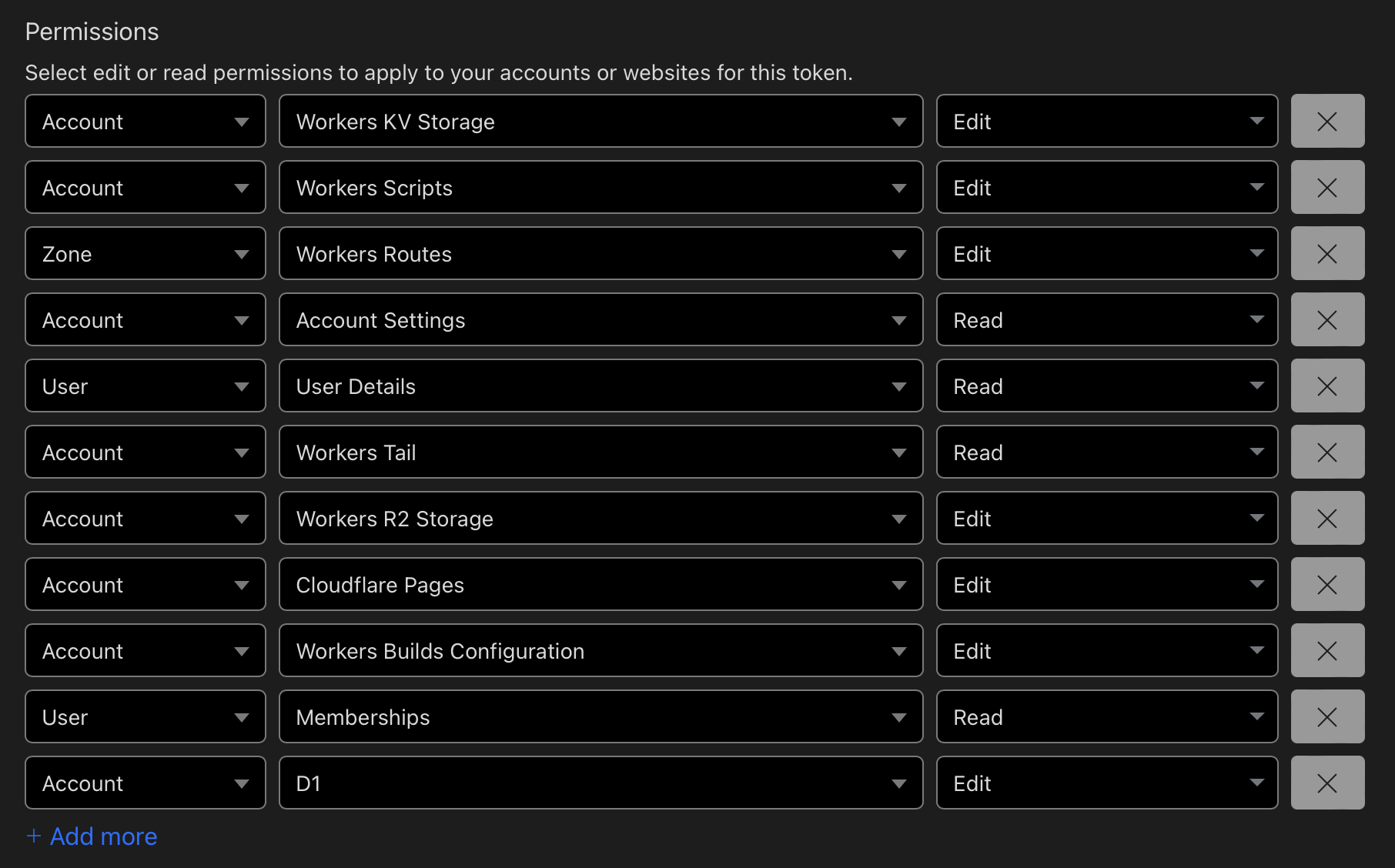
-> When creating a token, select the `Edit Cloudflare Workers` template directly, and then manually add the `D1 Edit` permission.
-
-
-
-Once deployed, please login as soon as possible, the first user to login will be set as the administrator.
-
----
-
-
-Command Deploy
-
-Requires the local installation of the node environment.
-Updating during command deployment is more troublesome, it is recommended to use Github actions for deployment.
-### 0. Download the code
-Download the latest service.zip from the release page, unzip it, and execute the following commands in the root directory.
-
-### 1. Login
-```bash
-npx wrangler login
-```
-
-### 2. Create r2 bucket
-```bash
-npx wrangler r2 bucket create web-archive
-```
-Output:
-```bash
- ⛅️ wrangler 3.78.10 (update available 3.80.4)
---------------------------------------------------------
-
-Creating bucket web-archive with default storage class set to Standard.
-Created bucket web-archive with default storage class set to Standard.
-```
-
-### 3. Create d1 database
-```bash
-npx wrangler d1 create web-archive
-```
-
-Output:
-
-```bash
- ⛅️ wrangler 3.78.10 (update available 3.80.4)
---------------------------------------------------------
-
-✅ Successfully created DB 'web-archive' in region UNKNOWN
-Created your new D1 database.
-
-[[d1_databases]]
-binding = "DB" # i.e. available in your Worker on env.DB
-database_name = "web-archive"
-database_id = "xxxx-xxxx-xxxx-xxxx-xxxx"
-```
-
-Copy the last line of the output, and replace the `database_id` value in the `wrangler.toml` file.
-
-Then execute the initialization sql:
-```bash
-npx wrangler d1 migrations apply web-archive --remote
-```
-
-Output:
-```bash
-🌀 Executing on remote database web-archive (7fd5a5ce-79e7-4519-a5fb-2f9a3af71064):
-🌀 To execute on your local development database, remove the --remote flag from your wrangler command.
-Note: if the execution fails to complete, your DB will return to its original state and you can safely retry.
-├ 🌀 Uploading 7fd5a5ce-79e7-4519-a5fb-2f9a3af71064.0a40ff4fc67b5bdf.sql
-│ 🌀 Uploading complete.
-│
-🌀 Starting import...
-🌀 Processed 9 queries.
-🚣 Executed 9 queries in 0.00 seconds (13 rows read, 13 rows written)
- Database is currently at bookmark 00000001-00000005-00004e2b-c977a6f2726e175274a1c75055c23607.
-┌────────────────────────┬───────────┬──────────────┬────────────────────┐
-│ Total queries executed │ Rows read │ Rows written │ Database size (MB) │
-├────────────────────────┼───────────┼──────────────┼────────────────────┤
-│ 9 │ 13 │ 13 │ 0.04 │
-└────────────────────────┴───────────┴──────────────┴────────────────────┘
-```
-
-### 4. Deploy
-```bash
-npx wrangler pages deploy
-```
-
-Output:
-```bash
-The project you specified does not exist: "web-archive". Would you like to create it?
-❯ Create a new project
-✔ Enter the production branch name: … dev
-✨ Successfully created the 'web-archive' project.
-▲ [WARNING] Warning: Your working directory is a git repo and has uncommitted changes
-
- To silence this warning, pass in --commit-dirty=true
-
-🌎 Uploading... (3/3)
-
-✨ Success! Uploaded 3 files (3.29 sec)
-
-✨ Compiled Worker successfully
-✨ Uploading Worker bundle
-✨ Uploading _routes.json
-🌎 Deploying...
-✨ Deployment complete! Take a peek over at https://web-archive-xxxx.pages.dev
-```
-
-
-## Usage Guide
-
-Download the latest extension.zip from the release page, unzip it, and install it to the browser.
-After the first installation, you need to enter the API address and key. The API address is the service address, and the key is the password of the first user (administrator).
-
-In the folder page, you can set whether a page is displayed in the showcase.
-Showcase address: /#/showcase/folder
\ No newline at end of file
+Plugin download:
+- [Chrome](https://chromewebstore.google.com/detail/web-archive/dfigobdhnhkkdniegjdagofhhhopjajb?hl=zh-CN&utm_source=ext_sidebar)
+- [Firefox](https://addons.mozilla.org/zh-CN/firefox/addon/web-archive-ray-banzhe/)
\ No newline at end of file
diff --git a/docs/README_zh.md b/docs/README_zh.md
index b2f42c3..3f89636 100644
--- a/docs/README_zh.md
+++ b/docs/README_zh.md
@@ -10,146 +10,18 @@ Web Archive 是一个网页归档工具,包含以下几个部分:
服务端基于 Cloudflare Worker 的全套服务,包含 D1 数据库、R2 存储桶。
-## Why
-大多数网页归档工具,比如 archivebox,都是基于服务器调用无头浏览器抓取的方式进行归档。
-这种做法的弊端是 知乎、medium 这种需要登录的网站操作很麻烦,需要配置 token 或 cookie。
-同时无头浏览器对服务器的要求也比较高,大多数都是 nas 用户在使用。
-web-archive 是一个完全免费、无门槛的方案,而且 Cloudflare 可以非常方便的将数据迁移回本地转为 self-host。
+## 功能
-## feat & roadmap
-- [x] 文件夹分类
-- [x] 页面预览图
-- [x] 标题关键字查询
-- [x] 橱窗,可以分享自己抓取的页面
-- [x] 移动端适配
-- [x] tag 分类
-- [x] ~~将页面保存为 markdown~~ 阅读模式
-- [ ] 划词高亮?
+- 网页归档,搜索,分享
+- 文件夹分类
+- 移动端适配
+- AI 生成 tag 分类
+- 阅读模式
-## 部署指南
-Github Actions 一键部署(推荐)
+## 部署
+可以参考 [部署文档](https://web-archive-docs.pages.dev/deploy.html) 进行部署。
+部署完成后,在浏览器插件中输入服务地址和 key 即可使用。
-[](https://deploy.workers.cloudflare.com/?url=https://github.com/ray-d-song/web-archive)
-
-点击上面的按钮,按照 Cloudflare 的指引完成部署。
-
-> [!IMPORTANT]
-> R2 存储桶是需要在 Cloudflare 面板上手动开通的功能,请开通后再进行部署或者失败后 re-run Github Actions。
-> 仅需开通 R2 功能,不需要创建存储桶,存储桶会在部署时自动创建。
-
-> [!NOTE]
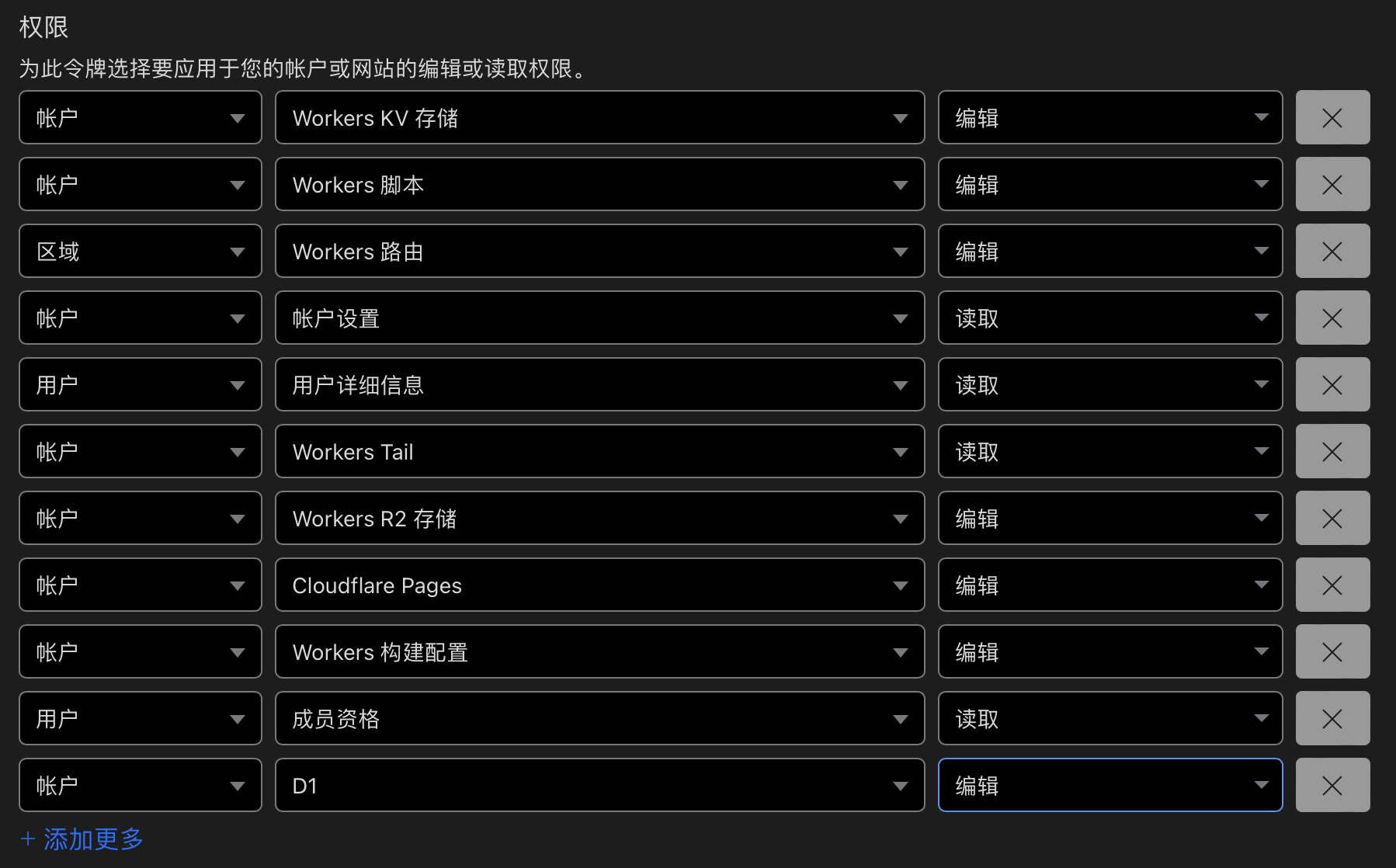
-> 创建令牌时,直接选择 `编辑 Cloudflare Workers` 模版,再手动添加 `D1 编辑` 权限。
-
-
-
-部署后请尽快登录,首个登录的用户会被设置为管理员。
-
----
-
-
-命令部署
-
-要求本地安装了 node 环境。
-命令部署时更新比较麻烦, 推荐实用 Github actions 部署。
-### 0. 下载代码
-在 release 页面下载最新的 service.zip,解压后在根目录执行后续操作。
-
-### 1. 登录
-```bash
-npx wrangler login
-```
-
-### 2. 创建 r2 存储桶
-```bash
-npx wrangler r2 bucket create web-archive
-```
-成功输出:
-```bash
- ⛅️ wrangler 3.78.10 (update available 3.80.4)
---------------------------------------------------------
-
-Creating bucket web-archive with default storage class set to Standard.
-Created bucket web-archive with default storage class set to Standard.
-```
-
-### 3. 创建 d1 数据库
-```bash
-# 创建数据库
-npx wrangler d1 create web-archive
-```
-
-执行输出:
-
-```bash
- ⛅️ wrangler 3.78.10 (update available 3.80.4)
---------------------------------------------------------
-
-✅ Successfully created DB 'web-archive' in region UNKNOWN
-Created your new D1 database.
-
-[[d1_databases]]
-binding = "DB" # i.e. available in your Worker on env.DB
-database_name = "web-archive"
-database_id = "xxxx-xxxx-xxxx-xxxx-xxxx"
-```
-拷贝最后一行,替换 `wrangler.toml` 文件中 `database_id` 的值。
-
-然后执行初始化 sql:
-```bash
-npx wrangler d1 migrations apply web-archive --remote
-```
-
-成功输出:
-```bash
-🌀 Executing on remote database web-archive (7fd5a5ce-79e7-4519-a5fb-2f9a3af71064):
-🌀 To execute on your local development database, remove the --remote flag from your wrangler command.
-Note: if the execution fails to complete, your DB will return to its original state and you can safely retry.
-├ 🌀 Uploading 7fd5a5ce-79e7-4519-a5fb-2f9a3af71064.0a40ff4fc67b5bdf.sql
-│ 🌀 Uploading complete.
-│
-🌀 Starting import...
-🌀 Processed 9 queries.
-🚣 Executed 9 queries in 0.00 seconds (13 rows read, 13 rows written)
- Database is currently at bookmark 00000001-00000005-00004e2b-c977a6f2726e175274a1c75055c23607.
-┌────────────────────────┬───────────┬──────────────┬────────────────────┐
-│ Total queries executed │ Rows read │ Rows written │ Database size (MB) │
-├────────────────────────┼───────────┼──────────────┼────────────────────┤
-│ 9 │ 13 │ 13 │ 0.04 │
-└────────────────────────┴───────────┴──────────────┴────────────────────┘
-```
-
-### 4. 部署服务
-```bash
-# 部署服务
-npx wrangler pages deploy
-```
-
-成功输出:
-```bash
-The project you specified does not exist: "web-archive". Would you like to create it?
-❯ Create a new project
-✔ Enter the production branch name: … dev
-✨ Successfully created the 'web-archive' project.
-▲ [WARNING] Warning: Your working directory is a git repo and has uncommitted changes
-
- To silence this warning, pass in --commit-dirty=true
-
-🌎 Uploading... (3/3)
-
-✨ Success! Uploaded 3 files (3.29 sec)
-
-✨ Compiled Worker successfully
-✨ Uploading Worker bundle
-✨ Uploading _routes.json
-🌎 Deploying...
-✨ Deployment complete! Take a peek over at https://web-archive-xxxx.pages.dev
-```
-
-
-## 使用指南
-
-在 release 页面下载最新的 extension.zip,解压后安装到浏览器中。
-首次安装后,需要输入 API 地址和密钥,API 地址是服务地址,密钥就是首个用户(管理员)的密码。
-
-在文件夹页面,你可以设置某个页面是否在橱窗中展示。
-橱窗地址:/#/showcase/folder
\ No newline at end of file
+插件下载:
+- [Chrome](https://chromewebstore.google.com/detail/web-archive/dfigobdhnhkkdniegjdagofhhhopjajb?hl=zh-CN&utm_source=ext_sidebar)
+- [Firefox](https://addons.mozilla.org/zh-CN/firefox/addon/web-archive-ray-banzhe/)
\ No newline at end of file
diff --git a/docs/en/usage.md b/docs/en/usage.md
index 8aa42fd..9f0f9f8 100644
--- a/docs/en/usage.md
+++ b/docs/en/usage.md
@@ -1,6 +1,9 @@
# Usage
-Download the latest extension.zip from the release page, unzip and install it into the browser.
+Download the plugin from the plugin store:
+- [Chrome](https://chromewebstore.google.com/detail/web-archive/dfigobdhnhkkdniegjdagofhhhopjajb?hl=zh-CN&utm_source=ext_sidebar)
+- [Firefox](https://addons.mozilla.org/zh-CN/firefox/addon/web-archive-ray-banzhe/)
+
After the first installation, you need to input the API address and key, the API address is the service address, and the key is the password of the first user (administrator).
In the folder page, you can set whether to display a page in the showcase.
diff --git a/docs/usage.md b/docs/usage.md
index 93df22b..68e8cdc 100644
--- a/docs/usage.md
+++ b/docs/usage.md
@@ -1,6 +1,9 @@
# 使用指南
-在 release 页面下载最新的 extension.zip,解压后安装到浏览器中。
+在浏览器插件商店下载插件:
+- [Chrome](https://chromewebstore.google.com/detail/web-archive/dfigobdhnhkkdniegjdagofhhhopjajb?hl=zh-CN&utm_source=ext_sidebar)
+- [Firefox](https://addons.mozilla.org/zh-CN/firefox/addon/web-archive-ray-banzhe/)
+
首次安装后,需要输入 API 地址和密钥,API 地址是服务地址,密钥就是首个用户(管理员)的密码。
在文件夹页面,你可以设置某个页面是否在橱窗中展示。
diff --git a/packages/plugin/manifest.firefox.json b/packages/plugin/manifest.firefox.json
index f01d94a..039231a 100644
--- a/packages/plugin/manifest.firefox.json
+++ b/packages/plugin/manifest.firefox.json
@@ -88,5 +88,11 @@
"chunks/*"
]
}
- ]
+ ],
+ "browser_specific_settings": {
+ "gecko": {
+ "id": "{bafa7bca-e0ab-44f2-a343-4a6b7b52ba24}",
+ "strict_min_version": "109.0"
+ }
+ }
}
diff --git a/packages/plugin/popup/components/NewFolderDialog.tsx b/packages/plugin/popup/components/NewFolderDialog.tsx
index 1c153f3..455dfc3 100644
--- a/packages/plugin/popup/components/NewFolderDialog.tsx
+++ b/packages/plugin/popup/components/NewFolderDialog.tsx
@@ -49,7 +49,12 @@ function NewFolderDialog({ afterSubmit, open, setOpen }: NewFolderProps) {
Create New Folder
- setName(e.target.value)} placeholder="Folder Name" />
+ setName(e.target.value)}
+ onKeyDown={e => e.key === 'Enter' && handleSubmit()}
+ placeholder="Folder Name"
+ />
diff --git a/packages/plugin/popup/components/TagInputWithCache.tsx b/packages/plugin/popup/components/TagInputWithCache.tsx
index c6668be..5c764e7 100644
--- a/packages/plugin/popup/components/TagInputWithCache.tsx
+++ b/packages/plugin/popup/components/TagInputWithCache.tsx
@@ -3,7 +3,7 @@ import type { AutoCompleteTagInputRef } from '@web-archive/shared/components/aut
import AutoCompleteTagInput from '@web-archive/shared/components/auto-complete-tag-input'
import { Button } from '@web-archive/shared/components/button'
import type { GenerateTagProps } from '@web-archive/shared/utils'
-import { generateTagByOpenAI, isNil } from '@web-archive/shared/utils'
+import { generateTagByOpenAI } from '@web-archive/shared/utils'
import { useRequest } from 'ahooks'
import { AlertCircleIcon, Loader2Icon, SparklesIcon } from 'lucide-react'
import { sendMessage } from 'webext-bridge/popup'
diff --git a/packages/plugin/privacy.md b/packages/plugin/privacy.md
new file mode 100644
index 0000000..2945d8d
--- /dev/null
+++ b/packages/plugin/privacy.md
@@ -0,0 +1,11 @@
+# Privacy Policy
+
+Your data always belongs to you, and only you. WebArchive does not collect any
+data.
+
+## How your data is protected and used
+
+- WebArchive sends data to the server address configured in the extension,
+ typically a Cloudflare Page that you have deployed yourself.
+- If you have configured AI-related APIs, data will also be sent to these APIs.
+- Screenshots are only taken when you choose to save a page.
diff --git a/packages/server/src/api/folders.ts b/packages/server/src/api/folders.ts
index 9e8029f..a4763bb 100644
--- a/packages/server/src/api/folders.ts
+++ b/packages/server/src/api/folders.ts
@@ -89,7 +89,7 @@ app.put(
return {
id: Number(value.id),
- name: value.name as string | undefined,
+ name: value.name,
}
}),
async (c) => {
diff --git a/packages/server/src/api/pages.ts b/packages/server/src/api/pages.ts
index d8db655..1f8bd53 100644
--- a/packages/server/src/api/pages.ts
+++ b/packages/server/src/api/pages.ts
@@ -371,6 +371,10 @@ app.get(
c.res.headers.set('Content-Type', 'image/webp')
c.res.headers.set('cache-control', 'private, max-age=31536000')
+ if (isNil(screenshot)) {
+ return c.body(null)
+ }
+
return c.body(await screenshot.arrayBuffer())
},
)
diff --git a/packages/server/src/api/showcase.ts b/packages/server/src/api/showcase.ts
index 0bccaf3..374b946 100644
--- a/packages/server/src/api/showcase.ts
+++ b/packages/server/src/api/showcase.ts
@@ -1,3 +1,4 @@
+import { isNotNil } from '@web-archive/shared/utils'
import { Hono } from 'hono'
import { validator } from 'hono/validator'
import type { HonoTypeUserInformation } from '~/constants/binding'
@@ -28,7 +29,7 @@ app.post(
const pages = await queryShowcase(c.env.DB, { pageNumber, pageSize })
pages.list = await Promise.all(pages.list.map(async (page) => {
- const screenshot = await getBase64FileFromBucket(c.env.BUCKET, page.screenshotId, 'image/png')
+ const screenshot = isNotNil(page.screenshotId) && await getBase64FileFromBucket(c.env.BUCKET, page.screenshotId, 'image/png')
return {
...page,
screenshot,
diff --git a/packages/server/src/model/folder.ts b/packages/server/src/model/folder.ts
index 65d840c..de88633 100644
--- a/packages/server/src/model/folder.ts
+++ b/packages/server/src/model/folder.ts
@@ -82,7 +82,7 @@ async function getFolderById(DB: D1Database, options: { id: number, isDeleted?:
WHERE id = ?
`
const folder = await DB.prepare(sql).bind(id).first()
- if (isNotNil(isDeleted) && folder.isDeleted !== Number(isDeleted)) {
+ if (isNotNil(isDeleted) && folder?.isDeleted !== Number(isDeleted)) {
return null
}
return folder
@@ -108,7 +108,7 @@ async function selectDeletedFolderTotalCount(DB: D1Database) {
WHERE isDeleted == 1
`
const sqlResult = await DB.prepare(sql).first<{ count: number }>()
- return sqlResult.count
+ return sqlResult?.count ?? 0
}
async function restoreFolder(DB: D1Database, id: number) {
diff --git a/packages/server/tsconfig.json b/packages/server/tsconfig.json
index a95062c..635dcfa 100644
--- a/packages/server/tsconfig.json
+++ b/packages/server/tsconfig.json
@@ -8,6 +8,7 @@
"@cloudflare/workers-types",
"vite/client"
],
+ "strict": true,
"outDir": "./dist/server"
},
"include": ["*.ts", "./src/**/*.ts"]
diff --git a/packages/shared/components/badge.tsx b/packages/shared/components/badge.tsx
index 5146908..3bcc5ce 100644
--- a/packages/shared/components/badge.tsx
+++ b/packages/shared/components/badge.tsx
@@ -33,4 +33,10 @@ function Badge({ className, variant, ...props }: BadgeProps) {
)
}
-export { Badge, badgeVariants }
+function BadgeSpan({ className, variant, ...props }: BadgeProps) {
+ return (
+
+ )
+}
+
+export { Badge, badgeVariants, BadgeSpan }
diff --git a/packages/web/src/components/edit-folder-dialog.tsx b/packages/web/src/components/edit-folder-dialog.tsx
index 7d142ca..718a4ef 100644
--- a/packages/web/src/components/edit-folder-dialog.tsx
+++ b/packages/web/src/components/edit-folder-dialog.tsx
@@ -57,7 +57,12 @@ function EditFolderDialog({ afterSubmit, open, setOpen, editFolder }: EditFolder
diff --git a/packages/web/src/components/edit-tag-dialog.tsx b/packages/web/src/components/edit-tag-dialog.tsx
index 2632656..6a3c0de 100644
--- a/packages/web/src/components/edit-tag-dialog.tsx
+++ b/packages/web/src/components/edit-tag-dialog.tsx
@@ -63,7 +63,12 @@ function EditTagDialog({ afterSubmit, open, setOpen, editTag }: EditTagProps) {
diff --git a/packages/web/src/components/list-view.tsx b/packages/web/src/components/list-view.tsx
index afde5d0..0e17cc9 100644
--- a/packages/web/src/components/list-view.tsx
+++ b/packages/web/src/components/list-view.tsx
@@ -1,6 +1,6 @@
import type { Page } from '@web-archive/shared/types'
import { Table, TableBody, TableCell, TableRow } from '@web-archive/shared/components/table'
-import { useState } from 'react'
+import React, { useState } from 'react'
import { useMouse } from 'ahooks'
import ScreenshotView from './screenshot-view'
@@ -8,15 +8,15 @@ interface ListViewProps {
pages?: Page[]
children?: (page: Page) => React.ReactNode
imgPreview?: boolean
- onItemClick?: (page: Page) => void
+ onItemClick?: (page: Page, event: React.MouseEvent) => void
}
function ListView({ pages, children, imgPreview, onItemClick }: ListViewProps) {
const mouse = useMouse()
const [prevScreenshotId, setPrevScreenshotId] = useState(null)
- const handleClickPage = (page: Page) => {
- onItemClick?.(page)
+ const handleClickPage = (page: Page, event: React.MouseEvent) => {
+ onItemClick?.(page, event)
}
const handleHoverPage = (e: React.MouseEvent, page: Page) => {
if (imgPreview)
@@ -48,7 +48,7 @@ function ListView({ pages, children, imgPreview, onItemClick }: ListViewProps) {
{pages?.map(page => (
- handleClickPage(page)} onMouseEnter={e => handleHoverPage(e, page)} onMouseLeave={handleLeavePage}>
+ handleClickPage(page, e)} onMouseEnter={e => handleHoverPage(e, page)} onMouseLeave={handleLeavePage}>
{page.title}{page.createdAt.toLocaleString()}
{children && (
diff --git a/packages/web/src/components/new-folder-dialog.tsx b/packages/web/src/components/new-folder-dialog.tsx
index cdbd4b3..decea14 100644
--- a/packages/web/src/components/new-folder-dialog.tsx
+++ b/packages/web/src/components/new-folder-dialog.tsx
@@ -41,7 +41,12 @@ function NewFolderDialog({ afterSubmit, open, setOpen }: NewFolderProps) {
Create New Folder
- setName(e.target.value)} placeholder="Folder Name" />
+ setName(e.target.value)}
+ onKeyDown={e => e.key === 'Enter' && handleSubmit()}
+ placeholder="Folder Name"
+ />
diff --git a/packages/web/src/components/page-card.tsx b/packages/web/src/components/page-card.tsx
index fc0a8b2..165377c 100644
--- a/packages/web/src/components/page-card.tsx
+++ b/packages/web/src/components/page-card.tsx
@@ -7,28 +7,24 @@ import { Tooltip, TooltipContent, TooltipProvider, TooltipTrigger } from '@web-a
import { ExternalLink, Eye, EyeOff, SquarePen, Trash } from 'lucide-react'
import { useLocation } from 'react-router-dom'
import toast from 'react-hot-toast'
-import { Badge } from '@web-archive/shared/components/badge'
+import { BadgeSpan } from '@web-archive/shared/components/badge'
+import { TooltipPortal } from '@radix-ui/react-tooltip'
import ScreenshotView from './screenshot-view'
-import { useNavigate } from '~/router'
import { updatePageShowcase } from '~/data/page'
import CardEditDialog from '~/components/card-edit-dialog'
import TagContext from '~/store/tag'
+import { Link } from '~/router'
function Comp({ page, onPageDelete }: { page: Page, onPageDelete?: (page: Page) => void }) {
- const navigate = useNavigate()
-
const { tagCache, refreshTagCache } = useContext(TagContext)
const bindTags = tagCache?.filter(tag => tag.pageIds.includes(page.id)) ?? []
const tagBadgeList = bindTags.map((tag) => {
- return ({tag.name})
+ return ({tag.name})
})
const location = useLocation()
const isShowcased = location.pathname.startsWith('/showcase')
-
- const handleClickPageCard = (page: Page) => {
- navigate(isShowcased ? '/showcase/page/:slug' : '/page/:slug', { params: { slug: String(page.id) } })
- }
+ const redirectTo = isShowcased ? `/showcase/page/:slug` : `/page/:slug`
const handleClickPageUrl = (e: React.MouseEvent, page: Page) => {
e.stopPropagation()
@@ -42,14 +38,14 @@ function Comp({ page, onPageDelete }: { page: Page, onPageDelete?: (page: Page)
}
}
- const [showcaseSate, setShowcaseState] = useState(page.isShowcased)
+ const [showcaseState, setShowcaseState] = useState(page.isShowcased)
const { run: updateShowcase } = useRequest(
updatePageShowcase,
{
manual: true,
onSuccess() {
toast.success('Success')
- setShowcaseState(showcaseSate === 1 ? 0 : 1)
+ setShowcaseState(showcaseState === 1 ? 0 : 1)
},
},
)
@@ -68,26 +64,29 @@ function Comp({ page, onPageDelete }: { page: Page, onPageDelete?: (page: Page)
)
}
+
handleClickPageCard(page)}
className="cursor-pointer hover:shadow-lg transition-shadow flex flex-col relative group overflow-hidden"
>
-
- {page.title}
-
- {tagBadgeList}
-
-
-
-
-
-