Showing posts with label FuseSoC. Show all posts

Monday, December 22, 2025

FOSSi Fiesta 2024


 It's time again to do one of those yearly retrospectives. Am I early being unusally early this year since the year hasn't even ended yet? Actually.... this one is for 2024. I was supposed to to it in January but...well... life happened. Anyway, this should be fine, right? It's still 2025 so it's still a retrospective of last year. Aiming to keep this one a bit shorter to release it before the bells ring.

SERV

2024 was an action-packed year for the award-winning SERV, the world's smallest RISC-V CPU. A new version, 1.3, was released, and thanks to a collaboration with Harvard and Pragmatic Semiconductors, SERV became the first ever fully programmable general purpose CPU implemented on printed electronics. The resulting article was published in Nature and can be found here.

Being published in Nature is nice and all, but you really know you made it when your Nature article is picked up by PC Gamer


 The first steps were also taken this year to make wider and faster versions of SERV called QERV and HERV which was presented as a fancy poster at the European RISC-V Summit in Munich.

Extra proud of the little pockets for holding stickers at the bottom of the poster


During Latch-Up at MIT in Cambridge (which is totally not Boston), I also did the first-ever presentation of the SERV-based benchmarking project CoreScore as a lightning talk. I also had the luck to win a slot on the seventh TinyTapeout....tapeout which I used as an opportunity to create Underserved, yet another SERV-based SoC with even tighter resource requirements than usual.

FuseSoC & Edalize

Both FuseSoC and Edalize saw massive improvements over 2024. At Latch-Up in Cambridge (which is definitely not Boston) I did the first-ever dedicated presentation on Edalize, rather than sneaking it in as a part of a FuseSoC presentation. There was definitely enough things to talk about to fill a whole presentation. The new Flow API is shaping up nicely and more tool backends and flows are being ported over from the legacy API. There's also a whole bunch of things in the work that I won't bore you with here. Just watch the video instead. It's probably still boring but at least it's moving pictures instead of text which I hear all the kids prefer today.

I did a presentation of FuseSoC during ORConf, called the future of FuseSoC, some of which is now the past of FuseSoC and present of FuseSoC since we now live in the future relative to when the presentation was made. ORConf this year was a bit special since it was held in my old hometown and my old university. Amazing that they still let me in there, come to think of it. As always, ORConf was a lot of fun and an opportunity to meet old and new friends and learn about things.

Color-coordinated FOSSi fashionistas

So, was that all that happened in 2024? Not really, but as I mentioned initially, it's already slightly delayed so let's stop here. And you know what? Why don't you tell me what I missed? Happy to make updates. Still got nine days to go. Have a great 2025. I'm sure it can't be worse than 2024.

Thursday, November 13, 2025

FuseSoC gains SPDX support

FuseSoC now supports SPDX for creating SBOMs, making it the first FPGA/ASIC IP management system with native SBOM capabilities. This advancement is crucial for supply chain security in FPGA device products and is essential for CRA compliance.

Open source software is key to modern software creation. With its increasing importance, the need grows to track open source parts and their versions in a project. This is needed both to ensure that the components comply with their licenses and that they don't contain any known security issues. 

There are standardized ways of doing this analysis by creating an SBOM, Software Bill of Materials, or in some interpretations System Bill of Materials to indicate its applicability outside of traditional software development. The SBOM is essentially a detailed inventory that lists all the components in a piece of software. It typically includes the names, versions, and license information for all open source and proprietary pieces that make up the software, aiding in license compliance and vulnerability management. 

The two leading SBOM standards are SPDX and CycloneDX, both having tools for automating the process of creating, visualizing or validating SBOM documents. Many software frameworks such as Yocto or Zephyr already contains built-in SPDX support, but up until now, there has been no such thing for chip design.

FuseSoC, being the world's most widely used package manager for IP cores is in the perfect position to remedy this. With thousands of FuseSoC-compatible packages, it provides a solid foundation for product development. Built-in SPDX support will now also make it easier to ensure license compliance and perform vulnerability scanning for FPGA-based products.

Visualization of an SBOM generated by FuseSoC

The SPDX generation support in FuseSoC is implemented as a filter and can be enabled, like other filters, on the command-line or by registering it in the relevant core file targets or FuseSoC configuration file. The example above was generated by running

fusesoc run --target=verilator_tb --filter=spdxgen servant

In addition to SPDX generation, FuseSoC now supports the PURL standard for a unified way to reference FuseSoC packages, or cores as we call them in this domain. The PURL standard provides a standardized mapping between package names and a URI. For FuseSoC this means that the VLNV identifers gets translated to pkg:/fusesoc/vendor/library/name@version

For example, the currently latest version of the award-winning SERV, the world's smallest RISC-V CPU, has the VLNV identifer award-winning:serv:serv:1.40 which becomes pkg:fusesoc/award-winning/serv/serv@1.4.0 The PURL is used within the SPDX nodes to uniquely refer to an IP core.

So if you needed another reason to start using FuseSoC, you got one right here. Enjoy!

The work on adding SPDX support for FuseSoC was sponsored by NLNet Foundation and Qamcom.

Saturday, June 15, 2024

FOSSi Freakout 2023


So, this was supposed to be one of those new year retrospectives. It's just that I didn't really find time to write this until now. Still closer to last new year than the next one, so I think it's ok. As usual, this is a round-up of all free and open source silicon, or FOSSi, things I have been involved in over the past year.

FOSSi Foundation

Beatiful evening in Santa Barbara. What is not seen in the picture is that everyone spent the rest of the evening trying to get rid of tar from their feet


This was the year when we resumed our on-site conferences after doing our virtual FOSSi Dial-Up series for a few years. We did Latch-Up in Santa Barbara and ORconf in Munich, and both events were great successes. Hope to see you all at our future events. Fellow FOSSi Foundation director Philipp Wagner also did a well-received open source chip design talk at the FOSDEM main track.

SERV

The award-winning SERV, the world's smallest RISC-V CPU turned five years old, which I wrote about in a retrospective called Five years of SERVing for its fifth birthday. It was also the year when SERV got its big sister, QERV, which provides a 3x speed-up for a marginal extra cost in area. Most of the work was done by a colleague at Qamcom and we did a press release called Qamcom boosts RISC-V which has more details. QERV currently lives in a separate repository, but the ultimate goal is to integrate it into SERV with a switch to select width.

There's also an ever bigger version called HERV on its way. A lot more things has happened with SERV but I'm saving that for the next SERV release announcement. Some of the news were also revealed in the talks I did about SERV at FPL (not recorded), ORConf and the Göteborg RISC-V Meetup (not recorded).

FuseSoC

A tour through FuseSoC and Edalize


FuseSoC saw a lot of activity in 2023. We finally got version 2.0 out of the door and with that we could remove a lot of old code and focus on new features such as core file validation, supporting the use of FuseSoC as a library instead of a stand-alone application, cached generators, file tags, minimizing rebuilding and other things that you can read about in the FuseSoC documentation. I also managed to three FuseSoC presentations; at FPL (not recorded), ORConf and the CHIPS Alliance Technology Update.

VeeRWolf

During 2023 I found some time to work on VeeRwolf...wait, did you say VeeRwolf? I thought it was called SweRVolf. Yes, one of the bigger changes was a complete renaming from SweRVolf to VeeRwolf, since the SweRV cores were renamed VeeR. Anyway, apart from the renaming, the Zephyr BSP for VeeRwolf was upgraded to support Zephyr 3.5 instead of the old 2.7 thanks to one of my Qamcom colleagues. As regular readers probably know already, VeeRwolf is the base for the RVFPGA computer architecture programme, and over the year I had the pleasure of participating in two different RVFPGA workshops and meet the other RVFPGA team members.

Edalize


The big new things for Edalize the past year was the introduction of the Flow API. I have written about this specifically a few times before,  but to sum it up, it's a complete revamp of how the Edalize backends work that enables new workflows, avoids code duplication, allows for external plugins, avoid unnecessary rebuilds and a lot more good things. As with all new feature introductions, some effort was spent hunting down newly introduced bugs but the code is now in a good shape. I'm using the flow API with Cocotb-enabled simulations as my daily driver now and it works great. It would still be great to get some help porting over all the old backends to the new API.

Speaking of backends, Edalize got several new ones in 2023, namely sandpiper-saas, openroad, design compiler, genus and efinity

Also the documentation saw a lot of improvements.

CoreScore


The CoreScore project did not see any new records. 10000 cores in an FPGA is still at the number one. We did howver see support for some new boards with Intel snatching three of the top five spots with their new Agilex devices and the introductions of new FPGA vendor Efinix and their Xyloni board.

LED to Believe

I tried to push for project LED to Believe to support 100 different FPGA boards by the end of the year. We got reeeeally close, but the big celebration came after the year had ended.  Still there was a healthy number of newly supported boards over the year.

Other

In an attempt to collect all videos of my FOSSi projects, I made a video gallery. After that experience I decided not to add web design to my CV.

As I have started using Cocotb more and more, I thought it would be a good idea to also have a quick example of how to use FuseSoC and Cocotb together, so I made an example design called fusesocotb to serve as a reference design.

This very blog also celebrated since 2023 was the year that saw the 100000th visitor to the site, much thanks to a UVM vs Cocotb post that went viral in late 2022.

And that pretty much sums up my 2023 FOSSi activities. Well, not quite. I won an award also. At the RISC-V Summit I was awarded a Community Contributor award. I was really happy to receive that and to hear that the open source contributions I do are actually acknowledged and appreciated. So, big thanks for that. And thanks also to the RISC-V summit organizers for making it easy to find my seat.


Friday, July 14, 2023

Happy 100k!

Sure, it's not a million, but then again I'm not Arianna Huffington. Given how extremely niche these topics are and that blogging has been declared dead for about a decade now (about as long as I have been blogging, come to think of it), I think that a hundred thousand visitors is actually really really good. It's sure is a lot more than I would ever had imagined when I started doing this ten years ago.

The proof! Also notice the massive amount of followers this blog has gathered over the years
 

I don't remember anymore why I started blogging but I guess I felt that the world deserved to hear my opinions on random things. Also, there wasn't really anyone else writing about the things we were doing with OpenRISC and open source silicon in general at that time. Nowadays, any industry conference and news outlet worth mentioning will have FOSSi content but back then, most people in the industry just didn't get it. (To be fair, most industry people still don't get it given the number of "open source" panels I have seen at conferences consisting of people with zero insights who just sit there making up stuff because their companies have paid to have them there. Thank god for events like ORConf and Latch-Up!).

Enough about why. I thought it could be fun to look at how instead. There are a number of events that have lead to the magic six figure number. So, let's go back to the beginning. What was supposed to be the first article actually became the second article because when I wrote it I went off on a tangent and ended up with a whole article on scope creep instead. And I think that pretty much sums up my writing and how I (fail to) get things done in general by starting something and then ending up getting stuck in some detail and end up doing something completely different instead. Not that it really mattered though. The readership consisted mostly of friends who I forced to read the blog and questioned them afterwards to make sure they had read the whole thing. But I kept writing every now and then about different things around the OpenRISC archicecture. And then one day the people in my regular IRC chat channel notified me that my latest blog post was on the frontpage of Slashdot! For all you youngsters out there, Slashdot used to be the place where all nerds got their news and if you were featured on the Slashdot frontpage during its heydays you'd better have a server that could handle a massive influx of traffic. There were stories about servers burning up after being "slashdotted" because they were humble machines that never thought they would see so many visitors in their life. Luckily, 2014 was a bit after the heydays of Slashdot and Google hosted the blog so I don't think anyone got particularly worried about overloaded servers. But it did make some difference in numbers for the statistics for this humble blog.

The Slashdot effect in action


A couple of hours later, the Slashdot crowd moved their attention elsewhere and never came back, as is painfully clear from the statistics. I kept writing now and then however, mostly about FuseSoC, FuseSoC and FuseSoC which apparently didn't lead to any new front page news. A couple of years later though, I wrote about my complicated love-hate relationship with IP-XACT and that seemed to have struck a chord with some people. This one was more of a sleeper hit that didn't cause any immediate sensations but eventually became my most read, and definitely most cited, article I had written.

IP-Xact - an evergreen of confusing and questionable EDA standards

Getting noticed in premier geek media and cited in academic circles have both been happy surprises. There's no getting around that does feel a little more fun writing when you get these kind of validations. So I kept writing to a tiny uptick in readership after the IP-XACT article, again mostly about FuseSoC, FuseSoC and FuseSoC, but after starting way too many FOSSi projects over the years, like SERV, SweRVolf and Edalize, I also started doing yearly round-ups partly to remind myself what I did over the past year. And then one evening, after spending a day in a workshop with a clueless EDA vendor trying to shove their awful tooling down our throats, I wrote about one of the FOSSi projects that I believe will have a large impact the coming years, namely cocotb and how it will save us from SystemVerilog for verification. And that, my friends, turned out to be of more interest than anything I had previously written about.

Cocotb and Python coming to steal the show, as always


Suddenly, the hordes of geeks coming via Slashdot was just a blip on the radar compared to the angry, happy, confused and relieved verification engineers who showed up en masse to state their opinions, tell their stories, show their support or ask what this was all about.

Not everyone agreed, but it was clear that it was a hot topic. And that's the third thing I'm really happy about, to have ignited discussions around the status quo of chip design and get people to bring their ideas and opinions to the table.

I really hope to continue writing about stuff when I'm in the mood and can find the time. And hopefully some people find it interesting, at least occasionally. Given the sporadic output of the past, we will never know the next time that happens, so I'll just say until then!


Thursday, April 27, 2023

FOSSi Fantasies 2022


2022 is behind us and as usual I'm wrapping up my open source silicon efforts of the past year in a blog post.

Hang on...a 2022 retrospective...? In... the end of April??

Yes, I am fully aware that a third of 2023 has already passed, thank you very much, and that it's way too late to write a new year's retrospective. I have just been extremely busy, but I still wanted to get it out of the system. It's only been a month since the Persian new year, so in the light of that I'm not that late. Anyway...

This year, the list is shorter than usual simply because I haven't done as much FOSSi work as previous years. The upside is that I managed to complete this article close to new year, rather than much later as in previous years.

But why have I done less work? The main reason is that I have been terribly busy with my day job which is mostly of proprietary nature. While I do a lot of interesting stuff in this capacity, it's unfortunately not much I can talk about publicly. This is another reason why I greatly prefer open source work, so that I can show, share ideas and collaborate with other people.

There is one thing however from my day job that I can and want to talk about. This summer we launched a fully remote office that we call Qamcom Anywhere. Having worked remote myself for the past four years I have been pushing to make it possible for more people in the company to do the same, and this year we got it going for real. Qamcom Anywhere has been a massive success and we have found amazing new colleagues in various parts of Sweden where we previously haven't been looking before. Given my previous experience with working remote as well as working on open source projects, which by nature tend to be highly distributed, I was tasked to run this new office. As part of the campaign we also recorded a commercial, so I can now also add movie star to my CV ;)

As for now, we have launched Qamcom Anywhere in Sweden, but hope to spread to more countries in the future. Stay tuned if you want to be colleagues!

But even outside of this I have found some time to work on my long list of open source silicon projects.

Let's start by looking at what has happened to FuseSoC over the past year. Most of the effort has been spent on getting FuseSoC in shape for a long overdue 2.0 release. A couple of major features and changes were identified as being important to complete before this release. Most notably is the support for the new flow API in Edalize, but a number of critical bug fixes and backwards-incompatible changes were put in place. Unfortunately, we never manages to get the 2.0 release out of the door, but we got close and at least released a first release candidate in late December, while the final release saw the light in the beginning of this year.

Most of my other FOSSi projects made good progress. There were a few new Edalize releases, SweRVolf got some new board support, a maintenance release to an old i2c component that I maintain (hey! it's important to put some effort into cleaning up old code, not just rewrite new code all the time) and even good old ipyxact saw a new release, which now contains ipxact2v, a very handy tool to automatically convert IP-XACT designs to Verilog top-levels. It's not fully complete, but the functionality that exists is already coming to good use in various projects.

The project that probably saw the most interesting news in 2022 was SERV. SERV itself gained support for compressed instructions, thanks to Abdul Wadood who I had the great pleasure of mentor through Linux Foundation's LFX Mentorship Program. And aside from improvements to the core itself, in 2022, fellow FOSSi superstar developer Florent Kermarrec, who might be most known for Litex, managed to run 10000 SERV cores in a Xilinx FPGA. This seems to be the current world record right now for the most RISC-V cores in a single device, but I'm very curious how the competitors will react (looking at you, Intel!).

This year was the first in three years where I didn't create any new videos (or Fully Immersive Multimedia Edutainment Experiences, as I prefer to call them). Instead I did a number of presentations using old-fashioned slides for a live audience. The first of them being the RISC-V Week in Paris in early May where I did both a presentation on FuseSoC as well as one on SERV. The SERV video was unfortunately never published, but the slides for the presentation called How much score could a CoreScore score if a CoreScore could score cores? can be found here. I did another FuseSoC talk at FPGA World in Stockholm, Sweden which was also not recorded, but the final one, from the RISC-V Summit in San Jose was. This one was title SERV: 32-bit is the new 8-bit and aims to look at how RISC-V can be competitive in the traditional 8-bit market thanks to SERV.

Both at the RISC-V week as well as the RISC-V Summit I also got the chance to meet with the people behind RVFPGA, a project I have been involved with almost since the start. For those unaware, RVFPGA is a free computer architecture course by Imagination University Programme that runs on a slightly modified version of SweRVolf that I built a couple of years ago. Right after the RISC-V Summit I also got the chance to watch a RVFPGA workshop in action, and it was super fun to see all these students working their way through the labs.

Let's see.... what else then...hmm... you know what? I'm sure other things in 2022 as well, but my memory is fading and May is just outside the door waiting to come in, so let's just cut it here before the rest of the year passes too. Here's to 2023. Happy new year!

Wednesday, April 19, 2023

FuseSoC 2.2


Do you know the best way to find out who is using your open source software? Introduce bugs! You will suddenly come in touch with a lot of users you didn't know existed. And let's just say I found out about a lot of new users after the release of FuseSoC 2.1. And with FuseSoC 2.1 having a lot of new features, it's perhaps not too surprising that the odd bug crept in.

But enough about that, because FuseSoC 2.2, the topic for today, has hopefully fixed what was broken. And of course we have a couple of new features as well, even though the list is somewhat shorter than usual. But let's see what the new version has to offer

JSON Schema

Generally, I'm pretty happy about the code quality of FuseSoC. It has proven to be relatively friendly to new contributors and has gone through a couple of major refactorings without too much problems over its almost 12 years of existence. But there is one part of the code base that I usually try to stay clear from.

Deep inside of the FuseSoC code base there is a yaml structure encoded inside a Python string that is parsed when the module is imported to dynamically create a tree of Python classes which are then used to recursively read and validate core description files. Pretty clever, right? This is a fantastic example of the sort of thing that seems great because it's possible and not too hard to actually do with Python. Now, the thing is, because of the cleverness of the code, it is pretty much unreadable even for me who wrote it. Every time I need to fix some bug in this area of the code I end up spending hours trying to figure out how it all works, all the time crying and asking why oh why I built it like this in the first place.

So what little time was saved on writing some more verbose code, we pay for over and over again in maintenance. Not to mention all the bizarre corner cases that arises because the code is trying to outsmart itself. Things that required us to create classes like this:

The time was ripe now to rework this whole thing into something more sensible. So what we do instead now is to have a JSON Schema definition of the CAPI2 format...encoded as a string in a Python module deep inside the FuseSoC code base. I understand this doesn't look all that much like an improvement, but it's the first, and most important, step of a journey.


Short-term this leads to a more maintainable parser and validator because we only need to care about the definition. There is battle-proven Python code already that does the actual validation and is better at pointing out where in a core description file there is an error. There are also other utilities for generating documentation to offload this from FuseSoC itself. The parsing is also a bit more consistent now and supports use flag expansion in more places.

But long-term, this paves the road for actually splitting out the CAPI2 definition to its own project that can be readily reused by other tools without having to use FuseSoC. Having the validation code in jsonschema allows for much easier reimplementations and utilities written in other languages than Python. The first case that comes to mind is JavaScript for having web-based utilities around CAPI2 or built-in validation of core description files in e.g. VS code. But it also makes it easier to implement support for CAPI2 files directly in EDA tools written in Java, C++ or why not Rust.

It should be noted that the new parser is a bit more strict than the old one, so it might complain on files that were previously deemed ok. Hopefully there shouldn't be too many of those. There's also a new command-line switch --allow-additional-properties that can be turned on to make the parser more relaxed towards elements in the core description files that it doesn't know about.

Tags

The other thing I want to mention in this release is a small code change that I think will have open up for more use cases. It's now possible to set tags for files or filesets, very much like we can set file_type or logical_name today. FuseSoC itself doesn't care about the tags, but they are passed on to Edalize through the EDAM file. In Edalize, since version 0.5.0 we have begun to look at tags in some of the flows and take decisions upon them. The only tag that is recognized today is the "simulation" tag, that can be set on HDL files to indicate they are intended for simulation and not for synthesis. This change opens up for use-cases such as gate-level simulation where we first send our code through a synthesis tool and then the created netlist is simulated together with a testbench. By marking the testbench files with simulation, we tell the synthesis tools to not try to synthesize them into the netlist but instead pass them on to the simulator untouched. Another future use-case is for TCL files. There might be many tools in a tool flow that parses TCL files and so far, there hasn't been a way to tell the backend for which tool a particular TCL file is intended. I suspect we will see a whole bunch of more use-cases in the future.

Other things

I mentioned some bugs, right? A big one was that users of the old tool API (which I believe is still most users) noticed that the FPGA image or simulation model was not rebuilt when source files were changed. The new flow API has some properties that allows us to track changes in a much better way and avoids unnecessary rebuilds in many cases. Unfortunately, when these changes were made we didn't properly test how that affected the tool API.

Another issue was reported from users who uses --no-export together with generators. The recently introduced caching mechanism forced us to rewrite much of the code around generators and unfortunately we ended up missing this case, where the generated code got removed before it was used. Whoops. Also fixed now.

All in all, I hope you enjoy the new features and the new release. Happy FuseSoCing!

Sunday, October 30, 2022

Don't copy that IP

Making copies of other people's IP is a terrible thing! And it's a really big problem in the EDA world.


Oh, I'm not talking about the legal aspects. That's something I happily leave to the lawyers. No, I'm talking about making copies of source code instead of referencing the original code. It's a big problem because suddenly you have two different versions, and the chances that a fix that was done in one version will reach the other version are slim to none. When I was entering the world of open source silicon around 2010, this was how things were normally done. And my first reaction was to try and upstream all fixes to IP cores that I found in various projects that were using those cores. My second reaction was to try and find a more sustainable way to avoid this problem in the first place. And solving this problem was one of the initial driving forces behind FuseSoC, and it still is. So it makes me very very sad when, twelve years later, I still find random copies of IP cores, all with various subsets of fixes applied to them.

When we started working on the OpenLANE Edalize backend, one important thing was to have as many example designs as possible, both to make sure the backend was flexible enough to cover all use-cases and also to have a good set of examples for anyone interested in adding FuseSoC support for their own cores. We found a number of example designs in the OpenLANE repository which were used to test OpenLANE itself. Great! ...except... it turned out most of the examples were cores or parts of cores copied from various places. So we did what every sensible person (not really) would do. We decided to upstream all those example designs, so that the OpenLANE support and any other fixes would benefit all users of that IP core.

Bringing' it all back home

At the time we started looking at this, there were 32 different example designs. Our first job was to find out where on earth all these came from. That took a fair amount of detective work, but in the end we found what we believe is the proper upstream for all, except perhaps for one where we are a bit unsure. In that case we chose to file a PR against OpenLANE since that was the closest we could get to an upstream. A few designs were dropped from the OpenLANE examples while we were working on this, in which case we also chose to ignore them.

Once we had identified the origin, we tried to figure out how they worked and then set off to add FuseSoC support for each and every core. At the minimum we added a target for linting and a target for building with OpenLANE through the Edalize backend. In the cases where we found testbenches, we also added support for running those, with a few exceptions where that required tools we didn't have access to.

In addition to adding FuseSoC support, we also added support for running the targets as GitHub CI actions, so that every new commit to the project would automatically lint, build a GDS with OpenLANE and potentially run some testbenches.

And finally we packaged it all up and sent a humongous number of pull requests to different projects with detailed instructions how they could use this. Many of these pull requests have been accepted, but not all. There's not much more we can do about that however. If you are curious, it's possible to check the progress here

So, what does this really mean? Did we make the world a better place for you and for me and the entire human race? I like to think so. At least we didn't make it worse. There are a couple of very real benefits to this work.

  • Adding FuseSoC support makes it eaiser for other users to use these cores in their own projects
  • Adding testbench targets makes it easy for other people to check the cores work as expected
  • Adding a lint target makes it easy to check code quality. Far from all of the designs we encountered pass the lint check
  • On a few occasions, fixes had been made in the copies. These were fed upstream to benefit all users of those cores
  • The CI actions makes it easy to check nothing breaks on future updates of the cores
  • We could test the Edalize OpenLANE backend on a number of different designs to ensure it was flexible enough to handle them all
  • We now have a large pool of example designs for anyone interested in doing the same for their cores
  • And finally, we have seen that some of the maintainers whose cores we added support for, have started doing the same on their other cores, which is fantastic to see.

Now, our hope is of course that you too will be bitten by the FuseSoC fever and add support for your cores too so that we can keep growing the ecosystem of FuseSoC-compatible cores, which in turn will help the EDA tool developers improve their tools.

This work was sponsored by a grant from NLNet Foundation

From simulation to SoC with FuseSoC and Edalize

As you probably also know by now there is a fully open source ASIC toolchain called OpenLANE + a 130nm PDK from SkyWater Foundries together with a program called OpenMPW which allows anyone to produce ASICs from their open source RTL designs completely for free.

And regular readers probably also know that NLNet Foundation has kindly sponsored an Edalize backend for this toolchain, so that users can easily run their designs through this toolchain just as they would do with a simulation environment or an FPGA implementation.

But wouldn't it be great if there also was a good example design to show how this is actually accomplished? And wouldn't it be good if this example design was small enough to quickly run through the tools but still complex enough to showcase several of the features that users might want to use in their own designs.

Well, what better design could exist than a small SoC based on the award-winning SERV, the world's smallest RISC-V CPU? This tutorial will show we can take an existing building block, in this case SERV, turn it into an ASIC-friendly SoC, run it in simulation, make an FPGA prototype and finally have it manufactured as an ASIC. All using FuseSoC and Edalize to hide most of the differences between these vastly different tool environments. Afterwards, you should be able to use the same process and thinking to turn your own designs into FuseSoC packages that can be used with different tools and easily reused in your own and other people's designs.

From design to simulation to FPGA to ASIC. FuseSoC+Edalize helps you all the way


Let's start by looking at what we can do to make an ASIC-friendly SoC out of our good friend SERV.

Creating an ASIC-friendly SoC

For FPGA implementations, there is a reference design for SERV called the Servant SoC. That one is unfortunately not so well suited for ASIC implementation for two reasons. The main one being that it relies on the data/instruction memory being preinitialized with an application that we can run, which is not something we can easily support in an ASIC. The other thing is also memory-related. The Servant SoC uses a separate memory for RF and for instruction+data but SERV supports using a a single shared memory for that, which will allow for an even smaller footprint.

Servant SoC - the reference platform for running SERV on FPGA


So with these things taken into consideration, we look at how to design our SoC called Subservient. An obvious inspiration for this is the Serving SoClet which uses this aformentioned shared memory setup. For the subservient SoC however we need to move the actual RAM macro out of the innards of the design so that we can instead connect the RAM and the subservient SoC as hard macros. Related to this we also introduce a debug interface that we can use to write to the memory while SERV is held in reset since we can't rely on preinitialized memory content.

The Serving SoClet. A building block for making tiny SoCs. Just add peripherals.
 

We can reuse the arbiter and mux from the serving SoClet as is (reuse is good!), but use a slightly modified version of the RAM IF that basically just introduces a Read Enable for the RAM. The debug interface is just a dumb mux that assumes there aren't any memory accesses in flight when the switch is toggled. The RAM interface module that turns the internal 32-bit accesses to 8-bit accesses towards the RAM is the only moderately complex addition, and this is a great thing! It means that we have been able to reuse most of the code and have less untested code to deal with. The resulting architecture looks like this.
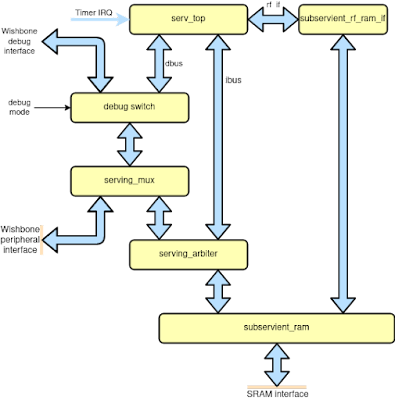
The core of the Subservient SoC. Made for portable ASIC implementation. Needs RAM, peripherals and a way to initialize the instruction/data memory
 

The subservient_core exposes a Wishbone interface where we can hook up peripheral devices. Since we want the simplest thing possible, we just terminate the peripheral bus in a 1-bit GPIO controller and make a wrapper. The greyed out blocks are potential future additions.
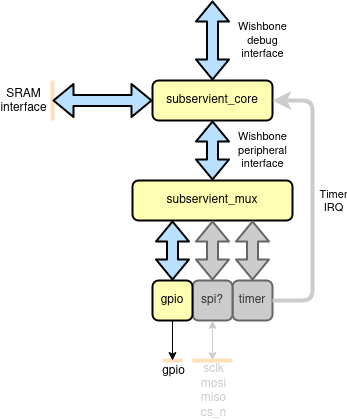
The simplest I/O configuration for Subservient. Just a single output pin

 And for someone looking at it from the outside, it looks like this.


Now that we have a design we want to do some testing. For this, we create a testbench that contains a SoC hooked up to a model of the OpenRAM macro that we intend to use in the SkyWater 130nm OpenMPW tapeout and a UART decoder so that we can use our GPIO as a UART. We also add some hastily written lines of code to read a Verilog hex file and write the contents to memory through the debug interface before releasing the SoC reset. This task would be handled by the Caravel harness in the real OpenMPW setup.
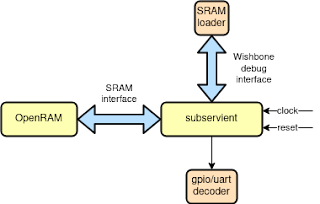
Subservient testbench. Starts by loading a program to the simulated RAM through the debug interface and then hand over to SERV to run.


Adding FuseSoC support

We are almost ready to run some simulations with FuseSoC. The last thing remaining is just to write the core description file so that FuseSoC knows how to use the core. Once you have a core description file, you will be able to easily use it with almost any EDA tool as we will soon see. Having a core description file is also an excellent way to make it easier for others to use your core, or conversely, pull in other peoples cores in your design.

We begin with the CAPI2 boilerplate.

CAPI=2:

name : ::subservient:0.1.0


Next up we create filesets for the RTL. Filesets are logical groups of the files that build up your design. You can have a single fileset for your whole design or a fileset each for your files. The most practical way is often to have a fileset for the core RTL, one for each testbench, and separate ones for files that are specific for implementation on a certain FPGA board etc. This is also what we will do here.

Filesets is also where you specify dependencies on other cores. In our case, subservient_core instantiates components from the serving core (or package to use the software equivalent of a core) so we add a dependency on serving here. The serving core in turn depends on the serv core. This means we don't have to care about the internals of either serving or SERV. Their respective core description files take care of the details for us. And if some larger project would want to depend on the subservient SoC, the core description file we are about to write will take care of that complexity for them.

The testbench fileset uses an SRAM model available from a core called sky130_sram_macros and also our trusty testbench utility core, vlog_tb_utils. Finally we add a couple of test programs in Verilog hex format.

filesets:
  core:
    files:
      - rtl/subservient_rf_ram_if.v
      - rtl/subservient_ram.v
      - rtl/subservient_debug_switch.v
      - rtl/subservient_core.v
    file_type : verilogSource
    depend : [serving]

  mem_files:
    files:
      - sw/blinky.hex : {copyto : blinky.hex}
      - sw/hello.hex  : {copyto : hello.hex}
    file_type : user

  tb:
    files:
      - tb/uart_decoder.v
      - tb/subservient_tb.v
    file_type : verilogSource
    depend : [sky130_sram_macros, vlog_tb_utils]

  soc:
    files:
      - rtl/subservient_gpio.v
      - rtl/subservient.v
    file_type : verilogSource


We then define the user-settable parameters to allow us to easily change test program from the command-line, experiment with memory sizes and decide whether the GPIO pin should be treated as a UART or a regular I/O pin.

parameters:
  firmware:
    datatype : file
    description : Preload RAM with a hex file at runtime
    paramtype : plusarg

  memsize:
    datatype    : int
    default     : 1024
    description : Memory size in bytes for RAM (default 1kiB)
    paramtype   : vlogparam

  uart_baudrate:
    datatype : int
    description : Treat gpio output as an UART with the specified baudrate (0 or omitted parameter disables UART decoding)
    paramtype : plusarg


Finally we bind it all together by creating a simulation target. Targets in the core description files are end products or use-cases of the design. In this case, we define a target so that we can run the design within a testbench in a simulator. The targets is also where we reference the filesets and parameters that were defined earlier. This allows us to use different subsets of the core for different targets. We also throw in a derivative sim_hello target as a shortcut to run the other test program, a default target and a lint target so that we can get quick feedback on any potential design mistakes.

targets:
  default:
    filesets : [soc, core]

  lint:
    default_tool : verilator
    filesets : [core, soc]
    tools:
      verilator:
        mode : lint-only
    toplevel : subservient

  sim: &sim
    default_tool: icarus
    filesets : [mem_files, core, soc, tb]
    parameters :
      - firmware
      - memsize
      - uart_baudrate
    toplevel : subservient_tb

  sim_hello:
    <<: *sim
    parameters :
      - firmware=hello.hex
      - memsize=1024
      - uart_baudrate=115200


With this in place we can now run

$ fusesoc run --target=sim_hello subservient

which will run the testbench with the hello.hex program loaded and the GPIO output interpreted as a UART with 115200 baud rate. The output should eventually look something like this.
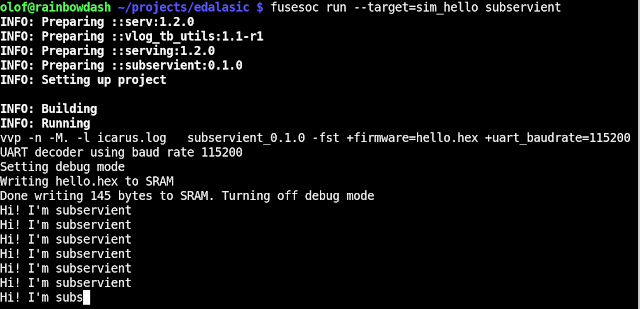
Running our first FuseSoC target on Subservient

We can run any other program like this, for example the blinky example which toggles the GPIO pin on and off, by supplying the path to a verilog hex file containing a binary

$ fusesoc run --target=sim subservient --firmware=path/to/subservient/sw/blinky.hex

 We won't go into detail on how to prepare a Verilog hex file, but there's a Makefile in the subservient sw directory with some rules for to convert an elf to a hex file.

And as usual, you can list all targets with

$ fusesoc core show subservient

and get help about all available options for a specific target by running

$ fusesoc run --target=<target> subservient --help

Prototyping on FPGA

All right then. Simulations are nice and all, but wouldn't it also be good to have this thing running on a real FPGA as well? Yes, but let's save ourselves a bit of work. In the simulation we could load a file through the debug interface from our testbench. In the ASIC version, that task will be handled by someone else. But to avoid having to implement an external firmware loader in Verilog for the FPGA case, we use the FPGA's capability of initializing the memories during synthesis instead. Remember, always cheat if you have the option!

What board we want to use does not really matter. We can probably just take any random board we have at hand and add the proper pinout and clocking. I happened to have a Nexys A7 within arm's reach so let's go with that one.

We put the FPGA-specific clocking in a separate file so that we can easily switch it out if we want to run on a different board. Next up we add an FPGA-compatible SRAM implementation that supports preloading. We can steal most of the logic for the memory and clocking as well as a constraint file from the Servant SoC (Remember, always steal if you have the option!). Finally we add the subservient SoC itself, connect things together and put them in a new FPGA toplevel like this.

FPGA-friendly version for quick prototyping of our ASIC-friendly SoC

We're now ready to build an FPGA image but it's probably a good idea to run some quick simulations first to check we didn't do anything obviously stupid. All we need for that is a testbench, and since the Subservient FPGA SoC is very similar to the Servant SoC from the outside, we just take the Servant testbench and modify it slightly. We also put in a clock generation module that just forwards the clock and reset signals. With the code in place we add the necessary filesets

  fpga:
    files:
      - rtl/subservient_generic_sram.v : {file_type : verilogSource}
      - rtl/subservient_fpga.v : {file_type : verilogSource}
    
  fpga_tb:
    files:
      - tb/subservient_fpga_clock_gen_sim.v : {file_type : verilogSource}
      - tb/subservient_fpga_tb.cpp : {file_type : cppSource}

and the target for the fpga testbench

  fpga_tb:
    default_tool : verilator
    filesets : [core, soc, mem_files, fpga, fpga_tb]
    parameters: [firmware, uart_baudrate=46080]
    tools:
      verilator:
        verilator_options : [-trace]
    toplevel: subservient_fpga

to the core description file. Note that we're using a baud rate of 46080. That's because we define the testbench to run at 40MHz instead of 100MHz (for reasons that will become clear later) and then we must scale down that baud rate to 40% of 115200. Let's give it a shot by running

$ fusesoc run --target=fpga_tb subservient

Works in simulation! This increases our confidence in the FPGA implementation

Works like a charm. Now we have more confidence when going to FPGA.

There are a couple of things that differ between our simulation and an actual FPGA target. Instead of a testbench we need to add an FPGA-specific clocking module and a pin constraint file for our board. So let's put them in a new fileset and then create a target referencing these files and telling the EDA tool (Vivado) what FPGA we're targeting.


filesets:
  ...
  nexys_a7:
    files:
      - data/nexys_a7.xdc : {file_type : xdc}
      - rtl/subservient_nexys_a7_clock_gen.v : {file_type : verilogSource}

targets:
  ...
  nexys_a7:
    default_tool: vivado
    filesets : [core, soc, mem_files, fpga, nexys_a7]
    parameters: [memfile]
    tools:
      vivado: {part : xc7a100tcsg324-1}
    toplevel: subservient_fpga

 VoilĂ ! Now we can run our FPGA build with

$ fusesoc run --target=nexys_a7 subservient

If everything goes according to plan and we have the board connected, it will be automatically programmed. Using our favorite terminal emulator and setting the correct baud rate should then give us the following output.

Wow! It's just like in the simulation...which is kind of the idea

Alright then, simulation and FPGA is all good, but our original idea was to put this in an ASIC. Sooo....how do we do that?

Making an ASIC target

The good news is that we have actually done most of the work already, and this is very much the point of FuseSoC and Edalize. It allows you to quickly retarget your designs for different tools and technologies without having to do a lot of tool-specific setup every time. Now, OpenLANE is a bit special compared to other EDA tool flows so there will be a couple of extra bumps in the road, but hopefully these will be smoothed out over time.

Since we have an Edalize backend for the OpenLANE toolchain already, all we need to to is to add any technology- and tool-specific files and invoke the right backend. OpenLANE can be operated in several different ways, but the way that Edalize integration currently works is by adding TCL files with OpenLANE configuration parameters that will be picked up by OpenLANE and then Edalize assumes it will find an executable called flow.tcl and that a usable PDK is installed and can be found by OpenLANE.

So on the tool configuration side, all we need to do is to add a TCL file containing the parameters we want to set. And the only things we are strictly required to put into this file is information about the default clock signal and target frequency.

set ::env(CLOCK_PERIOD) "25"
set ::env(CLOCK_PORT) "i_clk"

There are a million other parameters that can be set as well to control size, density and different routing strategies so I encourage everyone to read the OpenLANE docs and experiment a bit, but for this time we just add the aforementioned settings to a tcl file and add a fileset and target.

filesets:
  ...
  openlane:
    files:
      - data/sky130.tcl : {file_type : tclSource}

targets:
  ...
  sky130:
    default_tool: openlane
    filesets : [core, soc, openlane]
    parameters :
      - memsize
    toplevel : subservient

Seriously, it's not harder than that. We're now ready to run OpenLANE and have our GDS file. The thing is, though, that it can be a bit finicky to install the toolchain and the PDK. Building the PDK from sources using the official instructions requires downloading gigabytes of Conda packages, keeping track of a number of git repositories and an somewhat convoluted build process. There are several disjointed attempts at providing a pre-built PDK but at the time of writing there didn't seem to be an agreement on how to do that. Also, the OpenLANE toolchain itself is a bit special in that the recommended way of running it is from a Docker image rather than install it directly. So, with these two facts at hand we decided to simply prepackage a Docker image with OpenLANE and a PDK included. This image gets updated from time to time, but in general it's a bit behind the upstream version. But that's totally fine. There's seldom any need for running the absolutely latest versions of everything.

Launcher scripts

But how then do we run OpenLANE from the Docker image? For that we use another one of Edalize's nifty features, launcher scripts! Normally, Edalize calls the EDA tools it wants to run directly but we can also tell Edalize to use a launcher script. A launcher scripts is a script (or any kind of program, really) that gets called instead of the EDA tools. The launcher script is also passed the original command-line as parameters so that it can make decisions based upon what Edalize intended to originally run.

In this case, Edalize wants to run flow.tcl -tag subservient -save -save_path . -design . when we invoke the OpenLANE backend but telling Edalize to use a custom launcher that we choose to call el_docker, the command-line instead becomes el_docker flow.tcl -tag subservient -save -save_path . -design .

If we just want the launcher script to do something special when OpenLANE is launched, then we simply check if the first argument is flow.tcl. In that case we do something special, or otherwise call the original command-line as usual. Simple as that.

So what special magic do we want to do for OpenLANE? We want to run flow.tcl from our OpenLANE+PDK Docker image and at the same time make our source and build tree available within the image. The whole command in its simplest forms looks something like this when invoked from the Edalize work root

$ docker run -v $(pwd)/..:/src -w /src/$(basename $(pwd)) edalize/openlane-sky130:v0.12 flow.tcl -tag subservient -save -save_path . -design .

We could make this script a bit nicer if we want so that we run as the ordinary user instead of as root, and so on, but this has in fact already been taken care of. The aforementioned el_docker launcher script already exists and is installed together with Edalize. And not only does it support running OpenLANE through Docker but also a whole bunch of other tools like verilator, icarus, yosys, nextpnr and so on. So you can just as well use this script for simulation and FPGA purposes if you for some reason don't want to natively install all these EDA tools. The proprietary tools are for obvious reasons not runnable this way since the EDA vendors would probably get very, very angry if we put their precious tools in containers and published them for everyone to be used. Hopefully we can completely avoid proprietary tools some day, but not yet. Anyway, so how do we tell Edalize to use a launcher script? Currently, this is done by setting the EDALIZE_LAUNCHER environment variable before launching FuseSoC (which launches Edalize).

So, our final command will be:

$ EDALIZE_LAUNCHER=el_docker fusesoc run --target=sky130 subservient

And with that, my friends, we have built a GDS file for the Subservient SoC that we can send to the fab and get real chips back. And this we did, but that's for another day. So let's just lean back and take in the beauty of the world's smallest RISC-V SoC, created by open source tools, and think a bit about how incredibly easy it was thanks to FuseSoC and Edalize (and of course NLNet who funded the Subservient SoC and integration of OpenLANE and Edalize).

 And now, it's your turn to do the same with your own designs. Good luck!


Friday, February 11, 2022

FOSSi Explosion 2021


Do you know what just happened? 2021 just happened. Most years has its ups and downs, but when it comes to 2021 it seems like the prevalent feeling was that everyone just wanted it to be over. And now it is over, except for all those damn retrospectives. So, with the risk of opening up some old wounds I would like to take a look at what happened last year in my corner of the free and open source silicon world.

In the 2020 retrospective I wrote about a couple of big milestones, like the first vendor-supplied FOSSi FPGA toolchain and the first fully FOSSi ASICs. 2021 was... more of the same I guess. And personally I think this is the interesting part. Everyone is now working hard to actually do stuff with these new opportunities that arose in 2020. Finding new possibilities, hitting limitations and working around them. Solving problems, being creative and coming up with new ideas. Less headline-friendly but will have more impact longer term. And 2021 was by no means void of interesting news. Just look at the FOSSi Foundation newsletter El Correo Libre that was packed to the brim with interesting projects and announcements each month.. It's more that I couldn't think of anything that particularly stood out so I'm moving directly to the more personal events instead. Is that ok? Of course it's ok. I'm writing now!


FuseSoC

Let's start by looking at my oldest active open source project, FuseSoC, that turned ten years old in 2021. For those who don't already know, FuseSoC is an award-winning package manager for HDL code. Package manager is a concept that is well-known for software developers, from system-level package managers like apt and rpm to language-specific ones like npm, pypi maven and cargo.

For chip designers, the idea of a ubiquitous package manager has not taken hold and most companies invent and maintain their own incompatible system. Kind of like how we did software up to the mid nineties. Although not as ubiquitous as I had hoped by now, FuseSoC has over its ten years life span still grown to be the most widely used package manger for Verilog/VHDL code and is used internally in large and small companies as well as powering many of the most popular open source silicon projects.

 So how was 2021 for FuseSoC? Frankly, not all that exciting. There was the FuseSoC 1.12 release early 2021 that you can read about here. We got to see some new features, like fellow RISC-V Ambassador Carlos Eduardo de Paula showing how to use FuseSoC with Chisel-based designs, but most of the work done on FuseSoC over the year was to prepare for a big, exciting 2.0 release that will happen some time in 2022. Still, it makes sense to mention FuseSoC first because it is used by every single other project written about here, and the number of projects using FuseSoC steadily rises regardless of the activities on FuseSoC itself.

And just how to get started with FuseSoC for a new design is a question that pops up from time to time. So when Alibaba Group's T-Head Semi released their OpenC910 I did a spur-of-the-moment live coding session, adding FuseSoC support for the core, documenting it through a Twitter thread for everyone to see the process as it unfolded. Check it out if you want to see the unfiltered process of taking a previously unseen core and adding FuseSoC support for it, as well as  showing some of the benefits in doing so.


Edalize

Edalize started out as a part of FuseSoC but was split out into its own project in 2018. That turned out to be the right decision because it is now used in several different projects other than FuseSoC. And in 2021, Edalize saw far more activity than FuseSoC. In case someone is wondering what Edalize is, it's an abstraction library for EDA tools. Basically, it provides a common API for different EDA tools such as simulators, formal tools, linters, synthesis tools and FPGA toolchains. So instead of writing Makefiles, TCL scripts and other configuration files for 30 different EDA tools manually, you just need to describe it once it the EDAM (EDA Metadata) format and Edalize will generate the correct setup files for your tool of choice. Very handy. The award-winning five minute Edalize introduction video provides more detail about this.

As mentioned, Edalize saw a lot of activity during 2021. First of all it gained support for three new FPGA toolchains; oxide for Lattice Nexus chips, libero for MicroSemi devices and apicula for Gowin FPGAs. The biggest news in terms of tool support was however the openlane backend which provided the first ASIC flow for Edalize. I wrote about that in A first look at Edalize for ASIC flows last year if you want to learn more.

From cheese to chips with the Flow API


A large chunk of the work done in 2021 was not immediately visible to users but was done to lay the foundation of the new Flow API, which will add a great deal of more features and flexibility to Edalize in the future. This has been in the works for quite some time and for those wanting to get a rough idea about it, I recommend taking a look at the article accompanying the Edalize 0.3.0 release which contains a brief introduction to the flow API.


SERV

Moving on to another of my more well-known projects, the award-winning SERV, the world's smallest RISC-V CPU, there's plenty of news to report. The question everyone seems to ask first is if it got any smaller, and yes, it did. I was able to optimize away around 20% of the remaining FFs during 2021, although the combinatorial parts of SERV remained more or less the same size.


 But size isn't all that matters. The documentation was massively improved with most of the internal modules now having schematics which are accurate down to the gate-level. And to prove this is actually the fact, I redid the ALU in Digital (a logisim clone) from the schematics and used that as a drop-in replacement of the original ALU. If anyone has the time and interest it would be really cool to see all of SERV implemented in a Logisim-like program and even use that as an interactive documentation somehow.

Working, runnable implementation of the SERV ALU
 

In addition to schematics, I also added descriptions and timing diagrams for most of the important signal transitions. The ambition is to not only be the world's smallest RISC-V CPU, but also the most well documented. Still got some ways to go but it's already really good. As for new features, SERV got support for the M extension thanks to Zeeshan Rafique who added that as part of Google Summer of Code.

Another big milestone was that SERV was taped out at least four times during 2021 as part of the OpenMPW programme. Two of those tapeouts, both of them the SERV-based Subservient SoC, were done by my colleague Klas Nordmark and I (mostly Klas) as part of a grant by NLNet Foundation to add the Edalize OpenLANE backend and an accompanying reference project. There will hopefully be more things written about this particular project in 2022, especially when we receive the actual chips.

I also found some more time in 2021 to talk about SERV and presented at four conferences, with a brand new SERV video premiering at the embedded RISC-V Forum and being subsequently updated with some additional project ideas for the following events. This new video has shown to be quite popular and goes into more detail on more things that happened during 2021. It's still not as popular as the SERV talk from WOSH 2019 though which apparently has been seen almost 30000 times(!?!?!?)


CoreScore

CoreScore is one of the more niche uses of SERV... ok, most uses of SERV are pretty niche come to think of it. Anyway, CoreScore is a project that tries to answer the question How big is my FPGA? by simply seeing how many SERV cores we can fit into the FPGA
on different development boards. Pretty straight-forward but also very useful for comparing both FPGAs, and also the efficiency of different toolchains. Going into 2021 the record was 5087 cores in a single FPGA. That number was topped twice in 2021 with 6000 cores being the new world record thanks to Sylvain Lefevbre and his Xilinx VCU128 board. Apparently this made some numbers in the tech media and among other things ended up on Tom's Hardware. That was particularly fun as I have fond memories of my 15 year old self spending hours and hours on Tom's Hardware trying to find which motherboard was best for overclocking my Celeron 300A Mendocino. But it was not just in the top where things happened in CoreScore land. In total there were 19 new scores submitted by different users, almost doubling the number of known CoreScores. And best of all, there's now a beautiful highscore table at corescore.store to keep track of all the numbers.


If you're missing your favorite board in the list, don't hesitate to find out the CoreScore and submit a number for it. Love to see more!

LED to Believe

Another less known but somewhat similar project to CoreScore is project LED to Believe. The goal is simple. If you have an FPGA board, LED to Believe will be able to generate and FPGA image that blinks a LED on your board. While being a very simple project it does serve two purposes. The first is to act as a pipe cleaner for your toolchain. FPGA toolchains are complex and there's a suprising amount of things that can go wrong. Having the most simple project possible helps verifying that the tools are properly installed and can generate an image before you move on to other projects. The second purpose is to be an entrypoint into using FuseSoC and demonstrate how well-suited FuseSoC is for porting a design to different hardware targets. And I would like to claim that it has been very successful in this regard. Already when the year started we could blink LEDs on 44 different FPGA boards and as the year ended this number had risen to 77 thanks to all fantastic contributions from users all over the world. And again, see a board that's missing? Roll up your sleeves and send me a pull request.

SweRVolf

The final big open source project I took into 2021 is SweRVolf, a reference platform for the Western Digital SweRV family of RISC-V cores. More recently, SweRVolf is also the foundation of the RVFPGA Computer Architecture Course from Imagination University Programme. RVFPGA is rapidly gaining popularity and I'm both excited and a bit scared now that thousands of university students will get their first contact with computer architecture, RISC-V, Zephyr, open source silicon and FuseSoC through a SoC I designed. And with that in mind, there has been some work to make SweRVolf even more robust and accessible.


The year started with landing support for simulating using Vivado XSim in addition to the already supported Verilator and QuestaSim. Software support was improved as well thanks to a port of SweRVolf for the Tock OS. Increased availability could also be seen on the hardware side where it is now possible to use the smaller SweRV EL2 CPU as an alternative its larger sibling SweRV EH1. The EL2 support was also a prerequisite to run SweRVolf on the Digilent Basys3 board, which carries a smaller FPGA than the Nexys A7 and thus can only fit the EL2 CPU. Many of the latest features can be read about in the SweRVolf 0.7.4 announcement.

ViDBo

The last piece of functionality added to SweRVolf is technically a separate project, but it was born out of a need in RVFPGA and is where it was first used as well. As RVFPGA will become available as an online course, there were some concerns about hardware costs. The online education platform used wasn't totally happy about requiring students to buy an FPGA board. This could be solved by running the course entirely using an RTL simulator but it's really not the same thing as interacting with a board, running your own code and see how it reacts to moving switches and watching LEDs light up from your memory writes. There have been plenty of efforts to visualize simulations by providing some kind of GUI, either in terminal or through some graphics. All of those however seems to be one-off efforts and not easily portable. I wasn't really keen on either repurposing an existing solution nor writing a new single-use system. But then I got an idea. Instead of a tight coupling between simulator and GUI I decided to define a protocol that communicates I/O state over websockets. Websockets are readily available in almost any programming language and most importantly can be used directly in browsers without any complications.

ViDBo : AKA, SoC over sockets
 

This allows for adding a small component into the simulation model that sends simulation model outputs and receives inputs over websockets. On the other side of the websockets connection sits a browser with an interactive picture of the board, a Virtual Development Board, or ViDBo. This gets us as close as we reasonably can to a no-cost FPGA board experience without any simulator- or OS-specific building blocks. And while this first implementation uses an RTL simulator as the backend and a web browser as its frontend, there is nothing that stops us from having a pure software model as the backend or a headless CI system that acts as a frontend, injecting I/O state and observing outputs. VidBo only defines the protocol sent over websockets, not what sits on either side of the protocol. The only drawback of VidBo is that I now have yet another open source project to maintain which probably was the last thing I needed. Oh well, so far it hasn't been all that bad and I have had some very welcome contributions.

Other stuff

Wow! This turned out far longer than I had anticipated. Sorry about that. But if you got this far and for some reason still haven't had enough of SERV and FuseSoC or want to learn a bit more about the history of open source silicon, I also did a series of video interviews during 2021, covering different topics. First out was two episodes on open source silicon and RISC-V for the FOSS North pod followed by Matt Venn interviewing me for the YosysHQ. Highly recommend checking out both those channels even if you don't want to hear more of me. They both have many high quality interviews with a wide range of topics and guests.

I think this covers most of my open source silicon activities over the past year. Wait! One more thing. I made a UART that's small enough to fit in a tweet in case, you know,  someone needs a UART that's small enough to fit in a tweet.

Finally, I would also like to mention and extend my thanks to Qamcom and NLNet Foundation for funding work on Edalize and Subservient as well as Imagination Technologies and Western Digital who have been funding most of the SweRVolf and ViDBo work during 2021. Take note, all you freeloading companies out there. This is what real support of open source looks like and how you help build a healthy ecosystem.

And with those well chosen words we can leave 2021 without any regrets and sail into the bright future of 2022. Bon voyage!