Repository navigation
[css-fonts] system-ui behavior is undesired for some users #3658
Description
From crbug.com/554590#c21, github, Bootstrap, and Wikipedia decided to stop using the system-ui font family because the visual quality of their pages is suffered on some OS/language combinations.
Context reported in the issue above:
Activity
litherum commentedon Feb 28, 2019
One of two things is true:
Malvoz commentedon Mar 1, 2019
Why is this a CSSWG issue? Does the spec need clarification or is this a suggestion for deprecation?
The blog post mentions a couple of things:
Why would one expect all OS versions to render the same font? That is no different to using a "system font stack"-hack.
Not all fonts support all languages, which is unfortunate and an issue with the rendered font.
The rendered font is considered undesired, that'd be an issue for that OS version?
kojiishi commentedon Jul 15, 2019
I guess we need to solve this when we add more system font families.
@litherum
I’m afraid I don’t understand what you’re suggesting. Can you please expand? I agree 1 is true. I’m not sure what 2 means, and I’m not sure what you suggest from these two.
@Malvoz
One of the original motivations of
system-uiis to deprecate non-standard vendor-specific values (-apple-systemandBlinkMacSystemFont) and we thought what the spec currently defines can help it:However, github, medium, bootstrap, and wikipedia considered that this definition isn’t what they want for Chinese Windows, and that they’re back to the vendor-specific values because they provide what they want. True that this is Windows specific problem, but if people stops using
system-uiand stick to non-standard values due to the problem, isn’t it our failure?Blink can fix this. I’m hoping to solve this somehow, make
system-uiusable, and deprecate our vendor-specific value. But 1) I wanted to note that it will no longer “the default UI fonts on the platform” in some cases, and 2) I would like to sync with other browsers on Windows. /cc @atanassov @emilioAmeliaBR commentedon Jul 15, 2019
Koji, what particular change are you requesting for the CSS definition of
system-ui?In general, I think user agents should have flexibility to select the font(s) to use, even if it doesn't always match the System UI. And we already have text in Fonts 4 allowing the generic font keywords to map to composite fonts that consist of different fonts for different languages. But, if cross-browser consistency on a given platform is important, then we might need stricter guidance than that.
litherum commentedon Jul 16, 2019
If the Windows system font really is ugly in Chinese, what do Chinese native apps do?
kojiishi commentedon Jul 17, 2019
They just live with the fonts. The difference is that, those apps are in Chinese and that no other choices are available to render Chinese characters. On the other hand, they were seeing much better fonts when they visit github and other English content sites. But with
system-ui, all such contents were downgraded to the Chinese fonts too.Japanese is in similar situation, and I was under impression that users/authors prefer native fonts, even though it looks worse. The feedback revealed that I was wrong. They preferred English system fonts, no matter which language their platform is in, at least for English contents.
We probably need to hard-code the name of English system fonts, and pick it instead of the actual default UI fonts under some conditions. I haven't finalized the exact heuristic yet, I'll think about it more.
Oh, really, great if so, thank you. The definition of
system-uididn't read so to me, but my English isn't great, so I trust your reading.If the spec text already allows UA to pick other arbitrary fonts than "the default user interface font on the platform", this might not be a spec issue. I can investigate how to make authors happy, and may sync with @atanassov and @emilio outside the WG.
NightFurySL2001 commentedon Sep 26, 2022
I would argue that the current implementation of
system-uiis on point and should be kept that way; the issue pointed out by https://infinnie.github.io/blog/2017/systemui.html is a non-issue.What this section missed in context is that, the system font itself is also changed (to the uglier but clearer bitmap font, which is SimSun for Simplified Chinese system) when the theme changed, so what
system-uievaluates to be does indeed match the current system font. The following provides screenshots for the actual Windows 7 system, please notice the font used by the file names on the desktop and Windows Explorer.Windows 7 Aero theme, using Microsoft YaHei:


Windows 7 Classic theme, using SimSun:
`index.html` source code
This is an "issue" with Windows rendering engine, not with the CSS specs. Display for CJK (and corresponding Latin text in their languages) has been using bitmap fonts for a long time, and in places where clarity is required, using bitmap font is better than using newer system fonts (considering there is still a relatively large CRT moniter user group in China).
On Windows 7 and earlier, there are two ways:
I am unable to test on Windows 8 and later due to single display language pack limitation, but I would guess the High Contrast settings might result in the same behaviour (Chinese font reverted to bitmap font, i.e. SimSun/PMingLiU for high contrast theme for display clarity).
Do be noted that this "issue" only arises when the user voluntarily choose to use the Classic theme (Windows 7 & lower)/High Contrast settings (Windows 8 & higher), which is a correct response as the user might intend to use the theme/settings for their individual requirements. We as developer should in no way work against the choices users had made, even though it might look worse for us (but not them).
Thus, my conclusion is:
1. The Windows system font really is terrible in some situations, but intended. There is no reason to stop using/implementing
system-ui, and with Firefox adding support in August 2021 (mdn/content#7751), there is literally nothing stopping the usage ofsystem-ui.fireattack commentedon Sep 26, 2022
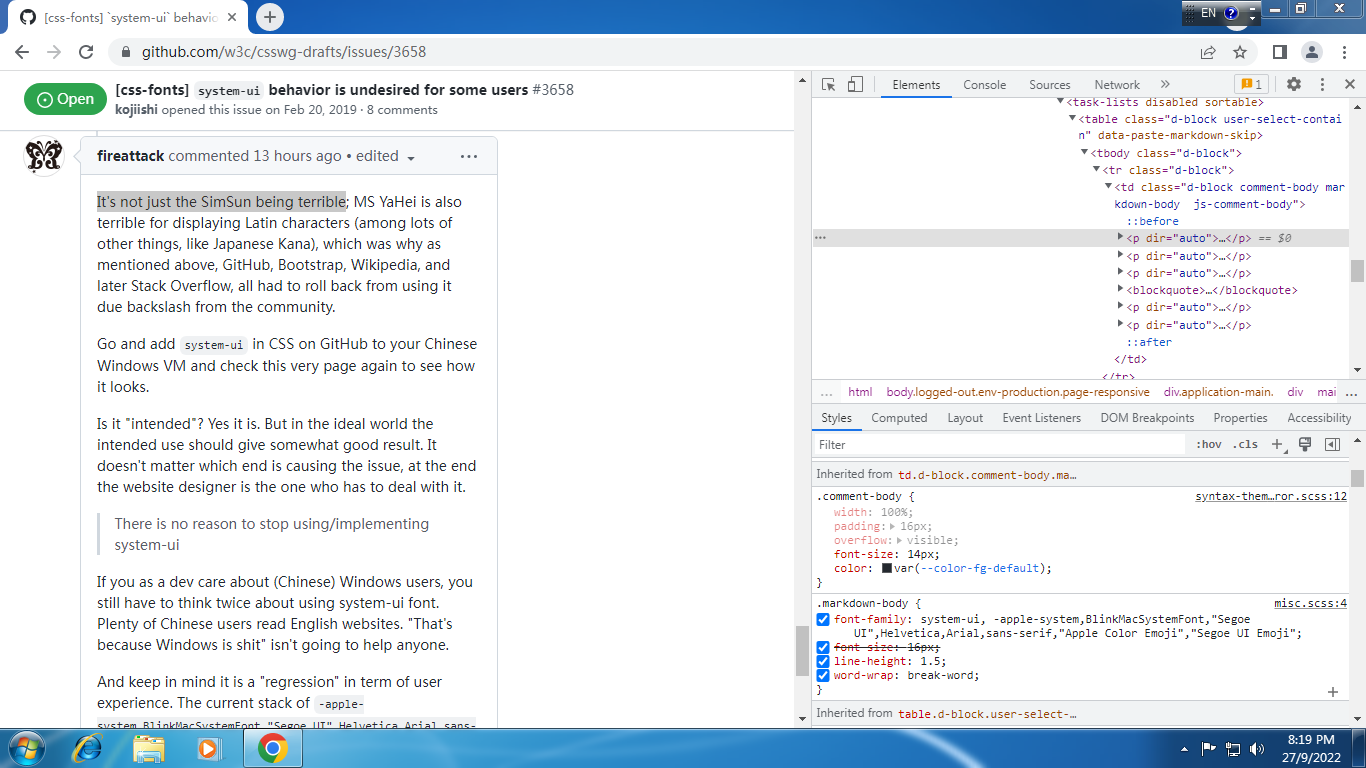
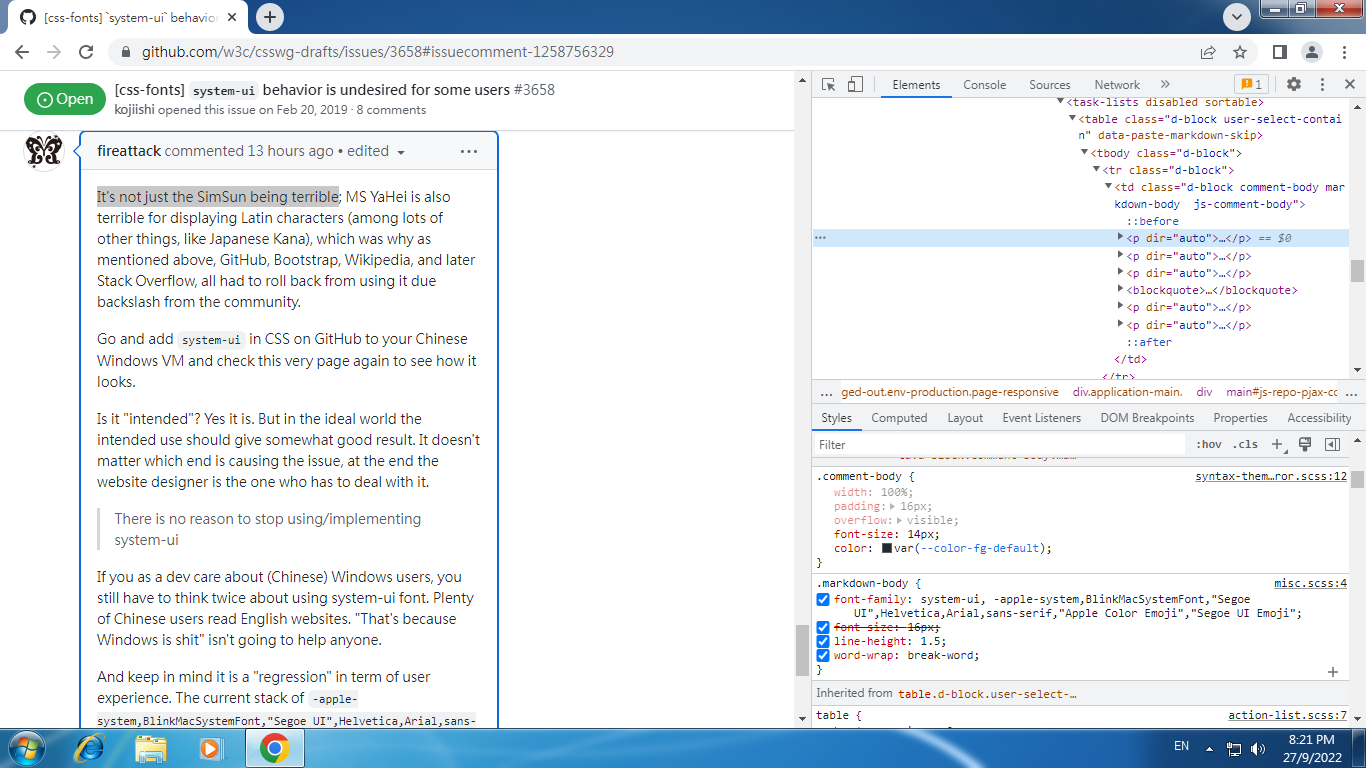
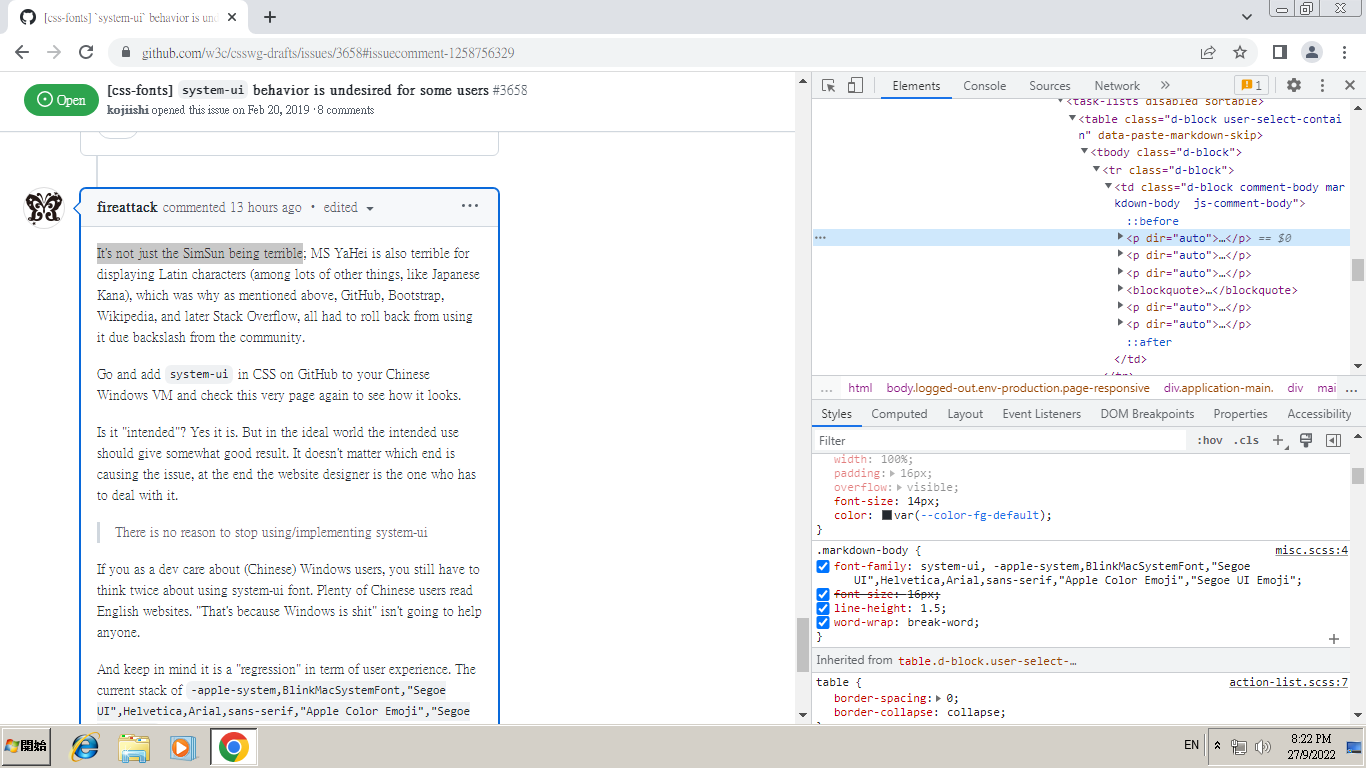
It's not just the SimSun being terrible; MS YaHei is also terrible for displaying Latin characters (among lots of other things, like Japanese Kana), which was why as mentioned above, GitHub, Bootstrap, Wikipedia, and later Stack Overflow, all had to roll back from using it due backslash from the community.
Go and add
system-uiin CSS on GitHub to your Chinese Windows VM and check this very page again to see how it looks.Is it "intended"? Yes it is. But in the ideal world the intended use should give somewhat good result. It doesn't matter which end is causing the issue, at the end the website designer is the one who has to deal with it.
If you as a dev care about (Chinese) Windows users, you still have to think twice about using system-ui font. Plenty of Chinese users read English websites. "That's because Windows is shit" isn't going to help anyone.
And keep in mind it is a "regression" in term of user experience. The current stack of
-apple-system,BlinkMacSystemFont,"Segoe UI",Helvetica,Arial,sans-serif,"Apple Color Emoji","Segoe UI Emoji"can at least generate good result (Segoe UI) for these users (without sacrificing other users).NightFurySL2001 commentedon Sep 27, 2022
@fireattack The Latin characters in Microsoft YaHei comes from Segoe UI (of Windows 7), just slightly enlarged. I don't think it looks terrible; in fact, comparing it to the original Segoe UI it is way more legible due to its increased font size.
For the benefit of doubt, I have also tried out Traditional Chinese (Microsoft JhengHei) which also is based on Segoe UI. It did not make too much of a difference too. Both Chinese variants only had "issue" when using Windows 7 Classic theme.
Following are attached screenshots from my Windows 7 work machine, with UI language English, Simplified Chinese and Traditional Chinese, all 3 presented using both Aero theme and Classic theme:
Expand for screenshot
English
Aero
Evals to Segoe UI.

Classic
Evals to Tahoma.

Simplified Chinese
Aero
Evals to Microsoft YaHei.
Classic
Evals to SimSun.

Traditional Chinese
Aero
Evals to Microsoft JhengHei.
Classic
Evals to PMingLiU.
Please note: most of these sites changes reference the only one "issue" regarding
system-ui: https://infinnie.github.io/blog/2017/systemui.html on GitHub (GitHub Primer CSS, Bootstrap [note that the issue author is the same as the blog post author - conflict on interest], Wikipedia), which only "affects" Simplified Chinese, Classic theme, Windows 7 users. It should be in no way that such a minority group should be allowed to direct most of the users to stop usingsystem-uijust because the font rendering is bad for their language in one old settings, ignoring all the other benefits of usingsystem-ui.Please note that what
system-uiis not for giving good result, it is to integrate with the look and feel of the native OS (https://drafts.csswg.org/css-fonts-4/#system-ui-def). It is just faithfully reproducing what the user had already been using on their native OS, regardless of the font choice. If the designer doesn't like it, do stop usingsystem-ui, but they're just missing on the chance to localize to the users correctly.Do note that this will make Windows 7 Classic theme (pointed in "the issue") display the wrong font: it should have been Tahoma, not Segoe UI.
When I was in discussion with GitHub when they naively added Meiryo to the font stack (overriding Chinese text too), the devs have mentioned that they would very much like to use
system-ui, including if the user chose to use a serif font, but is blocked only due to "the issue". Quote:GitHub Primer's response so far is to allow users to write their own font family stack.
Mentioed in https://infinnie.github.io/blog/2017/systemui.html:
I acknowledge that this is an issue on Windows, but do note that this issue also affect other languages and systems too.
On Windows, Traditional Chinese uses Microsoft JhengHei, which has an even worse Bold weight compared to Simplified Chinese Microsoft YaHei. Both Chinese fonts come with 3 weight: Light, Regular, Bold. Following is a rough font weight comparison for both Chinese fonts (hanzi only) relative to Segoe UI (italic are new weights not in Windows 7):
Meiryo for Japanese isn't anywhere good; it only have 2 weights: Regular and Bold.
On Mac side of things, the Chinese font PingFang comes in Simplified Chinese (China), Traditional Chinese (Taiwan), and Traditional Chinese (Hong Kong), each comes with 6 weights. However, the weights provided are (source (2)):
Its Semibold isn't even reaching Bold weight of SF Pro.
Only Japanese text is remotely good on Mac: Hiragino Sans comes with W0-W9, matching closely with SF Pro's weights.
It's way better on Android (and some Linux) side: Noto Sans CJK comes with 7 weights, roughly matching Roboto's 6 weights. Also, all CJK regions uses the same font design, which is a plus when using
system-uisince there is no discrepency between different localization.Point is, CJK fonts have been quite a pain on system vendors due to its pricey nature. "lacking many font weights" is definitely not a factor when considering a design to match user's system: there's only that many weights on all these OS, and OS fonts are limited to the same set of weights too. The burden of
system-uibeing "ugly" is on OS vendor on this issue. Website developers will be better off hard coding the best font for their own locale (which might be an issue; see next point) instead of relying onsystem-uiif they want a "good result" instead of "system default". Note that "system default" ∌ "good result" outside of Latin text.Also, there is additional benefits such as correctly localizing the font for the users, especially towards CJK users. Let me demonstrate: the following is a text typesetted in Microsoft YaHei (SC), Microsoft JhengHei (TC), Meiryo (JP):
Notice the following characters:
将,甩,复,与,窗. These characters are written differently in different languages/regions due to an issue: Han unification. By usingsystem-uiand correct user localization settings (which most Chinese users do), this above issue is mitigated by using the correct font stack to display CJK Unified Ideographs, and preventing display of incorrect localization. Usingsans-serifdoes not come with this benefit as it uses the default font fallback regardless of system locale settings, which on Windows prioritise Japanese over Chinese and leading to more issues than of broken Latin text. Hard-coding the font stack will only work if you're targeting one specific locale, as you will be required to order the priority of fonts. Most Chinese users will appreciate "correct writing form" more over "looking good".The locale settings in
system-uidoesn't only help CJK, it might help with other locales too (e.g. different italic forms of Cyrillic).Ignore this point if your website has correct language tagging:
<html lang="zh-hans">/zh-hant/jawill fix the font forsans-serifmost of the time. If your (or user-generated) content does not have any language information,system-uiis the better bet for localization.As I said, no reason to stop using
system-uifor just some "ugly" display due to poor system font (and user) choice.TL;DR: The issue mentioned in https://infinnie.github.io/blog/2017/systemui.html is a non-issue as it isn't what
system-uitries to achive: providing the native OS feel that the user already had on their machine. Developers can note the one minor consequence for the one specific situation for some Chinese users, but do remember thatsystem-uiis working perfectly matching the user OS's native interface.fireattack commentedon Sep 27, 2022
@NightFurySL2001
I'm aware the other aspects of this issue as you mentioned, and I'm pretty sure OP being an expert in CJK field, knows it better than both of us.
But let's go back the topic: I don't agree with you that MS YaHei is "not terrible"; it's too wide compared to majority of English typefaces. Also some punctuations are totally ruined:
GitHub default:

system-ui (i.e. MSYH):

Regardless, it being "enlarged" alone is already a serious drawback since the designers of the sites often have a fixed (perceptive) font size in their mind. Let's put it this way: if English users see the font in that size is expected, why Chinese users (when seeing the same English content) would need something different?
Totally false. Did you test it? Firefox and Chrome have slightly different fallback mechanics [1] in this regard, but both will fallback to Chinese version glyphs on a Chinese Windows. It even works with Chinese Windows with browsers in English display language.
(All tested on Chinese Win7)
Chrome:
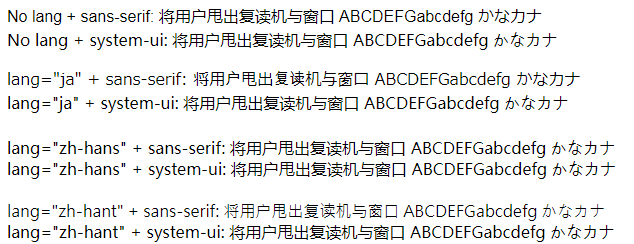

Firefox:
Chrome is even better when using
sans-serif, because it uses Meiryo to display kanas and proper English fonts to display Latin letters. Firefox on the other hand, will use heuristics to guess the language of un-tagged content and use that for the whole page instead, it is not a glyph-by-glyph process.Footnote
[1] On chrome, make sure you set Chinese priority higher than Japanese. Which is the default if you use Chinese version Chrome.
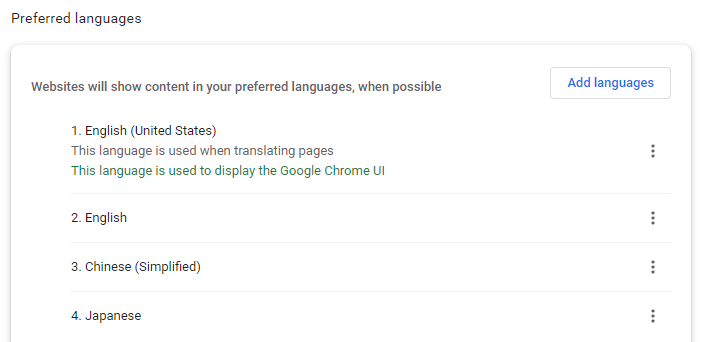
Funny you mentioned lang tagging. This is one of THE worst issue of system-ui, actually, other than being ugly.
Even if you tag it with
<lang="ja">, it will still use MS YaHei font if you use system-ui. See the screenshots above.Also, system-ui is intrusive. If I don't like X font, I can always manually replace it with
However, this doesn't work with system-ui keyword (it used to work in Chrome, but they got rid of it); if certain websites use it, I have to replace the whole font stack manually.
At last, a more general point: https://infinnie.github.io/blog/2017/systemui.html is not the holy grail of system-ui issue. Refuting that alone doesn't mean all issues are non-issue. As I displayed above, the issue of it isn't limited to "niche, classic theme" users.
NightFurySL2001 commentedon Sep 28, 2022
Have you seen Tahoma for Windows 7 Classic theme (screenshot provided in previous comments)? It is wider and higher than Segoe UI, but users does not have a problem with it. What you are trying to do now is you are forcing people to follow your own aesthetic standards by saying the font is too wide compared to Segoe UI and ignoring all the other benefits of
system-ui.This is non-issue: The font being used is compliant to GB 18030, which makes the quotation mark full-width as it is used in Chinese for quotation (E.g.
“我觉得:‘你觉得’。”) This is a legacy problem related to the decisions of GB team and Unicode to share a codepoint for quotation marks. Font support (in Microsoft YaHei) from its vendor Microsoft is required to fix this "problem", and not a problem ofsystem-ui.If you are designing for cross-platform, multilingual use, a "fixed (perceptive) font size" is a very bad decision. Some languages requires bigger line height/size to accommodate their respective languages, which sometimes reflects on to the fonts being used. It is better to use the designated font (and size) provided by the system for each language rather than trying to enforcing a constant aesthetic across all language groups.
If the system vendor does not think enlarging text is required (eg in Mac), then that will fit your usage. Else, just write your own font stack.
Sorry, this is my fault. I did not test this issue thoroughly.
However, I failed to recreate this issue.
system-uiwith language tagging works just fine on pure English Windows. Screenshot below (latest stable Chrome & Firefox):This is an issue with Windows multilingual and should be raised to Microsoft. However, this alone shouldn't be an issue to block websites from using
system-uias the issue is vendor-specific. The testing works fine on Android and iPadOS, with respective correct locale display, and even better display of Latin text using Roboto (both using Simplified Chinese UI):Screenshot of lang on Android and iPadOS
Also, I will argue that displaying the correct localization with correct font when no language tag is present is more important than displaying the best visual result when no language tagging is done. You definitely do not want Meiryo to overrride the Chinese part (especially by default, Meiryo is overriding Microsoft YaHei in regedit) as most of the internet does not tag languages properly (e.g. GitHub user content). Using
system-uiwill ensure the correct locale is displayed based on system settings.system-uiis not designed to be replaced. It is just a keyword that is used to replace Mac's hacky-apple-system,BlinkMacSystemFontfont stack while expanding the same functionality across platform, such that developers can integrate their website using the system font. For the screenshot provided in "the issue" by infinnie, remember, this is what the system font has already been using.English
Aero theme
Classic theme
Simplified Chinese
Aero theme
Classic theme
There is no point to replace
system-uifor something you want instead of what its intended purpose is. If you don't like it, write your own global CSS with!importantkeyword to always replace the site font.Please note, all issues I have been looking on
system-ui(StackOverflow, and including your issue) points to this specific target group: Windows, Simplified Chinese users; literally no other languages have any related kind of issues.TL;DR:
system-uiis for using the current system font. Locale tagging might be broken for some languages, however all texts will be displayed by the user's preferred locale first instead of relying on prewritten font stack. Some fonts for specific locale (most notably Simplified Chinese) will be bad in some particular instances; in other languages it will be enough for normal daily usage.Side note: Windows has always been bad on multilingual display; Win32 doesn't even handle multilingual text in the same line. That is the main point why this "issue" is being brought up in the first place from Simplified Chinese users (bad Latin in SimSun from Windows 95-XP, "wide" Latin in Microsoft YaHei from Windows Vista-11). However, there is no way that this should be the point that all sites must stop using
system-ui, and CSS should drop support forsystem-ui. It is a great tool for devs to use, and if you can't handle it, do write your own font stack; just please dont shove your opinion through all other user's throat. The most minimal fix that does not affect other users should be contacting Microsoft and let them fix it (e.g. WinUI), rather than blocking all other global users from usingsystem-ui.myakura commentedon Sep 28, 2022
Well,
system-uiisn't great on Japanese Windows either. Yu Gothic UI, the font which is resolved whensystem-uiis used on Windows (10+), looks like a condensed typeface thus is not great when used in paragraphs. People complained when GitHub addedsystem-uito their theme so they tweaked their CSS to add Meiryo for readability primer/css#1573 .I really wish people use
sans-serif(orserif) instead ofsystem-uifor content;system-uitakes away users' ability to customize fonts in browser settings...NightFurySL2001 commentedon Sep 28, 2022
That is still a problem with Microsoft and bad font choices, along with bad Win32 font technology. Please report the problem to Microsoft. (Same for customization: report the bug to system vendors; not a problem from CSS specs)
If
system-uiis so bad, what alternatives do you suggest for replacing the lengthy-apple-system,BlinkMacSystemFont,"Segoe UI",Helvetica,Arial,sans-serif,"Apple Color Emoji","Segoe UI Emoji"(and even longer if considering Android, also bad display of Arial on *nix systems) to achive the same goal: "integrate with the look and feel of the native OS", while being "friendly" to localization? If this goal not suitable to be achived, what goal shouldsystem-uido?fireattack commentedon Sep 28, 2022
You keep saying real issues are "non-issue" because "that's what MS should fix", "that's what XXX should fix", that's a frustrating way to constructively discuss anything.
The full-width curly quotes isn't an issue of MS YaHei, which is supposed to be a Chinese font. It's totally fine for it to have full-width quotes. The issue is you force to use MSYH on pure English content, which is what system-ui on Chinese Windows does.
Exactly?
system-ui.system-ui.How is this an advantage of
system-uithan disadvantage????? The whole discussion is about issues of
system-uifor Chinese Windows (or Japanese Windows) and now you test on English Windows?Of course it doesn't happen with English Windows, because its "system-ui" is Segoe UI, which don't have CJK glyphs and will fallback to a different Chinese/Japanese fonts for that. The whole point of "system-ui bad" is because on Chinese Windows the default font (MSYH) has too large character set and will be used to display anything, even when improper.
Previously you said these are non-issues and shouldn't block because it only affect a small, niche, classic theme users (quote: "Do be noted that this 'issue' only arises when the user voluntarily choose to use the Classic theme"), and I pointed it out it actually affects all the Chinese/Japanese Windows users. Now you moved the goalpost to say "Chinese, Windows users are too small to block".
I already said, will example, this won't happen if you have correct language priority setting. Chrome will pick characters based on that. Even on English Windows. Your own screenshot confirms it. Not sure how it has anything to do with regedit, or
system-ui. Go ahead and change your language priority in Chrome. You will see changes immediately in real-time:Result (remember to refresh):
Result (remember to refresh):
This problem actually WILL happen when you use
system-ui. You "definitely do not want MSYH to override the Japanese kana part", and it will happen if you use Chinese Windows +system-ui.Again, totally false. At this point, I feel like you don't know, or have not thoroughly tested, how
system-uior font fallback works. Since you use Chrome, here is how it works in Chrome:system-uiworks by simply applying MSYH (Simp. Chinese), Yu Gothic UI or Meiryo (Japanese), or Segoe UI (English) to all the content, regardless if there is a language tag or not (it also ignores display language setting of Chrome).sans-serifon the other hand is language-aware. It uses the sans-serif font in corresponding settings for each language if lang tag is set. For example, by defaultsans-serif+ lang="hans" will apply MSYH to all the content. Same goes to other languages. (If not lang tag is given, it uses the one with the current display language of Chrome.)The problem with
system-uion Chinese Windows is, MSYH have all the glyphs. Once it is set, it will override virtually everything, language tagged or not. As said above, this won't happen if you are using English Windows, because its system-ui font doesn't have CJK characters.The issue that "on English Windows, untagged content will use Meiryo to display Chinese characters instead of MSYH" you mentioned is because language priority setting isn't properly set (or set at all). So Chrome have nothing to work with, and it picks Japanese over Chinese. (This is not even "wrong" by the way: it will either mess Chinese characters in Chinese, or Japanese kanjis in Japanese.) If you prefer Chinese characters, this can be easily fixed by making sure Chinese locale has higher priority than Japanese, as said above.
You don't need system-ui to 'fix' this, because on English Windows all it does is just to apply Segoe UI on all the content and then it relies on font fallback to do the reset of the job. The same can be achieved by using any English font - even
sans-serif(which isn't a real font, but it maps to Arial by default on English Windows). Or just use Segoe UI.TL;DR:
system-uiisn't what fixed your "Chinese characters in Meiryo" issue. And it causes all sorts of other issues on Chinese and Japanese Windows simultaneously.I.. what?
No one is suggesting any of these.
No one is doing that, either. All the websites listed above are too big to not deal with
system-ui's drawbacks, because they have sizable Chinese users. Which is exactly why they "do write your own font stack" as you suggested.Keep in mind we're not asking for special treatment beyond everyone else. All these font stacks are complex because they're trying to work around the issues WITHOUT sacrificing experience of other users, be it English, MacOS, Linux, Android, or whatever. It's not perfect, but they are trying to be as inclusive and comprehensive as possible. You're the one that suggesting dev to just ignore real issues with millions if not billions of Chinese, Japanese Windows users, OTOH.
Just use
sans-serif? Or even just stick with these long mess font stacks. Yes it suckssystem-uididn't magically work in all cases but that's the reality you can't simply dismiss.36 remaining items
tats-u commentedon Sep 23, 2025
The widths of hiragana, katakana, and han glyphs in high-quality Japanese fonts supporting the OpenType feature palt e.g. Noto Sans CJK and Yu Gothic except for Yu Gothic UI are the same by default.
If the font provides a variant font whose name just removed P (e.g. MS PGothic and BIZ UDPGothic), those in it do not share the same width.
I think that han glyphs in Chinese fonts also share the same width but have not investigated it yet.
tats-u commentedon Mar 3, 2026
I just heard about another bug in Yu Gothic UI:
The Greek letter Ω turns into a different character (small Cyrillic letter и) only when it's bold (Semibold or Bold weights).
https://codepen.io/tats-u/pen/GgjombB
https://zenn.dev/arad/articles/omega-to-cyrillic (Japanese)
https://note.com/minn_1092/n/n2de6227e8224 (Japanese)
Removed `system-ui` as a font family, as the behavior of system-ui is…
tats-u commentedon Jul 17, 2026
The above occurs in not only Japanese but also English or Greek context:
All и in this screenshot are intended to be Ω.
jfkthame commentedon Jul 17, 2026
That looks like it's simply a platform font bug, not really anything to do with CSS. Have you reported it to Microsoft? Nobody else is in a position to fix it.
tats-u commentedon Jul 17, 2026
https://aka.ms/AA11xr5m (Japanese)
This is merely a casual, freely quotable warning aimed at non-Japanese speakers (especially Latin script users) who are system-ui fanboys trying to cram system-ui into a site or framework’s font stack: “Don’t abuse system-ui indiscriminately, because depending on the environment it can resolve to some buggy, messed-up font.” The Feedback Hub can’t be viewed by non-Windows purchasers, and the format of links to it doesn’t look permanent, so it’s important to leave evidence in a public place.
I do agree, however, that the CSS spec doesn’t allow any further approach to this problem.
tats-u commentedon Jul 17, 2026
If I could wish for anything, it would be for the browser vendors to update their sans-serif font stacks of Greek-like scripts, so websites wouldn't need to list Latin UI fonts for major operating systems (e.g. Segoe UI, Roboto).
NightFurySL2001 commentedon Jul 18, 2026
@tats-u The W3C CSS specification isn't a place to enforce personal preferences. Telling everyone to drop
system-uibecause it has issues in a specific evironment is a subjective choice, not something that should be imposed on everyone.The issue with poor
system-uifont is very obviously the fault on Windows whensystem-uiis better than developers speifying custom fallback font list on other major operating systems i.e. Android (Roboto/Noto family), Apple and Linux. The i18n implementation ofsystem-uion Apple device is even better than usingsans-serif, which is a plus of usingsystem-uiif they want to mimic the operating system feel.Given that Windows render long texts in Segoe UI eg EULA on installation, Windows do expect the system font i.e.
system-uito be usable for long text too. The issue is just that Windows developers have bad taste, worse implementations and nightmare customer support. (all majorsystem-uifailure reported so far only appears on Windows with CJK language)As a person in other comment thread says, and I quote:
If you really care that Japanese Windows shouldn't use Yu Gothic UI, you should submit this feedback to Microsoft to consider using another font. The benefits of using
system-uifor cross-compatibility isn't really outweighted by the poor implementation on Windows. If you realllly doesn't wantsystem-ui, maybe instead of suggesting others to remove it, add a JavaScript that detects Windows and override the CSS family. Note that i18n on Apple works better onsystem-uithansans-serif.tats-u commentedon Jul 19, 2026
Mi¢ro$oft has no incentive to render the EULA in a readable font. By deliberately rendering it in a hard-to-read font, they increase the probability that users will miss clauses favorable to Mi¢ro$oft.
https://aka.ms/AA4rj5q
https://x.com/search?q=%22Yu%20Gothic%20UI%22
It seems you don't understand even the slightest bit of frustration among Japanese Windows users. This issue of the Japanese Windows system font glyphs being terrible has been pointed out by many Japanese users who notice the differences between fonts for many years, yet Microsoft has stubbornly ignored it. While Yu Gothic UI has gained some positive recognition in PowerPoint slides, its overall design reputation remains negative.
↑ This image shows why Windows adopts overly narrow fonts that inherit the width of MS UI Gothic, such as Yu Gothic UI, as the default Japanese UI font. The Japanese UI font were developed as a compromise to avoid using half-width katakana, which is more difficult to read.
Layout shifts occur when JavaScript loads. This is completely unacceptable. The method to detect the User-Agent or Accept-Language on the server cannot be applied to static .html files.
In this case, -apple-system + BlinkMacSystemFont would be sufficient.
Call me again when the market share of macOS (and Linux) in the (desktop/laptop) computer market significantly surpasses Windows.
tats-u commentedon Jul 19, 2026
There are still many legacy desktop applications in Japan that rely on the narrow character width of MS UI Gothic. If these applications are forced to use standard-width fonts like Yu Gothic or Noto Sans JP instead of Yu Gothic UI or Meiryo UI, which have nearly identical character widths, it will likely lead to a series of tragedies where text overflows, as shown in the image above where text is truncated with ellipses.
The system-ui implementation on macOS isn't perfect either, with Safari displaying Japanese glyphs slightly smaller compared to other browsers, resulting in different rendering.
Sora2455 commentedon Jul 19, 2026
If there exist applications that break when they're not viewed with a particular font, then:
Neither of which are in scope for this WG, let alone this issue?
tats-u commentedon Jul 19, 2026
This is why MS UI Gothic becomes the default in Windows Forms.
WPF uses the default system font in the current locale (Yu Gothic UI for Japanese Windows 11) by default unless specified.
If Microsoft were to change system fonts to Noto Sans JP, Japanese WPF applications that don't specify a font would experience design breaks.
system-ui's behavior is considered to be equivalent to that of WPF. For quick-and-dirty solutions to use it only with domestic users of web applications or websites (outside e.g. Japan), it's perfectly adequate (unless a foreigner visits your page or app).
tats-u commentedon Jul 19, 2026
The YaHei and JhengHei fonts in Simplified and Traditional Chinese show slight differences between their UI and non-UI variants, but do Chinese designers find these differences noticeable?
PS: These quotation marks will be overwritten by Segoe UI, though.